Vyacheslav Makhrov·2024-09-06·via Mapping the <mark>Internet</mark> on Netlas: Comprehensive Internet-Wide Scanning & OSINT Platform
Web applications are now deeply embedded in our daily lives, often housing significant amounts of sensitive data, including personal information, financial details, and trade secrets. Therefore, securing these applications against cyberattacks is of paramount importance.
Penetration testing serves as a powerful defense in the digital realm. Often referred to as “pen testing,” this authorized practice involves simulating an attack on a system to identify vulnerabilities and evaluate security measures. It is carried out by professional penetration testers with the consent of the system owner.
Penetration Testing Steps
The process of penetration testing can vary depending on the specific objectives and tools employed. However, it typically involves the following steps.
Step 1: Reconnaissance
Open Source Intelligence (OSINT): Gathering information about a company, technologies, employees, etc. from search engines, social media, and other publicly accessible sources.
Whois Lookup: Checking domain information and DNS records.
Subdomain Enumeration: Discovering subdomains to expand the attack surface.
Website Mapping: Creating a sitemap to understand the structure and content of a web application.
Scanning: Using tools to identify open ports, services, technologies, and software versions.
Automated Scanners: Utilizing tools to identify known vulnerabilities in web applications (e.g., SQL injection, XSS, CSRF).
Manual Analysis: In-depth review of application code and configuration to uncover vulnerabilities that automated scanners may miss.
Step 3: Authentication and Authorization
Brute-Force Attack: Trying to guess passwords by systematically entering all possible combinations.
Social Engineering: Manipulating users to reveal sensitive information, such as passwords.
Authentication Vulnerability Assessment: Evaluating the security of authentication mechanisms, including session vulnerabilities and Cross-Site Request Forgery (CSRF) attacks.
Step 4: Bypassing Protection
Web Application Firewalls (WAF): Bypassing or compromising WAFs.
Intrusion Detection and Prevention Systems (IDS/IPS): Bypassing or compromising IDS/IPS systems.
Honeypots: Detecting and bypassing honeypots.
Step 5: Exploiting Vulnerabilities
SQL injection: Injecting malicious SQL statements to gain unauthorized access to a database.
XSS: Injecting malicious scripts into a vulnerable web application to be executed by a user’s browser.
CSRF: Forcing an authorized user to execute unwanted actions on a web application.
Remote Code Execution (RCE): Executing arbitrary code on a server.
Directory Traversal: Accessing restricted files and directories.
Server-Side Request Forgery (SSRF): Forcing a server to make requests to internal or external systems.
Step 6: Privelege Escalation
System Vulnerability Scanning: Searching for additional vulnerabilities to escalate privileges.
Lateral Movement: Moving across the network to access other systems.
Step 7: Generation
Summary of Findings: A detailed description of all identified vulnerabilities.
Remediation Recommendations: Suggestions on how to fix the identified vulnerabilities.
Risk Assessment: An evaluation of the risk level for each vulnerability.
We’ve explored the general sequence of actions in penetration testing. Now, let’s delve deeper into the tools that help specialists efficiently perform some of these tasks.
Let’s consider two tools. They specialize in gathering technical info about a target system.
Netlas
Netlas.io is a non-intrusive scanner. It adheres to the system’s intended operations during its scan. It does not engage in actions such as unauthorized access attempts, password cracking, or sending non-standard requests.
Netlas uses a passive approach to find vulnerabilities in software versions. This avoids disrupting system operations. It analyzes responses from public services. It examines headers, banners, and other elements. It identifies the software in use about two-thirds of the time. Once Netlas identifies the software and its version, it cross-references this information with the NIST vulnerability database to pinpoint potential security risks.
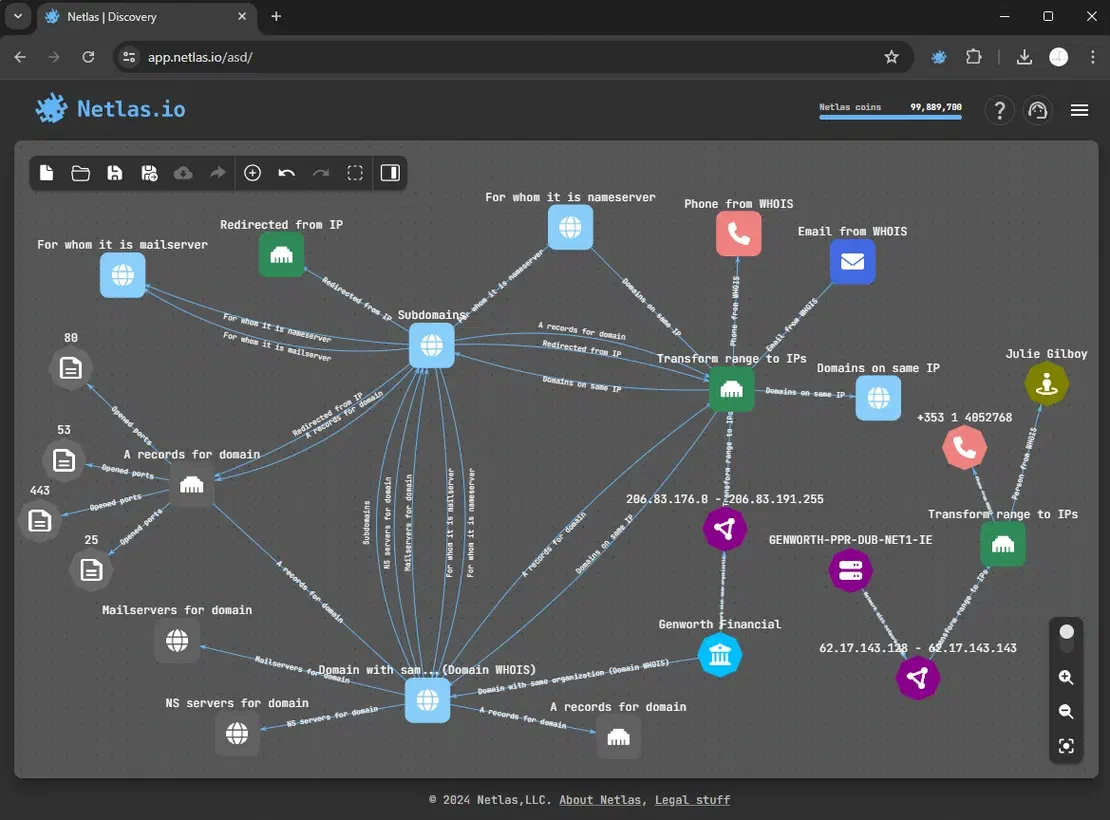
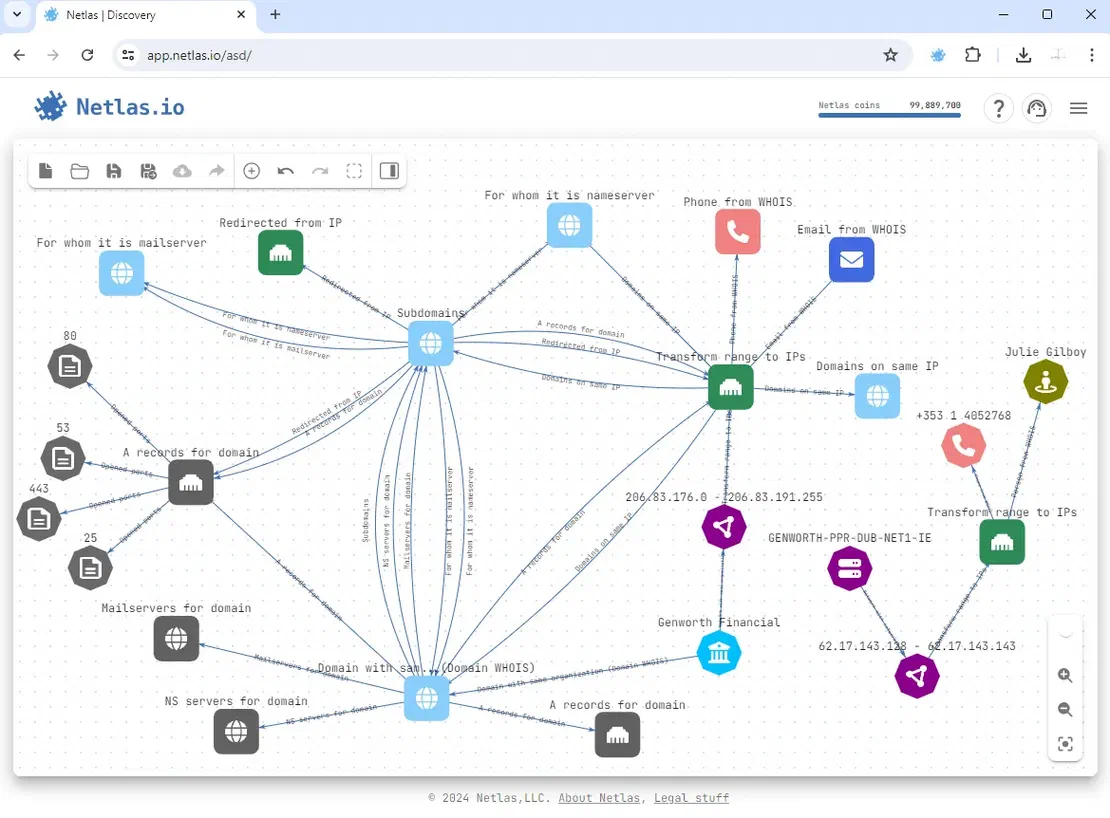
It’s important to note that reconnaissance and attack surface discovery are crucial initial steps in any penetration testing process. The Netlas Attack Surface Discovery Tool is intuitive. It enables users to build and visualize attack surfaces clearly. This enables the quick generation of attack surfaces of any size.
Key Features of Netlas Attack Surface Discovery Tool:
Grouped Nodes: Netlas allows grouping nodes of the same type (e.g., all subdomains of a single domain) into groups. This significantly simplifies the analysis and management of large amounts of data.
Grouped Searches: Searching can be performed not only on individual nodes but also on groups. This allows for quick discovery of all related elements and group-level analysis.
Export to File: Scan results can be exported in various formats (e.g., CSV, JSON), allowing you to save data for further analysis or integration with other tools.
Object Exclusion: Unwanted or already verified objects can be excluded from scan results. This allows you to focus on the most critical aspects of the attack surface.
Beyond the attack surface discovery tool, Netlas provides five search tools for its five primary data collections:
Responses: This collection consists of results from internet scans. Netlas non-intrusive scanners continuously scan internet-accessible hosts and save their responses.
DNS Registry: This stores domain names, their corresponding IP addresses, and other types of DNS records.
IP WHOIS: Information about the owner and management of an IP address, including the IP address range, network provider name, and contact information.
Domain WHOIS: Information about the domain owner and registrar, such as contact information, registrar details, registration dates, and expiration dates.
Certificates: A database of SSL certificates collected from various sources.
The Netlas Responses Data Collection is a complete set of web crawling results. It lets you search for details about domains, hosts, and servers across the web.
The DNS Registry Data Collection is a vast, up-to-date database of domain names, maintained by Netlas. It offers valuable insights into millions of domains, including their IP addresses and associated DNS records.
The IP WHOIS Data Collection is an extensive repository of IP address ownership information obtained through parsing WHOIS records. This collection has key details about the owners of specific IP address ranges. It covers companies, organizations, and individuals.
The Domain WHOIS Data Collection is a rich database of domain name information, also gathered through WHOIS record parsing. It provides detailed insights into domain owners. It includes their contact info, registration dates, and other key details.
The SSL Certificates Data Collection is a large archive of SSL certificates. It comes from various sources, including Certificate Transparency Logs and host scans. This database provides detailed information about the SSL certificates used on many websites.
Key Features of Netlas as an Information Gathering Tool:
Domain Search: Discover subdomains, related domains, registration information, and more.
IP Address Search: Find associated domains, owner information, open ports, etc.
SSL Certificate Analysis: Extract information about certificates, including issuer, owner, validity period, and more.
WHOIS Lookup: Retrieve ownership information for domains and IP addresses.
DNS Record Analysis: Obtain information about DNS records, including A, CNAME, MX, and others.
Open Port Scanning: Scan ports and identify running services.
How Netlas aids in the reconnaissance phase:
Rapid Information Gathering: Netlas enables quick collection of extensive information about a target system, eliminating the need for manual searches.
Identification of Potential Vulnerabilities: By identifying the technologies used and open ports, potential vulnerabilities can be determined.
Creating a Target System Profile: Netlas allows for the creation of a detailed profile of the target system, simplifying the planning of subsequent penetration testing phases.
Time Savings: Automation of information gathering saves a significant amount of time.
Netlas allows for security assessments without direct interaction with the target system, making it a safe, efficient, and versatile tool.
Nmap
Nmap is a free, popular tool for scanning networks. It finds hosts and services.
Nmap operates by sending ICMP echo requests (pings) to a specified range of IP addresses. By analyzing the responses, it identifies which hosts are active on the network. Once Nmap detects active hosts, it proceeds to scan their ports. If Nmap finds open ports, it tries to identify the services running on them. It does this by analyzing service banners—responses to specific requests—and cross-referencing them with known databases. Nmap can also detect the type of operating system installed on the target host.
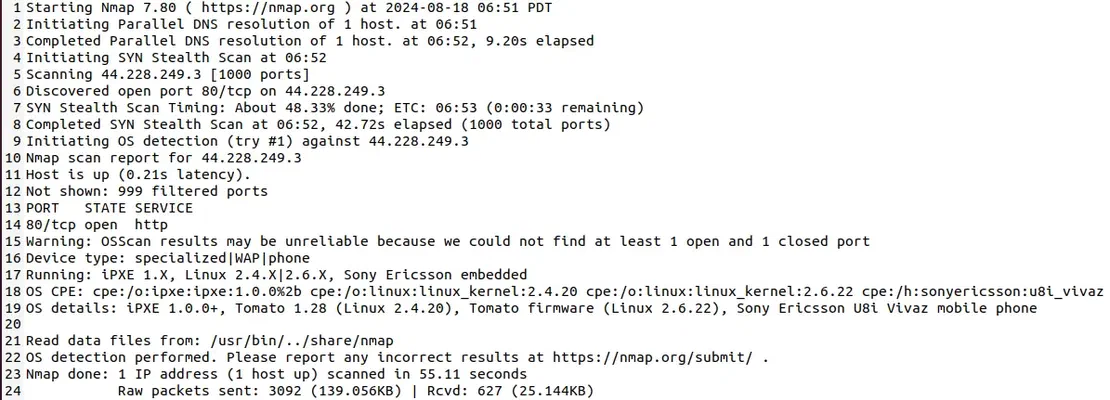
Upon completing the scan, Nmap generates a detailed report that includes information about the identified hosts, open ports, services, and operating systems.
How Nmap assists in the reconnaissance phase:
Host Discovery: Identifies active devices on the network.
Port Scanning: Identifies open ports and services.
Operating System Detection: Determines the operating system of devices.
VLAN Scanning: Scans virtual networks.
Network Mapping: Creates a visual representation of the network.
Vulnerability Scanning: Checks for known vulnerabilities.
Identifying the operating system of a scanned host
Nmap is a versatile tool that can be employed for a wide range of network security tasks.
Next, we’ll explore three tools that enable a deep and comprehensive security analysis of an application during the vulnerability scanning phase.
Arachni
Arachni is an open-source, high-performance Ruby framework designed specifically for assessing the security of web applications. It’s widely used by security professionals to automate the discovery of vulnerabilities.
Starting with a user-provided URL, Arachni methodically expands its coverage by following links, interacting with forms, and engaging with other dynamic elements on the page. Arachni creates a site map during the scan. It includes all found pages, request parameters, HTTP methods, and relevant metadata. It then simulates attacks, like SQL injection and XSS, to find vulnerabilities. It also analyzes the source code and HTTP headers.
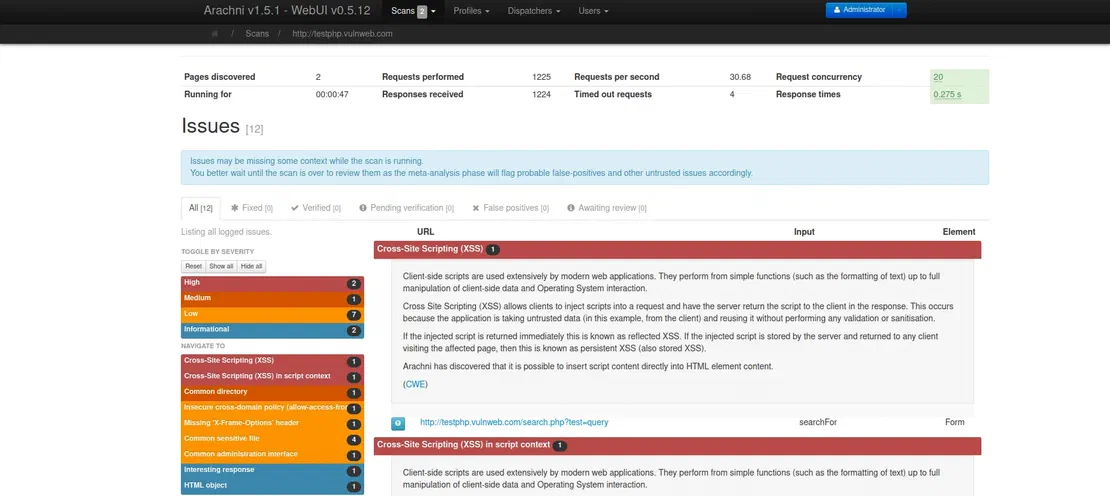
Once the scan is complete, Arachni generates a detailed report. It outlines the identified issues. This enables security experts to conduct rapid risk evaluations and countermeasures.
How Arachni assists in vulnerability scanning:
Automation of Routine Tasks: Arachni handles a large portion of routine work, freeing up the researcher’s time to analyze more complex issues.
Detection of a Wide Range of Vulnerabilities: Thanks to its extensive knowledge base and modules, Arachni can detect many different types of vulnerabilities.
Analysis of Dynamic Content: Arachni is capable of analyzing web applications that generate content dynamically, making them more resilient to traditional attacks.
Integration with Other Tools: Arachni integrates easily with other security tools such as Burp Suite and OWASP ZAP, allowing for the creation of comprehensive web application security solutions.
Web Application Scan Results Report
Arachni is a powerful and flexible tool for scanning web applications for vulnerabilities. It’s great for both seasoned pros and beginners, who want to learn the basics of penetration testing.
W3af
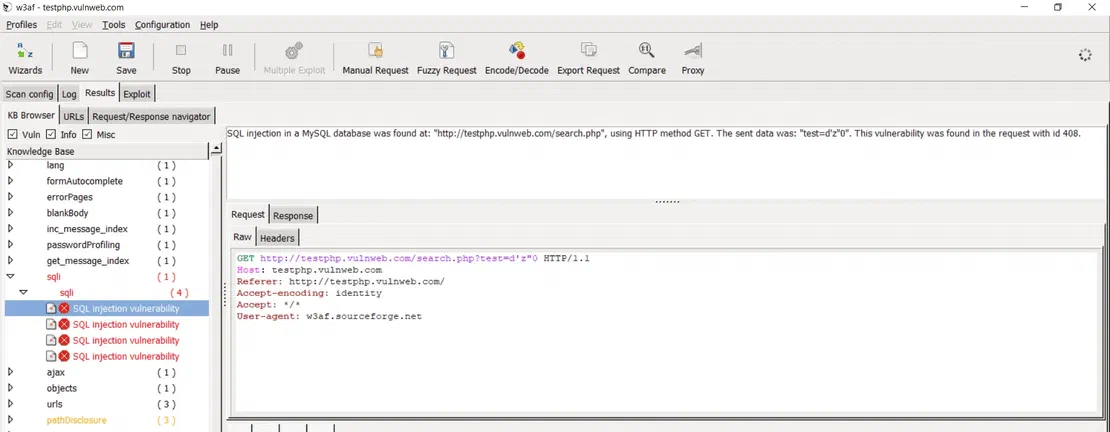
W3af (Web Application Attack and Audit Framework) is an open-source framework specifically designed for automated web application security testing. It provides a comprehensive suite of tools and plugins to discover and exploit a wide range of vulnerabilities.
W3af starts by collecting detailed data about the target web app. This includes the technologies used, the site structure, and the input forms. It then uses various methods and algorithms to analyze this data. It seeks to find vulnerabilities, like SQL injection, XSS, and CSRF. If a vulnerability is found, w3af will try to exploit it. This shows the potential damage an attacker could cause.
After the scan, w3af generates a report. It details the found vulnerabilities, rates their severity, and recommends fixes.
How W3af assists in vulnerability scanning:
Comprehensive Scanning: W3af can perform in-depth analysis of web applications, identifying a wide range of vulnerabilities including SQL injection, cross-site scripting (XSS), authentication vulnerabilities, command injection, and more.
Customizable Modules: W3af provides numerous customizable modules that allow tailoring the scanning process to specific needs and characteristics of the application being tested.
Report Generation: W3af generates detailed reports outlining the discovered vulnerabilities, their description, remediation recommendations, and evidence of their existence.
Support for Various Protocols: W3af supports multiple web protocols, including HTTP, HTTPS, FTP, SMTP, and others, enabling the scanning of various types of web applications.
Integration with Other Tools: W3af can be integrated with other tools for deeper analysis and automation of testing processes.
Web Application Scan Results Report
Nessus
Nessus is a powerful tool specifically designed to automatically identify vulnerabilities in information systems.
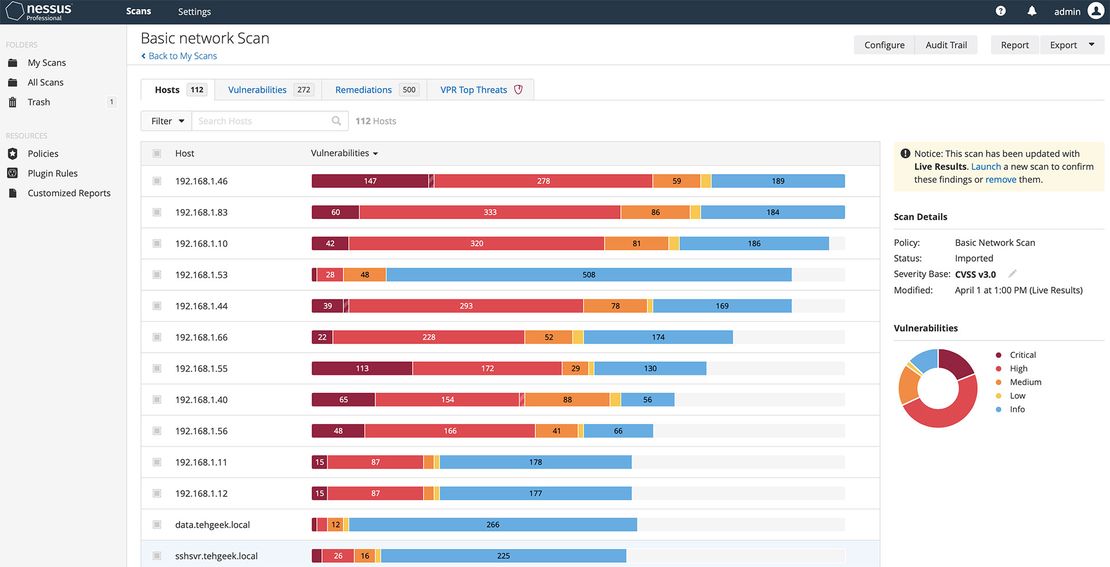
Nessus scans networks, servers, apps, and devices. It uses techniques like port, vulnerability, and web app scanning. Based on the data it collects, Nessus identifies potential vulnerabilities. After the scan, Nessus generates reports. They detail the discovered vulnerabilities, their risk levels, and remediation recommendations.
How Nessus assists in vulnerability scanning:
Extensive Vulnerability Database: Nessus is continuously updated, including information on new and known vulnerabilities. This enables the detection of even the latest threats.
In-depth Scanning: The tool goes beyond superficial port scanning. It is capable of conducting deep system audits, identifying vulnerabilities in configuration, software, and operating systems.
Automation: Nessus enables the creation and execution of automated scans, significantly saving time and resources.
Flexible Customization: You can customize scans for specific tasks, selecting target systems, vulnerability types, and report detail levels.
Detailed Reporting: Nessus generates detailed reports based on scan results, which include information about identified vulnerabilities, their priority, and remediation recommendations.
Integration with Other Tools: Nessus can integrate with other security tools, allowing for the creation of comprehensive solutions for information system protection.
Network vulnerability scanning
Nessus is a great tool that can significantly enhance your network’s security posture.
Finally, to demonstrate potential threats, we’ll move on to the vulnerability exploitation phase using the following two tools. These tools can also be valuable during the scanning phase for a more detailed analysis.
Burp Suite
Burp Suite provides a flexible and extensible platform for conducting both manual and automated penetration testing.
Burp Suite intercepts and analyzes HTTP traffic between a browser and a web application, automatically scanning the traffic for potential vulnerabilities such as SQL injection, XSS, CSRF, and others. Based on its findings, Burp Suite generates a detailed report that outlines the discovered vulnerabilities along with recommendations for remediation.
How Burp Suite aids in exploiting vulnerabilities:
Exploiting SQL Injection: Burp Suite allows for manual or automated crafting of SQL queries to gain access to database data, modify data, or execute arbitrary commands.
XSS Attacks: The tool allows for creating and sending malicious payloads, analyzing reflected and stored XSS, and executing various types of XSS-based attacks.
Bypassing Authentication: Burp Suite can be used for password cracking, analyzing authentication mechanisms, and finding vulnerabilities that allow bypassing security measures.
Cross-Site Request Forgery (CSRF): Burp Suite assists in creating and sending specially crafted requests to exploit CSRF vulnerabilities and perform unauthorized actions on behalf of an authenticated user.
Burp Suite is a robust tool that helps security professionals identify and remediate vulnerabilities within web applications, thereby strengthening their resilience against potential attacks.
SQLmap
SQLmap is a free, open-source penetration testing tool designed to automatically detect and exploit SQL injection vulnerabilities in web applications.
SQLmap sends HTTP requests to a web app. It injects malicious SQL code into various request parameters. It then analyzes the application’s responses to identify any potential SQL injection vulnerabilities. If a vulnerability is found, SQLmap can exploit it. It can extract data, run code, or take control of the system.
How SQLmap assists in vulnerability exploitation:
Automatic Detection: SQLmap can automatically detect various types of SQL injection, including numeric, string, boolean, and more.
WAF Bypass: The tool can bypass various web application firewalls (WAFs) using various obfuscation and evasion techniques.
Data Extraction: SQLmap allows extracting data from the database, including table and column names, row contents, and even database structure.
Arbitrary Code Execution: In some cases, SQLmap can be used to execute arbitrary code on the database server.
Filter Evasion: The tool can bypass various filters and sanitization mechanisms that may be used to prevent SQL injection.
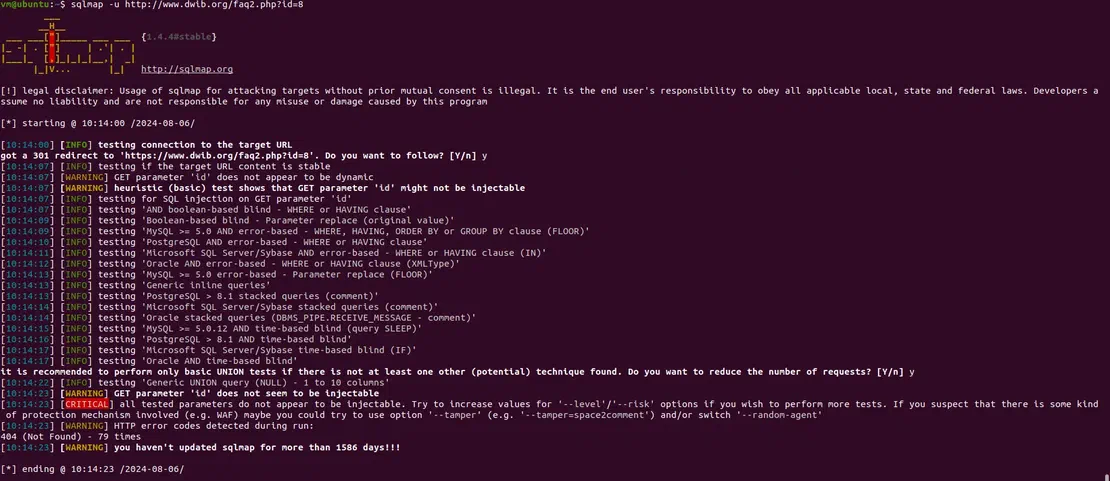
Detecting Web Application Vulnerabilities
SQLmap is a powerful tool that can effectively test web applications for SQL injection vulnerabilities.
Summary
In conclusion, choosing the right tools for penetration testing depends on your specific needs and objectives. It’s also essential to recognize that each tool comes with its own set of strengths and weaknesses.
Netlas
Advantages: A specialized tool for gathering information about domains and IP addresses. It’s excellent for the initial reconnaissance phase of a penetration test. Quickly provides extensive information about the target system.
Disadvantages: Limited functionality, primarily focused on information gathering.
Use Cases: Ideal for gathering intelligence, such as identifying open ports, technologies used on the target server, etc.
Nmap
Advantages: A classic tool for network scanning. It allows for the discovery of hosts, open ports, services, and operating systems.
Disadvantages: Basic functionality, requiring scripts for more complex tasks.
Use Cases: An excellent choice for quick network scans, host discovery, and detection of open ports.
Burp Suite
Advantages: A powerful web proxy that enables both manual and automated attacks on web applications. Offers a wide range of features, including vulnerability scanning, fuzzing, and traffic analysis.
Disadvantages: Can be quite complex to learn, especially for beginners. The professional version is paid.
Use Cases: Indispensable for in-depth analysis of web applications, finding vulnerabilities, and conducting exploits.
Arachni
Advantages: Detects a wide range of vulnerabilities. Allows customization of scans for specific tasks. Supports plugins and modules.
Disadvantages: Requires experience and knowledge. Can be resource-intensive.
Use Cases: For in-depth analysis of complex applications, for finding hard-to-reach vulnerabilities, for creating custom checks.
W3af
Advantages: A wide range of modules for various vulnerability types. Ability to create custom modules. Relatively fast analysis.
Disadvantages: Requires a learning curve. May produce false positives.
Use Cases: Detecting vulnerabilities such as SQL injection, XSS, and authentication flaws. Gathering information about technology, ports, and files. Also allows simulating attacks.
SQLmap
Advantages: Specialized tool for automated detection and exploitation of SQL injection vulnerabilities.
Disadvantages: Limited functionality, designed solely for attacking purposes.
Use Cases: Used for finding and exploiting SQL injection vulnerabilities.
Nessus
Advantages: A comprehensive vulnerability scanner that allows for automated auditing of systems and networks. It boasts an extensive plugin library for detecting various types of vulnerabilities.
Disadvantages: High cost for the professional version, and it can generate a significant number of false positives.
Use Cases: Excels at rapidly identifying vulnerabilities in large networks.
The choice of tool depends on the specific task at hand and the specialist’s skill level. To conduct an effective penetration test, it is advisable to combine various tools and approaches.
Beyond the tools mentioned above, there are many other penetration testing tools, each offering unique capabilities. As technology evolves, new threats will emerge. It’s crucial to keep learning and adopt new tools and methods. This will help you maintain your systems’ security.
I can show you how deep the Internet really goes
Discover exposed assets, infrastructure links, and threat surfaces across the global Internet.