


Command-and-control (C2) infrastructure is the nervous system of most advanced attacks. Track it well and you get ahead of active campaigns before victims know they’re targeted. Track it poorly and you’re constantly reacting to stale indicators. At RST Cloud, C2 tracking is a core part of how we produce actionable threat intelligence, and Netlas is one of the tools that makes it work at scale.
This post walks through our C2 tracking methodology and shows how Netlas fits into the workflow with concrete search examples.
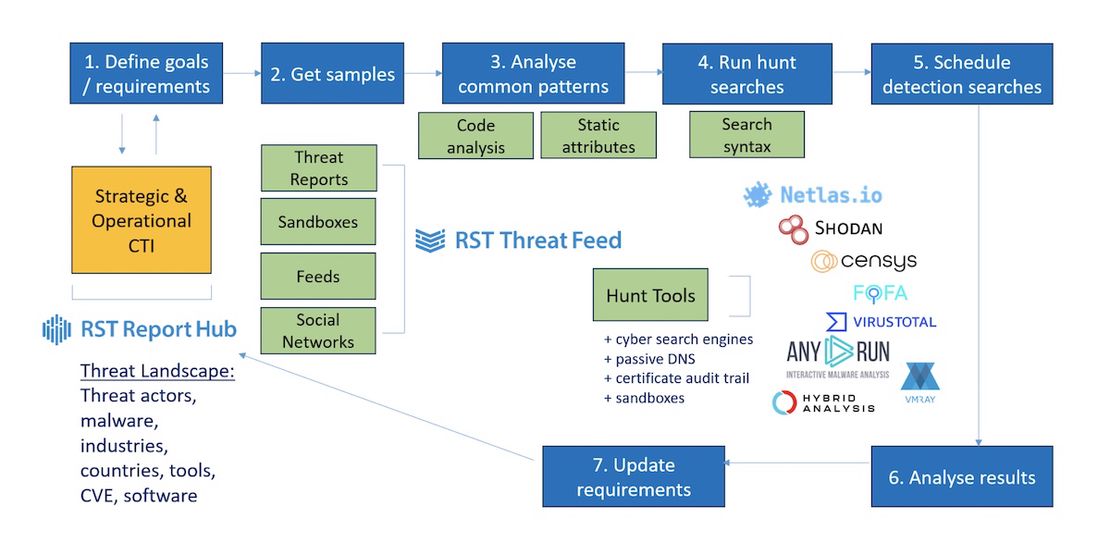
Before jumping to tools, it helps to understand the process. We run C2 tracking as a continuous loop with seven steps:
The analysis in step 3 is where the depth is. For open-source frameworks, you read the code and look for static identifiers: default page titles, specific JavaScript filenames, unique favicon hashes, and predictable certificate fields. For compiled beacons, you detonate them in a sandbox and capture network behaviour, including user agents, URI patterns, and TLS fingerprints.
A beacon is the malware component running on a compromised host that periodically checks in with a C2 server to receive commands and exfiltrate data.
There’s no single internet scanning engine that does everything. Censys gives you fresh scan data quickly. FOFA has deep historical coverage. Shodan has a large installed base with a lot of community-developed queries.
Recommended Reading
Netlas vs Shodan: Platforms Comparison
Netlas has a specific strength that makes it valuable for C2 hunting: domain-level analysis. It also follows redirects, which helps uncover additional linked or otherwise hidden malicious URLs. When you’re investigating an IP hosting dozens of websites, you need to be able to cut through that noise and correlate properly. Netlas handles this well. It also supports a clean query syntax across HTTP response attributes, including titles, body content, favicon hashes, JARM fingerprints, and certificate metadata, which maps directly to the fingerprints we extract in step 3.
Here’s how our queries translate into Netlas searches for specific C2 frameworks.
Hookbot operators regularly leave the default admin panel title in place. This is the simplest class of fingerprint to construct and often the most durable, because changing a panel title requires deliberate operator action rather than just server rotation.
http.title:"Hookbot Panel"SectopRAT C2 servers consistently expose their interface on port 9000, return 404 on unauthenticated requests, and use the Microsoft-HTTPAPI/2.0 server header alongside a specific set of allowed HTTP methods. No single attribute here is unique in isolation. The combination is what makes it a useful fingerprint.
port:9000 AND http.headers.server:"Microsoft-HTTPAPI/2.0" AND http.status_code:404 AND http.headers.access_control_allow_methods:"OPTIONS, HEAD, GET, PUT, POST, DELETE, PATCH"Cobalt Strike’s default self-signed certificate has been documented extensively, but operators still deploy it. Combined with other indicators, this remains a productive search.
certificate.fingerprint_md5:950098276A495286EB2A2556FBAB6D83Recommended Reading
Top 10 Critical Threat Actors to Watch in 2026: Ransomware, APTs & Defensive Strategies
JARM fingerprints the TLS stack rather than certificate content, which means it survives certificate rotation. This value corresponds to the default Cobalt Strike listener TLS configuration. Because JARM alone can match non-malicious infrastructure sharing similar TLS libraries, treat results as a starting point for further validation rather than confirmed C2.
jarm:2ad2ad16d2ad2ad00042d42d00042ddb04deffa1705e2edc44cae1ed24a4da AND http.status_code:404 AND http.headers.content_type:"text/plain" AND http.headers.server:"Apache" AND http.headers.content_length:0What is a JARM fingerprint?
A JARM fingerprint is a hash derived from how a server responds to multiple crafted TLS handshakes. It helps identify infrastructure by TLS behavior, even when certificates change.
Threat actors staging payloads often leave open directories on C2 infrastructure. This query is simple but consistently surfaces active staging servers. It is worth running routinely and pivoting from there.
http.title:"Directory listing for"Recommended Reading
Proactive Threat Hunting: Techniques to Identify Malicious Infrastructure
One underappreciated challenge in C2 hunting is shared infrastructure. A malicious server sitting on an IP that also hosts dozens of legitimate sites creates noise in indicator feeds and can generate false positives in detection pipelines.
This is an area where Netlas earns its place. The ability to quickly understand what’s co-hosted on an IP, and to query at the domain level rather than just the IP level, helps with triage. It is the difference between adding a dirty shared IP to a feed and adding a precise domain or URL that actually identifies the threat.
Internet scanning is not a complete solution, and it’s worth being direct about the blind spots.
IPv4 is finite, with 65,535 ports across roughly 4 billion public addresses, but scanning engines do not cover all ports. They follow a limited number of redirects. Some infrastructure is intentionally rate-limited or responds differently to scanner IP ranges, which are partially known to sophisticated operators.
Then there’s C2 that doesn’t use open ports at all. Telegram bots, Discord webhooks, and Reddit-based C2 channels leave no port-listening footprint. Tracking these requires sandbox detonation: get the beacon, run it, capture the outbound connections. YARA rules applied to beacon executables are the other side of this, providing static analysis for string patterns, communication structures, and known hashes that identify the implant before it calls home.
YARA rules are pattern-matching signatures used to identify malware families or suspicious files based on strings, byte patterns, and logical conditions.
For example, our pipeline ingests Any.Run sandbox reports at scale and extracts both network and file indicators. The Netlas searches and sandbox analysis are complementary, not competing, approaches.
Recommended Reading
The Evolution of C2: Centralized to On-Chain
Running one-off queries is useful for investigation. Running them continuously is what produces a feed. Once a search is validated with a low false positive rate and consistent results, we schedule it. New results are processed, tagged with the appropriate malware family or threat actor cluster, and pushed into RST Threat Feed.
The loop then closes: analysts consuming the feed get C2 indicators with context, detection engineers get STIX patterns and Sigma rules built from the same data, and the intelligence requirements get updated when threat actors shift tooling.
STIX (Structured Threat Information Expression) is a standardized format for sharing cyber threat intelligence, including indicators, threat actors, malware, and relationships between them.
Infrastructure-specific queries have a finite lifespan as operators rotate or rebuild servers, which is exactly why scheduling regular re-runs matters: new deployments using the same framework defaults will surface in the next cycle.
The searches above are a starting point, not an exhaustive list. If you want to explore RST Cloud’s C2 intelligence data directly, a free demo and trial is available at rstcloud.com. For questions on methodology or integration, reach out at [email protected].

Book Your Netlas Demo
Chat with our team to explore how the Netlas platform can support your security research and threat analysis.
此内容由惯性聚合(RSS阅读器)自动聚合整理,仅供阅读参考。 原文来自 — 版权归原作者所有。