







16 billion, sounds a lot, right? That’s approximately twice the world’s population, and that’s the number of credentials exposed online in a recent data breach, which could mean that your account is included in the dump. Cybernews calls it “not just a leak – it’s a blueprint for mass exploitation”.
It includes fresh usernames, session tokens, and passwords that can be easily used in phishing, identity theft, and other possible attacks. The data reportedly consists of accounts from Google, Facebook, Apple, GitHub, Telegram, various government portals, and many more. In this article, we discuss how the leak was discovered, what it contains, who was behind it, and why it is so alarming.
Usually, most of the typical breaches are disclosed by the company, but here the case is different. The 16 billion leak surfaced on the internet without any announcement. Independent researchers were responsible for discovering these leaks.
This discovery began with a smaller leak in May, where a cybersecurity researcher, Jeremiah Fowler, discovered an unsecured Elasticsearch database containing over 184 million plaintext credentials. This became the first major clue.
Then, Cybernews reporters Aras Nazarovas and Bob Diachenko spent months scanning the internet for unsecured Elasticsearch and cloud storage instances. In mid-June 2025, they discovered 30 different exposed datasets, each containing millions to billions of credentials, totaling approximately 16 billion records. Many of these datasets appeared to be built from infostealer malware logs, commonly sold on dark web forums. The exposed data was accessible without any authentication for an unknown period before researchers found it. Cybernews also published screenshots showing raw credential data, which we will cover later on in the article.
Soon, some news outlets, including the Houston Chronicle, Business Insider, AP News, and Rest of World, covered the story, citing the Cybernews findings. Some media outlets misinterpreted the leak as a fresh mega-breach of companies like Google and Apple, and then security experts from Rapid7 and SANS clarified that this wasn’t a single breach but an aggregate of old leaks and malware logs.
How To Search For Exposed Unsecured DBMS?
You can conduct your own investigation, similar to the one described above by Aras Nazarovas and Bob Diachenko, using the Netlas IoT Search Engine to identify exposed DBMSs, including Elasticsearch, MongoDB, Redis, and many others.
This is for sure one of the biggest breaches in history, but it is not a single breach – it is an aggregate of infostealer logs and past breaches. Let’s compare this with some other large breaches.
| Breach | Records | Year | Notes |
|---|---|---|---|
| Mother of All Breaches (MOAB) | ~26 billion | 2024 | Collection of 3,800+ past breaches. Mostly contained recycled data, some new entries. |
| 16B credential leak | ~16 billion | 2025 | Aggregated from ~30 exposed datasets, mostly from infostealer logs. |
| CAM4 leak | ~11 billion | 2020 | Exposed Elasticsearch server containing sensitive user and payment data. |
| Yahoo breach | ~3 billion | 2013 | Largest confirmed single-company hack. |
| National Public Data breach | ~2.9 billion | 2024 | Background-check database with SSNs, phone numbers, and addresses. |
| Aadhaar data exposure | ~1.1 billion | 2018 | India’s biometric ID system exposed via unsecured government API. |
What do we understand from this?
So no, this was not the biggest breach in history, but one of the most operationally dangerous due to the freshness of credentials.
Type Of Data Stolen Means More Than Breach Size
Headlines may exaggerate the breach size. What matters most is the type of exposed data.
This was not just an average bunch of emails – the 16 billion credentials dump contained highly sensitive, real-world login data. Cybernews reports it includes login info for “just about every online service you can think of”, mentioning Apple, Facebook, Google, GitHub, Telegram, government sites, cloud storage services, educational institutions, medical, and legal platforms.
According to the researchers at Cybernews, the datasets included:
This type of data is typical of infostealer malware, which quietly steals credentials from the infected systems and then sends them back to the attackers.
Yes, millions of passwords were in plaintext. Cybernews published screenshots showing credentials formatted like this:
This made the leak easy for hackers to use, as they did not have to crack hashes or guess passwords.
Here are some of the screenshots they published:
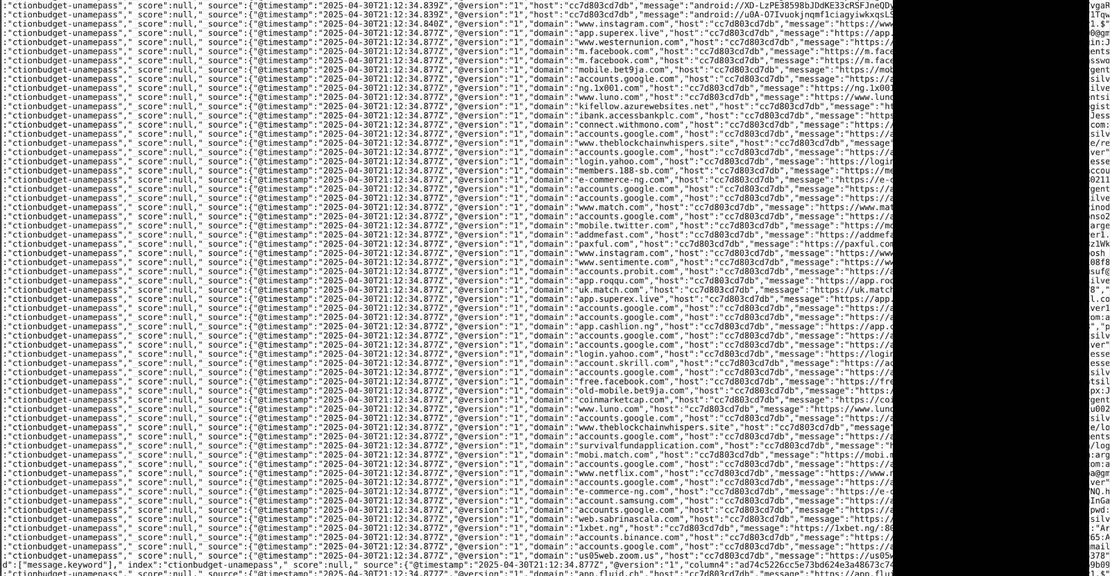
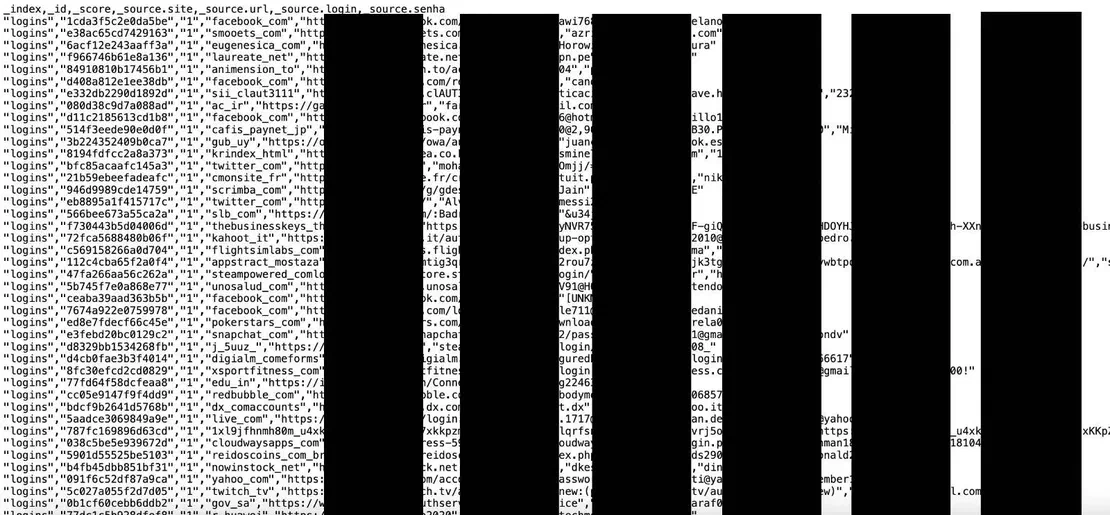
If you have ever reused your passwords or logged in on a compromised device, then yes, your credentials may be in this dump.
The risk is higher for:
Even if you haven’t noticed anything unusual, your credentials might still be in the dump. Many users are unaware that their accounts were compromised.
We’ll cover how to check if you’ve been exposed and what to do about it later in this article.
Social media and news sites exploded with claims that tech giants like Google, Meta, and Apple had been hacked, resulting in the exposure of 16 billion credentials. This conclusion was drawn from the fact that the leaked database actually contained millions of credentials linked to prominent companies such as Google, Apple, and Meta.
But despite the sensational headlines, none of the big tech companies were actually breached. The presence of these accounts in the dump comes not from hacking those servers, but from malware harvesting credentials when people log into those sites.
There was no centralized data breach at any of these companies.
– Bob Diachenko
Google itself confirmed that “the issue did not stem from a Google breach”. Meta has also clarified that nothing was hacked, and in fact, it’s accelerating the rollout of passkey login to reduce risk.
As mentioned earlier, this massive 16 billion credential leak did not come from a single data breach or one big hack. It’s the result of years of accumulated data from various sources, compiled into a single large archive.
Security experts found that the leaked credentials came from 30 different databases, which included:
Let’s understand each of these one by one.
A large portion of this data comes from previously known breaches spanning the 2010s and early 2020s. These breaches included compromised databases from multiple companies and platforms. Over time, these datasets have been combined, circulated, and sometimes repackaged by cybercriminals. Some of the previously known breaches are:
These datasets typically contain email addresses, usernames, and passwords, often in plain text, making them usable for attacks. The issue is that many users have still not changed their passwords, meaning these credentials remain exploitable today.
A large part of the data is believed to come from infostealer malware such as:
These programs infect a user’s system and silently collect data such as:
The dark web is a hub for cybercriminals to share, trade, or sell stolen data, including credentials. Leaked logs from these forums contribute significantly to the aggregated dataset. Cybercriminals often post “combo lists” (username-password pairs) on these forums, which are then scraped or redistributed. Some of these forums include:
A Forbes report from June 2025 notes that the 16 billion credentials were part of datasets found on unsecured online storage, some of which could trace back to dark web leaks.
Credential stuffing is when attackers take stolen credentials from one breach to attempt login on other platforms. For example, let’s say an attacker obtains credentials from the Yahoo breach and then attempts to log into Google using those same credentials. If the user reuses their password, the attacker gains access.
This method works well because:
The results from this credentials stuffing are then stored in dump sites, which contribute largely to the 16 billion credential dataset.
So, this wasn’t just one big hack; it was a massive mix of old leaks, malware infections, and reused passwords collected over the years. What’s scary is that all this data is now in one place, which is making it easier than ever for hackers to use.
Now that we know where the data came from, let’s look at who’s possibly behind it and how it all came together.
That’s the billion-dollar question, and unfortunately, there’s no definitive answer yet. Unlike past breaches where hacker groups immediately claimed responsibility, this came out of nowhere, posted silently without any announcement or trail.
These Are Just Assumptions
No one has claimed responsibility for the leak. These possibilities are based on the author’s expert observations and past trends in cybercrime.
Below is an analysis of the potential actors:
Cybercriminal Groups
Established hacking groups, possibly those behind Redline or Raccoon Stealer malware, may have compiled and dumped the dataset as a market signal to demonstrate their scale and attract buyers.
Data Broker
One theory among experts is that the data may have come from a data broker or a collector someone who had access to multiple credential sources and decided to combine and dump them all at once.
Security Researcher
A cybersecurity research group or white hat collective could be responsible. By exposing the dataset publicly, they may aim to push companies for stronger security.
Accidental Exposure
The datasets were found on unsecured Elasticsearch or object storage, indicating possible negligence by cybercriminals who failed to secure their repositories, a common issue in cybercrime.
Possible Motivations:
Profit: Cybercriminals might have compiled the data for dark web sales or attacks.
Research: A researcher might have centralized the data to expose infostealer threats, but this is speculative.
Fear: Some experts suggest that the leak’s announcement may have been exaggerated to generate fear.
While there’s no official confirmation yet, these possibilities highlight the unpredictability of the threat landscape. Whether it’s profit-driven hackers, careless brokers, or even ethical researchers, someone collected 16 billion records. And now, they’re out there.
Recommended Reading
Modern Cybercrime: Who’s Behind It and Who’s Stopping It
This timeline reflects the most accurate information available at the time of writing. The exact sources of all datasets remain unconfirmed.
May 2025: Researchers discovered and reported a dataset containing 184 million login credentials, including government and enterprise accounts, which was exposed on an unsecured web server.
Early June 2025: The server hosting the 184 Million dataset was disabled by the World Host Group, blocking public access. This incident received very limited attention.
June 18, 2025: CyberNews publishes a report revealing the full scope of the leak, announcing the discovery of 30 exposed datasets containing approximately 16 billion long credentials.
June 19-23, 2025: Many Security experts and media outlets analyzed the leak and confirmed that this was a compilation of data from infostealer malware, past breaches, and credential-stuffing attacks.
June 20, 2025: Major media outlets, including Forbes, CBS News, and The Economic Times, reported on the leak, amplifying public awareness. A Google spokesperson clarified to Axios that no Google systems were breached; the credentials were stolen from users’ devices via malware.
June 24–30, 2025: Further analysis and advisories were issued, with CERT-In (India’s cybersecurity agency) releasing an urgent advisory on June 23, urging users to change passwords and enable MFA.
Let’s see some steps and tools to check if your accounts are in the dump and also some precautionary measures to take for the future.
Use Breach Notification Services
Services like Have I Been Pwned and Cybernews’s Password Leak Checker allow you to check if your email address or username is in any known data breaches, including the 16 billion credential leaks. Simply enter your email address or username in the search bar, and they will cross-reference your input against a regularly updated database of breached credentials, which includes verified leaks.
Platforms Notifications
Many platforms, such as Google and Meta, proactively notify users if their credentials are detected in a known breach. These notifications often appear in account settings or via email. Always keep checking your account dashboards or security settings on affected platforms and review your email inbox and spam folders regularly for security alerts.
Monitor Account Activity
Regularly reviewing your account activity logs is very crucial as it can reveal unauthorized access attempts, which may indicate that your credentials are compromised. Many applications provide features like “Recent Activity” or “Login History” to check for any suspicious login activities. You can look for unrecognized IP addresses, devices, or locations.
You might be thinking, “Sure, 16 billion credentials got leaked, so what? My PC never had malware. I’m safe.” But you might be wrong. Even if you’re safe now, you should be concerned. Let’s look at the severe risks this exposure poses to individuals, businesses, and organizations worldwide.
These days, many platforms use weak password policies or lack multi-factor authentication. So, if a user reuses a password across various services, a single compromised credential could lead to multiple compromised credentials. For example, a stolen Google password could grant access to all Google applications, such as Gmail, Google Drive, or Google Photos, potentially exposing personal emails, documents, or photos. Gmail access could lead to further account takeovers, even if MFA is enabled. Even if 1% of the 16 billion credentials are active, that’s 160 million accounts at risk, which could affect millions of users and organizations.
Stolen credentials enable targeted phishing campaigns that appear legitimate, tricking users into revealing more sensitive information.
Attackers use the compromised email addresses and passwords from existing leaks to craft convincing phishing emails. For example, a phishing email appearing to come from a trusted service like Google could make people assume it’s real and then fall for it. The leak’s structured data enables attackers to automate phishing attacks using tools like EvilProxy, which helps create tailored phishing pages. Credentials from government portals also increase the risk of spear-phishing targeting high-value individuals.
These credentials, when paired with personal information that can be easily obtained through the compromised accounts, can be used to impersonate users, potentially leading to financial fraud or other forms of identity theft.
Attackers combine leaked credentials with personal data to create detailed profiles for fraudulent purposes. For example, a stolen Google account could reveal linked payment methods or other personal details, enabling attackers to open bank accounts or apply for loans in the victim’s name.
The 16 billion credential leak isn’t just another cybersecurity headline. It is a sign of how large the data theft ecosystem has become, and it teaches us several things.
Cybercrime has become a business now
This leak wasn’t just the work of a single hacker. It was the result of a chain of malware developers, people distributing that malware, and aggregators who compile stolen data into massive datasets, each profiting from it while normal people suffer.
Malware is quiet
Most victims of the infostealer malware likely had no idea that their systems were compromised. These malware operate silently in the background, collecting passwords and tokens without triggering any antivirus alerts.
One infected device is all it takes
With access to your stored credentials, autofill data, and cookies, the attacker doesn’t need to guess your passwords. One infected device can give them dozens of accounts.
Security is everyone’s problem
This breach may not have started with you, but it can surely end with you. A single infected vendor or employee can affect the whole organization.
User education is very important
Most of the credentials were stolen due to users engaging in unsafe practices, such as downloading pirated software and clicking on suspicious links, which emphasizes the need for cybersecurity education.
According to reports, the leaked data included credentials from major platforms such as Apple, Google, and Meta. However, there is no evidence that these platforms were directly breached; instead, the credentials were stolen from users’ devices that were infected with malware.
There is no 100% warranty. This is a permanent cat-and-mouse game. While malware developers consider how to trick antivirus software and evade detection, security engineers within antivirus laboratories study malware samples and develop mechanisms to prevent invasions. Both sides succeed from time to time.
Although they are related, the MOAB was a separate compilation released earlier in 2024. This 16 billion leak contains newer, fresher data, including information collected through info stealers in 2024-2025
Not entirely; some malware is specifically designed to target saved browser credentials by extracting them from the browser databases. Instead, I recommend using a secure password manager with two-factor authentication (2FA).
Finally, this leak exposes many flaws in cybersecurity, from user behavior to platform policies and industry practices. The attack chain exploited many preventable weaknesses. For example, password reuse and lack of MFA allowed attackers to maximize the damage. But this isn’t just a failure of individuals. It’s a reflection of a digital culture that still treats cybersecurity as optional.
It’s time we shift that mindset.
It’s time to treat cybersecurity as a shared responsibility.
Let this be a turning point.
Let’s take this as a sign to do better, to be more careful, and a bit more secure, and stop making it easy for cybercrime to thrive.

I can show you how deep the Internet really goes
Discover exposed assets, infrastructure links, and threat surfaces across the global Internet.
此内容由惯性聚合(RSS阅读器)自动聚合整理,仅供阅读参考。 原文来自 — 版权归原作者所有。