





Oh boy, I’ve been in this situation many times, and I can tell you — it’s definitely neither fun nor efficient.
Look at the cover. This is me, fully caffeinated at 4:00 in the morning, explaining to upper management the latest updates on a security breach that began 12 hours earlier. Typically, the walls of the war room in my Security Operations Center are clean and bright white. Still, over these past hours, they’ve been completely covered with facts, action items, indicators of compromise (IOCs), to-dos, notifications, correlations, text strikethroughs, erasures, and much more.
To add to the chaos on the physical whiteboard, there also needs to be a place where the same information is available digitally for team members working off-site.
In the world of Digital Forensics and Incident Response, this digital equivalent of the whiteboard chaos is known as the Spreadsheet of DOOM.
A “Spreadsheet of Doom” (SoD) is a centralized repository, usually a spreadsheet, used in incident response to track key findings, evidence, and the progress of an investigation. It serves as the single source of truth, helping responders stay organized, manage information, and collaborate effectively during a security incident.
While digital, every SoD begins as a clean, well-structured document, neatly organized with tabs for IOCs, notes, tasks, decisions taken, and more. But with each edit, new pivot tables, and attempts to create timelines from the data, the spreadsheet grows larger, less intuitive, and increasingly prone to errors. And just like that, complete chaos unfolds in no time! You’re DOOMED.
KANVAS is a Digital Forensics / Security Incident Response (DFIR) case management tool with an intuitive desktop interface. It’s Open Source, free to use, cross-platform, and built with Python 3. It provides a unified workspace for investigators working with SOD (Spreadsheet of Doom) or similar spreadsheets, enabling key workflows to be completed without switching between multiple applications.
I had the pleasure of having a quick interview with Jinto Anthony, a UK-based Senior Investigator at WithSecure and the creator of Kanvas.
Q: What inspired you to create Kanvas, and what specific problems in incident response, or digital forensics were you aiming to solve?
A: The DFIR community relies on many tools and workflows during incidents to track findings and observations. Among these, the SOD (Spreadsheet of Doom) is one of the key spreadsheets commonly used by responders.
While the SOD can be extremely helpful in capturing and organizing incident-related information, it also comes with several challenges, such as managing, updating, and extracting insights from the data efficiently. Considering that many investigators rely on some form of the SOD, I developed ‘Kanvas’. There are a few open-source projects available for IR case management, but I’ve faced two main challenges with most of them:
My approach with Kanvas was to address data portability - all data is stored in either spreadsheets or Markdown files. This means users retain full access to their data and can continue working with it even if the tool is no longer in use.
Q: How do you prioritize which features to develop next for Kanvas? And what upcoming features are you most excited about?
A: My plan is to start working on features that the community has requested, as well as some I personally think would be useful based on my investigations. I have a few ideas lined up, like integrating with MISP/OpenCTI for interactive investigations, generating prompts based on available data that can be used with any LLM to customize and create the final investigation report, and more.
Q: You call Kanvas a simple-to-use IR (incident response) case management tool for tracking and documenting investigations. Is this also the long-term goal for Kanvas – to keep it simple? Or are there plans to scale out and create a full-blown (commercial) tool? In other words, what is your long-term vision for Kanvas, if any?
A: The tool is simple to use, but the underlying logic has built up into quite a large codebase. I plan to keep contributing to it, but I don’t have any long-term plans to turn it into a commercial product. I’ve published the code under my company’s GitHub repo, not my personal one to make sure there’s enough ongoing contribution from the company side in the long run.
Q: How can the cybersecurity community contribute to the development and improvement of Kanvas? Any chance that you will create a more structured community or forum for users to share insights and feedback? Or will you keep using GitHub as the home for Kanvas?
A: I’ll keep using GitHub for development, fixing bugs, and releasing new features. Anyone interested in contributing to the code can do so by submitting a pull request — that’ll be the way to go.
Q: Kanvas is published on the GitHub page of WithSecure. Are you able to work on Kanvas in company time? And is it widely adopted as the default DFIR case management tool?
A: Yes, it’s published on the company’s GitHub repo to keep the focus and ongoing contributions on the project instead of letting it die out later. Withsecure has a lot of open-source tools maintained, and I hope this tool follows the same path.
Since the backend is an Excel sheet and many investigators use Excel for case management. I think people might find it interesting because it’s based on Excel spreadsheets. Another important point is that all the backend data, whether it’s Excel spreadsheets or Markdown files, is easy to move to another tool. So even if the tool isn’t available in the future, the data can still be used. That’s why I chose not to use a database as the backend.
Q: Is there anything else you would like to share with the reader or potential users of Kanvas?
A: If you’re using Excel spreadsheets to track findings during an investigation and use Markdown to organize your notes, you should definitely give this a try.
Kanvas is designed to address the common issues of the Spreadsheet of Doom (SoD) that we incident responders are all too familiar with. As incidents progress, traditional spreadsheets tend to become unwieldy, error-prone, and difficult to navigate, especially when multiple users contribute data and pivot the structure to meet urgent timelines or analysis requirements.
Kanvas addresses these pitfalls by providing a unified desktop workspace that enforces structure, enables efficient visualization, and introduces user management features such as file locking to prevent accidental data overwrites or conflicts. By keeping all data centralized yet accessible, Kanvas ensures that even as an investigation grows in complexity, responders can maintain clarity and control over the entire case.
Core Use
The core functionality of Kanvas centers around its comprehensive integration with the SoD while layering on essential features for modern digital forensics and incident response. With Kanvas, users can open and manage cases, switch between different sheets of investigative data, and instantly visualize timelines or attack chains to gain deeper situational awareness. It offers lookup integrations for threat intelligence enrichment, such as IP reputation and file hash checks with third-party platforms (via API keys), and an embedded knowledge base that consolidates event IDs, bookmarks, and customizable team notes. Kanvas’s export features make reporting straightforward, supporting both image and CSV formats directly from the app. This means that all collaborators can work from a single source of truth, supported by guidance and automation throughout their workflows.
Upcoming Features
While Kanvas already brings order to SoD-driven chaos, there are features still on the horizon. Upcoming releases are expected to integrate advanced threat intelligence feeds (like MISP/OpenCTI), provide AI-powered incident report generation, and further enhance collaboration for distributed teams.
Recommended Reading
The Pyramid of Pain: Beyond the Basics
Getting Kanvas Up and Running
Kanvas is built on Python 3. Assuming you already have Python installed, getting Kanvas up and running is straightforward! By following the instructions, you’ll clone the repository, create a virtual environment, install the dependencies, and then run Kanvas.
First impressions and user interface walkthrough
At startup, you get a nice and clean-looking interface. Kanvas arranges its main features neatly in a menu along the left side of the screen. A breakdown of the main features:
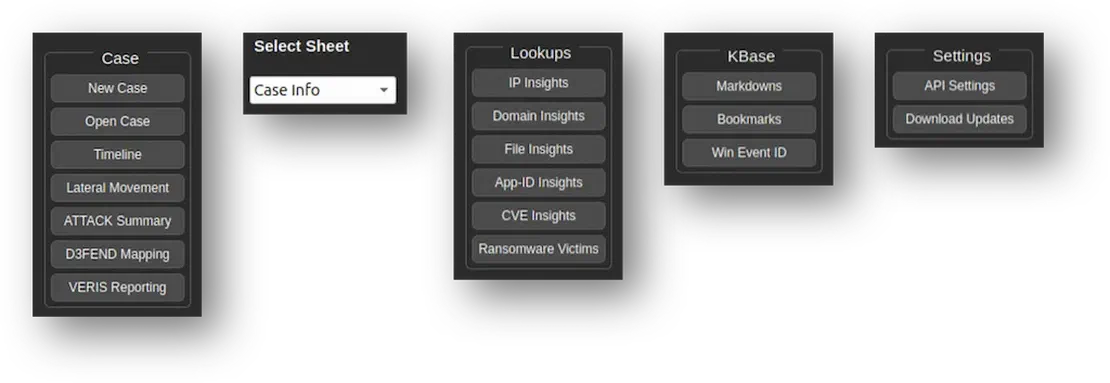
Case
This is the starting point when working with Kanvas. Here, you can create new cases or open existing ones. As you progress with documenting your case, you’ll have access to powerful visualization features, such as timeline views and MITRE ATT&CK mappings, to enhance your investigation.
Select Sheet
The Select Sheet option connects directly to the underlying Spreadsheet of Doom, keeping all investigative data centralized while preserving the spreadsheet workflow.
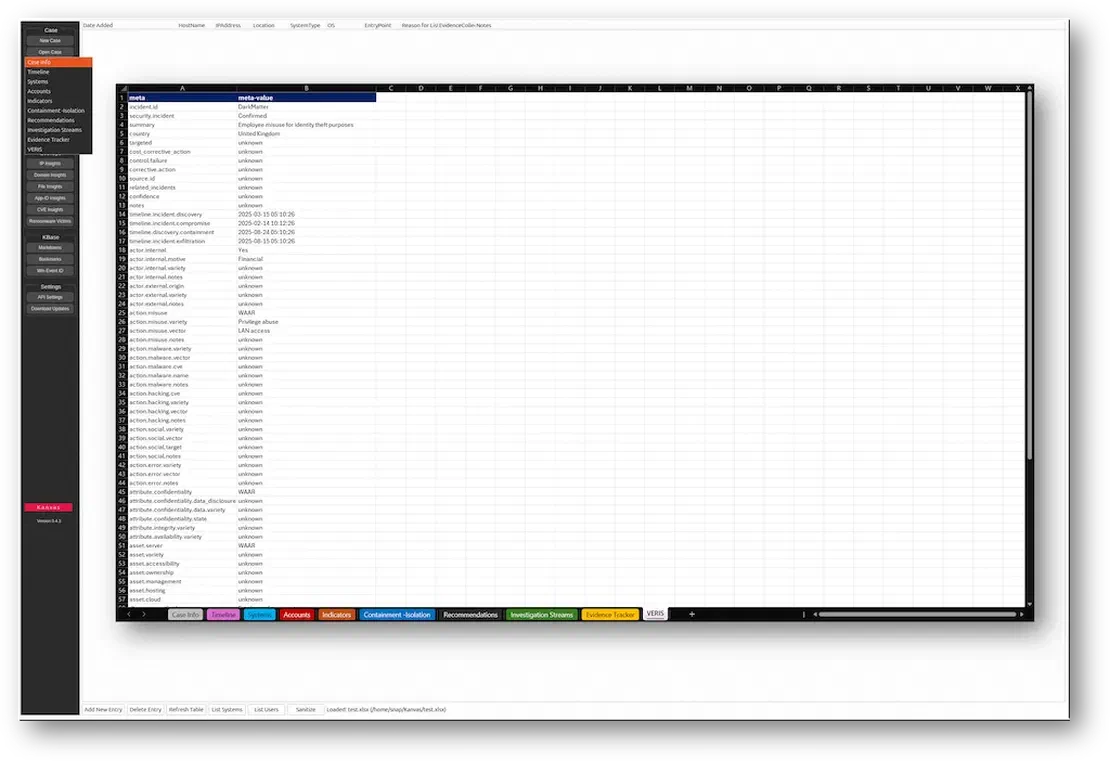
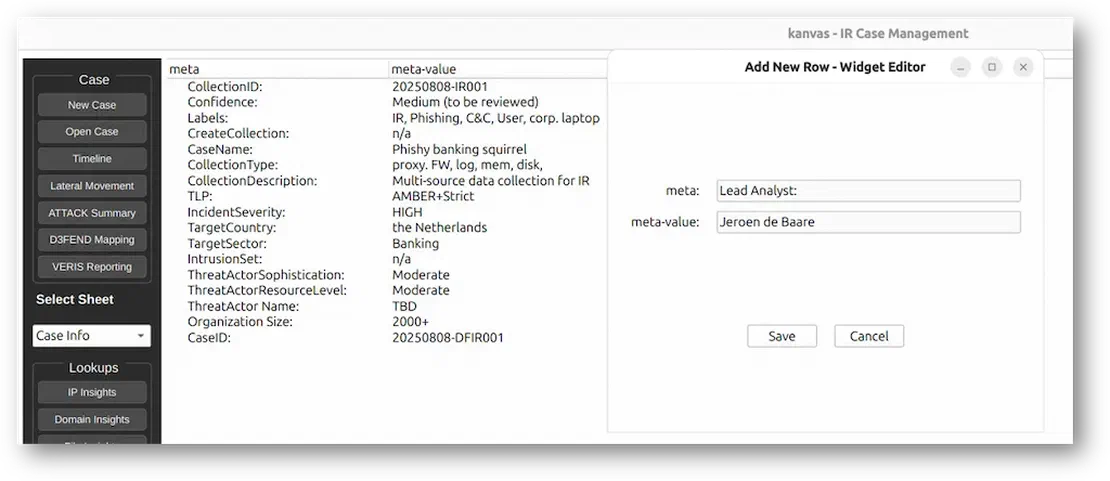
The metadata is recorded in the Sheet Info section of the SoD. This is the primary area where you enter details specific to your case. It uses key-value pairs, offering flexibility to customize the information according to your preferences.
Lookups
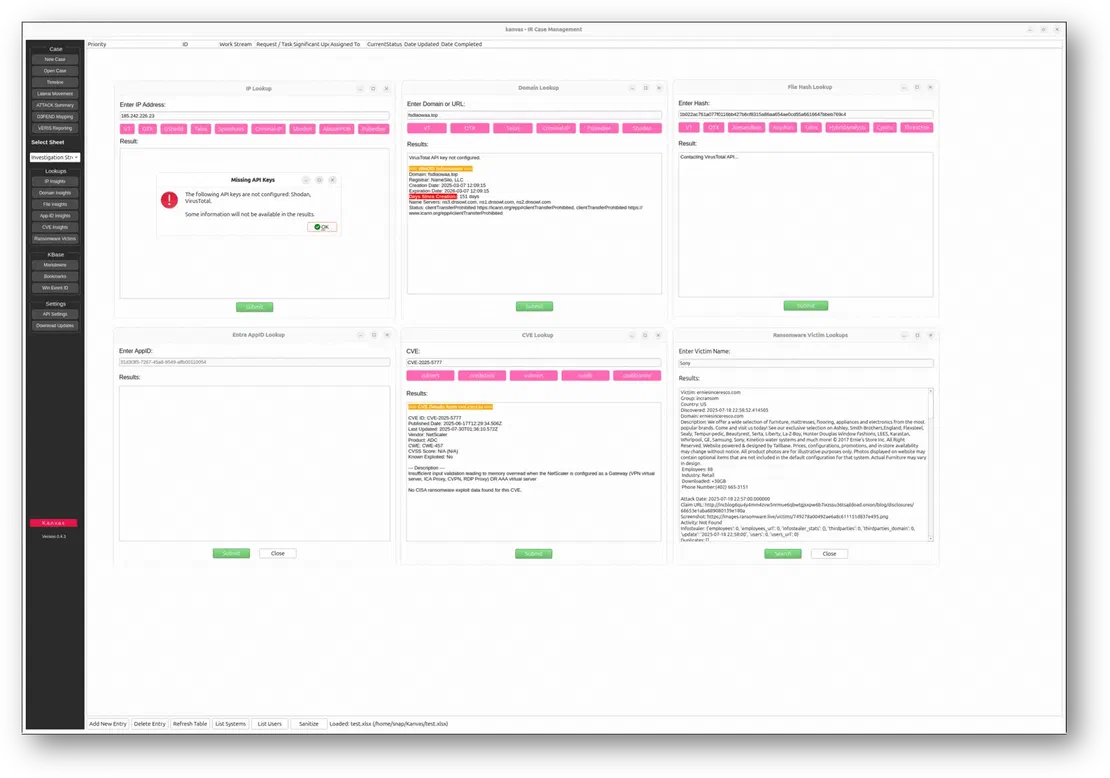
With the Lookups menu, Kanvas allowed users to enrich investigations with threat intelligence by querying external sources. For every option selected, Kanvas opens an additional window.
There are some features, like IP reputation, domain insights, and malware file hash lookups, that need personal account credentials. You need to configure additional API keys for services such as VirusTotal, Shodan, AlienVault, etc., to unlock the full potential of this integration.
Recommended Reading
Proactive Threat Hunting: Techniques to Identify Malicious Infrastructure
KBase
As an incident responder myself, I truly appreciate that Kanvas includes a built-in knowledge base that integrates data from external resources. For example, it provides convenient access to bookmarks from OneTracker and an extensive Event ID lookup database, both of which are invaluable during investigations. Beyond these resources, Kanvas also allows you to create your own personal or team knowledge base using its built-in Markdown editor and viewer. This feature is compelling for teams, as it ensures that evidence handling and investigative processes are consistent and standardized across all team members every time, ultimately enhancing collaboration and accuracy throughout the response lifecycle.
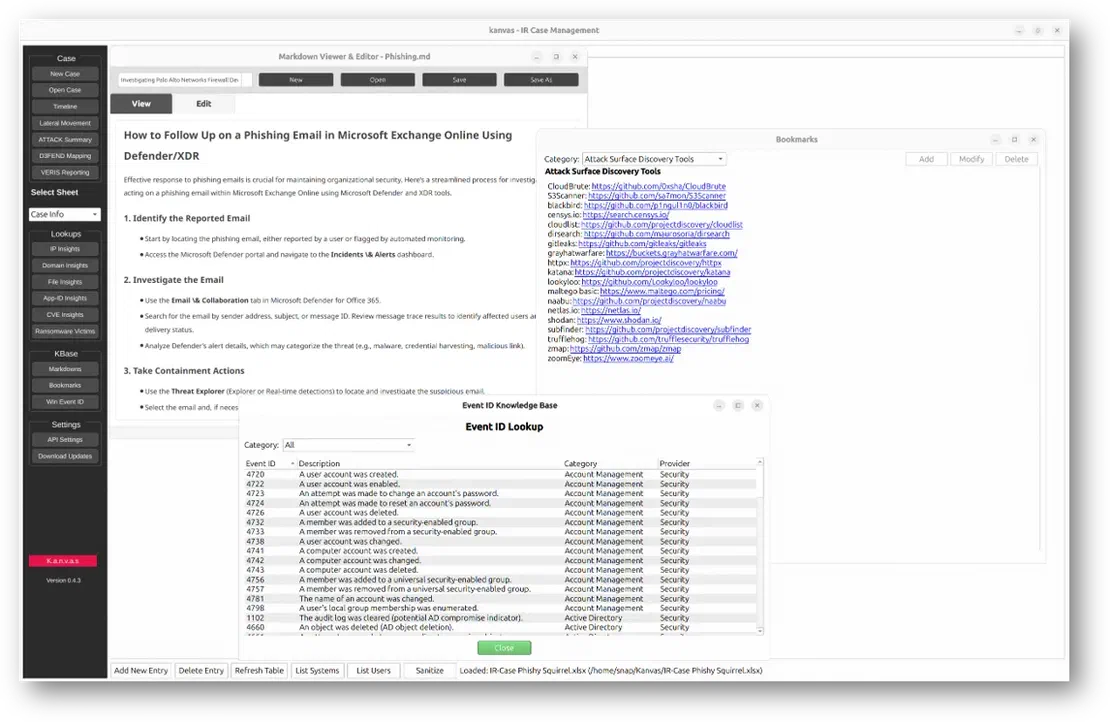
Kanvas in Action
This demo video (which is actually converted GIF from the Kanvas GitHub page) shows the desktop interface explicitly designed for incident response case management. It shows how you can navigate through the application to open and work directly with the underlying Spreadsheet of Doom, which acts as the central data repository. The demo highlights actions like selecting different sheets, exploring incident timelines, and using visualization features such as attack chain diagrams. It also demonstrates quick access to lookup tools that enrich threat intelligence and the built-in knowledge base for easy reference. Above all, the GIF clearly illustrates how Kanvas smoothly combines spreadsheet-based workflows with powerful visualization and investigation capabilities, helping make incident documentation and analysis more efficient and collaborative.
While researching this article, I examined popular “Spreadsheet of Doom” solutions for incident response case management and was excited to compare Kanvas with other SoD tools used in Digital Forensics and Incident Response. I was already familiar with Aurora IR, developed by SANS instructor Mathias Fuchs, which is pitched as a Spreadsheet of Doom on steroids, featuring enhanced graphing options, task tracking, and other capabilities. For the second competitor, I examined CrowdStrike’s Digital Forensics and Incident Response Tracker, a Microsoft Excel template that includes all the tabs you would expect from a traditional SoD.
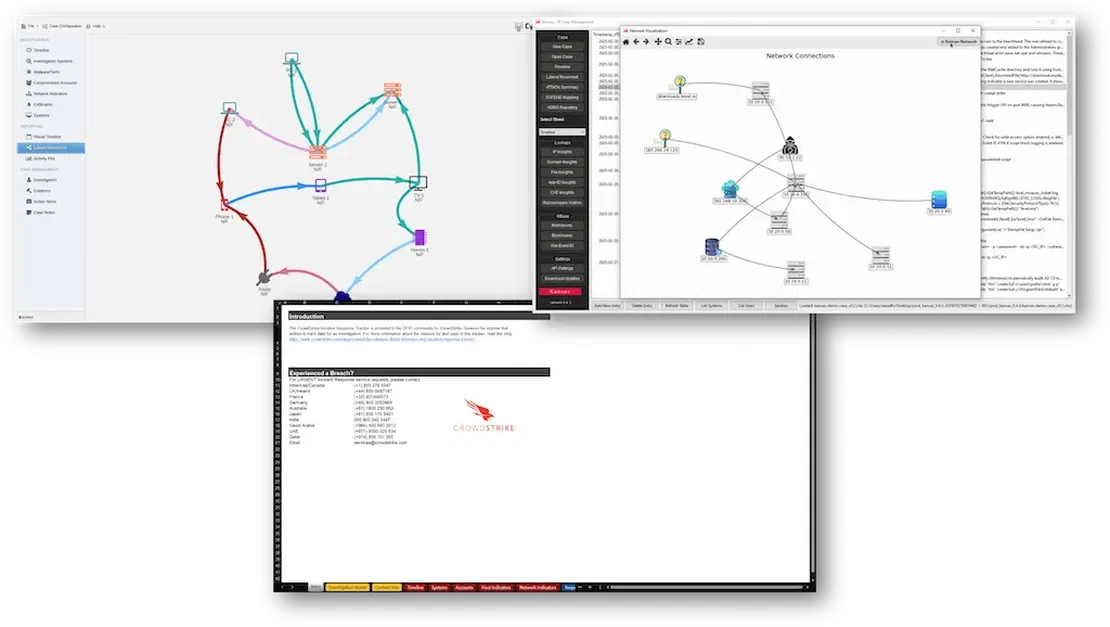
Right off the bat, each tool offered different approaches to bringing order, collaboration, and efficiency to incident response case management. I wanted to delve beyond basic tracking to see how each solution extended functionality, provided visualization, and supported the broader needs of cybersecurity teams.
In making comparisons, I focused on usability, the level of structure they enforced, their maintenance status, and the range and depth of features they offered. I also assessed how each product facilitated collaboration across teams, the types of reporting and visualization options available, and which integrations or security frameworks they supported.
| Feature/Aspect | Kanvas | Aurora IR | CrowdStrike IR Tracker |
|---|---|---|---|
| Ease of Use | Graphical Python app, intuitive, minimal learning curve | Desktop/electron app, user-friendly, also intuitive design | Traditional spreadsheet, clear layouts |
| Structured Working | Enforces IR process, SOD template, timelines, MITRE mapping | Task/finding/event tracking, case-centric workflow | Pre-set tabs for systems, indicators, tasks, timelines |
| Actively Maintained | Yes, regular releases, open-source | Project seems abandoned, no update in four years | Updated template from vendor, less frequent but stable |
| Functionality | Data visualization, threat lookups, MITRE ATT&CK/D3FEND, reporting | Task tracking, evidence handling, reporting, case notes | Timeline, IOCs, tasks, evidence trackers, reporting templates |
| Collaboration | Multi-user, shared files, file locking for edits | Single user, but spreadsheets can be shared | Spreadsheet format supports file sharing, not real-time collab |
| Visualization | Attack chains, incident timelines, exportable visuals, more to come | Graphing features, visual timeline | Tabular and timeline representation, no dedicated graphing |
| Extensibility, Integrations | Plug in threat intel APIs (VirusTotal, Shodan), customizable | MISP, VirusTotal | No automatic integrations, but easily customizable spreadsheet |
| Security Framework Mapping | MITRE ATT&CK, MITRE D3FEND, VERIS reporting built-in | No dedicated mapping, relies on user entry | no native mappings, user can manually map IR data |
| Reporting | One-click export to CSV/img, markdown note editor, templates | Autofill reporting, export support, Case notes | Baseline reporting, includes key incident and IOC tables |
| Platform, Access | Desktop (Python), spreadsheet-based, Windows/Linux/Mac | Cross-platform (Electron), Installer per platform available | Microsoft Excel spreadsheet, platform-agnostic, no app needed |
After diving deep into Kanvas during the research and writing of this article, I can confidently say it’s a tool every DFIR analyst and security specialist should keep on their radar.
If you’re like me and often find yourself overwhelmed by the real-life chaos of managing cases in the middle of a high-pressure security incident, juggling notes, timelines, evidence, and collaboration, Kanvas feels like a breath of fresh air. It brings order to the digital version of that “whiteboard chaos” we all know too well, combining familiar spreadsheet workflows with powerful, purpose-built incident response features.
What makes Kanvas stand out is its simplicity and thoughtful design. Built on the Spreadsheet of Doom concept, it retains all the flexibility analysts need while adding helpful visualization options, lookup integrations, and a built-in knowledge base to speed up investigations.
Recommended Reading
Best Attack Surface Visualization Tools
It enables multiple team members to collaborate smoothly and uniformly without losing data portability, which means your work stays accessible and adaptable, even if you switch tools down the line. Its open-source nature and active development provide confidence that Kanvas is not just a passing curiosity but a continually evolving asset for the community.
Kanvas isn’t about flashy AI tricks or excessive complexity. It’s about making incident response case management more manageable and intuitive in the heat of the moment. The user interface is friendly and clean, making adoption easier for analysts who already rely on Microsoft Excel or spreadsheets for their workflows. If you’re looking for a tool that respects your existing habits but extends your capabilities with automation, visualization, and threat intelligence enrichment, Kanvas is definitely worth trying.
In short, if you ever feel overwhelmed by an incident and want more control, Kanvas is the right tool for you. Try it out on its GitHub page, explore its features, and see how it can improve your case management by connecting with the creator, Jinto. You can also help him develop Kanvas further by sharing your feedback and suggestions directly on the GitHub page. Your expertise and real-world experience can influence the future of this powerful tool.
WithSecureLabs/Kanvas
456 71

I can show you how deep the Internet really goes
Discover exposed assets, infrastructure links, and threat surfaces across the global Internet.
此内容由惯性聚合(RSS阅读器)自动聚合整理,仅供阅读参考。 原文来自 — 版权归原作者所有。