惯性聚合 高效追踪和阅读你感兴趣的博客、新闻、科技资讯
阅读原文 在惯性聚合中打开

推荐订阅源

博客园 - 三生石上(FineUI控件)
Martin Fowler
Martin Fowler
月光博客
月光博客
AI
AI
B
Blog
钛媒体:引领未来商业与生活新知
钛媒体:引领未来商业与生活新知
C
CXSECURITY Database RSS Feed - CXSecurity.com
WordPress大学
WordPress大学
GbyAI
GbyAI
L
Lohrmann on Cybersecurity
O
OpenAI News
Schneier on Security
P
Palo Alto Networks Blog
Cyber Security Advisories - MS-ISAC
T
Troy Hunt's Blog
V2EX - 技术
V2EX - 技术
W
WeLiveSecurity
L
LINUX DO - 最新话题
人人都是产品经理
人人都是产品经理
S
Security Affairs
OSCHINA 社区最新新闻
OSCHINA 社区最新新闻
A
Arctic Wolf
Recorded Future
Recorded Future
Microsoft Security Blog
Threat Intelligence Blog | Flashpoint
G
GRAHAM CLULEY
N
Netflix TechBlog - Medium
TaoSecurity Blog
TaoSecurity Blog
C
Check Point Blog
Scott Helme
Scott Helme
cs.CV updates on arXiv.org
Apple Machine Learning Research
PCI Perspectives
PCI Perspectives
www.infosecurity-magazine.com
Vercel News
Vercel News
The Hacker News
The Hacker News
Y
Y Combinator Blog
Latest news
Latest news
SecWiki News
SecWiki News
Hugging Face - Blog
Hugging Face - Blog
cs.AI updates on arXiv.org
Google Online Security Blog
Webroot Blog
Webroot Blog
Google DeepMind News
Recent Commits to openclaw:main
C
Cisco Blogs
博客园_首页
H
Hackread – Cybersecurity News, Data Breaches, AI and More
宝玉的分享
宝玉的分享
L
LINUX DO - 热门话题

Mapping the <mark>Internet</mark> on Netlas: Comprehensive Internet-Wide Scanning & OSINT Platform

Weaponized RMM: Hunting the Adversary Abuse of Remote Monitoring Tools Device Code Phishing: Technical Analysis and Proactive Hunting via Netlas Discovering Data Exposure with Netlas Telegram Bot API Abuse - Netlas Blog Using OWASP Amass with Netlas Module - Netlas Blog How we hunt C2 infrastructure at RST Cloud using Netlas - Netlas Blog Using Uncover with Netlas.io module - Netlas Blog Netlas Updates Terms and API & Data License Agreement - Netlas Blog Top 10 Hacking Devices for Ethical Hackers in 2026 - Netlas Blog Inside ClickFix: How Fake Prompts Took Over the Web Top 10 Critical Threat Actors to Watch in 2026: Ransomware, APTs & Defensive Strategies - Netlas Blog Bug Bounty 101 - A Complete Bug Bounty Roadmap for Beginners (2026) - Netlas Blog Supply Chain Attack - How Attackers Weaponize Software Supply Chains - Netlas Blog The Evolution of C2: Centralized to On-Chain - Netlas Blog From Starlink to Star Wars - The Real Cyber Threats in Space - Netlas Blog LLM Vulnerabilities: Why AI Models Are the Next Big Attack Surface - Netlas Blog When AI Turns Criminal: Deepfakes, Voice-Cloning & LLM Malware - Netlas Blog Zero-Click Exploits - Netlas Blog When Patches Fail: An Analysis of Patch Bypass and Incomplete Security - Netlas Blog I Analysed Over 3 Million Exposed Databases Using Netlas - Netlas Blog Post-Quantum Now: From AES & RSA to ML-KEM Hybrids - Netlas Blog Bug Bounty 101: Top 10 Reconnaissance Tools - Netlas Blog Mapping Dark Web Infrastructure - Netlas Blog Top Vibe-Coding Security Risks - Netlas Blog From Chaos to Control: Kanvas Incident Management Tool - Netlas Blog Bug Bounty 101: The Best Courses to Get Started in 2025 - Netlas Blog I, Robot + NIST AI RMF = Complete Guide on Preventing Robot Rebellion - Netlas Blog The $1.5B Bybit Hack & How OSINT Led to Its Attribution - Netlas Blog Hannibal Stealer: A Deep Technical Analysis - Netlas Blog Proactive Threat Hunting: Techniques to Identify Malicious Infrastructure - Netlas Blog The Pyramid of Pain: Beyond the Basics - Netlas Blog SOCMINT: Intelligence in the Social Media Era - Netlas Blog Hannibal Stealer vs. Browser Security - Netlas Blog The Largest Data Breach Ever? How Hackers Stole 16 Billion Credentials - Netlas Blog DNS Cache Poisoning – Is It Still Relevant? - Netlas Blog Modern Cybercrime: Who’s Behind It and Who’s Stopping It - Netlas Blog AI-Driven Attack Surface Discovery - Netlas Blog Netlas vs Urlscan: Tools Comparison - Netlas Blog Track Adversary Infrastructure Challenge 2025 Recap - Netlas Blog What is Threat Intelligence - Netlas Blog Netlas vs IPinfo: Tools Comparison - Netlas Blog Best Nmap Alternatives - Netlas Blog Whois History: How to Check the Domain Owner History - Netlas Blog Top WHOIS & RDAP Tools for Fast IP Address Lookup - Netlas Blog ASN Lookup Explained: Tools, Methods & Insights - Netlas Blog How to Detect CVEs Using Nmap Vulnerability Scan Scripts - Netlas Blog Nmap Cheat Sheet: Top 10 Scan Techiques - Netlas Blog Netlas vs ZoomEye: Platforms Comparison - Netlas Blog Top 6 Most Widely Used Port Scanners in Cybersecurity - Netlas Blog FAQ: Understanding Root DNS Servers and the Root Zone - Netlas Blog Domain Recon: Must-Know Tools for Security Professionals - Netlas Blog DNSSEC: Should You Use It? An Expert’s View on the Pros, Cons, and When to Implement - Netlas Blog Which DNS Servers Offer the Best Balance of Speed, Security, and Privacy? - Netlas Blog theHarvester: a Classic Open Source Intelligence Tool - Netlas Blog - Netlas Blog Top 15 OSINT Tools for Expert Intelligence Gathering - Netlas Blog A Deep Dive into the Open Web Application Security Project Top 10 Vulnerabilities - Netlas Blog Using Subfinder with Netlas Module - Netlas Blog Netlas Chrome and Firefox Extensions - Netlas Blog Netlas vs Censys: Platforms Comparison - Netlas Blog OSINT in Cybersecurity: Exploring Its Spectrum and Tech - Netlas Blog Best Honeypots for Detecting Network Threats - Netlas Blog Using Maltego with Netlas Module - Netlas Blog Using theHarvester with Netlas - Netlas Blog Using TLDFinder with Netlas - Netlas Blog Netlas vs Fofa: Platforms Comparison - Netlas Blog Netlas vs Shodan: Platforms Comparison - Netlas Blog Google Dorking in Cybersecurity - Netlas Blog 7 Tools for Web Penetration Testing - Netlas Blog Using DNS History in Cybersecurity - Netlas Blog Mastering Online Camera Searches - Netlas Blog Best Attack Surface Visualization Tools - Netlas Blog Complete Guide on Attack Surface Discovery - Netlas Blog How to find unprotected databases with Netlas.io: Chapter 2 - Netlas Blog
DNS History: Exploring Domains Past by Inspecting DNS Trails - Netlas Blog
Vyacheslav Makhrov · 2025-03-04 · via Mapping the <mark>Internet</mark> on Netlas: Comprehensive Internet-Wide Scanning & OSINT Platform

What can you learn from examining the history of DNS records associated with a domain? As the name implies, DNS history logs every change made to a domain’s DNS configurations over time, offering key insights into domain management, security trends, and even potential vulnerabilities. This data is crucial for both protecting your online presence and shaping long-term strategy.

In this article, we will dive deep into the concept of DNS history, detailing the types of DNS records that reflect changes and providing you with an overview of the tools available for retrieving these valuable insights. Focusing on real-world applications, this guide will demonstrate how to utilize historical DNS data not only to strengthen your domain’s security but also to gain an edge over competitors and optimize your digital presence. By understanding DNS history, you can improve your domain’s resilience and make informed decisions about its future.

Key Insights on DNS History and Domain Data

Reviewing DNS history reveals important details about the progression of a domain, its traffic patterns, potential vulnerabilities, and can be instrumental in diagnosing connectivity issues or service interruptions.

Several free and paid tools, including SecurityTrails, DNS Spy, and other specialized services, provide in-depth DNS record history and offer robust analytics, making them essential resources for domain administrators, cybersecurity professionals, and network engineers.

Understanding DNS History and Its Role in Security

DNS History tracks the progression of domain names over time, recording changes in IP addresses, settings, and configurations. This historical data plays a critical role in cybersecurity, allowing professionals to monitor domain activity, detect potential threats, and understand how changes could impact security posture. Reviewing the history of DNS records helps in recognizing trends, detecting weaknesses, and confirming that domain settings follow optimal security protocols.

Advantages of Analyzing Historical DNS Records

Examining the progression of DNS records provides a detailed look at the changes applied to a domain’s configurations throughout its history. This extensive archival information can empower domain managers and website proprietors in numerous ways, including:

  • Verifying traffic routing following significant changes like moving to a new hosting provider.
  • Identifying trends that may reveal security vulnerabilities or unauthorized modifications in domain registration.
  • Linking past DNS configurations to malicious behavior or cyberattacks.

The DNS history serves as a detailed timeline, offering deep insights into the life of a domain, and plays a key role in both site management and security efforts.

Various platforms have meticulously cataloged DNS changes, with some holding records dating back to 2002. Long-standing solutions like SecurityTrails and Complete DNS — active since the early 2000s — remain in high demand. Additionally, many practitioners lean on search platforms such as Netlas, Shodan or Fofa for their broader data coverage. Below, we’ll review a variety of tools designed for digging into DNS history.

Why DNS Records Are Vital for Domain Protection

DNS records are foundational elements that quietly ensure the smooth operation of the internet. They act as essential links between domain names and IP addresses, facilitating the resolution process across various internet services. For example, A records link hostnames to IPv4 addresses, serving as one of the most widely used types of DNS records. Similarly, AAAA records fulfill a parallel role for the newer IPv6 addresses, supporting the growing number of devices connected to the internet.

In addition to these, other key records contribute significantly to domain functionality and security:

  • MX records define mail servers, playing a critical role in managing and directing email traffic.
  • NS records delegate authority, specifying which name servers handle the domain’s resolution process.
  • CNAME records allow one domain to point to another, facilitating easier domain management and redirection.
  • PTR records are responsible for associating IP addresses with domain names, useful for reverse lookups and troubleshooting.

By analyzing historical DNS records, domain administrators gain crucial insights that aid in DNS forensics, particularly when identifying suspicious activity. This historical data is instrumental in tracking cybercriminal movements and reinforcing domain security, allowing for prompt actions to safeguard online assets.

Best Free Tools for Performing DNS History Lookup

Now that we’ve established the importance of DNS history, the next step is figuring out how to access it. Fortunately, several free tools are available that help with discovering domain details, identifying potential threats, and reviewing your domain’s past DNS activity. Some of these popular tools include:

  • SecurityTrails (formerly DNS Trails): Offers comprehensive DNS history analysis, providing detailed information on past and current domain configurations.
  • DNS Spy: A real-time DNS monitoring tool that tracks changes and alerts users about any suspicious DNS alterations.
  • Complete DNS: A tool that provides access to DNS History and reverse NS record searches. It is distinguished by its very large amount of data.
  • Netlas: Internet-connected devices search engine, which provides users with DNS records data, among other things. A fairly young tool, which compensates for the lack of age of the data with its diversity.

These tools are instrumental in retrieving historical DNS data and can assist domain administrators in conducting thorough investigations, improving domain security, and enhancing overall management strategies.

Exploring DNS Trails: How to See DNS Changes Over Time

SecurityTrails is a tool for investigating DNS history and offers a wide range of features to help users track DNS changes:

  • Extensive DNS record database providing access to historical domain data.
  • Free access to 50 API queries, allowing users to automate the retrieval of DNS information.
  • Daily updates on DNS changes, keeping you informed with the most current domain records and configurations.
  • Customizable data feeds, enabling users to download both real-time and historical data for in-depth analysis.

This tool is particularly valuable for those who need to monitor changes over time, including updates to TXT records or other DNS configurations. It is a good resource for tracking modifications and ensuring accurate domain management, security, and compliance.

The picture below shows an example of a report obtained from SecurityTrails.
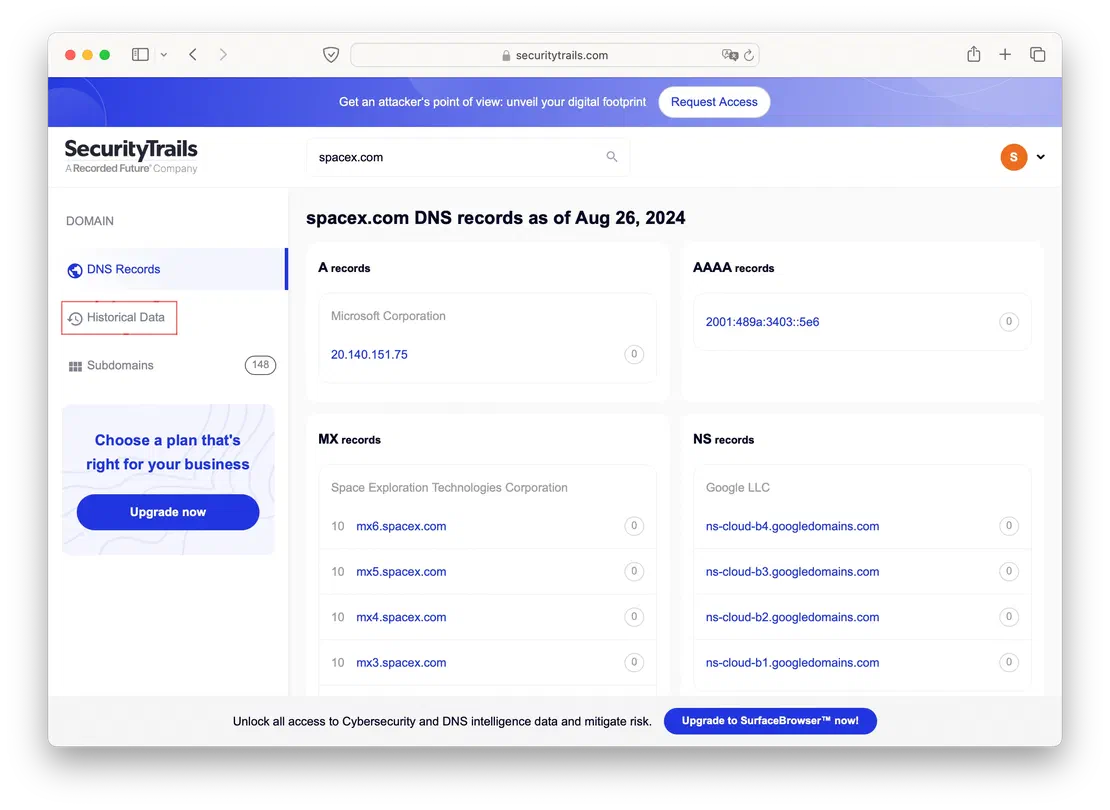
SecurityTrails report

By clicking on the “Historical data” button, you’ll be able to view the historical records for the selected domain. Let’s take a closer look at the A records as an example.
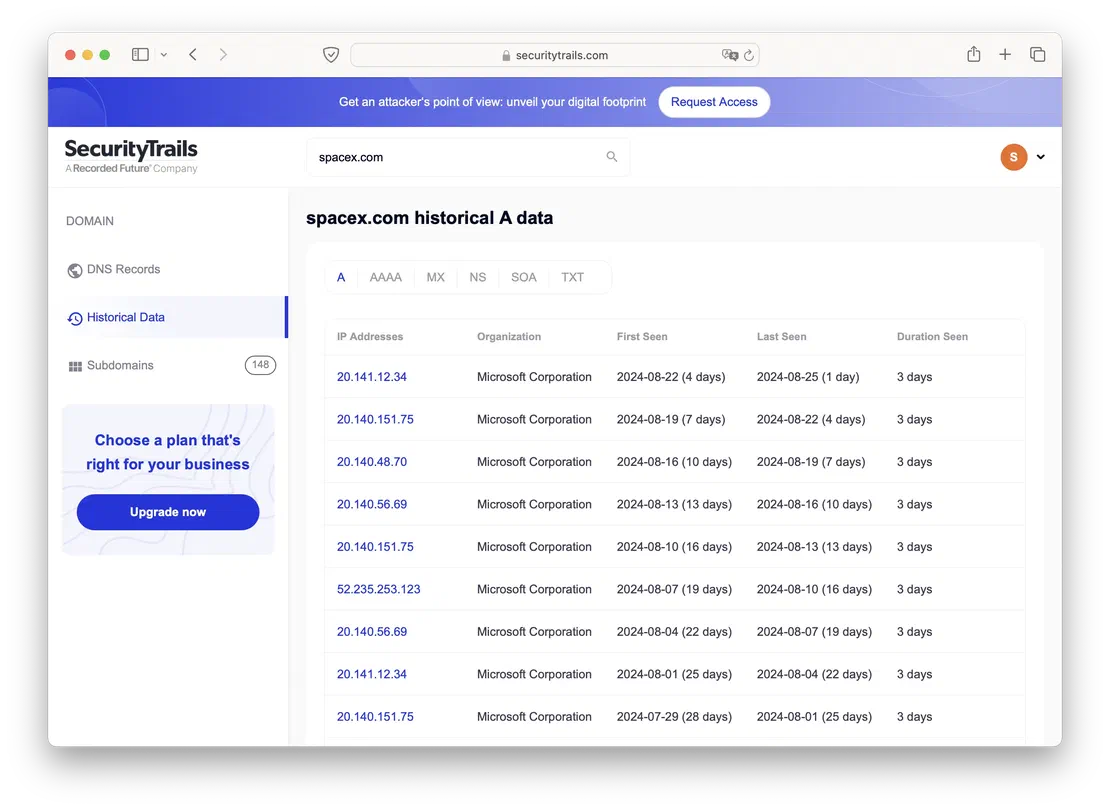
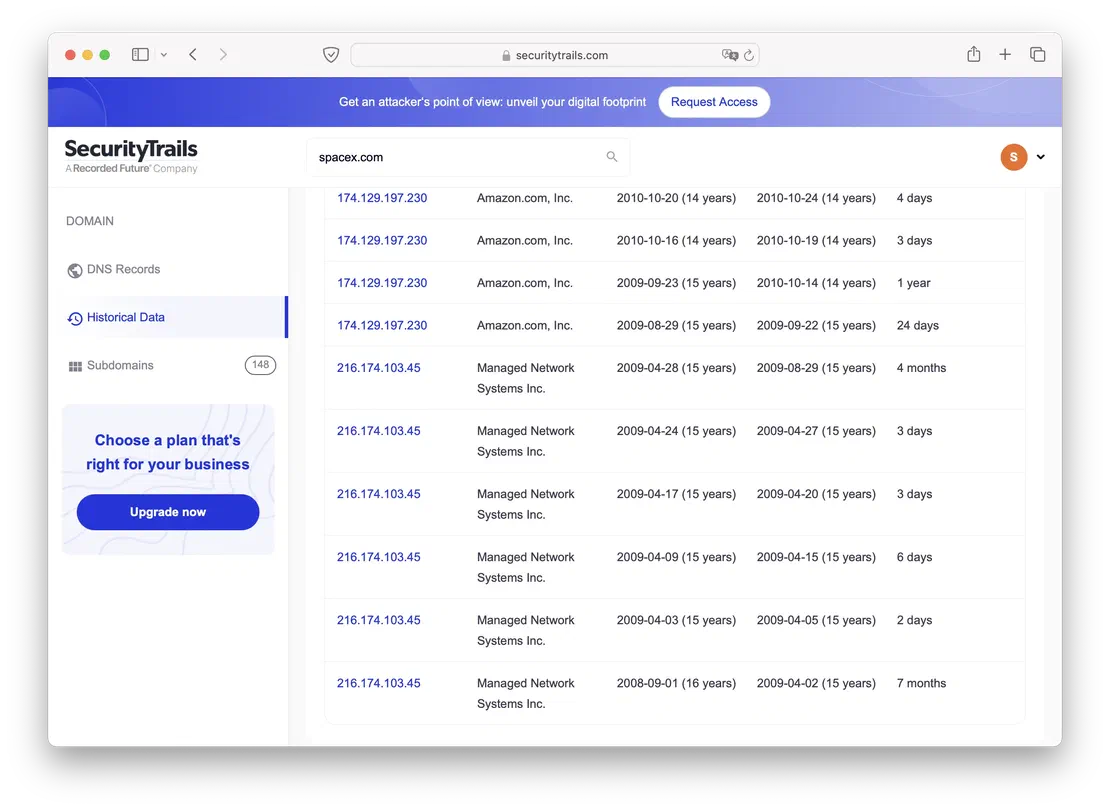
SecurityTrails Historical Data 1

SecurityTrails Historical Data 2

In-Depth DNS Analysis: A Complete DNS History Guide

Complete DNS is another resource for understanding domain history and tracking changes as they occur. One of its key strengths is the ability to present a timeline of domain modifications, making it invaluable for thorough historical analysis. Users can access 100 free queries each month through the free tier, enabling them to check domain history without incurring any costs.

For those requiring more advanced capabilities, Complete DNS offers a subscription plan that unlocks extra features, such as:

  • Increased query limits, allowing for more extensive research into domain activity.
  • Advanced filters to focus on specific types of DNS records.
  • Detailed reporting tools for better analysis and insights into domain performance and changes.

This tool is perfect for both basic checks and comprehensive DNS history investigations, offering flexibility based on user needs.

The following image shows an example of using Complete DNS.
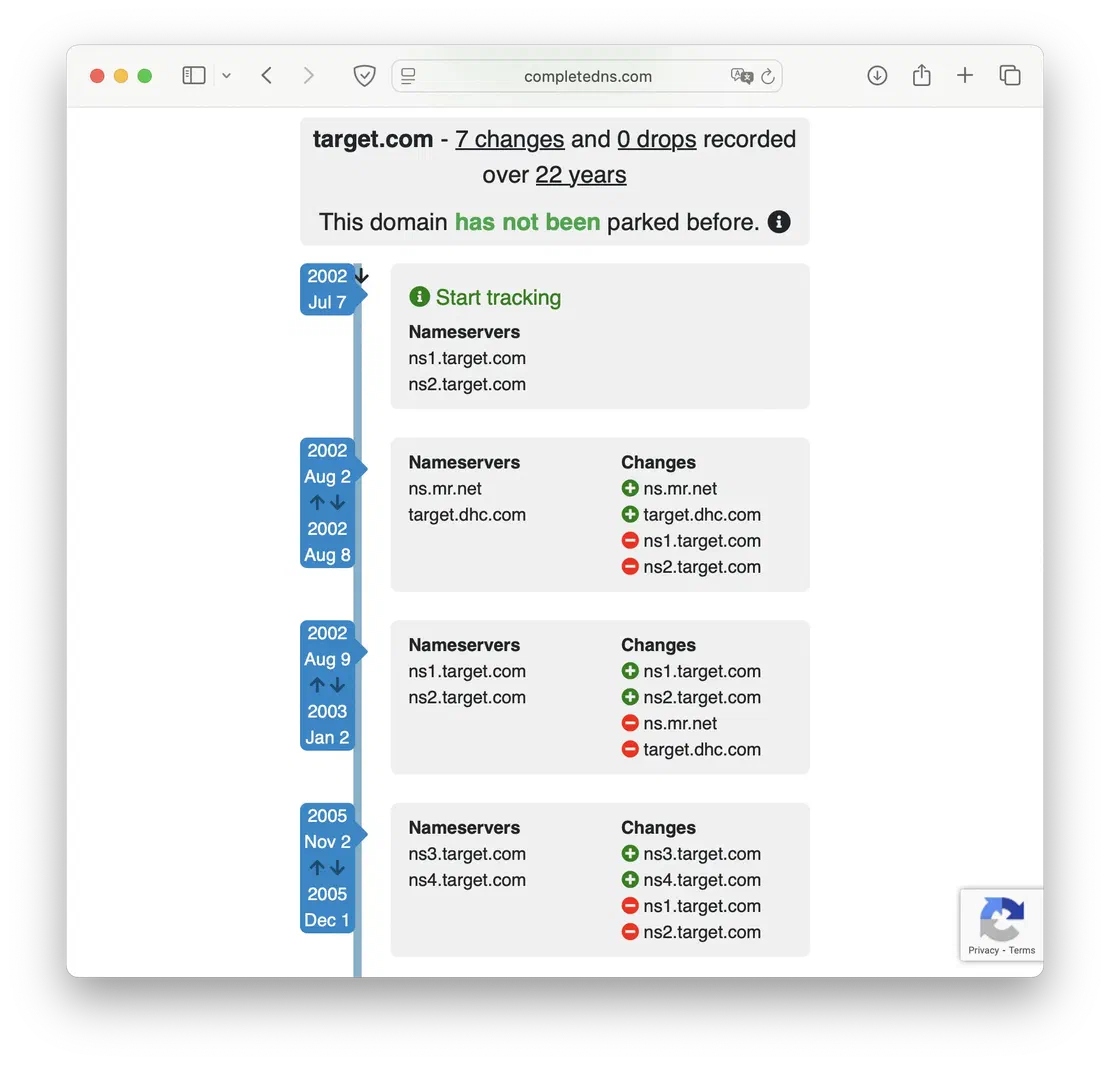
CompleteDNS report

IoT Search Engines: Netlas

As already mentioned, one of the ways to obtain historical DNS records is through internet-connected devices search engines. You can read more about some of them in the related articles: Shodan, Fofa, Censys. In this one, we will briefly mention the functionality of Netlas in the context of DNS History research.

The necessary functionality in Netlas is contained in the DNS Search tool. It provides the following features:

  • Search by all main types of DNS records, including reverse.
  • Use of wildcard characters, for example, in domain names.
  • Free access to old scans for DNS History research.

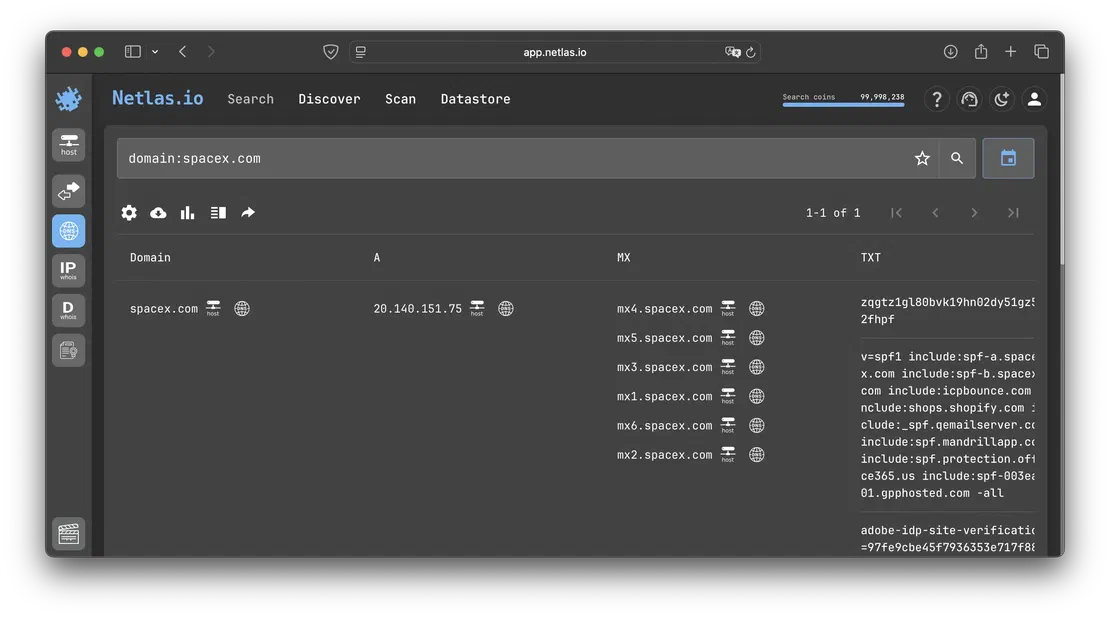
The picture below shows an example of using Netlas to view DNS records.
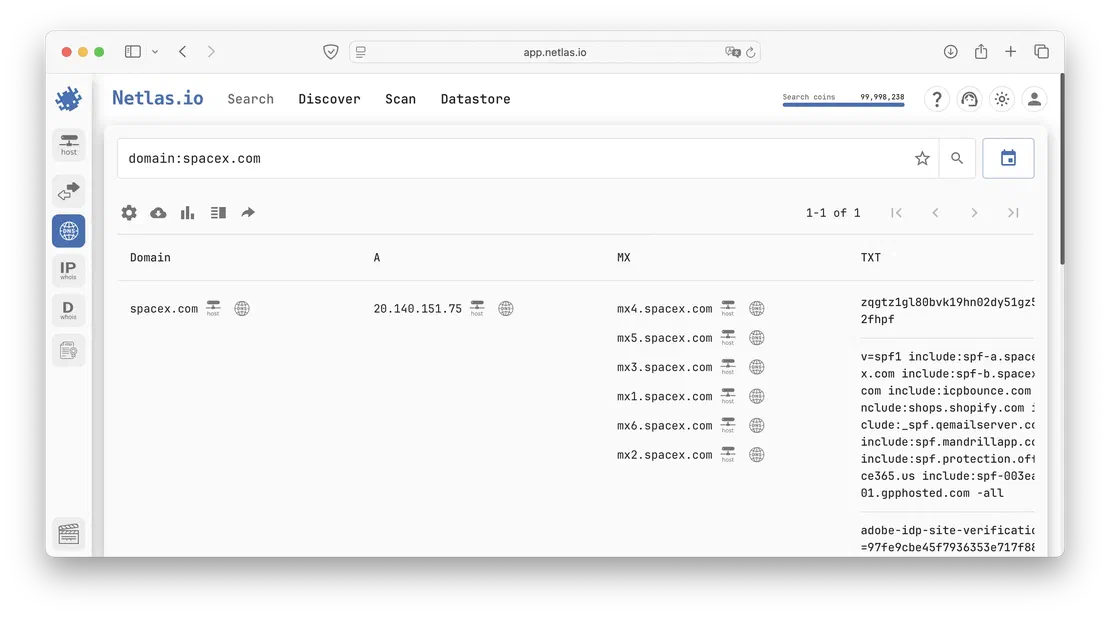
Netlas DNS Search tool Netlas DNS Search tool

Next, using old indexes, you will be able to access historical data.

Premium Services for Accessing DNS History and DNS TXT Record History

Leveraging the SecurityTrails DNS History API for Deep Insights

The SecurityTrails DNS History API is an integral feature of the SecurityTrails API, providing users with access to historical data about DNS records tied to specific hostnames. This tool allows for the retrieval of past DNS information across different record types, as well as providing insightful statistics comparing historical and current data.

The SecurityTrails API offers several important features:

  • Extensive Historical Data: Gain detailed insights into past DNS records for any given hostname, including various record types and statistical data.
  • Data Enrichment: Enhance your applications with additional information such as IP details, DNS configurations, WHOIS data, and company information—ideal for SIEM systems and security platforms.
  • RESTful Access: Utilizes a REST API for straightforward integration with systems via HTTP methods like GET and POST, making it easy to retrieve data programmatically.
  • Read-Only API: This API allows for retrieving data without altering or storing information, helping maintain integrity and security of the data.
  • JSON Data Format: All data is transmitted in JSON format, ensuring simple parsing and seamless integration with different systems.

One of the major advantages of using the SecurityTrails API is its ease of access from virtually any environment. A simple curl request can retrieve the desired DNS history data:

curl --request GET \
 	--url https://api.securitytrails.com/v1/history/oracle.com/dns/a \
 	--header 'accept: application/json'

This simplicity allows users to effortlessly integrate SecurityTrails DNS History into their workflows for in-depth domain research and security analysis.

Tracking DNS Changes with DNS Spy: A Real-Time Monitoring Tool

DNS Spy is a DNS monitoring solution that offers users powerful tools for tracking and managing DNS changes in real time. The platform comes equipped with several useful features, such as:

  • Automated Detection of DNS Changes: Seamlessly detects and tracks changes in DNS entries, ensuring that all modifications are promptly observed.
  • AXFR Zone Transfers: Enables comprehensive DNS record coverage by supporting AXFR zone transfers for better visibility into your DNS infrastructure.
  • Minimizing DNS Downtime: Focuses on reducing the impact of DNS outages by alerting users to potential disruptions before they affect service.
  • Backup and Restoration: Protects domain integrity with backup functionalities, allowing users to restore DNS configurations from various formats.

Additional functionalities of DNS Spy include:

  • Alerts for DNS Misconfigurations: Sends notifications when DNS settings are invalid or non-compliant, helping avoid errors and security issues.
  • Custom Notification Options: Provides users with customizable alerts, which can be sent via email or Slack, tailored to specific DNS record changes.
  • Support for DNS Migrations: Assists with DNS migrations, ensuring smooth transitions between DNS providers or setups without any disruptions.
  • DNS Health Dashboard: Offers a central dashboard to give a quick overview of all monitored domains and their DNS health status, helping administrators stay on top of their DNS infrastructure.

With these comprehensive features, DNS Spy makes tracking DNS changes effortless, providing real-time insights and enhancing the reliability and security of domain management.

IoT Search Engines Paid Functions

As noted above, we touched on search engines for internet-connected devices. Each of these platforms offers paid plans to extend their capabilities, yet they seldom introduce wholly new features—mostly they build upon existing ones. Consequently, for Netlas, Shodan, and Fofa, the premium tiers typically include:

  • Upgrading to a paid Netlas plan boosts user’s monthly query allowance and result limits.
  • On Shodan, DNS lookups and access to historical records are gated behind the Membership-level subscription.
  • Fofa’s premium tiers follow a model similar to Netlas, expanding query volume and data access.

When it comes to DNS History alone, stepping up to a premium plan on these search platforms offers little extra value. That said, it’s worth keeping in mind that each of these tools is a versatile powerhouse with applications far beyond just DNS analysis.

Tips for Effective Historical DNS Data Analysis

Performing consistent reviews of your DNS setups is crucial for ensuring their accuracy and relevance, ultimately preventing performance bottlenecks and security vulnerabilities. This practice not only helps in maintaining up-to-date configurations but also ensures that any inconsistencies or issues are identified and addressed before they impact your domain.

To enhance your DNS analysis process, consider the following strategies:

  • Set up automated audits: Use software solutions to organize periodic DNS evaluations, ensuring that every entry is accurately set up and remains current.
  • Monitor for discrepancies: Compare past and present DNS data to spot any unusual changes or inconsistencies that could signal problems.
  • Track DNS performance: Use historical DNS data to assess response times and identify any slowdowns or performance issues.
  • Integrate security checks: Make security a priority by analyzing DNS data for any potential vulnerabilities or unauthorized changes that could expose your network.
  • Regularly review backup records: Ensure that historical backup records are accessible and functional, which helps in restoring configurations quickly if needed.

By incorporating these techniques into your workflow, you can effectively manage and analyze DNS data, ensuring the continued security and performance of your domain infrastructure.

Restoring Lost DNS Records with Historical DNS Services

In a modern DevOps workflow, you often juggle application development alongside managing DNS zones and records. When a record is updated and fully propagated, the previous values disappear from public view—pinging the domain always returns the new IP, making rollback difficult.

Fictional scenario: A site administrator accidentally overwrote a critical A-record while performing routine maintenance. Hours later, every resolver worldwide reflected the new IP, and there was no internal backup of the old setting.

Generic recovery approach:

  1. Choose a historical DNS service. Select any from the previously listed tools (e.g., SecurityTrails, Complete DNS, Netlas).
  2. Query historical records. Use the service’s web UI or API to request past values for the record type and domain in question.
  3. Locate the timestamped entry. Identify the exact date and value you need.
  4. Restore in your DNS console. Copy the retrieved old record into your DNS provider’s interface or IaC configuration and publish the change.

Automate regular exports of critical DNS records or integrate historical lookups into your CI/CD pipeline to ensure you can always recover previous settings quickly.

How to Perform a Comprehensive DNS History Lookup

Whether you need to investigate a questionable domain or recover previous records, you can follow this generic workflow with any DNS history provider:

  1. Access the service portal. Open your preferred DNS history tool’s website.
  2. Enter the target domain. In the search field, type the domain you want to examine.
  3. Authenticate (if required). Log in with your credentials or sign up for a free account.
  4. Locate the historical data section. Look for a tab or menu labeled “History,” “DNS Timeline,” or similar.
  5. Choose the record type. Select the specific DNS record (A, AAAA, MX, CNAME, TXT, etc.) you wish to review.
  6. Review and export. Examine the list of past entries—each will include a timestamp and the record value. Export or copy the relevant data for your recovery or analysis.

Identifying Security Risks: How to Check DNS History for Threats

Accessing historical DNS data is an invaluable tool for detecting security vulnerabilities not only within DNS records but also across your entire network, applications, and services. It provides insights that can help in various critical areas, including:

  • Assessing potential cybersecurity risks
  • Resolving legal matters related to domain ownership and history
  • Preventing interruptions to online services and applications
  • Performing thorough investigations during corporate acquisitions or mergers
  • Analyzing and visualizing your domain’s previous attack surface

Furthermore, leveraging DNS intelligence is crucial when monitoring new assets on your cloud infrastructure, helping businesses navigate the challenges of tracking and securing these assets.

Investigating Cybercrime Through Domain Name History Lookup DNS

Investigating cybercrimes often involves examining historical DNS records to trace the movement of domain names across various hosting services and servers. This method is instrumental in identifying malicious actors and their digital footprints. A prime example of the effectiveness of this approach can be seen in high-profile investigations led by both private and public organizations.

For instance, in 2019, KrebsOnSecurity uncovered a series of large-scale DNS hijacking attacks, leveraging historical DNS data to track and identify the sources behind these widespread breaches. This investigation demonstrated the crucial role that DNS history plays in exposing cybercriminal activity and securing online environments.

Recommended Reading

Using DNS History in Cybersecurity

Tracking Competitors by Analyzing DNS Record History and Changes

Monitoring competitors’ DNS modifications can provide valuable insights into their business strategies, including:

  • The launch of new ventures or projects
  • Potential upgrades to their technology or network infrastructure
  • Shifts in their subdomain layout, signaling growth or the introduction of fresh offerings
  • A closer look at the IP addresses linked to their domain, which could reveal details about their hosting strategies and affiliations with other companies

Delving into historical DNS records can expose a competitor’s past decisions on hosting, domain acquisitions, and SEO strategies, all of which contribute to their current position in the market. By evaluating these historical insights, businesses can adjust and fine-tune their own strategies for greater success.

The Importance of DNS History and TXT Record History for Secure Domains

This article has delved into the significance of DNS history, exploring its advantages and key applications, including both free and premium tools available for analysis. By recognizing the value of frequent DNS audits and how they can reveal security vulnerabilities and competitive tactics, we’ve highlighted the critical role that DNS history plays. Understanding TXT record history, in particular, enhances your ability to secure domains and track changes over time, ensuring that you stay ahead in terms of both security and strategy.

Calendar

Book Your Netlas Demo

Chat with our team to explore how the Netlas platform can support your security research and threat analysis.