惯性聚合 高效追踪和阅读你感兴趣的博客、新闻、科技资讯
阅读原文 在惯性聚合中打开

推荐订阅源

Microsoft Azure Blog
博客园_首页
Forbes - Security
Forbes - Security
WordPress大学
WordPress大学
P
Proofpoint News Feed
T
Threat Research - Cisco Blogs
L
LINUX DO - 热门话题
L
Lohrmann on Cybersecurity
Spread Privacy
Spread Privacy
D
Darknet – Hacking Tools, Hacker News & Cyber Security
大猫的无限游戏
大猫的无限游戏
博客园 - 三生石上(FineUI控件)
P
Privacy International News Feed
A
About on SuperTechFans
T
Tailwind CSS Blog
I
InfoQ
S
Securelist
云风的 BLOG
云风的 BLOG
罗磊的独立博客
Recent Announcements
T
The Exploit Database - CXSecurity.com
B
Blog RSS Feed
V
Visual Studio Blog
Know Your Adversary
Know Your Adversary
The GitHub Blog
The GitHub Blog
Jina AI
Jina AI
腾讯CDC
Cyberwarzone
Cyberwarzone
有赞技术团队
有赞技术团队
AWS News Blog
AWS News Blog
博客园 - 【当耐特】
cs.AI updates on arXiv.org
F
Full Disclosure
S
Secure Thoughts
博客园 - 司徒正美
J
Java Code Geeks
Y
Y Combinator Blog
Google Online Security Blog
GbyAI
GbyAI
N
News and Events Feed by Topic
Help Net Security
Help Net Security
freeCodeCamp Programming Tutorials: Python, JavaScript, Git & More
Project Zero
Project Zero
T
Tenable Blog
cs.CV updates on arXiv.org
T
Tor Project blog
MyScale Blog
MyScale Blog
Scott Helme
Scott Helme
小众软件
小众软件
K
Kaspersky official blog

Mapping the <mark>Internet</mark> on Netlas: Comprehensive Internet-Wide Scanning & OSINT Platform

Weaponized RMM: Hunting the Adversary Abuse of Remote Monitoring Tools Device Code Phishing: Technical Analysis and Proactive Hunting via Netlas Discovering Data Exposure with Netlas Telegram Bot API Abuse - Netlas Blog Using OWASP Amass with Netlas Module - Netlas Blog How we hunt C2 infrastructure at RST Cloud using Netlas - Netlas Blog Using Uncover with Netlas.io module - Netlas Blog Netlas Updates Terms and API & Data License Agreement - Netlas Blog Top 10 Hacking Devices for Ethical Hackers in 2026 - Netlas Blog Inside ClickFix: How Fake Prompts Took Over the Web Top 10 Critical Threat Actors to Watch in 2026: Ransomware, APTs & Defensive Strategies - Netlas Blog Bug Bounty 101 - A Complete Bug Bounty Roadmap for Beginners (2026) - Netlas Blog Supply Chain Attack - How Attackers Weaponize Software Supply Chains - Netlas Blog The Evolution of C2: Centralized to On-Chain - Netlas Blog From Starlink to Star Wars - The Real Cyber Threats in Space - Netlas Blog LLM Vulnerabilities: Why AI Models Are the Next Big Attack Surface - Netlas Blog When AI Turns Criminal: Deepfakes, Voice-Cloning & LLM Malware - Netlas Blog Zero-Click Exploits - Netlas Blog When Patches Fail: An Analysis of Patch Bypass and Incomplete Security - Netlas Blog I Analysed Over 3 Million Exposed Databases Using Netlas - Netlas Blog Post-Quantum Now: From AES & RSA to ML-KEM Hybrids - Netlas Blog Bug Bounty 101: Top 10 Reconnaissance Tools - Netlas Blog Mapping Dark Web Infrastructure - Netlas Blog Top Vibe-Coding Security Risks - Netlas Blog From Chaos to Control: Kanvas Incident Management Tool - Netlas Blog Bug Bounty 101: The Best Courses to Get Started in 2025 - Netlas Blog I, Robot + NIST AI RMF = Complete Guide on Preventing Robot Rebellion - Netlas Blog The $1.5B Bybit Hack & How OSINT Led to Its Attribution - Netlas Blog Hannibal Stealer: A Deep Technical Analysis - Netlas Blog Proactive Threat Hunting: Techniques to Identify Malicious Infrastructure - Netlas Blog The Pyramid of Pain: Beyond the Basics - Netlas Blog SOCMINT: Intelligence in the Social Media Era - Netlas Blog Hannibal Stealer vs. Browser Security - Netlas Blog The Largest Data Breach Ever? How Hackers Stole 16 Billion Credentials - Netlas Blog DNS Cache Poisoning – Is It Still Relevant? - Netlas Blog Modern Cybercrime: Who’s Behind It and Who’s Stopping It - Netlas Blog AI-Driven Attack Surface Discovery - Netlas Blog Netlas vs Urlscan: Tools Comparison - Netlas Blog Track Adversary Infrastructure Challenge 2025 Recap - Netlas Blog What is Threat Intelligence - Netlas Blog Netlas vs IPinfo: Tools Comparison - Netlas Blog Best Nmap Alternatives - Netlas Blog Whois History: How to Check the Domain Owner History - Netlas Blog Top WHOIS & RDAP Tools for Fast IP Address Lookup - Netlas Blog ASN Lookup Explained: Tools, Methods & Insights - Netlas Blog How to Detect CVEs Using Nmap Vulnerability Scan Scripts - Netlas Blog Nmap Cheat Sheet: Top 10 Scan Techiques - Netlas Blog Netlas vs ZoomEye: Platforms Comparison - Netlas Blog Top 6 Most Widely Used Port Scanners in Cybersecurity - Netlas Blog FAQ: Understanding Root DNS Servers and the Root Zone - Netlas Blog Domain Recon: Must-Know Tools for Security Professionals - Netlas Blog DNS History: Exploring Domains Past by Inspecting DNS Trails - Netlas Blog DNSSEC: Should You Use It? An Expert’s View on the Pros, Cons, and When to Implement - Netlas Blog Which DNS Servers Offer the Best Balance of Speed, Security, and Privacy? - Netlas Blog theHarvester: a Classic Open Source Intelligence Tool - Netlas Blog - Netlas Blog Top 15 OSINT Tools for Expert Intelligence Gathering - Netlas Blog A Deep Dive into the Open Web Application Security Project Top 10 Vulnerabilities - Netlas Blog Using Subfinder with Netlas Module - Netlas Blog Netlas Chrome and Firefox Extensions - Netlas Blog Netlas vs Censys: Platforms Comparison - Netlas Blog OSINT in Cybersecurity: Exploring Its Spectrum and Tech - Netlas Blog Best Honeypots for Detecting Network Threats - Netlas Blog Using theHarvester with Netlas - Netlas Blog Using TLDFinder with Netlas - Netlas Blog Netlas vs Fofa: Platforms Comparison - Netlas Blog Netlas vs Shodan: Platforms Comparison - Netlas Blog Google Dorking in Cybersecurity - Netlas Blog 7 Tools for Web Penetration Testing - Netlas Blog Using DNS History in Cybersecurity - Netlas Blog Mastering Online Camera Searches - Netlas Blog Best Attack Surface Visualization Tools - Netlas Blog Complete Guide on Attack Surface Discovery - Netlas Blog How to find unprotected databases with Netlas.io: Chapter 2 - Netlas Blog
Using Maltego with Netlas Module - Netlas Blog
Vyacheslav Makhrov · 2025-01-20 · via Mapping the <mark>Internet</mark> on Netlas: Comprehensive Internet-Wide Scanning & OSINT Platform

Maltego is the best-in-class software for OSINT, reconnaissance, and investigation visualization. Combining data from many sources and visualizing the data obtained, greatly simplifies the process of exploration during the penetration test or incident investigation. One of its very important advantages is the ability to integrate any tool into Maltego and use it along with many others.

In this short article, we present you with instructions for using Netlas with Maltego. The plugin, written by our team, supports many transformations and works with the API key of your Netlas account.

Before Starting

Before starting the main part of the article, it is worth mentioning a few points.

Firstly, the article is written solely to familiarize Maltego users with the capabilities of the Netlas plugin for Maltego. Maltego Community Edition was used for demonstration purposes to write this article. Due to platform restrictions, the Maltego Community Edition returns a maximum of 12 results for each transform.

Secondly, this is already the second version of the article. The first one was published in 2023, and since then there have been several small but important changes made to the plugin. Thus, bugs in individual transformations were fixed and error reporting mechanisms were improved. Now, if something goes wrong, it will be much easier for the user to understand what exactly happened. If you have been using the Netlas module in Maltego for a long time, you need to update it.

Thirdly, it’s important to note, that each transformation you make counts as one request in your Netlas account. There is no way within the Netlas plugin for Maltego to count how many search results will be returned for a transform. So be careful with “heavy” transforms if you’re using a Netlas subscription that limits search results per month.

Installation

Before using the plugin, it must be installed. We will assume that you already have Maltego installed, and now it remains to add the Netlas module to it. If not, install it from the official website first.

For your convenience, we have prepared both a video showing the installation process and a text guide. Choose what suits you best.

Video Guide

Text Guide
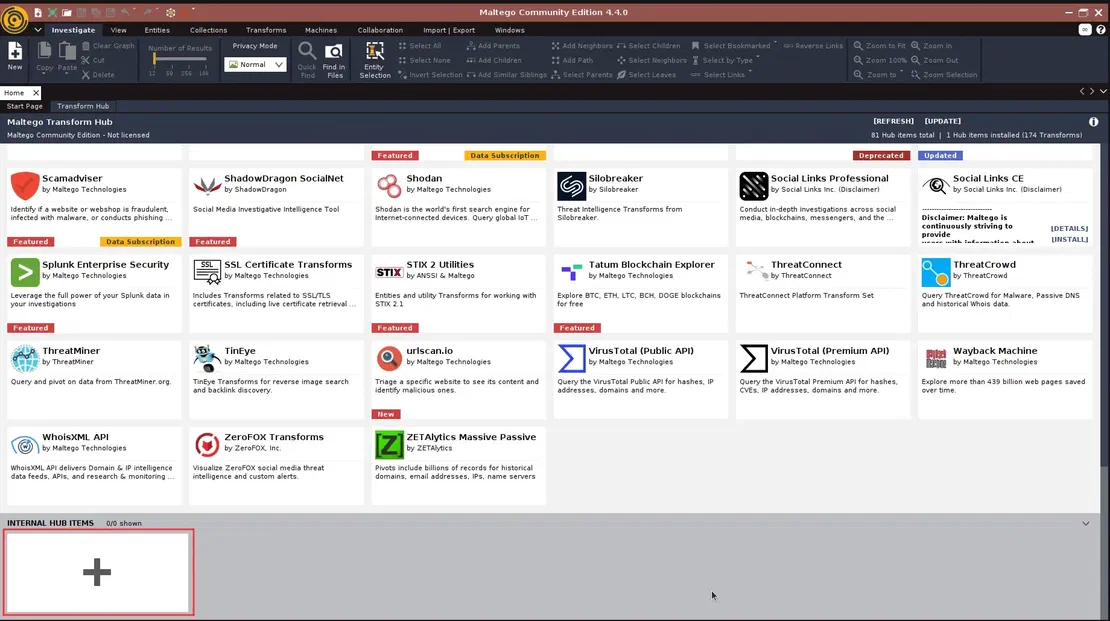
  1. Immediately after launching Maltego on your device, open the Transform Hub in the program and go down to the very bottom, to “Internal Hub Items”:

Maltego Hub

  1. Click on the “+” and fill out the form in the window that opens. The only required field here is the Seed URL, which is where the plugin will be found on the Transform Server.

Copy and enter the following link there:

https://public-tds.paterva.com/runner/showseed/vnvRYaAnv9s9hHlhi9P148KB
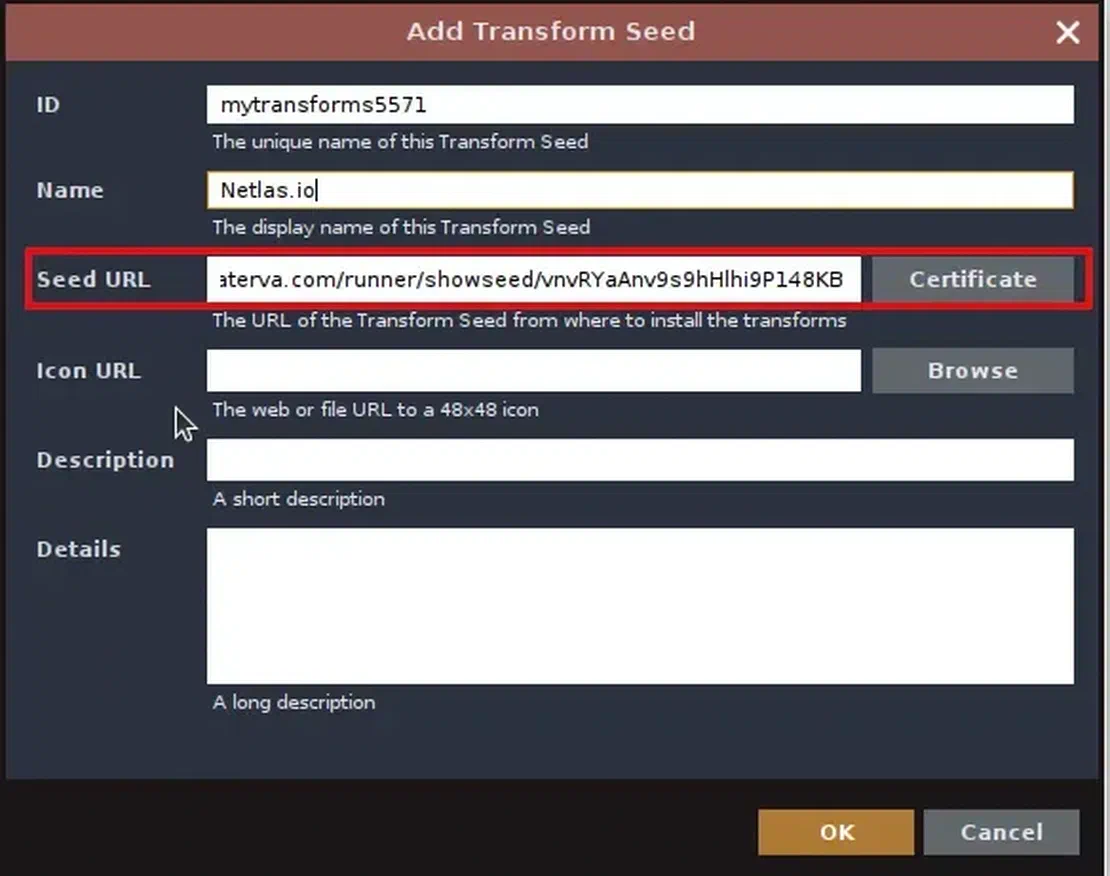
Add Transform Seed

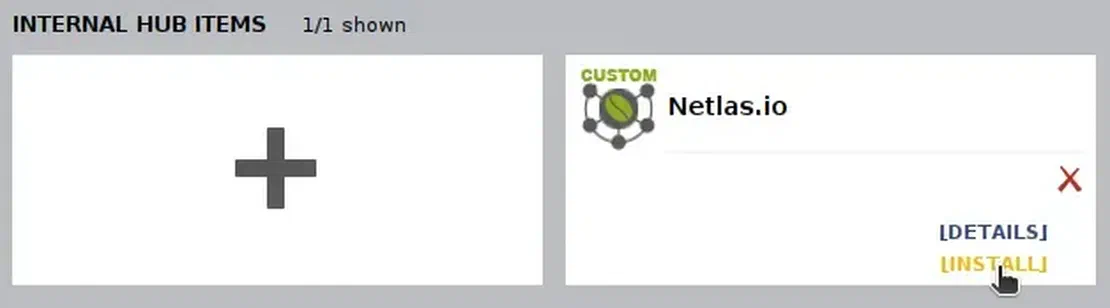
  1. After you click OK, the plugin will be added to your hub. Now you just need to hover over it and click “Install”. This will open the installation window.

Plugin Installing

  1. During installation, no input is required from you. Just wait until the end and you will be able to use Netlas inside Maltego.

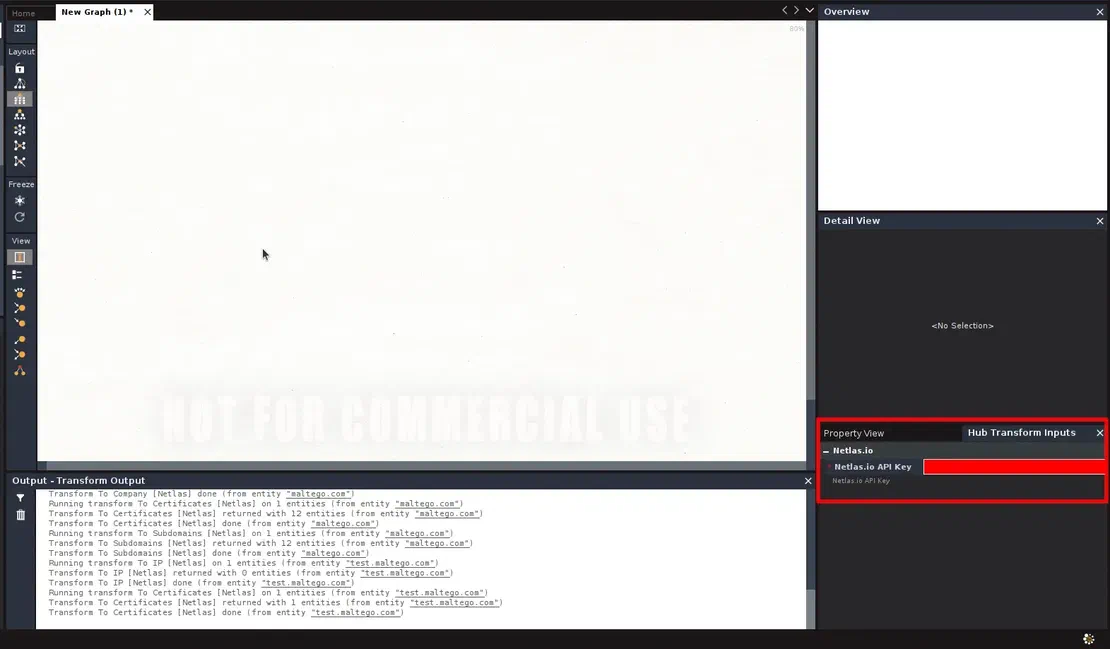
  2. You need an API key to use the Netlas Plugin for Maltego. Create an account on Netlas if you don’t have one. Go to your Profile page, copy the API key and insert it to your Maltego Desktop Client.
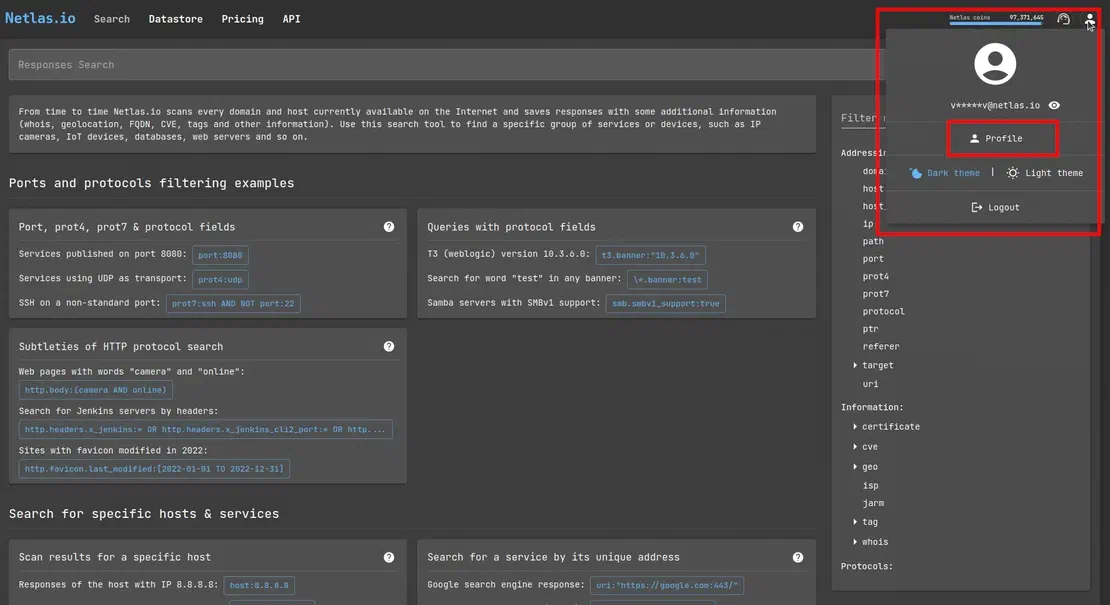
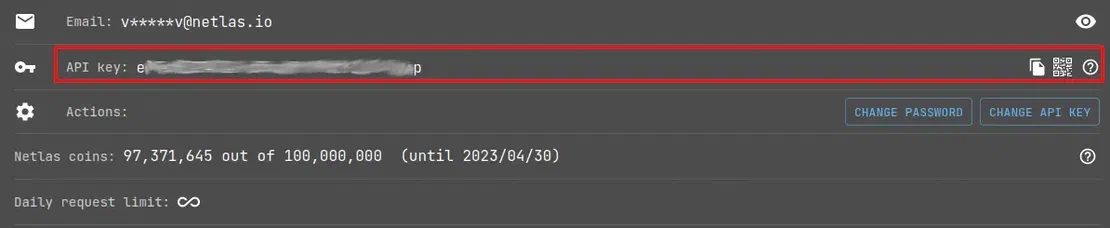
Path to Profile Here you can access your profile

Netlas API Key Here is the API key

Form for API key input And here it must be entered

Usage

The Netlas plugin extends Maltego by adding additional transformations1 powered by the Netlas platform. You can place the necessary objects, study the connections between them, and automatically or manually complete the constructed surface. In this guide, we will only touch on those points that directly relate to Netlas. However, the entities used in our plugin are identical to those in Maltego, so you can combine them with others as you wish.

Video Guide

Text Guide
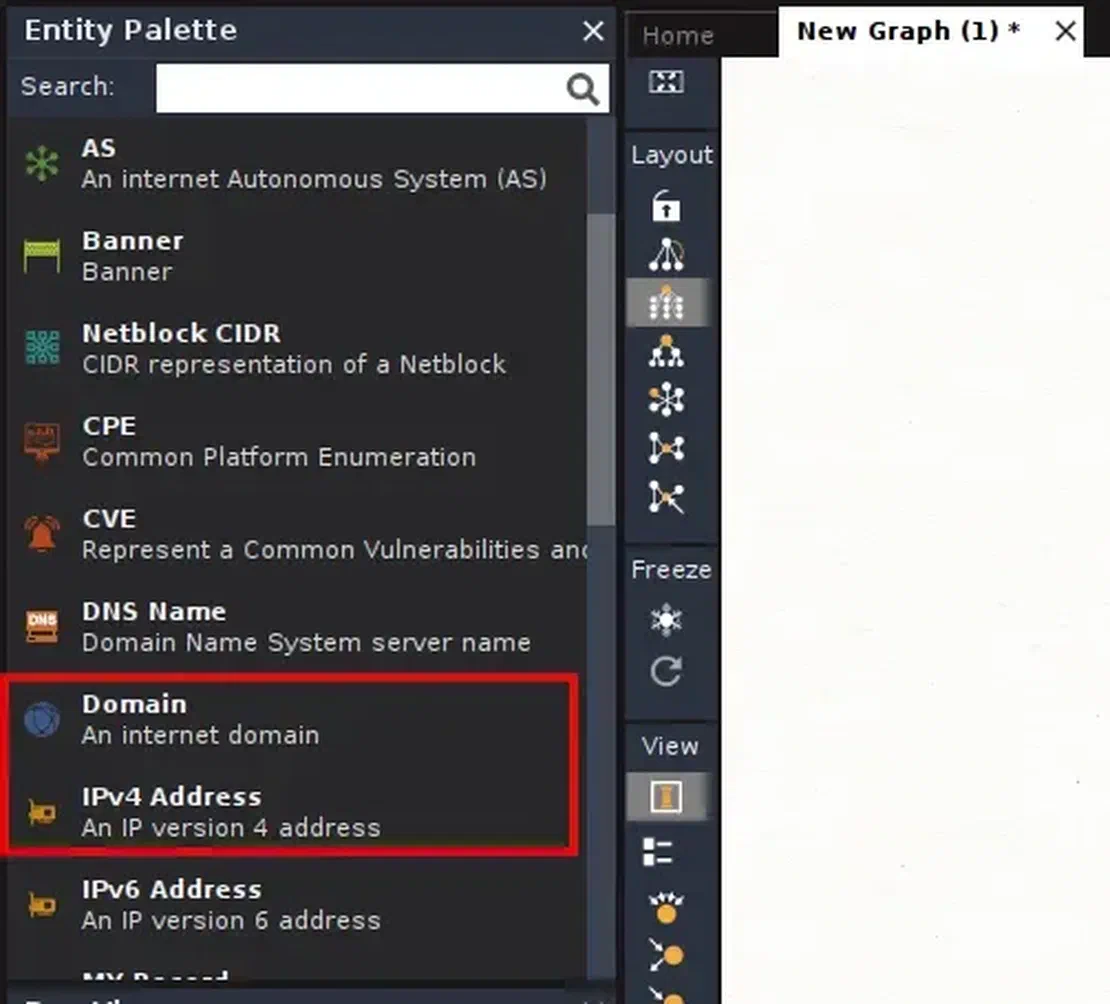
  1. You need to choose which object you will start your reconnaissance from. A domain name or an IP address is usualy used as a root node. However, you are free to choose any of the objects, the transformation of which the plugin supports. In order to place the root node, find the “Infrastructure” sub-item in the list on the left side of the workspace, and in it “Domain” or “IPv4 Address”.

Choose root node

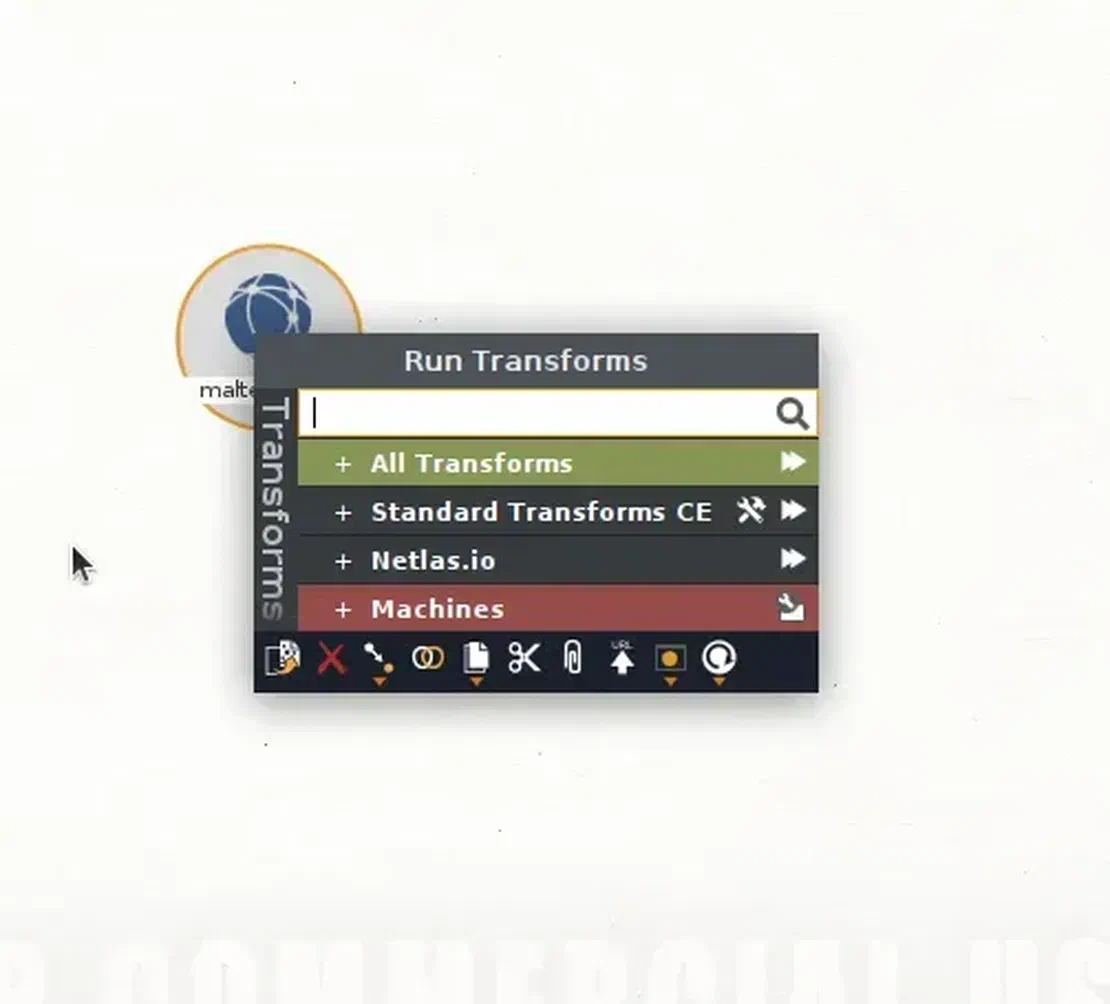
  1. Drag the selected object to the work area, placing it there. After you need to find Netlas transformations. To do this, simply right-click on the root object, and in the list of Transformations find the one that you added during the installation phase. In my case, it is called “Netlas.io”.

Choose transforms

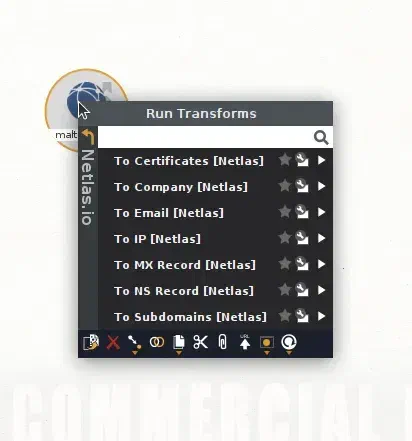
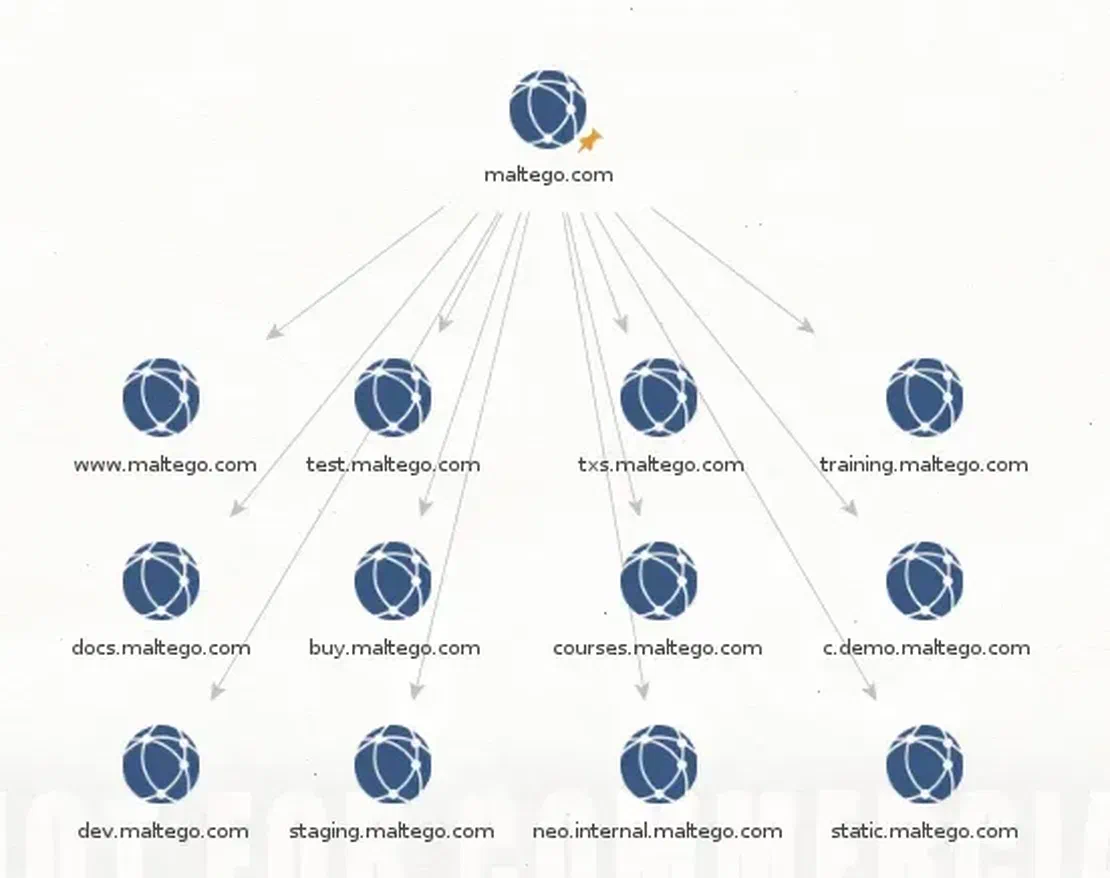
  1. Finally, select the desired transformation from the drop-down list. For example, let it be “To Subdomains”.

placeholder List of Netlas transformations

Transformation result Transformation result

  1. Don’t forget to controll the amount of Netlas Coins (available search results) on your Netlas Profile page. Each entity fetched by Netlas.io Plugin to Maltego costs one Netlas Coin. The plugin stops returning results when you run out of Netlas Coins.

Conclusion

By following this little guide, you can easily incorporate Netlas search results into your work with Maltego. Combine them with other queries, build complex graphs, and explore.

Please, give us some feedback if you know how to make this plugin better. We wish you pleasant work!

What is your choise

I can show you how deep the Internet really goes

Discover exposed assets, infrastructure links, and threat surfaces across the global Internet.