









Spammers are constantly seeking new ways to reach the widest audience possible while dodging email filters — all to ensure their “tempting” offers land in your inbox rather than the spam folder. To pull this off, bad actors are increasingly pivoting to legitimate platforms, dreaming up sophisticated ways to weaponize them for their own gain.
We’ve previously covered scam attacks using Google Forms, where fraudulent emails were sent directly from Google’s mail servers. In those cases, links were shielded by the reputable forms.gle domain, allowing them to breeze past spam filters. Now, a similar tactic has been implemented using Yandex Surveys. Here’s a look at how this new scam works, and how you can stay safe.
Online survey tools are fairly common these days. Marketing professionals use them to gather feedback, HR departments use them for employee engagement, and researchers use them to study target audiences. But how are scammers getting in on the action?
They create a survey, embed links to fraudulent websites within the body, and blast out emails containing the survey link to their mailing lists. Standard anti-spam filters see URLs like yandex.com/poll/… as legitimate. Recipients often have the same reaction, reasonably assuming, “It’s a link to a well-known service — what could go wrong?”
Our experts have tracked a massive spike in these emails. In January, Kaspersky Premium blocked just over 2200 of these messages; by February, that number soared to over 32 000. We’re looking at aggressive scaling here — nearly a 15-fold increase in just one month.

Here’s a survey page containing a scam message and link. The visible portion features a well-known crypto exchange logo and an active link to the attackers’ site. At the bottom, you’ll notice a couple of dots — more on these later
Spammers distribute these survey links through their own channels, often hijacking website feedback forms that lack sender verification. The fact that the message originates from a legitimate network provides yet another green flag for anti-spam filters to let these emails slide right through.
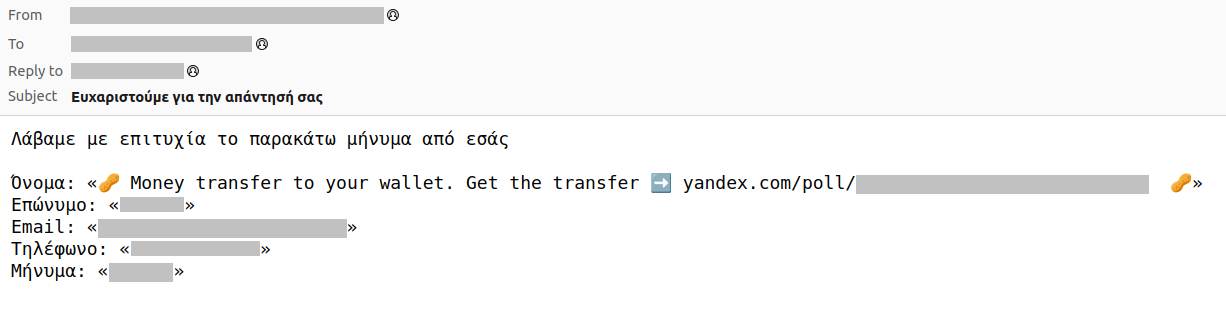
A crypto scam email in English sent through a feedback form on a Greek website
The most popular themes for this type of spam currently involve crypto scams — promising users a windfall in digital currency — and links to sketchy dating sites.
To build a survey that doesn’t actually look like one, attackers take advantage of the platform’s extended survey mode.
Yandex Surveys allows users to swap out a simple question for a text block, which can include descriptions, images, or videos. This is exactly where scammers embed their pitch and the link to their phishing site. They use the built-in “Upload media” feature to add official-looking logos and other embellishments that sell the illusion.
To make sure the victim doesn’t see the “Next” button or the standard disclaimer — which warns that surveys are created by third parties and that Yandex isn’t responsible for the content — the scammers pad the space below the scam block with invisible characters. For instance, they might add dozens of lines of transparent emojis; you can’t see them, but they still take up screen real estate. Further down, past the point where most people would stop scrolling, they simply drop in punctuation marks, one per line.
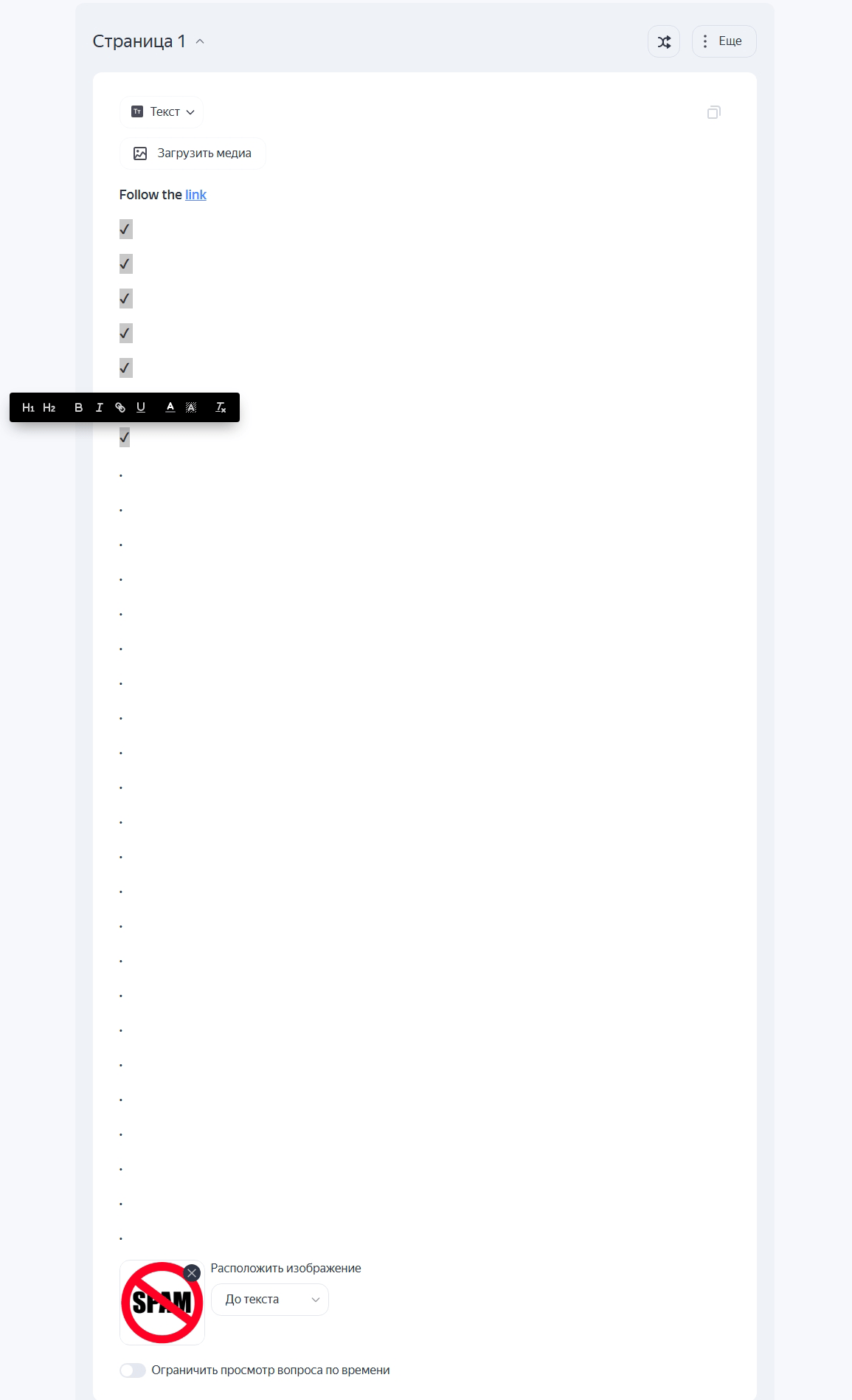
To understand how these surveys are built, we used a test survey to retrace the scammers’ steps. Transparent emojis are used to create dead space under the scam block, followed by punctuation marks further down where few users are likely to scroll
The result? The user sees nothing but the fraudulent offer and the link, while everything else is pushed off-screen. It’s the same technique we’ve seen used with Google Forms.
Beyond the benefit of using legitimate URLs, another perk for the scammers is that this method doesn’t cost them a dime. They aren’t paying the service for promotion, or using the built-in targeting tools; they simply blast the link to their own database. In this scenario, the service is essentially being used as good-reputation web page hosting.
To top it off, the scammers can jump into the “Statistics” section of the survey to track click-through rates in real-time and then export the data into a spreadsheet. This is basically a turnkey analytics suite.
Once a victim clicks the link in the survey and lands on the attackers’ website, they are greeted by a professional-looking site running a classic “prize giveaway” scheme.
How to avoid taking the bait:
Finally, it’s worth noting that scammers didn’t actually hack Yandex Surveys; instead, they took a creative — albeit malicious — approach to repurposing the tool for their own ends. Since Yandex Surveys is scheduled to shut down on April 6, 2026, this specific scheme will soon hit a dead end. Still, scammers are constantly hunting for the next loophole to exploit. Your best defense remains a healthy dose of skepticism toward any unexpected email — even if the links point to a domain you know and trust.
Other tricks spammers use:
此内容由惯性聚合(RSS阅读器)自动聚合整理,仅供阅读参考。 原文来自 — 版权归原作者所有。