
Need Some Help?
I help companies find and fix site-speed issues. Performance audits, training, consultancy, and more.





Written by on CSS Wizardry.
Independent writing is brought to you via my wonderful Supporters.
I began writing this article in early July 2023 but began to feel a little underwhelmed by it and so left it unfinished. However, after recent and renewed discussions around the relevance and usefulness of build steps, I decided to dust it off and get it finished.
Let’s go!
Need Some Help?
I help companies find and fix site-speed issues. Performance audits, training, consultancy, and more.
When serving and storing files on the web, there are a number of different things we need to take into consideration in order to balance ergonomics, performance, and effectiveness. In this post, I’m going to break these processes down into each of:
Concatenation is probably the trickiest bit to get right because, even though the three Cs happen in order, decisions we make later will influence decisions we make back here. We need to think in both directions right now.
Back in the HTTP/1.1 world, we were only able to fetch six resources at a time from a given origin. Given this limitation, it was advantageous to have fewer files: if we needed to download 18 files, that’s three separate chunks of work; if we could somehow bring that number down to six, it’s only one discrete chunk of work. This gave rise to heavy bundling and concatenation—why download three CSS files (half of our budget) if we could compress them into one?
Given that 66% of all websites (and 77% of all requests) are running HTTP/2, I will not discuss concatenation strategies for HTTP/1.1 in this article. If you are still running HTTP/1.1, my only advice is to upgrade to HTTP/2.
With the introduction of HTTP/2, things changed. Instead of being limited to only six parallel requests to a given origin, we were given the ability to open a connection that could be reused infinitely. Suddenly, we could make far more than six requests at a time, so bundling and concatenation became far less relevant. An anti pattern, even.
Or did it?
It turns out H/2 acts more like H/1.1 than you might think…
As an experiment, I took the CSS Wizardry homepage and crudely
added Bootstrap. In one test, I concatenated it all into one big file, and the
other had the library split into 12 files. I’m measuring when the last
stylesheet arrives1, which is denoted by the vertical purple line. This will
be referred to as css_time.
Read the complete test methodology.
Plotted on the same horizontal axis of 1.6s, the waterfalls speak for themselves:

With one huge file, we got a 1,094ms css_time and transferred 18.4KB of
CSS.
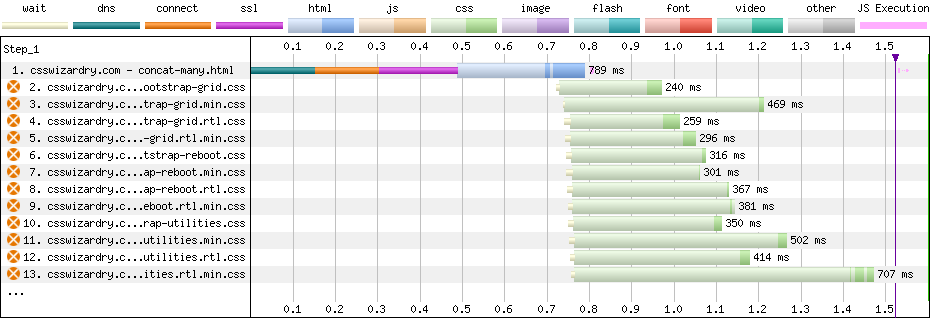
With many small files, as ‘recommended’ in HTTP/2-world, we got a 1,524ms
css_time and transferred 60KB of CSS. Put another way, the HTTP/2 way
was about 1.4× slower and about 3.3× heavier.
What might explain this phenomenon?
When we talk about downloading files, we—generally speaking—have two things to consider: latency and bandwidth. In the waterfall charts above, we notice we have both light and dark green in the CSS responses: the light green can be considered latency, while the dark green is when we’re actually downloading data. As a rule, latency stays constant while download time is proportional to filesize. Notice just how much more light green (especially compared to dark) we see in the many-files version of Bootstrap compared to the one-big-file.
This is not a new phenomenon—a client of mine suffered the same problem in July, and the Khan Academy ran into the same issue in 2015!
If we take some very simple figures, we can soon model the point with numbers…
Say we have one file that takes 1,000ms to download with 100ms of latency. Downloading this one file takes:
(1 × 1000ms) + (1 × 100ms) = 1,100ms
Let’s say we chunk that file into 10 files, thus 10 requests each taking a tenth of a second, now we have:
(10 × 100ms) + (10 × 100ms) = 2,000ms
Because we added ‘nine more instances of latency’, we’ve pushed the overall time from 1.1s to 2s.
In our specific examples above, the one-big-file pattern incurred 201ms of latency, whereas the many-files approach accumulated 4,362ms by comparison. That’s almost 22× more!
It’s worth noting that, for the most part, the increase is parallelised, so while it amounts to 22× more overall latency, it wasn’t back-to-back.
It gets worse. As compression favours larger files, the overall size of the 10 smaller files will be greater than the original one file. Add to that the browser’s scheduling mechanisms, we’re unlikely to dispatch all 10 requests at the same time.
So, it looks like one huge file is the fastest option, right? What more do we need to know? We should just bundle everything into one, no?
As I said before, we have a few more things to juggle all at once here. We need to learn a little bit more about the rest of our setup before we can make a final decision about our concatenation strategy.
The above tests were run with Brotli compression2. What happens when we adjust our compression strategy?
As of 2022, roughly:
What might each of these approaches mean for us?
| Compression | Bundling | css_time (ms) |
|---|---|---|
| None | One file | 4,204 |
| Many files | 3,663 | |
| Gzip | One file | 1,190 |
| Many files | 1,485 | |
| Brotli | One file | 1,094 |
| Many files | 1,524 |
Viewed a little more visually:
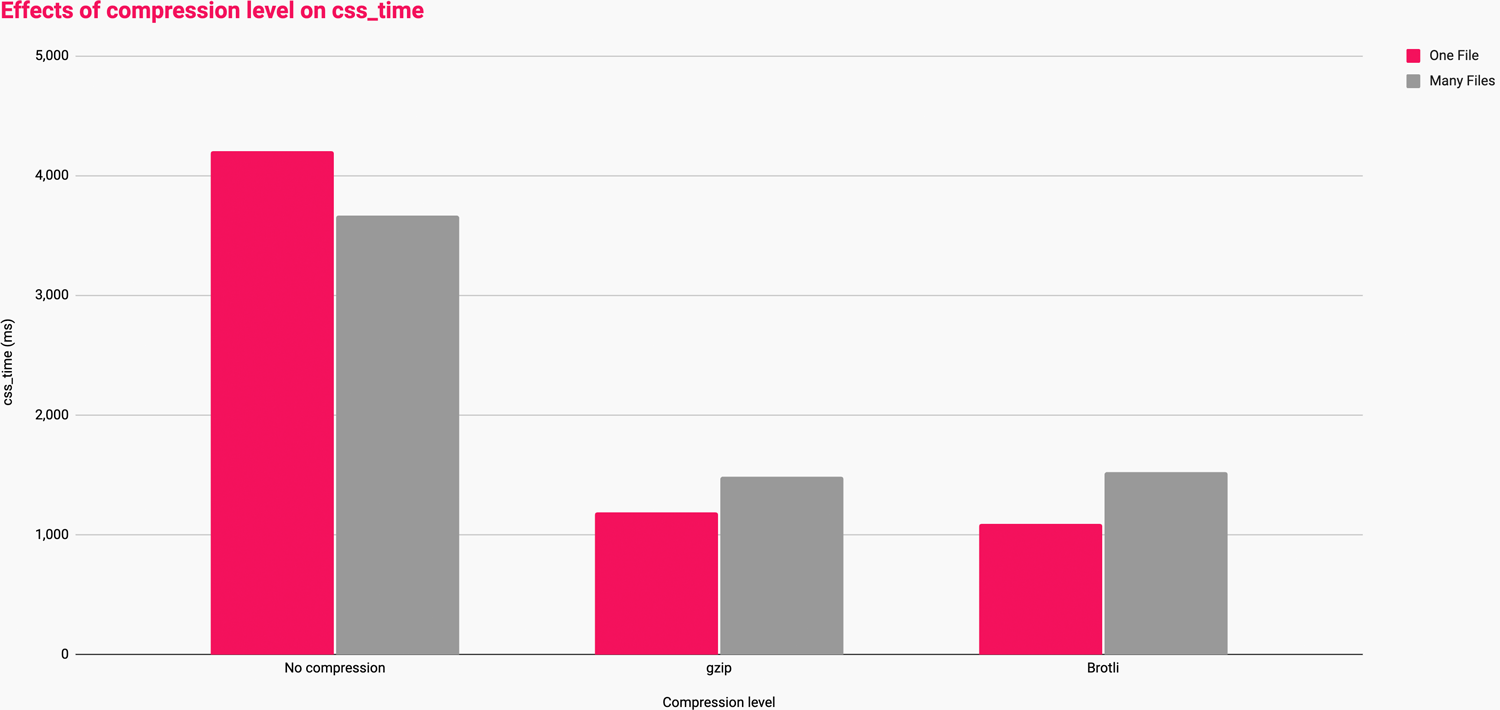
These numbers tell us that:
Basically, the more aggressive your ability to compress, the better you’ll fare with larger files. This is because, at present, algorithms like Gzip and Brotli become more effective the more historical data they have to play with. In other words, larger files compress more than smaller ones.
This shows us the sheer power and importance of compression, so ensure you have the best setup possible for your infrastructure. If you’re not currently compressing your text assets, that is a bug and needs addressing. Don’t optimise to a sub-optimal scenario.
This looks like another point in favour of serving one-big-file, right?
Caching is something I’ve been obsessed with lately, but for the static assets we’re discussing today, we don’t need to know much other than: cache everything as aggressively as possible.
Each of your bundles requires a unique fingerprint, e.g. main.af8a22.css.
Once you’ve done this, caching is a simple case of storing the file forever,
immutably:
Cache-Control: max-age=2147483648, immutable
max-age=2147483648: This
directive instructs all caches
to store the response for the maximum possible time. We’re all used to
seeing max-age=31536000, which is one year. This is perfectly reasonable and
practical for almost any static content, but if the file really is immutable,
we might as well shoot for forever. In the 32-bit world, forever is
2,147,483,648 seconds, or 68
years.immutable: This
directive instructs caches
that the file’s content will never change, and therefore to never bother
revalidating the file once its max-age is met. You can only add this
directive to responses that are fingerprinted (e.g. main.af8a22.css)All static assets—provided they are fingerprinted—can safely carry such an
aggressive Cache-Control header as they’re very easy to cache bust. Which
brings me nicely on to…
The important part of this section is cache busting.
We’ve seen how heavily-concatenated files compress better, thus download faster, but how does that affect our caching strategy?
While monolithic bundles might be faster overall for first-time visits, they suffer one huge downfall: even a tiny, one-character change to the bundle would require that a user redownload the entire file just to access one trivial change. Imagine having to fetch a several-hundred kilobyte CSS file all over again for the sake of changing one hex code:
  .c-btn {
-   background-color: #C0FFEE;
+   background-color: #BADA55;
  }
This is the risk with monolithic bundles: discrete updates can carry a lot of redundancy. This is further exacerbated if you release very frequently: while caching for 68 years and releasing 10+ times a day is perfectly safe, it’s a lot of churn, and we don’t want to retransmit the same unchanged bytes over and over again.
Therefore, the most effective bundling strategy would err on the side of as few bundles as possible to make the most of compression and scheduling, but enough bundles to split out high- and low-rate of change parts of your codebase so as to hit the most optimum caching strategy. It’s a balancing act for sure.
One thing we haven’t looked at is the impact of network speeds on these outcomes. Let’s introduce a fourth C—Connection.
I ran all of the tests over the following connection types:
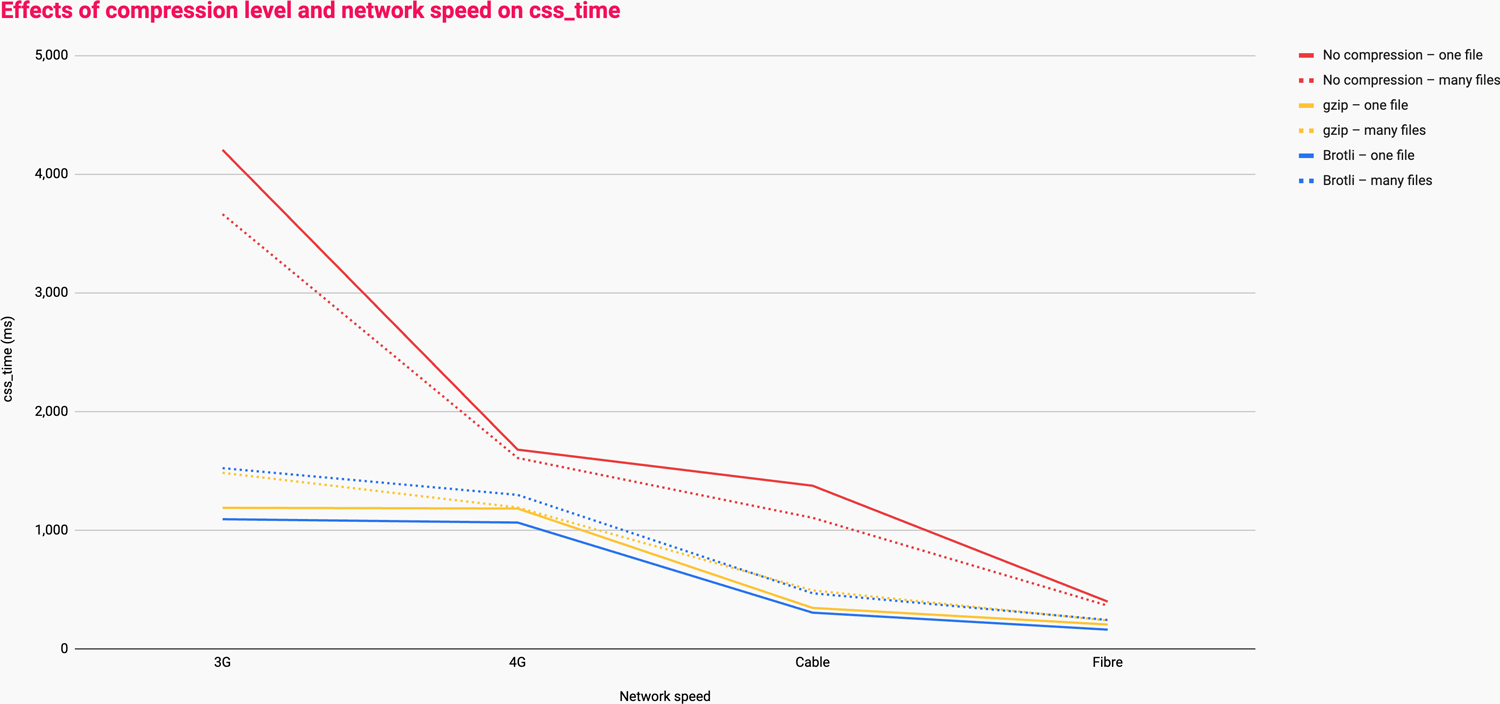
This data shows us that:
Again, no compression is not a viable option and should be considered a bug—please don’t design your bundling strategy around the absence of compression.
This is another nod in the direction of preferring fewer, larger files.
There’s a fifth C! The Client.
Everything we’ve looked at so far has concerned itself with network performance. What about what happens in the browser?
When we run JavaScript, we have three main steps:
Larger files will inherently have higher parse and compile times, but aren’t necessarily slower to execute. It’s more about what your JavaScript is doing rather than the size of the file itself: it’s possible to write a tiny file that has a far higher runtime cost than a file a hundred times larger.
The issue here is more about shipping an appropriate amount of code full-stop, and less about how it’s bundled.
As an example, I have a client with a 2.4MB main bundle (unfortunately that isn’t a typo) which takes less than 10ms to compile on a mid-tier mobile device.
If you have everything in place, then:
For example:
<head>

  <script src=vendor.1a3f5b7d.js   type=module></script>
  <script src=app.8e2c4a6f.js      type=module></script>
  <script src=home.d6b9f0c7.js     type=module></script>
  <script src=carousel.5fac239e.js type=module></script>

</head>
vendor.js is needed by every page and probably updates very
infrequently: we shouldn’t force users to redownload it any time we make
a change to any first-party JS.app.js is also needed by every page but probably updates more often than
vendor.js: we should probably cache these two separately.home.js is only needed on the home page: there’s no point bundling it
into app.js which would be fetched on every page.carousel.js might be needed a few pages, but not enough to warrant
bundling it into app.js: discrete changes to components shouldn’t require
fetching all of app.js again.Need Some Help?
I help companies find and fix site-speed issues. Performance audits, training, consultancy, and more.
The reason we’re erring on the side of fewer, larger bundles is that currently-available compression algorithms work by compressing a file against itself. The larger a file is, the more historical data there is to compress subsequent chunks of the file against, and as compression favours repetition, the chance of recurring phrases increases the larger the file gets. It’s kind of self-fulfilling.
Understanding why things work this way is easier to visualise with a simple
model. Below (and unless you want to count them, you’ll just have to believe
me), we have one-thousand a characters:
aaaaaaaaaaaaaaaaaaaaaaaaaaaaaaaaaaaaaaaaaaaaaaaaaaaaaaaaaaaaaaaaaaaaaaaaaaaaaaaaaaaaaaaaaaaaaaaaaaaaaaaaaaaaaaaaaaaaaaaaaaaaaaaaaaaaaaaaaaaaaaaaaaaaaaaaaaaaaaaaaaaaaaaaaaaaaaaaaaaaaaaaaaaaaaaaaaaaaaaaaaaaaaaaaaaaaaaaaaaaaaaaaaaaaaaaaaaaaaaaaaaaaaaaaaaaaaaaaaaaaaaaaaaaaaaaaaaaaaaaaaaaaaaaaaaaaaaaaaaaaaaaaaaaaaaaaaaaaaaaaaaaaaaaaaaaaaaaaaaaaaaaaaaaaaaaaaaaaaaaaaaaaaaaaaaaaaaaaaaaaaaaaaaaaaaaaaaaaaaaaaaaaaaaaaaaaaaaaaaaaaaaaaaaaaaaaaaaaaaaaaaaaaaaaaaaaaaaaaaaaaaaaaaaaaaaaaaaaaaaaaaaaaaaaaaaaaaaaaaaaaaaaaaaaaaaaaaaaaaaaaaaaaaaaaaaaaaaaaaaaaaaaaaaaaaaaaaaaaaaaaaaaaaaaaaaaaaaaaaaaaaaaaaaaaaaaaaaaaaaaaaaaaaaaaaaaaaaaaaaaaaaaaaaaaaaaaaaaaaaaaaaaaaaaaaaaaaaaaaaaaaaaaaaaaaaaaaaaaaaaaaaaaaaaaaaaaaaaaaaaaaaaaaaaaaaaaaaaaaaaaaaaaaaaaaaaaaaaaaaaaaaaaaaaaaaaaaaaaaaaaaaaaaaaaaaaaaaaaaaaaaaaaaaaaaaaaaaaaaaaaaaaaaaaaaaaaaaaaaaaaaaaaaaaaaaaaaaaaaaaaaaaaaaaaaaaaaaaaaaaaaaaaaaaaaaaaaaaaaaaaaaaaaaaaaaaaaaaaaaaaaaaaaaaaaaaaaaaaaaaaaaaaaaaaaaaaaaaaaaaaaaaaaaaaaaaaaaaaaaaaaaaaaaaaaaaaaaaaaaaaaaaaaaaaaaaaaaaaaa
This takes up 1,000 bytes of data. We could represent these one-thousand as as
1000(a), which takes up just seven bytes of data, but can be multiplied back
out to restore the original thousand-character string with no loss of data. This
is lossless compression.
If we were to split this string out into 10 files each containing 100 as, we’d
only be able to store those as:
That’s ten lots of 100(a), which comes in at 60 bytes as opposed to the seven
bytes achieved with 1000(a). While 60 is still much smaller than 1,000, it’s
much less effective than one large file as before.
If we were to go even further, one-thousand files with a lone a character in
each, we’d find that things actually get larger! Look:
harryroberts in ~/Sites/compression on (main)
» ls -lhFG
total 15608
-rw-r--r--    1 harryroberts  staff   1.0K 23 Oct 09:29 1000a.txt
-rw-r--r--    1 harryroberts  staff    40B 23 Oct 09:29 1000a.txt.gz
-rw-r--r--    1 harryroberts  staff     2B 23 Oct 09:29 1a.txt
-rw-r--r--    1 harryroberts  staff    29B 23 Oct 09:29 1a.txt.gz
Attempting to compress a single a character increases the file size from two
bytes to 29. One mega-file compresses from 1,000 bytes down to 40 bytes; the
same data across 1,000 files would cumulatively come in at 29,000 bytes—that’s
725 times larger.
Although an extreme example, in the right (wrong?) circumstances, things can get worse with many smaller bundles.
There was an attempt at compressing files against predefined, external dictionaries so that even small files would have a much larger dataset available to be compressed against. Shared Dictionary Compression for HTTP (SDHC) was pioneered by Google, and it worked by:
…using pre-negotiated dictionaries to ‘warm up’ its internal state prior to encoding or decoding. These may either be already stored locally, or uploaded from a source and then cached.
— SDHC
Unfortunately, SDHC was removed in Chrome 59 in 2017. Had it worked out, we’d have been able to forgo bundling years ago.
Friends Patrick Meenan and Yoav Weiss have restarted work on implementing an SDCH-like external dictionary mechanism, but with far more robust implementation to avoid the issues encountered with previous attempts.
While work is very much in its infancy, it is incredibly exciting. You can read the explainer, or the Internet-Draft already. We can expect Origin Trials as we speak.
The early outcomes of this work show great promise, so this is something to look forward to, but widespread and ubiquitous support a way off yet…
In the current landscape, bundling is still a very effective strategy. Larger files compress much more effectively and thus download faster at all connection speeds. Further, queueing, scheduling, and latency work against us in a many-file setup.
However, one huge bundle would limit our ability to employ an effective caching strategy, so begin to conservatively split out into bundles that are governed largely by how often they’re likely to change. Avoid resending unchanged bytes.
Future platform features will pave the way for simplified build steps, but even the best compression in the world won’t sidestep the way HTTP’s scheduling mechanisms work.
Bundling is here to stay for a while.
To begin with, I as attempting to proxy the performance of each by taking the
First Contentful Paint milestone. However, in the spirit of measuring what
I impact, not what
I influence,
I decided to lean on the User Timing
API
and drop a performance.mark() after
the last stylesheet:
<link rel=stylesheet href=...>

<script>
  const css_time = performance.mark('css_time');
</script>
I can then pick this up in WebPageTest using their Custom Metrics:
[css_time]
return css_time.startTime
Now, I can append ?medianMetric=css_time to the WebPageTest result URL and
automatically view the most
representative
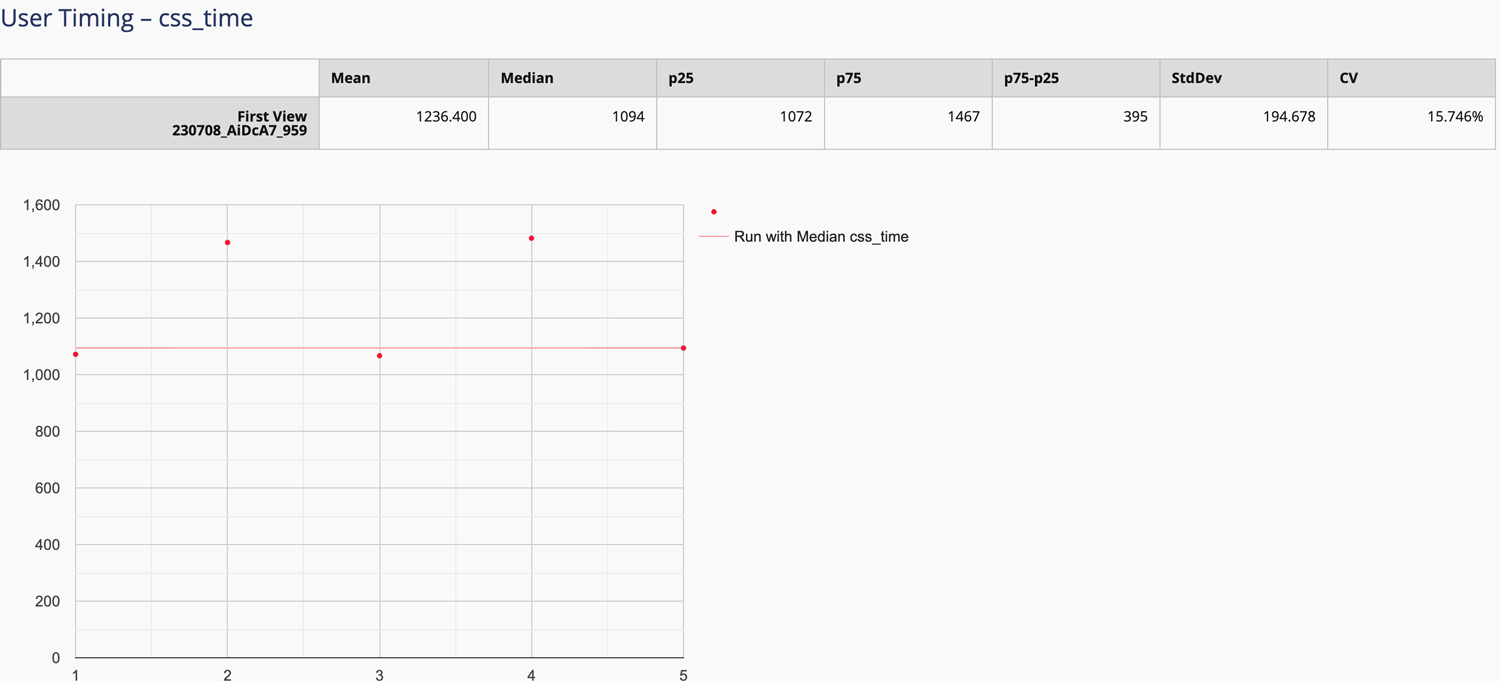
of the test runs. You can also see this data in WebPageTest’s Plot Full
Results view:
They are concatenate, compress, and cache: three practical ways to reduce request overhead, transfer size, and repeat work.
Not always, but not never either. Modern protocols reduce the need for blanket concatenation, yet there are still cases where fewer requests can be beneficial.
Absolutely. Compression remains one of the highest-return ways to reduce payload size and improve delivery speed.
Because the fastest request is often the one you do not need to make again. Good caching eliminates repeat transfers and avoids unnecessary latency.
Sometimes, but not universally. The right answer depends on what your tooling is doing for concatenation, compression, caching, and overall delivery strategy.
此内容由惯性聚合(RSS阅读器)自动聚合整理,仅供阅读参考。 原文来自 — 版权归原作者所有。