










Written by on CSS Wizardry.
Independent writing is brought to you via my wonderful Supporters.
preconnectpreconnect Too Many Originscrossorigin
Sec-* Request Headerspreconnect and DNSA trivial performance optimisation to help speed up third-party or other-origin
requests is to preconnect them: hint that the browser should preemptively open
a full connection (DNS, TCP, TLS) to the origin in question,
for example:
<link rel=preconnect href=https://fonts.googleapis.com>
In the right circumstances, this simple, single line of HTML can make pages hundreds of milliseconds faster! But time and again, I see developers misconfiguring even this most basic of features. Because, as is often the case, there’s much more to this ‘basic feature’ than meets the eye. Let’s dive in…
At the time of writing, the BBC News homepage (in
the UK, at least) has these four preconnects defined early in the <head>:
<link rel=preconnect href=//static.bbc.co.uk crossorigin>
<link rel=preconnect href=//m.files.bbci.co.uk crossorigin>
<link rel=preconnect href=//nav.files.bbci.co.uk crossorigin>
<link rel=preconnect href=//ichef.bbci.co.uk crossorigin>
Readers on narrow screens should know that each of these preconnects
also carries a crossorigin attribute—scroll along to see for yourself!
Note that the BBC use schemeless URLs (i.e. href=//…). I would not
recommend doing this. Always force HTTPS when it’s available.
Having consulted for the BBC a number of times, I know that they make heavy use of internal subdomains to share resources across teams. While this suits developer ergonomics, it’s not great for performance, particularly in cases where the subdomain in question is on the critical path. Warming up connections to important origins is a must for the BBC.
However, a look at a waterfall tells me that none of these preconnects worked!
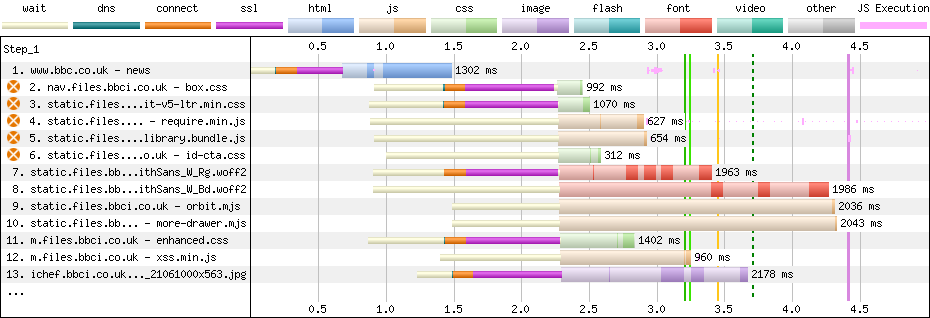
Above, you can see that the browser discovered references to each of these origins in the first chunk of HTML, before the 1-second mark. This is evidenced by the light white bars that denote ‘waiting’ time—the browser knows it needs the files, but is waiting to dispatch the requests. However, we can also see that the browser didn’t begin network negotiation until closer to the 1.5-second mark, when we begin seeing a tiny slither of green—DNS—followed by the much more costly TCP and TLS. What went wrong?!
preconnectIn the example above, we have five connections to the following four domains (more on that later):
nav.files.bbci.co.uk: On the critical path with render-blocking CSS.static.files.bbci.co.uk: On the critical path with
render-blocking CSS and JS.m.files.bbci.co.uk: On the critical path with render-blocking CSS.
preloaded, which is non-blocking, but it’s then
conditionally applied to the page using document.write() (which is its own
performance faux pas in itself).ichef.bbci.co.uk: Not on the critical path, but does host the
homepage’s LCP element.N.B. For neatness, I am omitting the https:// from
written prose, but it is vital that you include the relevant scheme in your
href attribute. All code examples are complete and correct.
Each of these four origins is vital to the page, so all four would be candidates
for preconnect. However, the BBC aren’t attempting to preconnect
static.files.bbci.co.uk at all; instead, they’re preconnecting
static.bbc.co.uk, which is also used, but isn’t on the critical path. This
feels more like a simple oversight or a typo than anything else.
As a rule, if the origin is important to the page and is used within the first
five seconds of the page-load lifecycle, preconnect it. If the origin is not
important, don’t preconnect it; if it is important but is used more than five
seconds into the page load lifecycle, your priority should be moving it sooner.
Note that important
is very subjective. Your analytics isn’t important;
your chat client isn’t important. Your consent management platform is important;
your image CDN is important.
One easy way to get an overview of early and important origins—and the method I use when advising clients—is to use WebPageTest. Once you’ve run a test, you can head to a Connection View of the waterfall which shows a diagram comprising entries per origin, not per response:

As easy as that—that’s your list of potential origins!
preconnect Too Many Originspreconnect should be used sparingly. Connection overhead isn’t huge, but too
many preconnects that either a) aren’t critical, or b) don’t get used at all,
is definitely wasteful.
Flooding the network with unnecessary preconnects early in the page load
lifecycle can steal valuable bandwidth that could have been given to more
important resources—the overhead of certificates alone can exceed 3KB. Further,
opening and persisting connections has a CPU overhead on both the client and the
server. Lastly, Chrome will close a connection if it isn’t used within the first
10 seconds of being opened, so if you act too soon, you might end up doing it
all over again anyway.
With preconnect, you should strive for as few as possible but as many as
necessary. In fact, I would consider too many preconnects a code smell, and
you probably ought to solve larger issues like self-hosting your static
assets and reducing reliance on third
parties in general.
crossoriginOkay. Now it’s time to learn why the BBC’s preconnects weren’t working!
This is the third time I’ve seen this problem this month (and we’re only nine
days in…). It stems from a misunderstanding around when to use crossorigin.
I get the impression that developers think ‘this request is going to another
origin, so it must need the crossorigin attribute’. But that’s not what the
attribute is for—crossorigin is used to define the CORS policy for the
request. crossorigin=anonymous (or a bare crossorigin attribute) will never
exchange any user credentials (e.g. cookies); crossorigin=use-credentials will
always exchange credentials. Unless you know that you need it, you almost never
need the latter. But when do we use the former?
If the resulting request for a file would be CORS-enabled, you would need
crossorigin on the corresponding preconnect. Unfortunately, CORS isn’t the
most straightforward thing in the world. Fortunately, I have a shortcut…
Firstly, identify a file on the origin that you’re considering preconnecting.
For example, let’s take a look at the BBC’s box.css. In DevTools (or
WebPageTest if you already have one available—you don’t need to run one just for
this task), look at the resource’s request headers:

There it is right there: Sec-Fetch-Mode: no-cors.
The preconnect for nav.files.bbci.co.uk doesn’t currently (I’ll
come back to that shortly) need a crossorigin attribute:
<link rel=preconnect href=https://nav.files.bbci.co.uk>
Let’s look at another request. orbit-v5-ltr.min.css from
static.files.bbci.co.uk also carries a Sec-Fetch-Mode: no-cors request
header, so that won’t need crossorigin either:
<link rel=preconnect href=https://nav.files.bbci.co.uk>
<link rel=preconnect href=https://static.files.bbci.co.uk>
Let’s keep looking.
How about the font BBCReithSans_W_Rg.woff2 also from
static.files.bbci.co.uk?

Hmm. This does need crossorigin as it’s marked Sec-Fetch-Mode: cors. What
do we do here?
Simple!
<link rel=preconnect href=https://nav.files.bbci.co.uk>
<link rel=preconnect href=https://static.files.bbci.co.uk>
<link rel=preconnect href=https://static.files.bbci.co.uk crossorigin>
We just add a second preconnect to open an additional CORS-enabled connection
to static.files.bbci.co.uk. (Remember earlier when the browser had opened five
connections to four origins? One of them was CORS-enabled!)
Let’s keep going and see where we end up…
As it stands, the very specific example of the homepage right now, needs the
following preconnects. Notice that all origins didn’t need crossorigin,
except static.files.bbci.co.uk which needed both:
<link rel=preconnect href=https://nav.files.bbci.co.uk>
<link rel=preconnect href=https://static.files.bbci.co.uk>
<link rel=preconnect href=https://static.files.bbci.co.uk crossorigin>
<link rel=preconnect href=https://m.files.bbci.co.uk>
<link rel=preconnect href=https://ichef.bbci.co.uk>
This feels comfortable! The browser naturally opened five connections, so I’m
happy to see that we’ve also landed on five preconnects; nothing is
unaccounted for.
I’d recommend familiarising yourself with the entire suite of Sec-*
headers—they’re incredibly useful debugging tools.
preconnect and DNSBecause DNS is simply IP resolution, it is unaffected by anything CORS-related. This means that:
preconnects to use or omit
crossorigin when you should have actually omitted or used crossorigin,
the DNS step can still be reused—only the
TCP and TLS need
discarding and doing again. That said, DNS is
usually—by far—the fastest part of the process anyway, so speeding it up
while missing out on TCP and
TLS isn’t much of an optimisation to celebrate.preconnect at all, you’ll actually see the browser reusing the
DNS resolution for a subsequent request that
needs a different CORS mode. If you zoom right in on this abridged waterfall,
you’ll see that the second CORS-enabled request to static.files.bbci.co.uk
doesn’t incur any DNS at all:

preconnect tells the browser to set up the connection to another origin early by performing DNS lookup, TCP connection setup, and usually TLS negotiation before the resource itself is requested.
dns-prefetch only resolves the hostname. preconnect goes further by also opening the transport connection, which makes it more powerful but also more expensive.
No. preconnecting to too many origins can waste resources and reduce the benefit, so it is best reserved for a small number of genuinely important, early-needed connections.
You should use crossorigin when the eventual request will need a CORS-enabled connection, such as many font requests, so the warmed connection can be reused properly.
Yes. Because preconnect is relatively expensive, overusing it can create unnecessary work and compete with more important requests.
此内容由惯性聚合(RSS阅读器)自动聚合整理,仅供阅读参考。 原文来自 — 版权归原作者所有。