








You wire up an image generation provider, get it working, and then a week later, you need to read an image. Maybe OCR on uploaded receipts, a quick object-detection pass before saving an asset, or alt-text generation for accessibility. That’s a different job. With most providers, it means a second SDK, a second API key, and a second billing relationship.
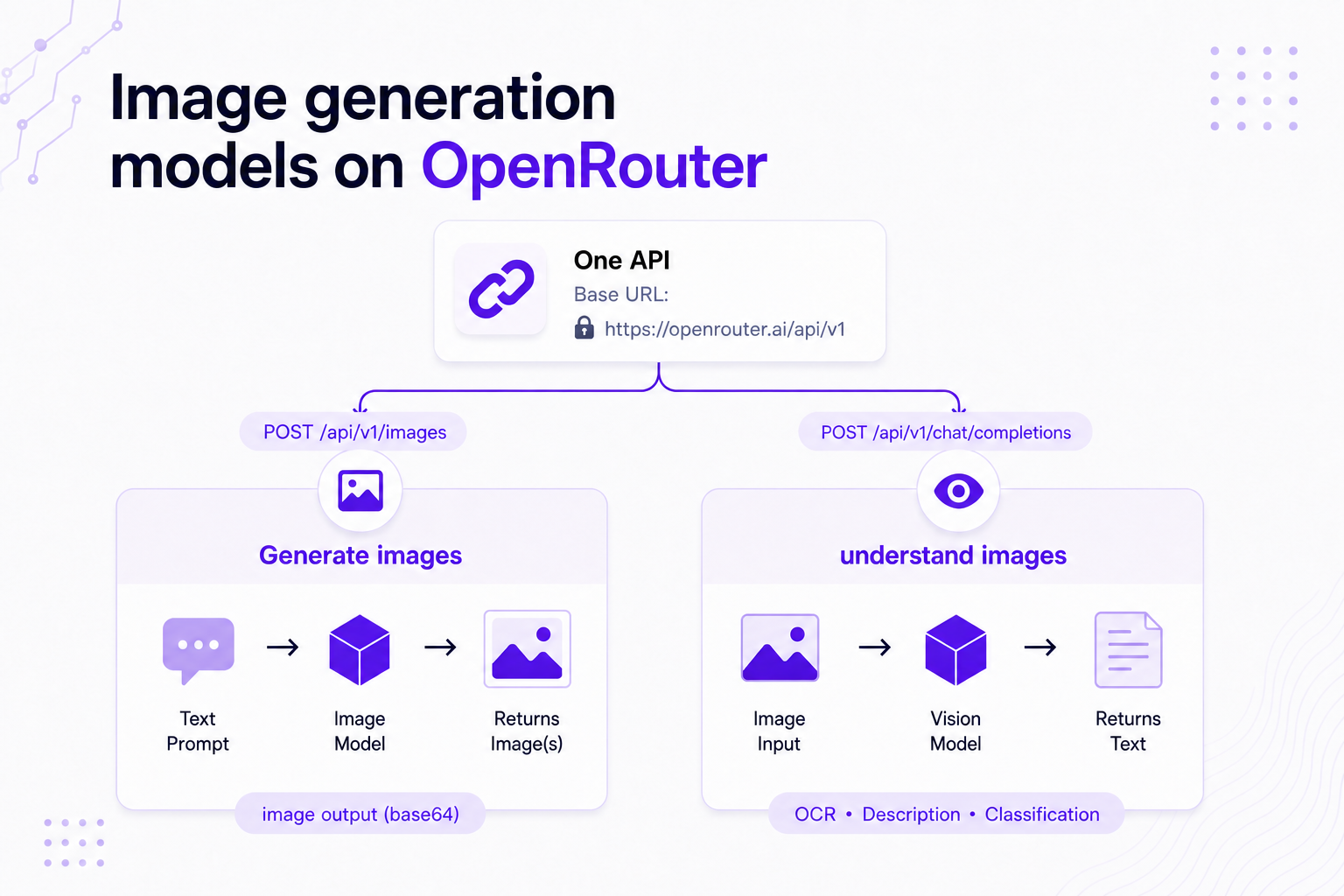
On OpenRouter, both jobs run through one base URL, https://openrouter.ai/api/v1, with one API key and one bill. To generate an image, POST a prompt to /images. To read one, send it to a vision model on /chat/completions.
The model catalog behind those endpoints covers the major image labs, and provider routing and failover work on image calls the way they do on chat calls.
POST /api/v1/images (model plus prompt in, base64 images out), and analyze images by sending an image_url to a vision model on /chat/completions./api/v1/images accepts order, only, ignore, sort, and allow_fallbacks, and vision calls on /chat/completions take the full chat provider object.input_modalities include image.Yes, through one base URL and one API key. To generate an image, POST a prompt to the dedicated Image API. To read one, send it to a vision model on the standard Chat Completions endpoint.
| Image job | Endpoint | How you call it | What you get back |
|---|---|---|---|
| Generation (prompt to image) | POST /api/v1/images | Image model + prompt, with optional input_references, aspect_ratio, resolution | data[]; each entry has base64 image bytes in b64_json |
| Understanding (image to text) | POST /api/v1/chat/completions | Vision model + image_url content type (URL or base64) | Text completion: OCR, description, classification, detection |
An app that already generates images can add vision capability with the same key and billing account. Only the endpoint and the request shape change.
The catalog includes Google (the Gemini image family), OpenAI (GPT Image), Black Forest Labs (FLUX), xAI (Grok Imagine), ByteDance (Seedream), Microsoft (MAI-Image), Recraft, Krea, and Sourceful (Riverflow). Specific model names shift with every release, so for the current lineup, capabilities, and per-model pricing, use the image model catalog.
Three ways to find an image model:
GET /api/v1/images/models lists every image model with its supported_parameters per endpoint, and GET /api/v1/models?output_modalities=image returns the same lineup through the general catalog.Send a POST to /api/v1/images with a model and a prompt. The images come back in the data array as base64.
curl https://openrouter.ai/api/v1/images \
  -H "Authorization: Bearer $OPENROUTER_API_KEY" \
  -H "Content-Type: application/json" \
  -d '{
    "model": "google/gemini-2.5-flash-image",
    "prompt": "A watercolor fox curled asleep in autumn leaves"
  }'
import os
import requests
api_key = os.environ["OPENROUTER_API_KEY"]
response = requests.post(
"https://openrouter.ai/api/v1/images",
headers={"Authorization": f"Bearer {api_key}"},
json={
"model": "google/gemini-2.5-flash-image",
"prompt": "A watercolor fox curled asleep in autumn leaves",
},
)
response.raise_for_status()
result = response.json()
print(len(result["data"][0]["b64_json"])) # base64-encoded image bytesimport { OpenRouter } from '@openrouter/sdk';
const openRouter = new OpenRouter({ apiKey: process.env.OPENROUTER_API_KEY ?? '' });
const result = await openRouter.images.generate({
imageGenerationRequest: {
model: 'google/gemini-2.5-flash-image',
prompt: 'A watercolor fox curled asleep in autumn leaves',
},
});
if ('data' in result) {
console.log(result.data[0].b64Json?.length); // base64-encoded image bytes
}Each entry in data carries the image as base64 in b64_json, plus a media_type field (typically image/png; Recraft vector models can return image/svg+xml). The usage field reports token counts and the request’s cost. Request up to 10 images per call with n (not every provider supports n > 1), and iterate data rather than hardcoding index 0.
The request body takes image-specific fields directly:
| Field | What it does |
|---|---|
resolution | Normalized tier: 512, 1K, 2K, 4K |
aspect_ratio | Ratio from 1:1 up to extended values like 21:9; providers clamp to their supported subset |
quality | auto, low, medium, or high |
output_format | png, jpeg, webp, or svg (vector models only) |
input_references | Reference images (URL or base64) for image-to-image work |
Check the model’s supported_parameters in GET /api/v1/images/models for what each endpoint accepts. Providers can also take provider-specific options through provider.options, and models with supports_streaming: true can stream partial images over SSE with stream: true. The image generation doc covers the full request schema.
Send a messages array containing a text part and an image_url part to a vision model on /chat/completions. You get a text completion back. The image_url accepts either a public URL or a base64 data URL.
curl https://openrouter.ai/api/v1/chat/completions \
  -H "Authorization: Bearer $OPENROUTER_API_KEY" \
  -H "Content-Type: application/json" \
  -d '{
    "model": "google/gemini-2.5-flash",
    "messages": [
      {
        "role": "user",
        "content": [
          {"type": "text", "text": "What is in this image?"},
          {"type": "image_url", "image_url": {"url": "https://example.com/receipt.png"}}
        ]
      }
    ]
  }'
import os
import requests
api_key = os.environ["OPENROUTER_API_KEY"]
response = requests.post(
"https://openrouter.ai/api/v1/chat/completions",
headers={"Authorization": f"Bearer {api_key}"},
json={
"model": "google/gemini-2.5-flash",
"messages": [
{
"role": "user",
"content": [
{"type": "text", "text": "What is in this image?"},
# For a local file, use a base64 data URL instead:
# {"type": "image_url", "image_url": {"url": "data:image/png;base64,iVBOR..."}}
{"type": "image_url", "image_url": {"url": "https://example.com/receipt.png"}},
],
}
],
},
)
response.raise_for_status()
data = response.json()
print(data["choices"][0]["message"]["content"])import { OpenRouter } from '@openrouter/sdk';
const openRouter = new OpenRouter({ apiKey: process.env.OPENROUTER_API_KEY ?? '' });
const response = await openRouter.chat.send({
model: 'google/gemini-2.5-flash',
messages: [
{
role: 'user',
content: [
{ type: 'text', text: 'What is in this image?' },
{ type: 'image_url', image_url: { url: 'https://example.com/receipt.png' } },
],
},
],
});
console.log(response.choices[0].message.content);The response comes back as a standard text completion, with the model’s answer in choices[0].message.content.
Four behaviors to plan for:
image/png, image/jpeg, image/webp, and image/gif.For PDFs, use the file content type rather than rendering pages to images first. OpenRouter also supports audio and video inputs through the same endpoint, using the same pattern of swapping the model and content type. The multimodal overview covers every input type.
Use generation when the output is a new visual asset: mockups, product shots, illustrations, marketing creative, anything that begins as a text prompt and ends as pixels.
Use understanding when you already have an image and need information from it: OCR on receipts and forms, accessibility alt-text, object or defect detection on a production line, classification, or plain description.
The endpoint you call tells us which job you’re doing. Generation posts to /api/v1/images; understanding posts to /chat/completions. Both use the same API key and land on the same bill.
There’s a third option for apps where the conversation itself should decide when an image is needed. The openrouter:image_generation server tool (beta) lets a chat model generate an image mid-conversation without your application code making that call explicitly. Add { "type": "openrouter:image_generation" } to the request’s tools array, and the model determines when to invoke it. It defaults to openai/gpt-5-image. The server-tool doc covers the available parameters.
Yes. On /api/v1/images, the provider object accepts order, only, ignore, sort, and allow_fallbacks. An image model served by more than one provider can fail over between them if the first is unavailable or slow.
{
  "model": "google/gemini-2.5-flash-image",
  "prompt": "A minimalist logo for a coffee roaster",
  "provider": {
    "order": ["google-ai-studio", "google-vertex"],
    "allow_fallbacks": true
  }
}
This request prefers one provider and falls back to the next if it fails. Vision calls on /chat/completions take the full chat provider object, including data_collection: "deny".
You pay the catalog rate with no markup from us. Under Zero Completion Insurance, an image call that fails over and never completes isn’t billed. For how the router picks a provider, see how OpenRouter model routing works.
Not at the moment. The free tier covers models with the :free suffix at 50 requests/day and 20 RPM with no credit card (1,000 requests/day with $10 or more in credits), and no image generation model currently carries that suffix. The free pool changes as models come and go, so it’s worth re-checking /models?output_modalities=image.
Generation therefore draws on your credit balance, but testing costs little. Per-image pricing on low-cost models starts around a cent, and each response’s usage.cost reports what the request cost. The free models guide covers the free tier’s mechanics for text models.
This error means you sent an image_url to a model that doesn’t accept image input. We auto-filter available models by request content, so when the model you named has no available endpoint that supports images, the request fails with this error instead of silently dropping the image.
Fix it in three steps:
input_modalities must include image. Text-only models never will.GET /api/v1/models?input_modalities=image, or use the input modality filter on the Models page.Sibling errors like no endpoints found that support tool use and the data-policy variants work the same way. The error names the requirement that didn’t match; relax it or pick a model and provider combination that meets it.
| Limit | What it means in practice |
|---|---|
| Base64 output | Generated images return in data[].b64_json as base64 bytes, not a hosted file URL. Decoding and storage are on you. |
| Direction support varies by model | Generation models live on /api/v1/images; vision input needs a model whose input_modalities include image on /chat/completions. Mismatches surface as the “no endpoints found” error. |
| Parameter support varies by endpoint | aspect_ratio values, n > 1, streaming, and provider-specific options differ per endpoint. Check supported_parameters in GET /api/v1/images/models. |
| All-or-nothing billing | A generation is billed in full on completion or not at all on failure; there’s no partial-image billing. |
Start with the image model catalog, test a prompt in the Chatroom, and wire the call with the snippets above.
Yes, through one base URL and one API key. To generate an image, POST a model and a prompt to https://openrouter.ai/api/v1/images. To read one, send it as an image_url to a vision model on /chat/completions. Both land on the same bill.
The catalog includes Google (Gemini image family), OpenAI (GPT Image), Black Forest Labs (FLUX), xAI (Grok Imagine), ByteDance (Seedream), Microsoft (MAI-Image), Recraft, Krea, and Sourceful (Riverflow). Filter /models?output_modalities=image or browse the image model collection for the current lineup and pricing.
You sent an image_url to a model that doesn’t accept image input. Confirm the model’s input_modalities include image, find a vision-capable model with GET /api/v1/models?input_modalities=image, and update the model string in your request.
Not at the moment. The free tier (50 requests/day, 20 RPM, no credit card) covers models with the :free suffix, and no image generation model currently carries it, so generation draws on your credit balance. Low-cost models start around a cent per image.
Yes. The /api/v1/images endpoint accepts provider.order, only, ignore, sort, and allow_fallbacks, so ordering, cost/latency sort, and cross-provider failover work the same way as on chat. Vision calls on /chat/completions take the full chat provider object, including data_collection: "deny".
In the response’s data array; each entry has b64_json with the base64-encoded image bytes and a media_type field (typically image/png). Request up to 10 images per call with the n parameter and iterate data rather than hardcoding index 0.
此内容由惯性聚合(RSS阅读器)自动聚合整理,仅供阅读参考。 原文来自 — 版权归原作者所有。