惯性聚合 高效追踪和阅读你感兴趣的博客、新闻、科技资讯
阅读原文 在惯性聚合中打开

推荐订阅源

P
Privacy & Cybersecurity Law Blog
V
V2EX
月光博客
月光博客
奇客Solidot–传递最新科技情报
奇客Solidot–传递最新科技情报
The Register - Security
MongoDB | Blog
MongoDB | Blog
P
Privacy International News Feed
The Last Watchdog
The Last Watchdog
Security Archives - TechRepublic
美团技术团队
Stack Overflow Blog
Stack Overflow Blog
博客园 - 司徒正美
博客园 - 三生石上(FineUI控件)
V
Visual Studio Blog
cs.CV updates on arXiv.org
K
Kaspersky official blog
S
Secure Thoughts
T
Tenable Blog
Security Latest
Security Latest
The Cloudflare Blog
S
Security @ Cisco Blogs
H
Heimdal Security Blog
aimingoo的专栏
aimingoo的专栏
TaoSecurity Blog
TaoSecurity Blog
Blog — PlanetScale
Blog — PlanetScale
Microsoft Security Blog
Schneier on Security
Webroot Blog
Webroot Blog
G
Google Developers Blog
www.infosecurity-magazine.com
Scott Helme
Scott Helme
IT之家
IT之家
Latest news
Latest news
The Hacker News
The Hacker News
C
Check Point Blog
T
The Exploit Database - CXSecurity.com
H
Hackread – Cybersecurity News, Data Breaches, AI and More
腾讯CDC
C
CERT Recently Published Vulnerability Notes
NISL@THU
NISL@THU
N
News | PayPal Newsroom
Forbes - Security
Forbes - Security
P
Palo Alto Networks Blog
S
Security Affairs
S
Securelist
Google Online Security Blog
WordPress大学
WordPress大学
Last Week in AI
Last Week in AI
C
Cybersecurity and Infrastructure Security Agency CISA
A
About on SuperTechFans

Linux – 魔帆博客

Git配置:如何优雅的配置多用户并使用 ssh 密钥验证 | 魔帆博客 Linux 报错Certificate verification failed: The certificate is NOT trusted. | 魔帆博客 Fedora 系统升级 32->34 跨版本升级 | 魔帆博客 教程:如何更新安装 docker-compose V2 和使用 docker switch | 魔帆博客 Docker WSL1/2 迁移 Linux 发行版目录 | 魔帆博客 双重验证 Authy 导出所有 TOTP token 和 golang 配置 GOPROXY 解决网络问题 | 魔帆博客 Linux 教程:Linux 初学者必了解的概念 | 魔帆博客 创建支持安全启动(Secure Boot)的 Arch Linux ISO 安装镜像 | 魔帆博客 使用 Aria2 搭建离线下载服务器 | 魔帆博客 【记录】Deepin 桌面无限转圈(风火轮) | 魔帆博客 梅林固件KoolProxy插件崩溃连接ssh卸载指南(北) | 魔帆博客 [Linux] dconf 系统配置编辑器——我的系统我做主 | 魔帆博客 Arch Linux 通过 xdg-mime 设置默认文件管理器解决总是用 Visual Studio Code 打开文件夹的问题 | 魔帆博客
Git 提示 fatal: unsafe repository is owned by someone else 错误 | 魔帆博客
野小新 · 2022-04-26 · via Linux – 魔帆博客

最近在使用 Git 和 GitHub Actions 时,应该不少人都遇到了这个问题:

fatal: unsafe repository ('D:/Paxos/scoop/buckets/MorFans' is owned by someone else)
To add an exception for this directory, call:

        git config --global --add safe.directory D:/Paxos/scoop/buckets/MorFans

解决

这个问题可能和 Git安全漏洞公布| GitHub 博客 有关,应该只发生于最近更新的 git 程序

解决方案也很简单,因为这个报错是因为当前目录所有者不是当前操作系统的用户。

下面介绍两种方法解决这个问题:

  1. 修改文件所有者
  2. 添加安全目录

修改文件所有者

Windows 修改所有者方法

如果习惯使用命令行,可以使用 takeown.exe 快速设定所有者为当前用户:

takeown.exe /F .\nonportable /R

命令行批量处理:

Get-ChildItem -Directory | % {takeown.exe /F $_ /R }

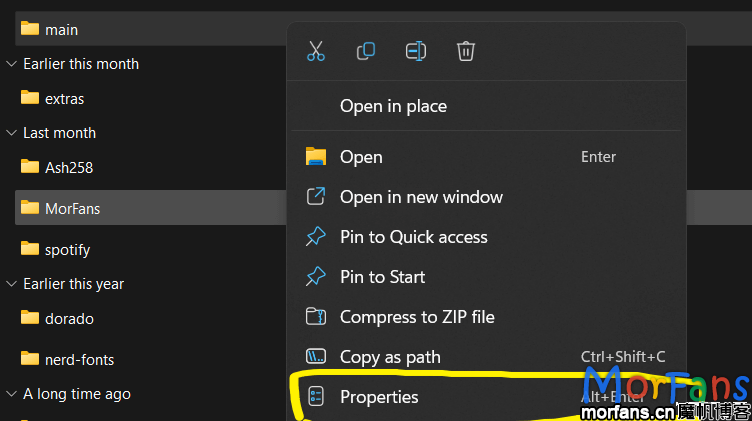
或者使用图形界面修改:

找到 git repo 的文件夹,右键点击属性:

3967533be19f476f98ee2daa3bcf6240
右键进入git repo 的文件夹属性

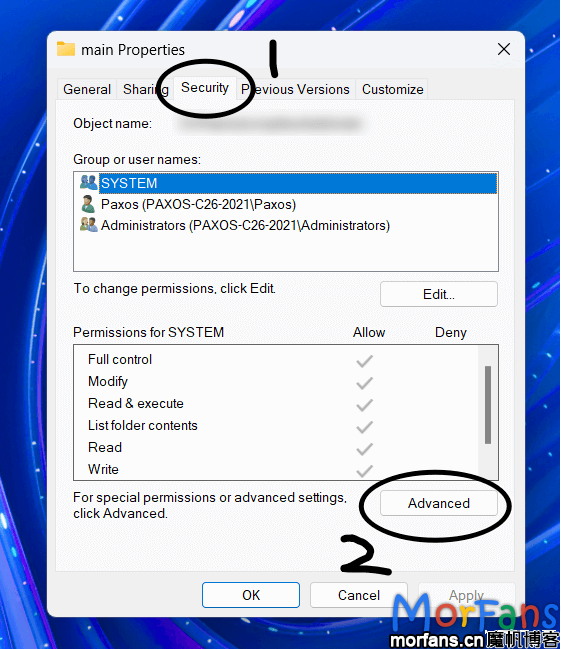
找到 安全,点击高级设置:

dae9ee6aa2434f24bca2b0c9ff527712
进入权限设置

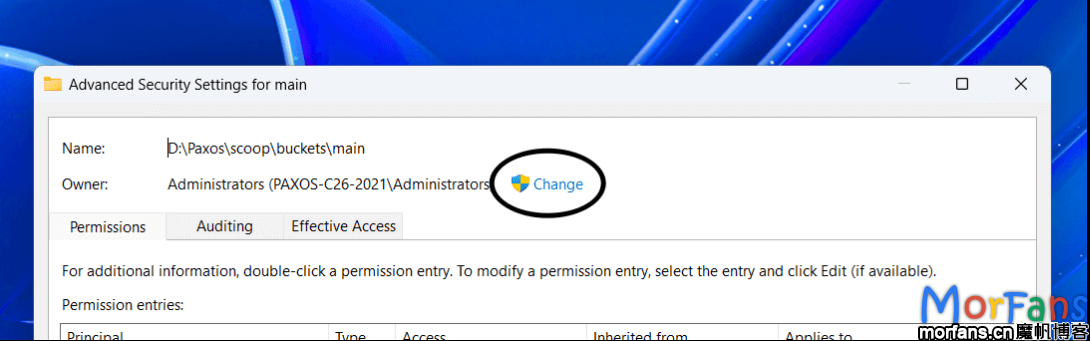
在弹出的窗口点击更改,输入自己电脑的用户名:

f5c49d88abbe4883a4d01d15c4940586
修改当前所有者用户
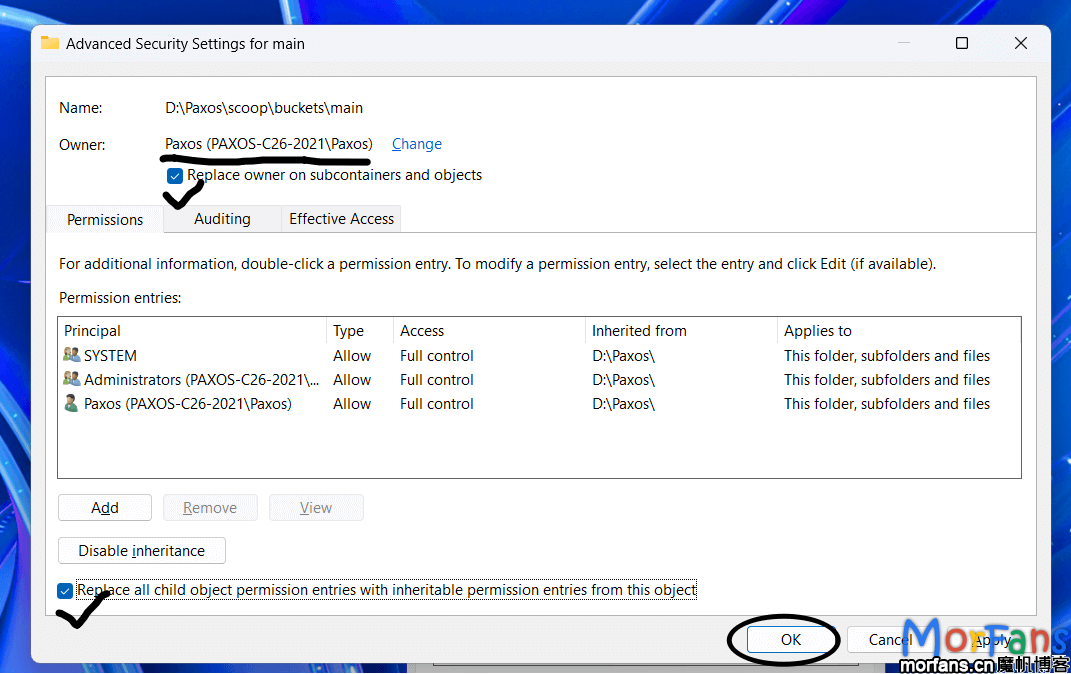
9e1514d625354a8480b32507626db4b3
按照图示操作然后应用设置

Linux 等Unix系系统修改所有者方法

# paxos:morfans => 用户名:组
sudo chown -R paxos:morfans  gitRepo文件夹路径

还可以通过指定 git 的用户身份运行

假设 morfans 是存储库所有者

sudo -u morfans -- git status

添加 git 安全目录

第二个方法就是 git 命令报错时候提示的方法。

如果你是在 GitHub Actions 中遇到这个问题,可能添加 safe.directory 是更方便的选择。

让 git 信任这个目录(如果您知道目录内容是安全的)

git config --global --add safe.directory <Git Repo文件夹路径>

或者手动调整 git 配置文件 C:\Users\<username>\.gitconfig

[safe]
    directory = gitRepo文件夹路径

repo太多了,批量来

Linux 下可以使用 find 命令来批量执行:

如果子目录太多了,可以使用 -maxdepth 参数

find 完整路径 -name '.git' -type d -exec bash -c 'git config --global --add safe.directory ${0%/.git}' {} \;

Windows 下可以使用 powershell 批量执行:

(ls D:\PowerShell\ParentFolder\ -Directory).FullName -replace '\\','/' | %{git config --global --add safe.directory $_}

虽然但是 👀,还是推荐修改文件夹权限,而不是添加 安全文件夹