惯性聚合 高效追踪和阅读你感兴趣的博客、新闻、科技资讯
阅读原文 在惯性聚合中打开

推荐订阅源

GbyAI
GbyAI
爱范儿
爱范儿
Y
Y Combinator Blog
T
Tor Project blog
V
Visual Studio Blog
U
Unit 42
B
Blog RSS Feed
博客园 - 叶小钗
OSCHINA 社区最新新闻
OSCHINA 社区最新新闻
阮一峰的网络日志
阮一峰的网络日志
T
Tailwind CSS Blog
G
Google Developers Blog
I
InfoQ
Stack Overflow Blog
Stack Overflow Blog
IT之家
IT之家
Microsoft Azure Blog
T
The Blog of Author Tim Ferriss
钛媒体:引领未来商业与生活新知
钛媒体:引领未来商业与生活新知
The Cloudflare Blog
Google DeepMind News
奇客Solidot–传递最新科技情报
奇客Solidot–传递最新科技情报
H
Hackread – Cybersecurity News, Data Breaches, AI and More
F
Fortinet All Blogs
人人都是产品经理
人人都是产品经理
Apple Machine Learning Research
The GitHub Blog
The GitHub Blog
Recorded Future
Recorded Future
博客园_首页
罗磊的独立博客
让小产品的独立变现更简单 - ezindie.com
量子位
P
Proofpoint News Feed
Jina AI
Jina AI
博客园 - 【当耐特】
S
Security @ Cisco Blogs
I
Intezer
MyScale Blog
MyScale Blog
Simon Willison's Weblog
P
Privacy & Cybersecurity Law Blog
腾讯CDC
T
Tenable Blog
A
Arctic Wolf
T
Threat Research - Cisco Blogs
S
Securelist
Know Your Adversary
Know Your Adversary
Spread Privacy
Spread Privacy
C
Check Point Blog
NISL@THU
NISL@THU
Microsoft Security Blog
V
Vulnerabilities – Threatpost

Blog of Simple Analytics

The EU wants to kill cookie banners Google is tracking you (even when you use DuckDuckGo) German court rules Meta’s tracking tech violates GDPR Closing the data gap - Simple Analytics x Usercentrics The EU-US data deal may be dead in the water You are missing 20% of your website data with GA4 How a reverse trial will push Simple Analytics to the next level Google will start tracking all your devices (WTF?) Big Tech Fails EU’s Digital Services Act: Only Wikipedia Passes the Test Meta fined $102 million by the Irish Data Protection Commission Europeans spend 575 Million hours per year clicking cookie banners The most interesting GDPR fines GDPR and fines: all there is to know Google loses key antitrust case Web Analytics for Crypto Companies Web analytics for publishers Google pulls Uno Reverse card: Rolls back decision to kill third-party cookies Privacy Monthly July 2024 Privacy Perspectives June 2024 Privacy Monthly June APRA fumbles targeted advertising Privacy Monthly May Meta loses key privacy battle Google delays cookie phase-out once again Privacy Monthly April 2024 Web Analytics and Consent Cookies 101 Privacy Monthly March 2024 German authority cracks down on cookie banners Google Tag Manager vs Google Analytics Google search alternative Data retention in Google Analytics Guide to Google Analytics and Cookie consent What are Google Analytics' identifiers? How to export data from Google Analytics Privacy Monthly February 2024 The Criteo case: a big deal for Big Tech Privacy Monthy January 2024 What the Digital Markets Act means for privacy Google Settles in $5B Incognito Mode Lawsuit Legal troubles for Adobe Analytics Web analytics for nonprofits HIPAA and mental health Why Meta subscriptions are under attack, and why it matters for privacy Privacy Monthly: December Simple Analytics AI Host analytics on Cloudflare Zaraz Add Google Analytics to Convertkit Google Analytics Pricing - Paid vs Free Road to 1 Million ARR - October update CCPA and Data Protection: all there is to know Analytics without a cookie banner Enterprise Analytics Privacy Monthly: November 2023 Delete Act: all you need to know Mobile App Tracking Under Fire The road to 1 Million ARR - September Update Privacy Monthly: October 2023 HIPAA violations First challenge to the EU-US data transfer framework Direct Marketing under GDPR Road to 1 million ARR - August Update CCPA vs CPRA: what is new? Privacy Monthly: September 2023 Dobbs v. Jackson ruling is a privacy mess Privacy Monthly: August 2023 What are your rights under the CCPA? When does the CCPA apply? How does the HIPAA compare to the CCPA and GDPR? Why Meta is in a world of trouble CJEU: cookie-based analytics collects sensitive data Road to 1 million ARR - July update All about the new Data Transfer Framework Road to 1 Million ARR - June update What is PHI under HIPAA? Sweden declares Google Analytics illegal Searching for GA4 Alternatives? Top 10 Reliable Options for Google Analyticss Ultimate HIPAA Compliance Checklist: Essential Steps for Healthcare Providers Privacy Monthly: June 2023 More troubles for Google Analytics The path to 1M ARR - May Update Data Processing Agreements Minimal Product Analytics Facebook data transfers declared illegal Is Google Analytics CCPA-compliant? Help us with your input Cookie banners: How to stay GDPR compliant? GDPR Compliance Checklist Privacy Monthly: May 2023 Simple Analytics: Privacy-first website analytics Improve your e-commerce performance with analytics European Facebook blackout is closer than we think Know your website’s Carbon Emissions - and how to reduce it The path to 1M ARR - April 2023 How to add video tracking using Google Tag Manager? How to track form submissions using Google Tag Manager? Why is my Simple Analytics data different from Google Analytics? Debug Simple Analytics script How to Import Google Analytics Data to Simple Analytics
A/B Testing with Simple Analytics
Iron Brands · 2023-09-05 · via Blog of Simple Analytics

A/B testing should be in every business “growth toolbox.” Understanding how users interact with different website versions will increase your conversion rate and increase signups and, eventually, sales.

You could use Google Analytics 4, which requires a complex and time-consuming setup process. There are simpler methods to approach this.

This article is an easy-to-follow use case on how to set up A/B tests that will effectively optimize your signup conversions by Daniel Nguyen of BoltAI.

Let’s dive in!

  1. Hypothesis and Approach
  2. Test Design
  3. Execution and Tracking
  4. Results and Reporting
  5. Final Thoughts

Michelin chose Simple AnalyticsJoin them

Hypothesis and Approach

First of all, you need to create a hypothesis you want to test. In this case, changing elements like headlines or call-to-action (CTA) can impact conversion rates.

To test this, you need to:

  1. Randomly show two versions of the website to different users with a different CTA or headline
  2. Track the conversion of each version
  3. Create a report dashboard to check the result

Test Design

We want to show each visitor a version of the website. One version is the "control" group or the version already in use. The second version changes a single element.

How these versions behave is up to you.

In this example, we’ll be running a headline test. Variant A (left) and variant B (right).

A/B test Simple Analytics

You can run other tests for calls to action text, pop-ups, featured images, etc., but the method is the same.

Daniel decided to store these variants in cookies and used conditional rendering to present the content of each version. Its good to note that this is not the only way to do this. At Simple Analytics, we don't use any cookies. We would test this by showing a different version of the website every other day. Use version A today and version B tomorrow and so on.

He used Next.js, but it also works for other frameworks.

Here is the code:

import Cookies from 'js-cookie'
import { useEffect, useState } from 'react'

function Page() {
  const [variant, setVariant] = useState(null)
  
  useEffect(() => {
    let cookieValue = Cookies.get('variant')
    if (!cookieValue) {
      cookieValue = Math.random() < 0.5 ? 'a' : 'b'
      Cookies.set('variant', cookieValue, {
        expires: 30,
      })
    }

    setVariant(cookieValue)
  }, [])

  return (
    <h1>
      {variant === 'a' && <span>Current headline</span>}
      {variant === 'b' && <span>New headline</span>}
      {variant === null && <span> </span>}
    </h1>
  )
}

Execution and Tracking

Now, we have the variant stored in a cookie. We need to track the conversion event of each version.

Tracking these conversion events with Simple Analytics is, well, simple. For BoltAI, Daniel wanted to track the number of downloads.

Here is the code used to create the event:

function Hero() {
  const handleBeforeDownload = () => {
    const variant = Cookies.get('variant') || null
    if (variant) {
      window.sa_event && window.sa_event('click_download', { variant })
    } else {
      window.sa_event && window.sa_event('click_download')
    }
  }

  return (
    <Button onClick={handleBeforeDownload}>
      <span className="mx-2">Download</span>
    </Button>
  )
}

Results and Reporting

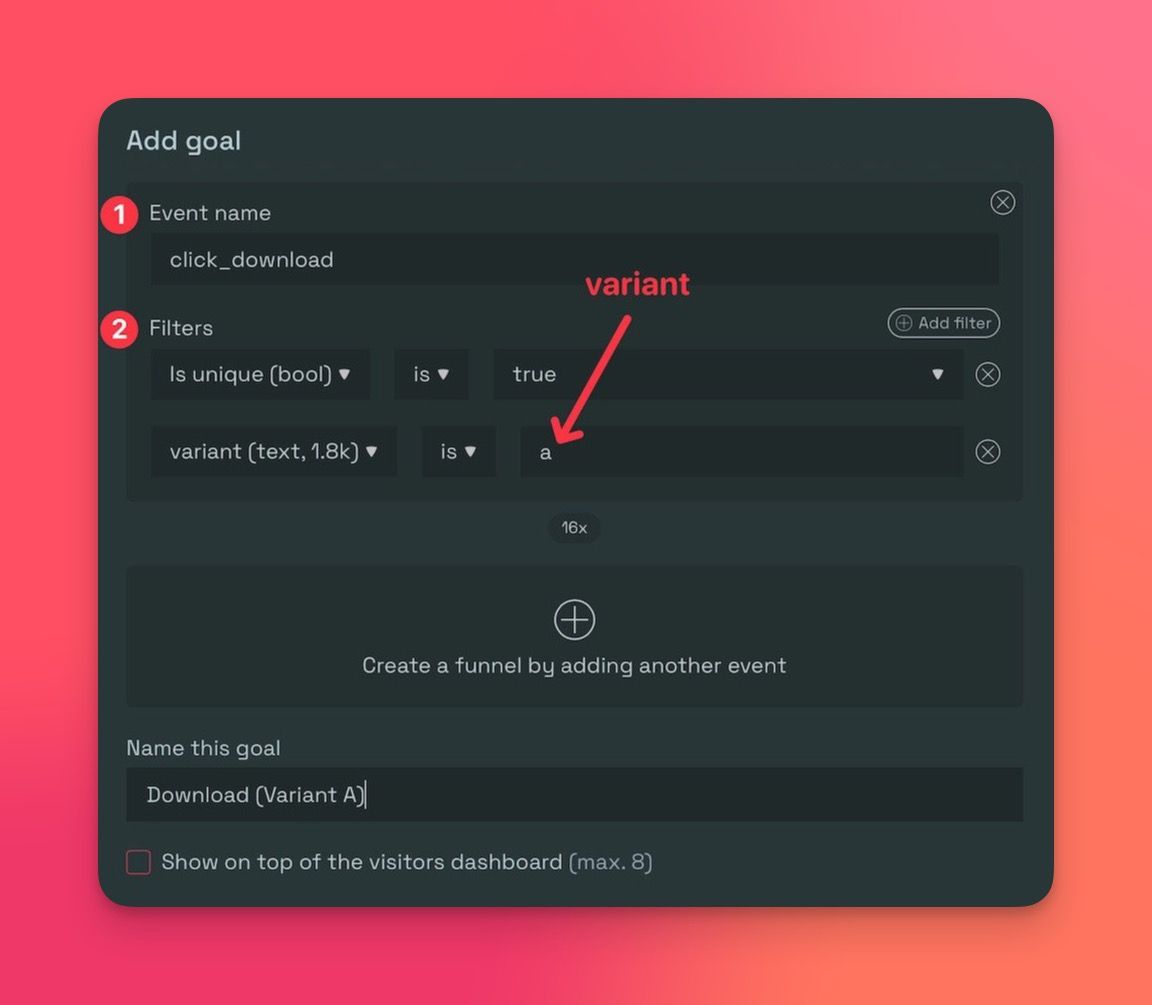
In the Simple Analytics website dashboard, open the tab "Goals" and click "Add goal."

  • Pick the conversion event name. It's “click_download” in this case
  • Make sure to filter unique visits & with the right variant
  • Set a name.

ezgif.com-webp-to-jpg (1).jpg

Now, we can view the conversion stats directly on his dashboard to review the results of the A/B test.
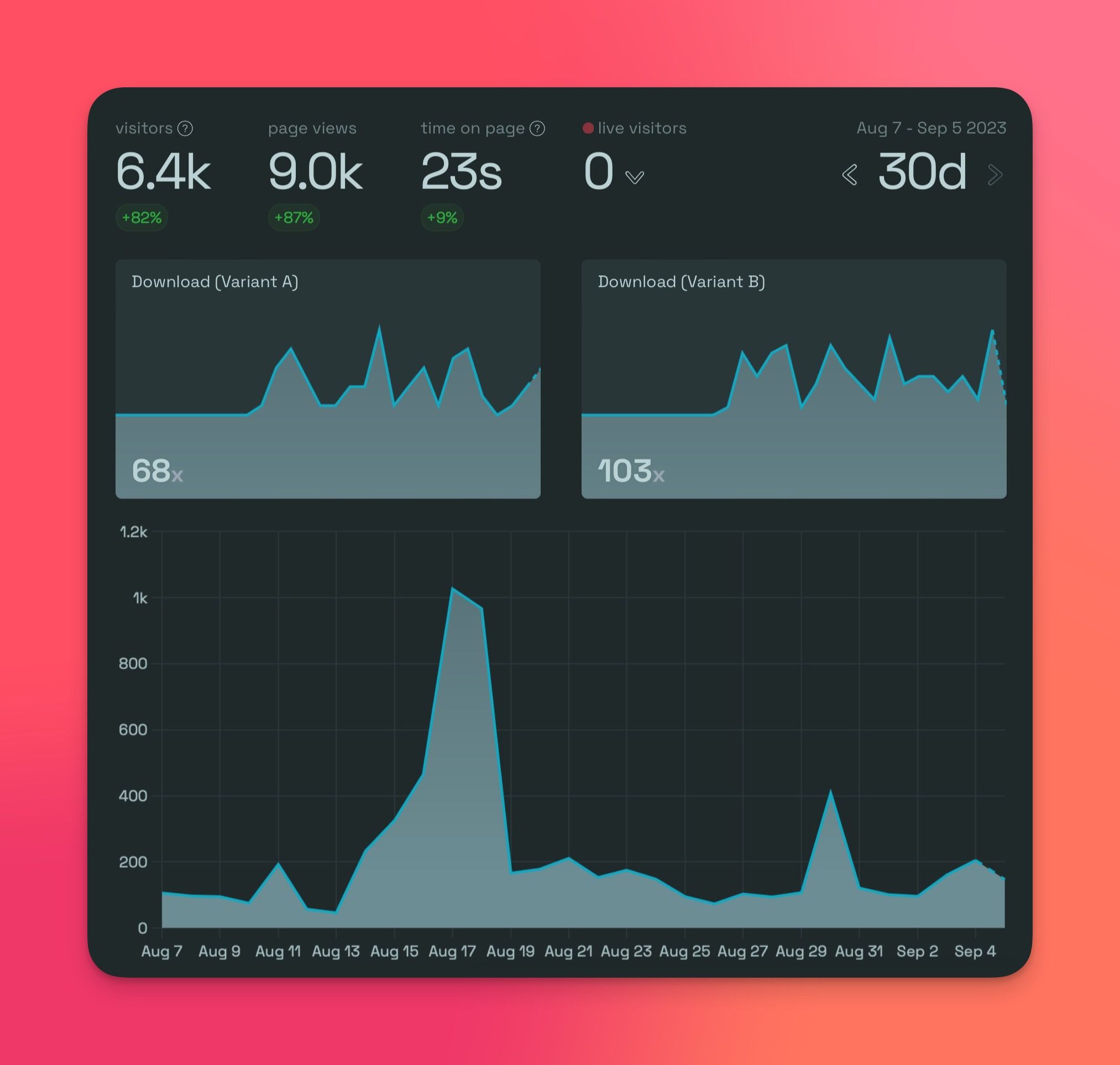
A/B Test Goals

Final Thoughts

A/B testing can be very helpful to grow your business by optimizing your conversion rate. It doesn't have to be complicated. As shown in this case, it's relatively easy to set up an A/B test. It doesn't require a complex tool like Google Analytics 4.

Simple Analytics is an intuitive tool. It takes less time to set up, is easy to use, respects user privacy, and provides real-time insights.

Feel free to give it a spin and see for yourself.