





Update to macOS Tahoe 26.4 today!
Apple’s latest macOS update came with no flashy headlines — but it did introduce a small security feature that tackles a very real and fast-growing threat.
With macOS 26.4, Apple is now warning users before they paste potentially dangerous commands into the Terminal app. On the surface, it’s a minor tweak. In practice, it directly targets one of today’s most effective social engineering techniques: ClickFix attacks.
Attackers are increasingly targeting macOS with social engineering tricks
macOS 26.4 introduces a critical layer of friction at the right moment — your Mac can now warn you before you paste dangerous commands
The feature targets ClickFix-style attacks that trick users into infecting their own devices
Let’s break down what’s happening — and why it matters more than it seems.
Terminal in macOS is a command-line interface that provides text-based access to the operating system, allowing users to execute commands, run scripts, and automate tasks. It has always been a powerful tool, giving users deep control over their system. But that power comes with risk.
Unlike traditional malware infections, some modern attacks don’t simply exploit software vulnerabilities. Instead, they trick users into running malicious commands themselves.
This is where ClickFix attacks come in.
ClickFix is a growing social engineering technique that tricks you into manually executing malicious commands on your own computer through “pastejacking” – where you’re duped into copying and running a malicious script to solve a fake technical error.
These scams typically:
Because the user willingly executes the command, many built-in protections are bypassed. And this technique is gaining traction on macOS.
Security researchers have already observed macOS-focused malware campaigns — like the Infiniti Stealer — leveraging ClickFix-style tactics to steal credentials and sensitive data.
macOS 26.4 introduces a simple but effective countermeasure: a warning prompt when users paste suspicious commands into Terminal.
When triggered, users see a message like:
Possible malware, paste blocked. Scammers often encourage pasting text into Terminal to try and harm your Mac or compromise your privacy. These instructions are commonly offered via websites, chat agents, apps, files, or a phone call.
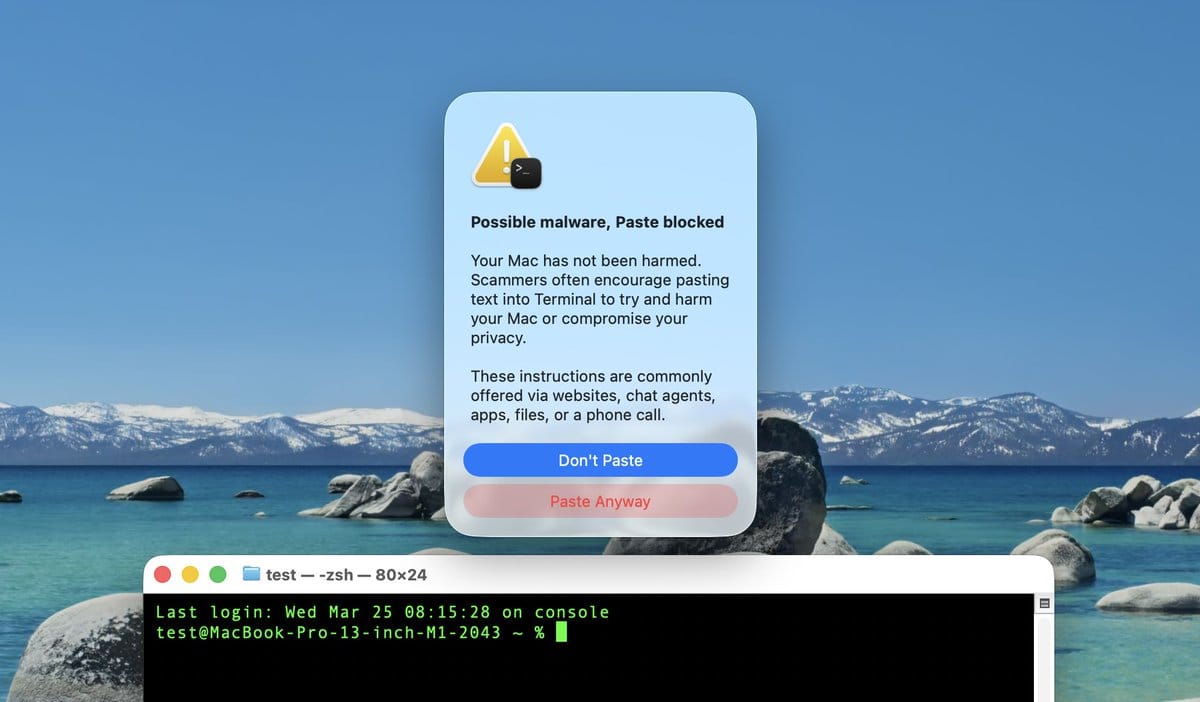
Source: Mr. Macintosh (via MacRumors)
The system:
This measure is designed to break the attacker’s flow. ClickFix attacks rely on speed and automation — copy, paste, execute. Apple’s new prompt inserts a moment of friction, giving people a chance to reconsider before damage is done.
The warning was spotted by Redditors and X users over the past week, as reported by MacRrumors.
As we note in our 2023 macOS Threat Landscape Report, threats designed to infect Macs typically require the victim to manually run an executable.
Apple's new approach might seem like a niche feature aimed at developers at first glance, but it’s not.
1. It protects non-techies
Terminal used to be a tool only advanced users touched. That’s no longer true. Today, people are frequently told to “just paste this command” in:
Many don’t fully understand what they’re running — and attackers exploit that.
2. It’s social engineering (not just malware)
Traditional security focuses on blocking malicious files. But ClickFix attacks don’t need files—they weaponize instructions. Apple’s approach reflects a broader shift in cybersecurity: protecting users from manipulation, not just malicious code.
3. It acknowledges a changing threat landscape
For years, macOS had a reputation as a safer platform. That perception is eroding. Attackers are adapting:
Apple’s update is a clear signal: macOS users are now squarely in the crosshairs.
The new security prompt added in macOS Tahoe 26.4 is a solid step towards protecting Mac users from malware — but it’s not a silver bullet.
In other words, user awareness still matters.
This new protection is important. So, the first thing you want to do is update to macOS Tahoe 26.4 so you’re equipped with this new layer of security. That’s a given. Next:
1. Never paste commands you don’t understand
If you can’t explain what a command does, don’t run it.
2. Be skeptical of ‘verification’ steps
No legitimate website or service will ask you to paste commands into Terminal to prove you’re human.
3. Treat urgency as a red flag
ClickFix attacks often use countdown timers or warnings to pressure users into acting quickly.
4. Stick to trusted sources
Only follow instructions from reputable documentation—not random forums or pop-ups.
5. Always run an independent security solution on your Mac
Bitdefender Antivirus for Mac offers real-time protection against threats targeting macOS. If you accidentally end up downloading malware on your Mac, we’ll block it for you.
You may also want to read:
Apple Sends Urgent Security Alert to iPhone Lock Screens — Here’s Why You Shouldn’t Ignore It
Windows and macOS Malware Spreads via Fake “Claude Code” Google Ads
此内容由惯性聚合(RSS阅读器)自动聚合整理,仅供阅读参考。 原文来自 — 版权归原作者所有。