






If your iPhone isn’t up to date, you’re at greater risk of cyber-attacks — that’s Apple’s warning to users wielding older-generation hardware capped on outdated software versions.
The tech titan has taken the unusual step of pushing critical security warnings directly to iPhone lock screens, urging users to update their devices immediately amid active cyberattacks targeting outdated iOS versions.
The move echoes earlier warnings about exploit kits like Coruna and DarkSword, which threaten unpatched devices.
As signaled by the Cupertino company earlier this month, users running older versions of iOS — including iOS 17 — now see a “Critical Software” notification appear directly on their lock screen. The alert warns that Apple is aware of real-world attacks targeting outdated devices and strongly recommends installing the latest update.
Unlike typical update reminders buried in settings, these alerts are deliberately hard to ignore. Apple is escalating its messaging because the threat is no longer theoretical.
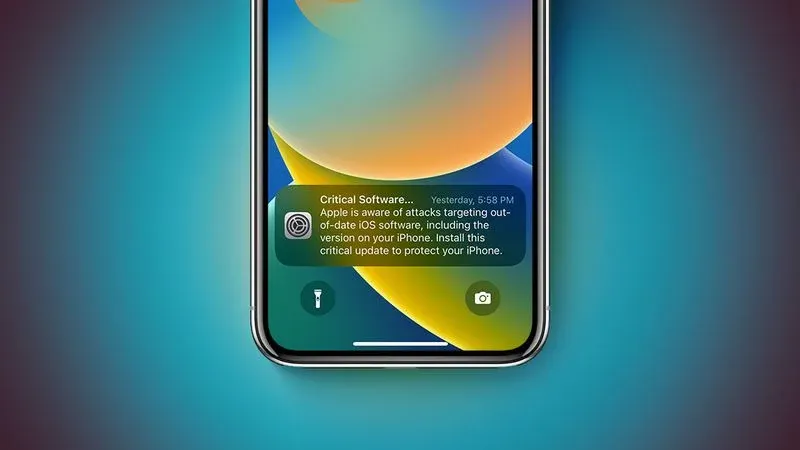
Source: MacRumors
According to reports, attackers are actively exploiting vulnerabilities through malicious websites and links, meaning a simple tap could expose sensitive data on an unpatched device.
Apple’s warning ties into the continued use of sophisticated exploit kits targeting older iOS versions.
Security researchers have linked ongoing attacks to exploit kits like Coruna and DarkSword that can exploit vulnerabilities across multiple iOS generations — from iOS 13 up to early iOS 17 builds.
These toolkits are especially dangerous because they:
This mirrors what we’ve previously covered — attackers don’t need zero-days if users stay on vulnerable versions.
Apple has already released fixes (but you need to install them)
Apple has patched the vulnerabilities in recent updates, including:
However, patches only protect people who actually install these updates.
Devices stuck on very old versions (like iOS 13 or 14) are being pushed to upgrade to iOS 15 just to receive critical protections.
Why Apple is taking this seriously
The Cupertino tech giant rarely uses lock screen alerts for updates, which makes this move notable.
According to reports, attacks are active, exploits are circulating, and outdated devices are prime targets.
If you receive this alert — or if you’re unsure about your device status — take action immediately:
1. Update your device
2. Avoid risky browsing behavior
3. Enable built-in protections
4. Consider additional security layers
Apple’s decision to push lock screen security alerts is a clear warning: attackers are actively targeting outdated iPhones, and the window to stay protected is shrinking.
As we regularly warn, exploit kits have historically been used in spyware attacks on the devices of activists, dissidents, political rivals, human rights advocates, investigative journalists and high-profile figures in general. Big-Tech players have been fighting spyware for years.
Even if you’re not a high-risk person, it’s a good idea to stay up to date with the latest security patches — you never know when you trip a wire and become a target.
The company has posted a support page dedicated entirely to updating iOS — from iOS 12 to iOS 26.
For those who can’t update their device for any reason, Apple recommends enabling Lockdown Mode.
A real Apple security alert appears as a system notification on your device or through your Apple ID settings—not as a browser pop-up, random text, or phone call. Legitimate alerts never ask for passwords, payments, or to click suspicious links. If unsure, check directly in Settings or on Apple’s official website.
You may receive a real security alert if your iPhone is running outdated software, your Apple ID was used on a new device, or suspicious activity was detected. Apple sends these alerts to help protect your account and prompt you to take action, such as updating iOS or reviewing account access.
If it’s a fake pop-up, close the browser tab immediately, clear your browsing data, and avoid clicking any links. Then check your device for suspicious apps and update your iOS. If the alert came from a legitimate Apple notification, follow the instructions in Settings to resolve the issue.
In most cases, no. Messages claiming “your iPhone has been hacked” are usually scam pop-ups designed to scare you into clicking links or downloading malicious apps. Real Apple warnings do not use alarming language or appear as browser pop-ups.
You may also want to read:
‘Update iOS to Protect Your Data’ – Apple Urges Users to Patch Against Coruna and DarkSword Exploits
Apple Patches Older iPhones Against ‘Coruna’ Hacks Used in Espionage and Crypto Theft
此内容由惯性聚合(RSS阅读器)自动聚合整理,仅供阅读参考。 原文来自 — 版权归原作者所有。