





Scaling a database presents many challenges, one of which is backups. When your database is small, backups can be taken quickly and frequently. As your database grows to into the terabytes, backups become more of a challenge. Taking a single backup can take many hours or even days, depending on hardware and network conditions. At PlanetScale, we make backing up huge databases both easy and fast, and this is accomplished with sharding.
With a PlanetScale database, you typically don't have to think too hard about the backup and restore process, as we handle all of the difficult parts for you. However, we know many are interested in learning more about what goes on "behind the curtains" of our backup process, and how sharding a database can drastically improve backup time.
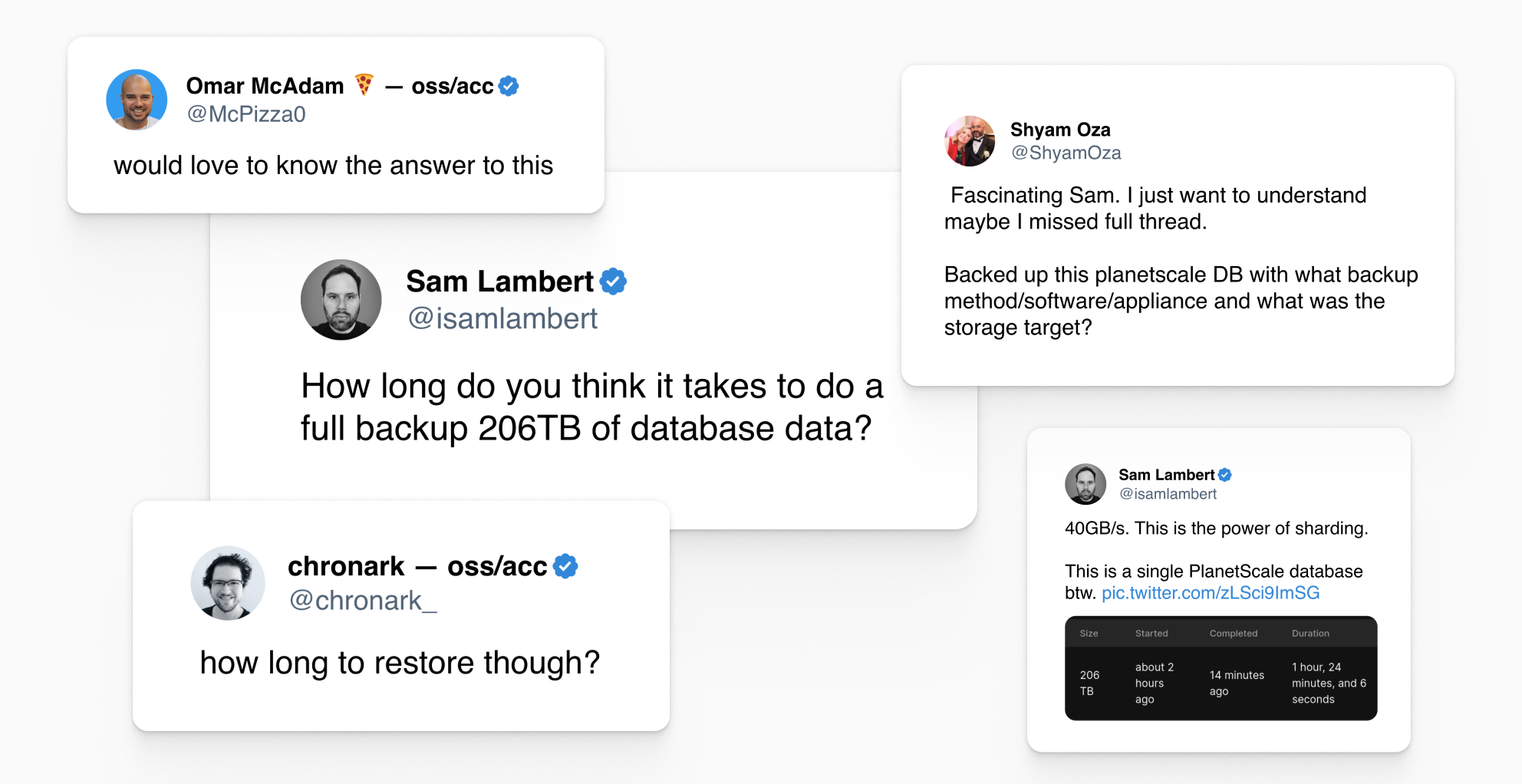
How do we back up huge databases correctly, efficiently, and without having a significant negative impact on production workloads? This article aims to answer those questions.
How PlanetScale backups work
All PlanetScale databases are powered by Vitess which exists as a proxy, sharding, and coordination layer that sits between your application and the MySQL instances. The default architecture of an unsharded Base plan database on PlanetScale looks like this:
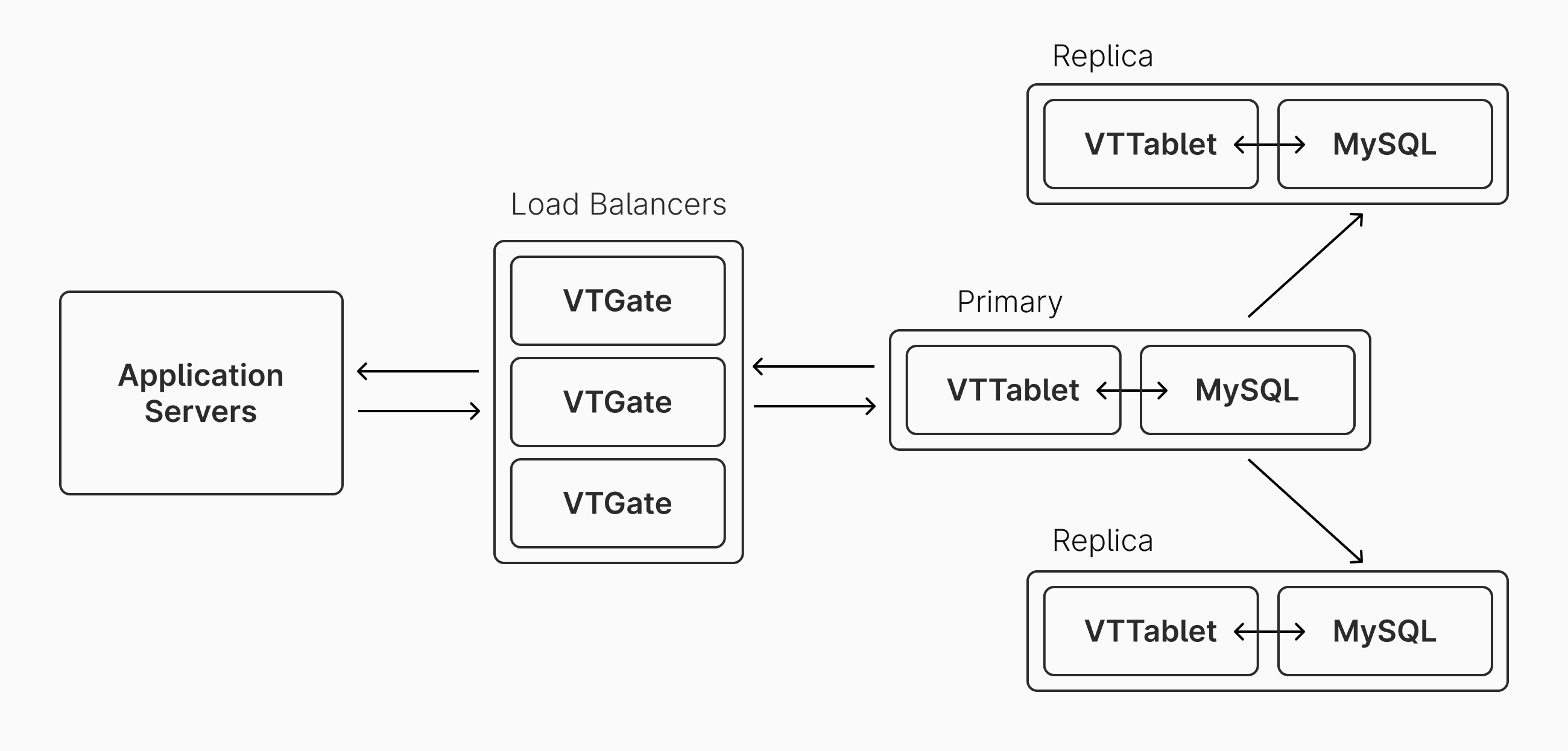
By default, all query traffic is handled by the primary MySQL instance. The replicas primarily exist for high availability, but can also be used for handling read queries if desired.
The default configuration is to have a backup taken every 12 hours. However, the schedule is configurable, and you can also manually trigger a new database backup. Backups can be viewed and scheduled from the Backups page in the PlanetScale app:
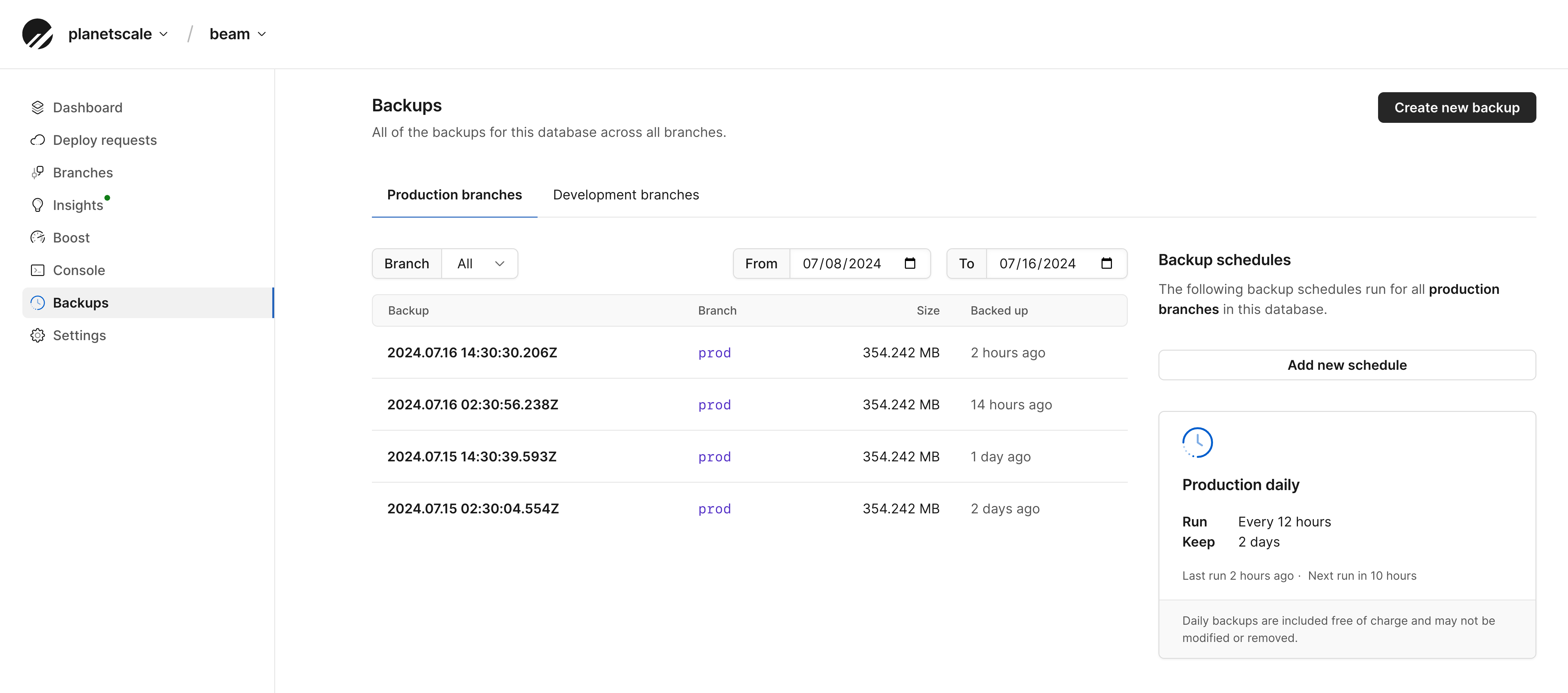
Our internal PlanetScale API routinely checks for pending scheduled backups and starts them when necessary.
If you are managing your own independent Vitess cluster, you can configure the backup engine and storage service to suit your needs. Internally, PlanetScale uses the builtin backup engine since it works well for our backup procedure. It will store the backups themselves in either Amazon S3 or Google GCS, depending on which cloud the database cluster resides in.
The following occurs on the PlanetScale platform for each backup:
- The internal PlanetScale API initiates a backup request for a database, which includes backing up both the production branch and all development branches.
- This request gets passed on to PlanetScale Singularity, our internal service for managing infrastructure. This spins up a new compute instance in the same cluster as the primaries and replicas. This instance will handle running VTBackup, which manages the backup process.
- If a previous backup exists (the common case), this backup gets restored to the dedicated VTBackup instance. PlanetScale uses Vitess'
builtinbackup policy for these restore operations. They are retrieved from either Amazon S3 or Google GCS. Existing backups are encrypted at rest, so they are decrypted upon arrival. - After restoration is complete, VTBackup spins up a new instance of MySQL, running atop the backup that was just fetched from S3/GCS.
- VTBackup then instructs the new MySQL instance to connect to the primary VTGate. It will request a checkpoint in time, and then all changes between the last backup and the checkpoint will be replicated. This is typically a very small % of the total database size.
- After everything is caught up, the MySQL instance that was managing the catch-up replication for the backup is stopped.
- The regular Vitess backup workflow is started, storing the new full backup to to Amazon S3 or Google GCS.
When working with a sharded database, each shard can complete steps 2-7 in parallel. This parallelization allows backups to be taken quickly, even for extremely large databases. We'll look at some real-life examples of this in the next section.
For step 5, we choose to connect to a primary to get caught up rather than a replica. Why is that? There's a minor trade-off between using the primary vs using a replica to do this catch-up replication. If taken from a primary, it will have the most up to date information. If taken from the replica, we avoid sending additional compute, I/O, and bandwidth demand to the primary server.
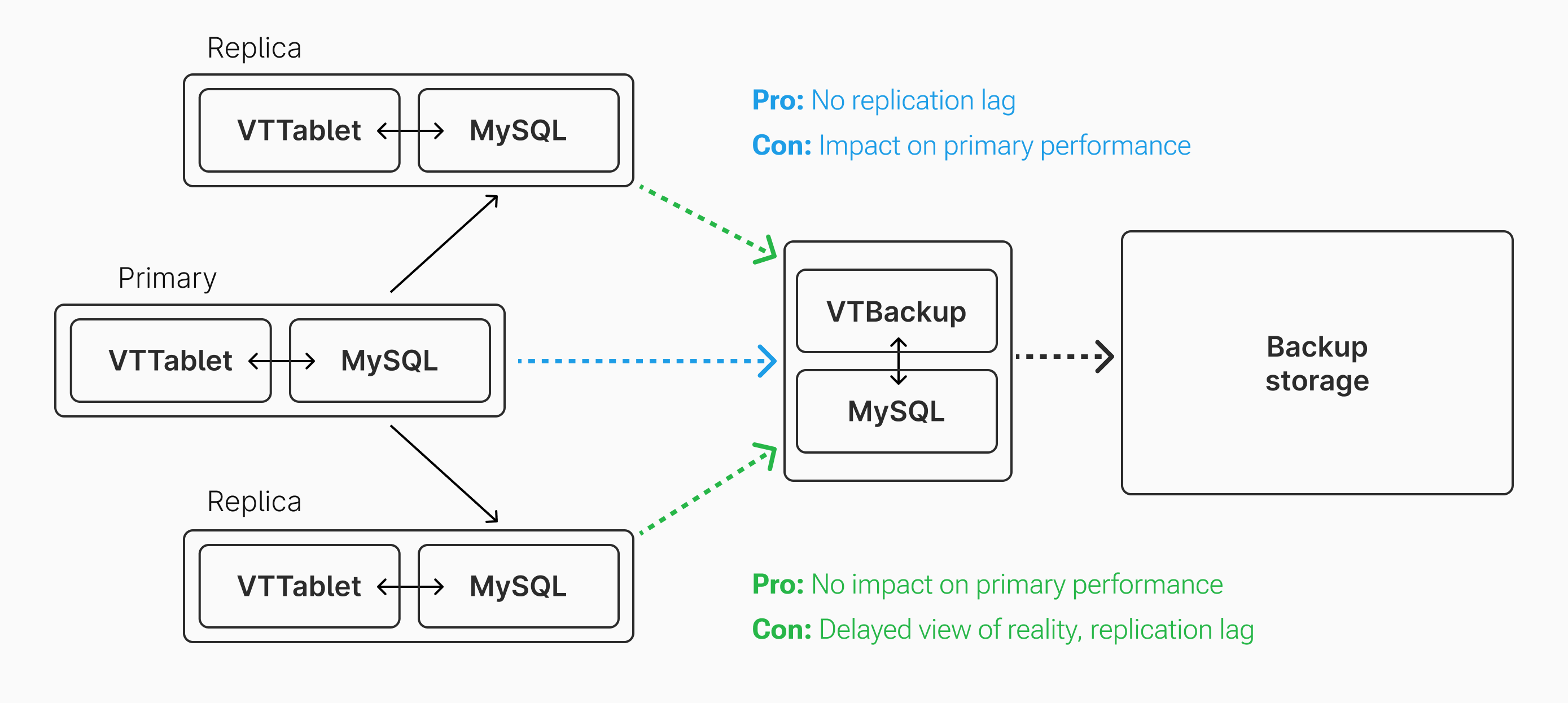
However, in our case, the primary is already performing replication to two other nodes. Also, unless it is the first backup, the primary does not need to send the full database contents to the backup server. It only needs to send what has changed since the last backup, ideally only 12 or 24 hours prior. Thus, having the backup server replicate from the primary is typically acceptable from a performance perspective. If this performance hit becomes an issue, backups can be scheduled to happen during lower traffic hours.
Backing up an unsharded database
Let's examine a backup of an unsharded database. This database is 161 Gigabytes, in an unsharded environment, running with one primary and two replicas. Each primary and replica is provisioned with 8 vCPUs and 32 GB of RAM. Here's a screenshot of a recent backup of this database:

The backup took 30 minutes and 40 seconds to complete. Recall that for each backup, PlanetScale must:
- Fetch the previous backup from storage
- Catch up this backup
- Send an fresh backup to storage
Given this, we can approximate the average network throughput for the backup by computing:
(previous_backup_size + new_backup_size) / duration
In this case, the previous backup was 163 GB (some data must have been pruned since). Using the formula, we get 176 MB/s as the average network throughput during this backup. Though that is not extraordinarily fast, it's quite a reasonable number for a database of that size. Backups are scheduled once every 12 hours, so there is no issue with one backup overlapping with another.
Note
The formula above is only to be used for rough approximations. It is not a precise calculation. It does not take into account data compression, catch-up replication, schema structure, throttling, and other factors that affect data size and backup speed.
Backing up a sharded database
Let's now consider a backup of a much larger 20 terabyte sharded database. 20 terabytes is 124x the size of the previous 161 gigabyte database. Extrapolating from what we calculated before, we might think that backing up this database would take 63 hours. If true, it would be completely unacceptable for two reasons:
- That's a long window of time for something to go wrong (poor network conditions, etc).
- If our policy is to back up every 12 hours, backups would overlap or have to be delayed. Backups would either have to wait 2-3 days before beginning again, or multiple would have to be running simultaneously, bogging down the server and network resources.
Let's look at a recent backup from a real production 20 terabyte database running on PlanetScale:

Instead of the projected 63 hours, it took 1 hour, 39 minutes, and 4 seconds. How can this be? The answer is sharding.
This particular database is running on 32 shards, each of which has comparable resources to the unsharded 161 gigabyte database from earlier. In a sharded architecture, the data for the cluster is spread out across instances. If the data is distributed evenly, that means each shard contains approximately 625 gigabytes. Each of these can be backed up in parallel, managed and monitored by PlanetScale's infrastructure.
Using the same formula from before, this means the overall database backup operated at approximately 6.7 GB/s of throughput. That's a much more impressive number! However, each individual shard was operating at closer to 210 MB/s. This is only slightly faster transfer speed than our smaller example. Yet, due to the power of parallelization, we are able to back up the database quickly.
Any sharded database can benefit from this parallelization, whether you have 4 shards or 400.
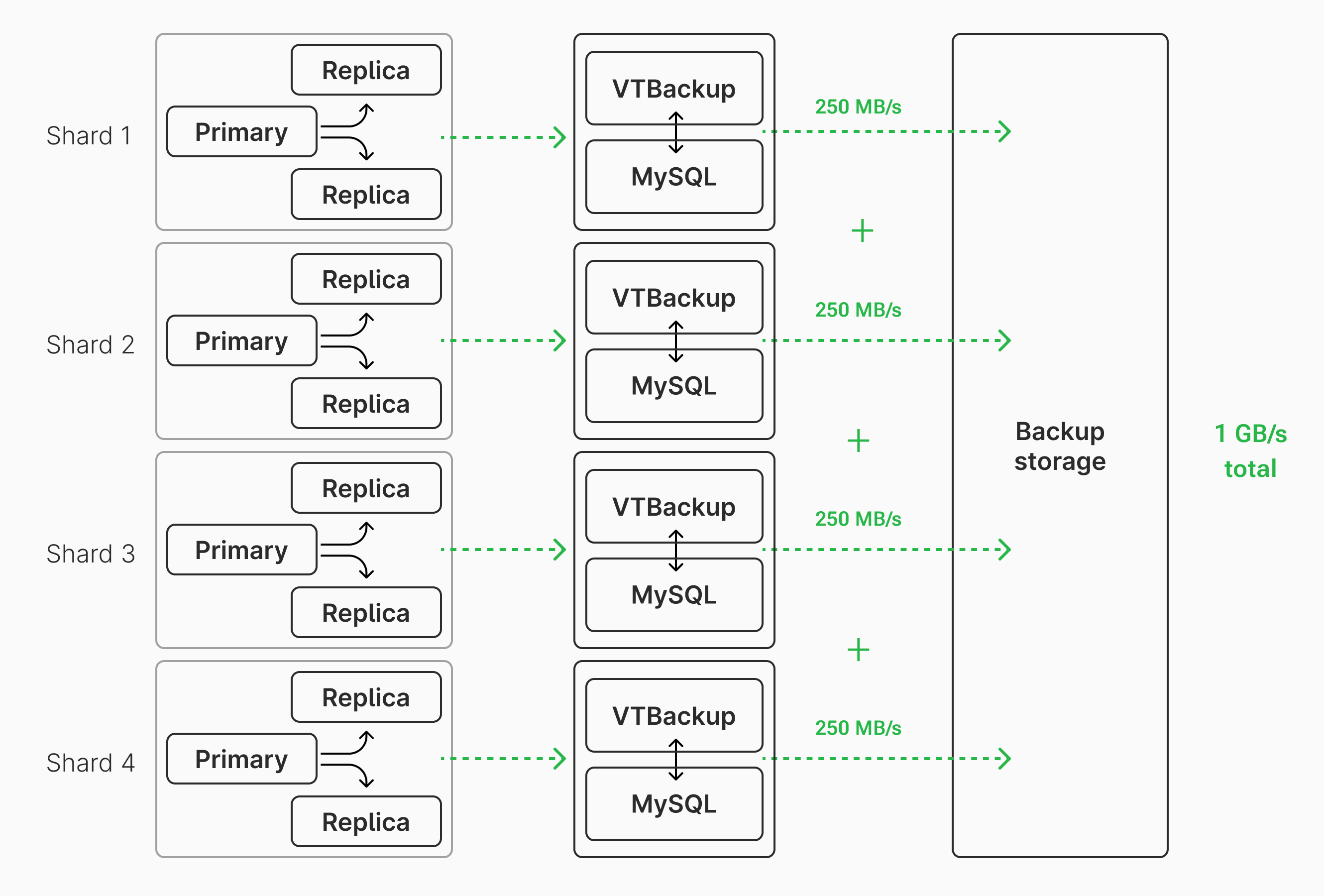
For fun, let's take a look at one other recent backup of a large, sharded database hosted on PlanetScale:

This backup took a mere 3 hours, 37 minutes, and 11 seconds. This database is an order of magnitude larger than the last example and is running on 256 shards. Again using the same formula, the database backup operated at an average of 35 GB/s of throughput. Extremely fast! However, each shard is only responsible for ~900 gigabytes of data and has an average throughput of 137 MB/s throughout the backup. The performance comes from the power of parallelization, which a sharded database allows for.
Recovering from failure
The speed benefits that one gains from backing up in parallel with sharding also apply in reverse when performing a full database restore. All of the same parallelization can be used, each shard individually restoring the data it is responsible for. This allows the restoration of a massive database to take mere hours rather than days or weeks. Though full database restores should be a less common operation, it's good to know that it can be accomplished quickly in case of an emergency.
Why are backups important?
At first, this may seem like a question with an obvious answer: I want to back up my DB in case the server (or disk on the server) crashes! This is true in some cases, but the introduction of replication adds more nuance to this question. The two replicas already act as a form of "backups" of the primary, helping in the case of a primary server failure. If the primary goes down, there's no need to spin up a new primary directly from a backup. Instead, PlanetScale elects an existing replica to become the new primary. So if we're already "safe" from primary failure, what else are backups important for?
For one, backups are needed when creating a new replica. When the primary goes down, we promote a replica to a primary, but now we need a replacement replica! To do this, Vitess spins up a new empty replica server, restores a backup to that server, then points it to the primary to get caught-up via replication. Without the ability to restore from backup, the new replica would need to replicate the entire database from the primary. This would take a long time and have a negative impact on performance. Backups allow for new replica creation to happen with less negative performance impact on the primary.
Backups also provide a snapshot in time of the entire DB state. This is crucial for some situations.
As one example, we recently heard a story from one of our customers about how a backup was crucial for recovering deleted data. A customer on their platform accidentally deleted a bunch of information from their account, which in turn dropped many rows from their PlanetScale database. These changes go to the primary and are propagated to both replicas. The application also did not have a "soft-delete" feature, meaning that the data was really deleted, rather than just hidden. However, this data still existed in one of the recent backups, and thus was able to be restored. Accidental deletion of data can also be caused by application bugs or malicious attacks. Backups provide a safety net for these scenarios.
PlanetScale makes it simple to restore data from a backup. Backups can be restored to a development branch, and then browsed and cherry-picked as necessary. In fact, when a new replica is spun up after a primary failure, a backup is used to seed the new replica. Then, the regular replication flow is used to catch the replica up with all changes on the newly elected primary.
Backups are also needed to perform point in time recovery in Vitess.
Conclusion
Sharding has many benefits, and backup time is no exception. If backup frequency and overall time taken is important to you and your infrastructure team, using a sharded database is a great way to keep backups performant.