已经好久没有写博客了。本文不说 Vue3.0 了,相信已经有很多文章在说它了。而前一段时间尤大开源的 Vite 则是一个更加吸引我的东西,它的总体思路是很不错的,早期源码的学习成本也比较低,于是就趁着假期学习一番。
本文撰写于 Vite-0.9.1 版本。
借用作者的原话:
Vite,一个基于浏览器原生 ES imports 的开发服务器。利用浏览器去解析 imports,在服务器端按需编译返回,完全跳过了打包这个概念,服务器随起随用。同时不仅有 Vue 文件支持,还搞定了热更新,而且热更新的速度不会随着模块增多而变慢。针对生产环境则可以把同一份代码用 rollup 打包。虽然现在还比较粗糙,但这个方向我觉得是有潜力的,做得好可以彻底解决改一行代码等半天热更新的问题。
注意到两个点:
一个是 Vite 主要对应的场景是开发模式,原理是拦截浏览器发出的 ES imports 请求并做相应处理。(生产模式是用 rollup 打包) 一个是 Vite 在开发模式下不需要打包,只需要编译浏览器发出的 HTTP 请求对应的文件即可,所以热更新速度很快。 因此,要实现上述目标,需要要求项目里只使用原生 ES imports,如果使用了 require 将失效,所以要用它完全替代掉 Webpack 就目前来说还是不太现实的。上面也说了,生产模式下的打包不是 Vite 自身提供的,因此生产模式下如果你想要用 Webpack 打包也依然是可以的。从这个角度来说,Vite 可能更像是替代了 webpack-dev-server 的一个东西。
Vite 的实现离不开现代浏览器原生支持的 模块功能 。如下:
1 2 3 <script type ="module" > import { a } from './a.js' </script >
当声明一个 script 标签类型为 module 时,浏览器将对其内部的 import 引用发起 HTTP 请求获取模块内容。比如上述,浏览器将发起一个对 HOST/a.js 的 HTTP 请求,获取到内容之后再执行。
Vite 劫持了这些请求,并在后端进行相应的处理(比如将 Vue 文件拆分成 template、style、script 三个部分),然后再返回给浏览器。
由于浏览器只会对用到的模块发起 HTTP 请求,所以 Vite 没必要对项目里所有的文件先打包后返回,而是只编译浏览器发起 HTTP 请求的模块即可。这里是不是有点按需加载的味道?
看到这里,可能有些朋友不免有些疑问,编译和打包有什么区别?为什么 Vite 号称「热更新的速度不会随着模块增多而变慢」?
简单举个例子,有三个文件 a.js、b.js、c.js
1
2
3
4
5
6
7
const a = (export { a }const b = (export { b }
1
2
3
4
5
6
7
8
9
import { a } from './a' import { b } from './b' const c = ( return a () + b () } export { c }
如果以 c 文件为入口,那么打包就会变成如下(结果进行了简化处理):(假定打包文件名为 bundle.js)
1
2
3
4
5
6
7
8
const a = (const b = (const c = ( return a () + b () } export { c }
值得注意的是,打包也需要有编译的步骤。
Webpack 的热更新原理简单来说就是,一旦发生某个依赖(比如上面的 a.js )改变,就将这个依赖所处的 module 的更新,并将新的 module 发送给浏览器重新执行。由于我们只打了一个 bundle.js,所以热更新的话也会重新打这个 bundle.js。试想如果依赖越来越多,就算只修改一个文件,理论上热更新的速度也会越来越慢。
而如果是像 Vite 这种只编译不打包会是什么情况呢?
只是编译的话,最终产出的依然是 a.js、b.js、c.js 三个文件,只有编译耗时。由于入口是 c.js,浏览器解析到 import { a } from './a' 时,会发起 HTTP 请求 a.js (b 同理),就算不用打包,也可以加载到所需要的代码,因此省去了合并代码的时间。
在热更新的时候,如果 a 发生了改变,只需要更新 a 以及用到 a 的 c。由于 b 没有发生改变,所以 Vite 无需重新编译 b,可以从缓存中直接拿编译的结果。这样一来,修改一个文件 a,只会重新编译这个文件 a 以及浏览器当前用到这个文件 a 的文件,而其余文件都无需重新编译。所以理论上热更新的速度不会随着文件增加而变慢。
当然这样做有没有不好的地方?有,初始化的时候如果浏览器请求的模块过多,也会带来初始化的性能问题。不过如果你能遇到初始化过慢的这个问题,相信热更新的速度会弥补很多。当然我相信以后尤大也会解决这个问题。
上面说了这么多的铺垫,可能还不够直观,我们可以先跑一个 Vite 项目来实际看看。
按照官网的说明,可以输入如下命令(<project-name> 为自己想要的目录名即可)
1
2
3
4
$ npx create-vite-app <project-name> $ cd <project-name> $ npm install $ npm run dev
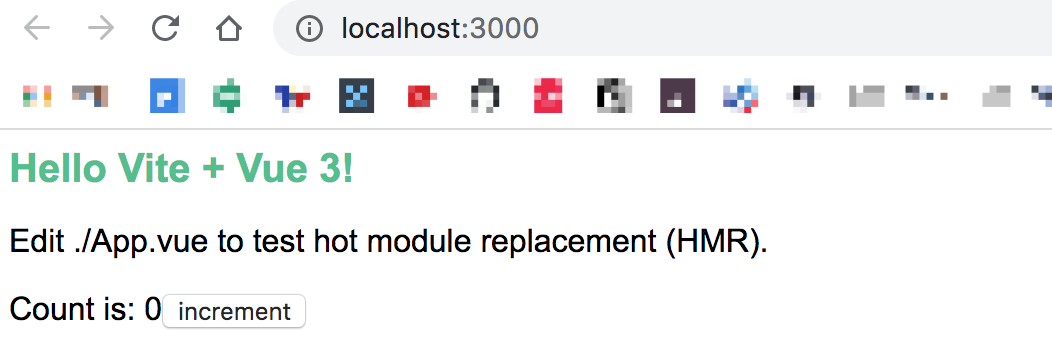
如果一切都正常你将在 localhost:3000(Vite 的服务器起的端口) 看到这个界面:
并得到如下的代码结构:
1
2
3
4
5
. ├── App.vue // 页面的主要逻辑 ├── index.html // 默认打开的页面以及 Vue 组件挂载 ├── node_modules └── package.json
接下来开始说一下 Vite 实现的核心——拦截浏览器对模块的请求并返回处理后的结果。
我们知道,由于是在 localhost:3000 打开的网页,所以浏览器发起的第一个请求自然是请求 localhost:3000/,这个请求发送到 Vite 后端之后经过静态资源服务器的处理,会进而请求到 /index.html,此时 Vite 就开始对这个请求做拦截和处理了。
首先,index.html 里的源码是这样的:
1 2 3 4 5 6 7 <div id ="app" > </div > <script type ="module" > import { createApp } from 'vue' import App from './App.vue' createApp (App ).mount ('#app' )</script >
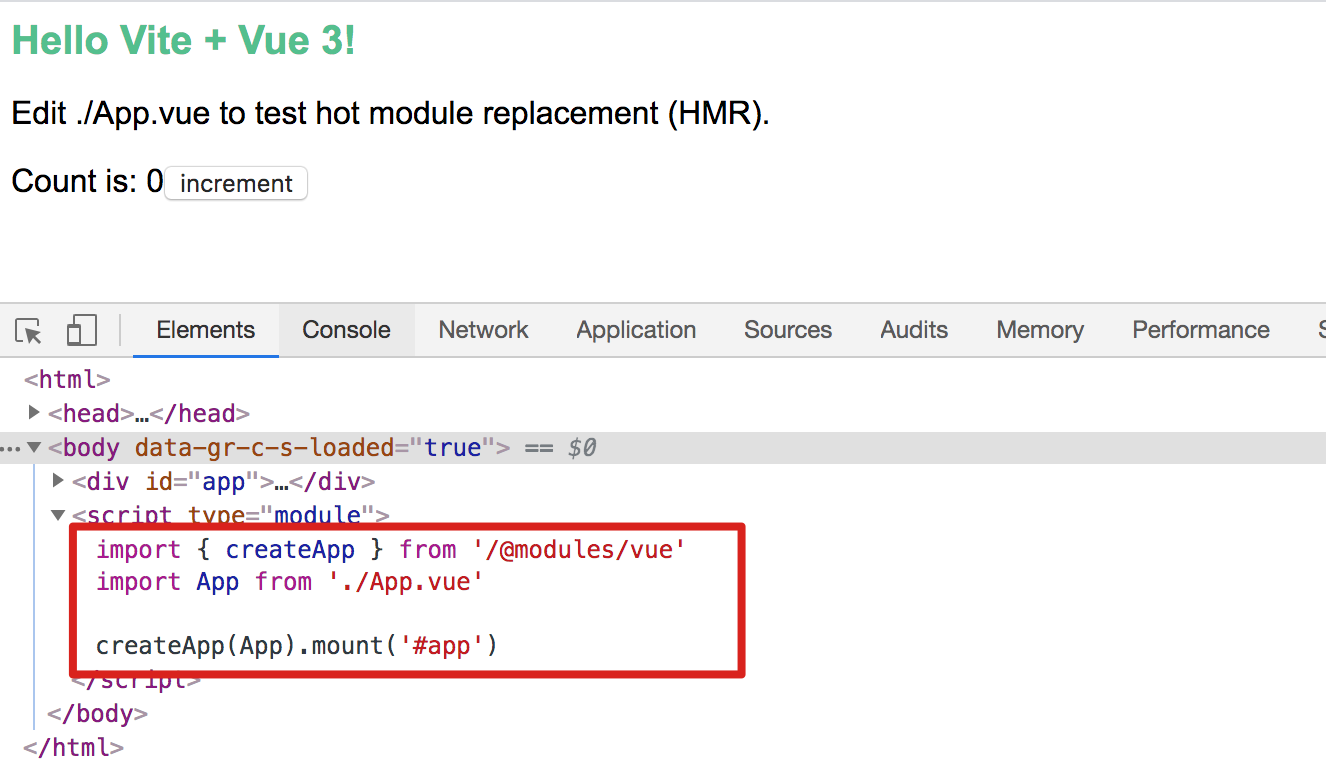
但是在浏览器里它是这样的:
注意到什么不同了吗?是的, import { createApp } from 'vue' 换成了 import { createApp } from '/@modules/vue。
这里就不得不说浏览器对 import 的模块发起请求时的一些局限了,平时我们写代码,如果不是引用相对路径的模块,而是引用 node_modules 的模块,都是直接 import xxx from 'xxx',由 Webpack 等工具来帮我们找这个模块的具体路径。但是浏览器不知道你项目里有 node_modules,它只能通过相对路径去寻找模块。
因此 Vite 在拦截的请求里,对直接引用 node_modules 的模块都做了路径的替换,换成了 /@modules/ 并返回回去。而后浏览器收到后,会发起对 /@modules/xxx 的请求,然后被 Vite 再次拦截,并由 Vite 内部去访问真正的模块,并将得到的内容再次做同样的处理后,返回给浏览器。
上面说的这步替换来自 src/node/serverPluginModuleRewrite.ts:
1
2
3
4
5
6
7
8
9
10
11
12
13
14
15
16
17
18
19
20
21
22
if (ctx.path === '/index.html' ) { const html = await readBody (ctx.body ) ctx.body = html.replace ( /(<script\b[^>]*>)([\s\S]*?)<\/script>/gm , (_, openTag, script ) => { const devFlag = hasInjectedDevFlag ? `` : devInjectionCode hasInjectedDevFlag = true return `${devFlag} ${openTag} ${rewriteImports( script, '/index.html' , resolver )} </script>` } ) }
如果并没有在 script 标签内部直接写 import,而是用 src 的形式引用的话如下:
1 <script type="module" src="/main.js" ></script>
那么就会在浏览器发起对 main.js 请求的时候进行处理:
1
2
3
4
5
6
7
8
9
10
11
12
13
14
15
16
17
18
if ( ctx.response .is ('js' ) && ) { const content = await readBody (ctx.body ) await initLexer ctx.body = rewriteImports ( content, ctx.url .replace (/(&|\?)t=\d+/ , '' ), resolver, ctx.query .t ) rewriteCache.set (content, ctx.body ) }
替换逻辑 rewriteImports 就不展开了,用的是 es-module-lexer 来进行的语法分析获取 imports 数组,然后再做的替换。
如果 import 的是 .vue 文件,将会做更进一步的替换:
原本的 App.vue 文件长这样:
1 2 3 4 5 6 7 8 9 10 11 12 13 14 15 16 17 18 19 20 21 22 23 24 <template > <h1 > Hello Vite + Vue 3!</h1 > <p > Edit ./App.vue to test hot module replacement (HMR).</p > <p > <span > Count is: {{ count }}</span > <button @click ="count++" > increment</button > </p > </template > <script > export default { data : () => ({ count : 0 }), } </script > <style scoped > h1 { color : #4fc08d ; } h1 , p { font-family : Arial, Helvetica, sans-serif; } </style >
替换后长这样:
1
2
3
4
5
6
7
8
9
10
11
12
13
14
15
16
17
18
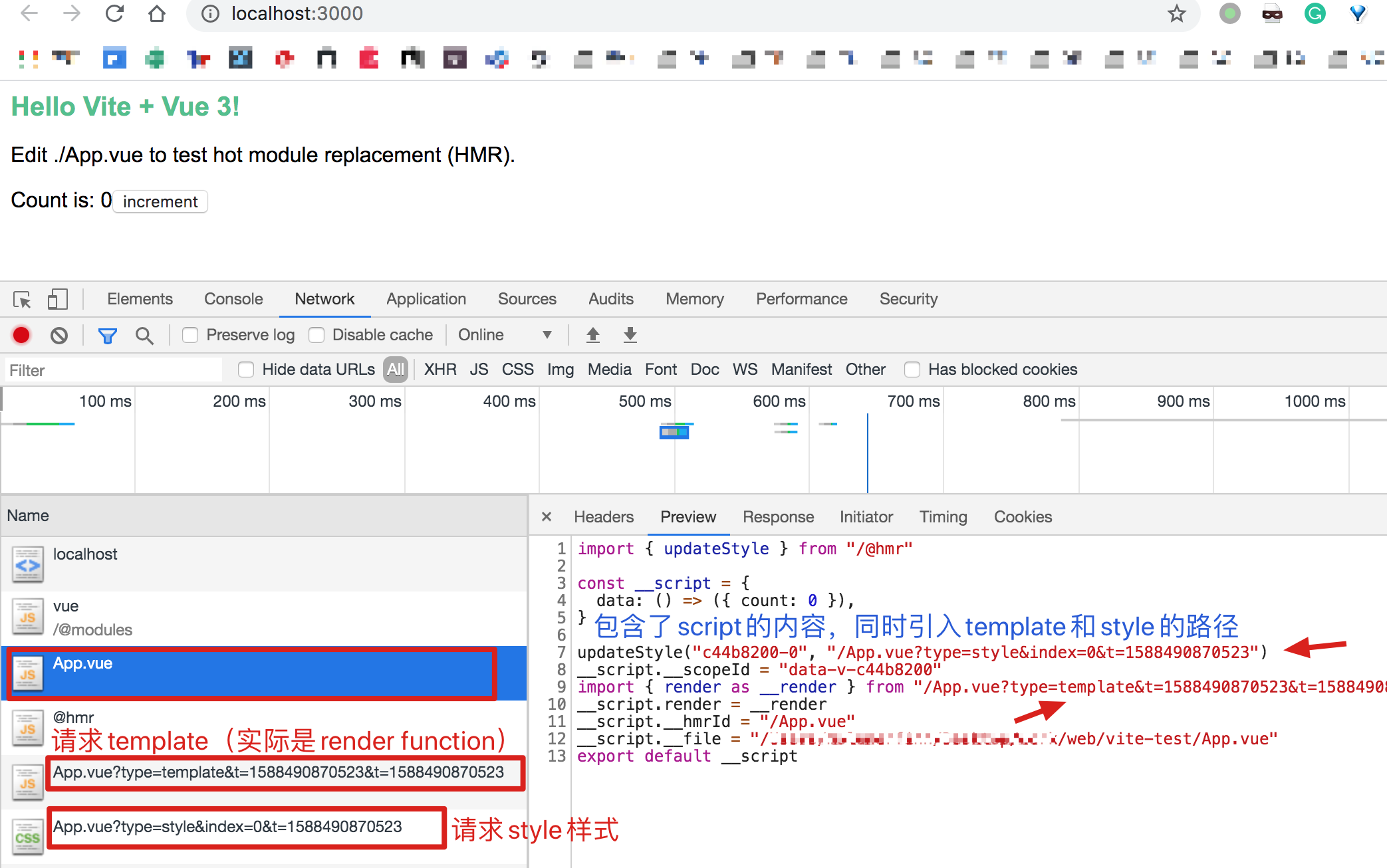
import { updateStyle } from "/@hmr" const __script = { data : () => ({ count : 0 }), } updateStyle ("c44b8200-0" , "/App.vue?type=style&index=0&t=1588490870523" )__script.__scopeId = "data-v-c44b8200" import { render as __render } from "/App.vue?type=template&t=1588490870523&t=1588490870523" __script.render = __render __script.__hmrId = "/App.vue" __script.__file = "/XXX/web/vite-test/App.vue" export default __script
这样就把原本一个 .vue 的文件拆成了三个请求(分别对应 script、style 和template) ,浏览器会先收到包含 script 逻辑的 App.vue 的响应,然后解析到 template 和 style 的路径后,会再次发起 HTTP 请求来请求对应的资源,此时 Vite 对其拦截并再次处理后返回相应的内容。
如下:
不得不说这个思路是非常巧妙的。
这一步的拆分来自 src/node/serverPluginVue.ts,核心逻辑是根据 URL 的 query 参数来做不同的处理(简化分析如下):
1
2
3
4
5
6
7
8
9
10
11
12
13
14
15
16
17
18
19
20
21
22
23
24
25
26
27
28
29
30
31
if (!query.type ) { ctx.type = 'js' ctx.body = compileSFCMain (descriptor, filePath, publicPath) return etagCacheCheck (ctx) } if (query.type === 'template' ) { ctx.type = 'js' ctx.body = compileSFCTemplate ( ) return etagCacheCheck (ctx) } if (query.type === 'style' ) { const index = Number (query.index ) const styleBlock = descriptor.styles [index] const result = await compileSFCStyle ( ) if (query.module != null ) { ctx.type = 'js' ctx.body = `export default ${JSON .stringify(result.modules)} ` } else { ctx.type = 'css' ctx.body = result.code } }
上面只涉及到了替换的逻辑,解析的逻辑来自 src/node/serverPluginModuleResolve.ts。这一步就相对简单了,核心逻辑就是去 node_modules 里找有没有对应的模块,有的话就返回,没有的话就报 404:(省略了很多逻辑,比如对 web_modules 的处理、缓存的处理等)
1
2
3
4
5
6
7
8
9
10
11
try { const file = resolve (root, id) return serve (id, file, 'node_modules' ) } catch (e) { console .error ( chalk.red (`[vite] Error while resolving node_modules with id "${id} ":` ) ) console .error (e) ctx.status = 404 }
上面已经说完了 Vite 是如何运行一个 Web 应用的,包括如何拦截请求、替换内容、返回处理后的结果。接下来说一下 Vite 热更新的实现,同样实现的非常巧妙。
我们知道,如果要实现热更新,那么就需要浏览器和服务器建立某种通信机制,这样浏览器才能收到通知进行热更新。Vite 的是通过 WebSocket 来实现的热更新通信。
客户端的代码在 src/client/client.ts,主要是创建 WebSocket 客户端,监听来自服务端的 HMR 消息推送。
Vite 的 WS 客户端目前监听这几种消息:
connected: WebSocket 连接成功vue-reload: Vue 组件重新加载(当你修改了 script 里的内容时)vue-rerender: Vue 组件重新渲染(当你修改了 template 里的内容时)style-update: 样式更新style-remove: 样式移除js-update: js 文件更新full-reload: fallback 机制,网页重刷新其中针对 Vue 组件本身的一些更新,都可以直接调用 HMRRuntime 提供的方法,非常方便。其余的更新逻辑,基本上都是利用了 timestamp 刷新缓存重新执行的方法来达到更新的目的。
核心逻辑如下,我感觉非常清晰明了:
1
2
3
4
5
6
7
8
9
10
11
12
13
14
15
16
17
18
19
20
21
22
23
24
25
26
27
28
29
30
31
32
33
34
35
36
37
38
39
40
41
42
43
44
45
46
47
48
49
50
51
52
53
54
55
56
57
58
59
60
import { HMRRuntime } from 'vue' console .log ('[vite] connecting...' )declare var __VUE_HMR_RUNTIME__ : HMRRuntime const socket = new WebSocket (`ws://${location.host} ` )socket.addEventListener ('message' , ({ data } ) => { const { type, path, id, index, timestamp, customData } = JSON .parse (data) switch (type) { case 'connected' : console .log (`[vite] connected.` ) break case 'vue-reload' : import (`${path} ?t=${timestamp} ` ).then ((m ) => { __VUE_HMR_RUNTIME__.reload (path, m.default ) console .log (`[vite] ${path} reloaded.` ) }) break case 'vue-rerender' : import (`${path} ?type=template&t=${timestamp} ` ).then ((m ) => { __VUE_HMR_RUNTIME__.rerender (path, m.render ) console .log (`[vite] ${path} template updated.` ) }) break case 'style-update' : updateStyle (id, `${path} ?type=style&index=${index} &t=${timestamp} ` ) console .log ( `[vite] ${path} style${index > 0 ? `#${index} ` : `` } updated.` ) break case 'style-remove' : const link = document .getElementById (`vite-css-${id} ` ) if (link) { document .head .removeChild (link) } break case 'js-update' : const update = jsUpdateMap.get (path) if (update) { update (timestamp) console .log (`[vite]: js module reloaded: ` , path) } else { console .error ( `[vite] got js update notification but no client callback was registered. Something is wrong.` ) } break case 'custom' : const cbs = customUpdateMap.get (id) if (cbs) { cbs.forEach ((cb ) => cb (customData)) } break case 'full-reload' : location.reload () } })
服务端的实现位于 src/node/serverPluginHmr.ts。核心是监听项目文件的变更,然后根据不同文件类型(目前只有 vue 和 js)来做不同的处理:
1 2 3 4 5 6 7 8 watcher.on ('change' , async (file) => { const timestamp = Date .now () if (file.endsWith ('.vue' )) { handleVueReload (file, timestamp) } else if (file.endsWith ('.js' )) { handleJSReload (file, timestamp) } })
对于 Vue 文件的热更新而言,主要是重新编译 Vue 文件,检测 template 、script 、style 的改动,如果有改动就通过 WS 服务端发起对应的热更新请求。
简单的源码分析如下:
1
2
3
4
5
6
7
8
9
10
11
12
13
14
15
16
17
18
19
20
21
22
23
24
25
26
27
28
29
30
31
32
33
34
35
36
37
38
39
40
41
42
43
44
45
46
47
48
49
50
51
52
53
54
55
56
57
58
59
60
61
62
63
64
65
66
67
68
69
70
71
72
73
74
75
76
77
78
79
80
async function handleVueReload ( file: string, timestamp: number = Date .now(), content?: string const publicPath = resolver.fileToRequest (file) const cacheEntry = vueCache.get (file) debugHmr (`busting Vue cache for ${file} ` ) vueCache.del (file) const descriptor = await parseSFC (root, file, content) const prevDescriptor = cacheEntry && cacheEntry.descriptor if (!prevDescriptor) { return } let needReload = false let needRerender = false if (!isEqual (descriptor.script , prevDescriptor.script )) { needReload = true } if (!isEqual (descriptor.template , prevDescriptor.template )) { needRerender = true } const styleId = hash_sum (publicPath) const prevStyles = prevDescriptor.styles || [] const nextStyles = descriptor.styles || [] if (!needReload) { nextStyles.forEach ((_, i ) => { if (!prevStyles[i] || !isEqual (prevStyles[i], nextStyles[i])) { send ({ type : 'style-update' , path : publicPath, index : i, id : `${styleId} -${i} ` , timestamp }) } }) } prevStyles.slice (nextStyles.length ).forEach ((_, i ) => { send ({ type : 'style-remove' , path : publicPath, id : `${styleId} -${i + nextStyles.length} ` , timestamp }) }) if (needReload) { send ({ type : 'vue-reload' , path : publicPath, timestamp }) } else if (needRerender) { send ({ type : 'vue-rerender' , path : publicPath, timestamp }) } }
对于热更新 js 文件而言,会递归地查找引用这个文件的 importer。比如是某个 Vue 文件所引用了这个 js,就会被查找出来。假如最终发现找不到引用者,则会返回 hasDeadEnd: true。
1
2
3
4
5
6
7
8
const vueImporters = new Set <string>() const jsHotImporters = new Set <string>() const hasDeadEnd = walkImportChain ( publicPath, importers, vueImporters, jsHotImporters )
如果 hasDeadEnd 为 true,则直接发送 full-reload。如果 vueImporters 或 jsHotImporters 里查找到需要热更新的文件,则发起热更新通知:
1
2
3
4
5
6
7
8
9
10
11
12
13
14
15
16
17
18
19
20
21
if (hasDeadEnd) { send ({ type : 'full-reload' , timestamp }) } else { vueImporters.forEach ((vueImporter ) => { send ({ type : 'vue-reload' , path : vueImporter, timestamp }) }) jsHotImporters.forEach ((jsImporter ) => { send ({ type : 'js-update' , path : jsImporter, timestamp }) }) }
写到这里,还有一个问题是,我们在自己的代码里并没有引入 HRM 的 client 代码,Vite 是如何把 client 代码注入的呢?
回到上面的一张图,Vite 重写 App.vue 文件的内容并返回时:
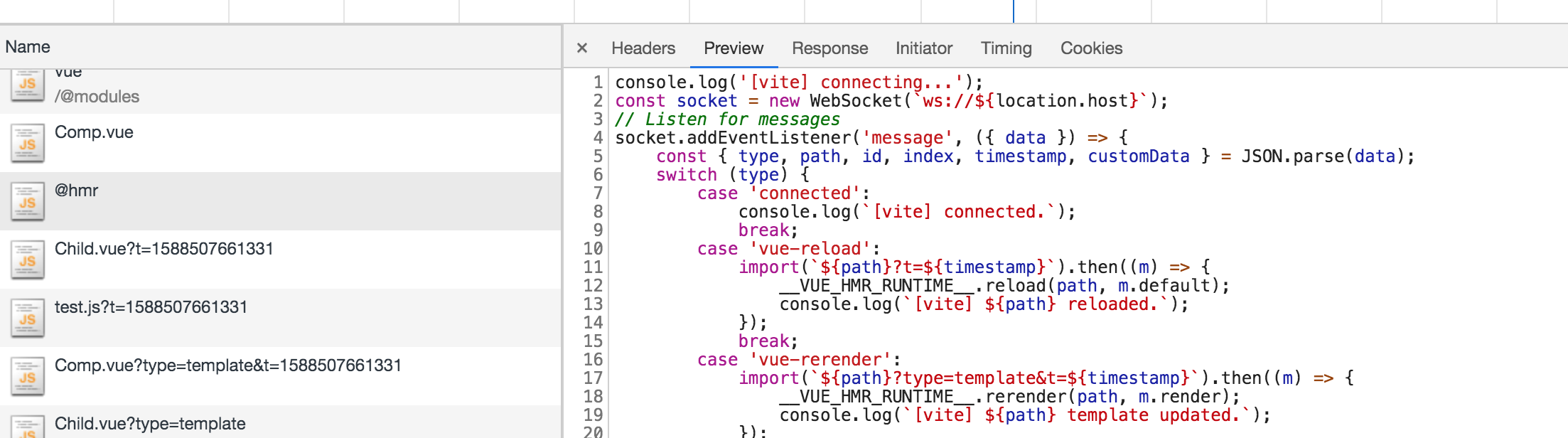
注意这张图里的代码区第一句话 import { updateStyle } from '/@hmr',并且在左侧请求列表中也有一个对 @hmr 文件的请求。这个请求是啥呢?
可以发现,这个请求就是上面说的客户端逻辑的 client.ts 的内容。
在 src/node/serverPluginHmr.ts 里,有针对 @hmr 文件的解析处理:
1
2
3
4
5
6
7
8
9
10
11
12
export const hmrClientFilePath = path.resolve (__dirname, './client.js' )export const hmrClientId = '@hmr' export const hmrClientPublicPath = `/${hmrClientId} ` app.use (async (ctx, next) => { if (ctx.path !== hmrClientPublicPath) { return next () } debugHmr ('serving hmr client' ) ctx.type = 'js' await cachedRead (ctx, hmrClientFilePath) })
至此,热更新的整体流程已经解析完毕。
这个项目最近在以惊人的速度迭代着,因此没过多久以后再回头看这篇文章,可能代码、实现已经过时。不过 Vite 的整体思路是非常棒的,在早期源码不多的情况下,能学到更贴近作者原始想法的东西,也算是很不错的收获。希望本文能给你学习 Vite 一些参考,有错误也欢迎大家指出。