



惯性聚合 高效追踪和阅读你感兴趣的博客、新闻、科技资讯
阅读原文 在惯性聚合中打开

推荐订阅源

罗磊的独立博客
Forbes - Security
Forbes - Security
Blog — PlanetScale
Blog — PlanetScale
P
Proofpoint News Feed
Apple Machine Learning Research
Google DeepMind News
MyScale Blog
MyScale Blog
GbyAI
GbyAI
B
Blog RSS Feed
S
SegmentFault 最新的问题
freeCodeCamp Programming Tutorials: Python, JavaScript, Git & More
cs.AI updates on arXiv.org
CTFtime.org: upcoming CTF events
小众软件
小众软件
The Last Watchdog
The Last Watchdog
W
WeLiveSecurity
Webroot Blog
Webroot Blog
S
Security @ Cisco Blogs
Hugging Face - Blog
Hugging Face - Blog
Microsoft Security Blog
月光博客
月光博客
博客园 - 聂微东
F
Fortinet All Blogs
H
Hacker News: Front Page
A
About on SuperTechFans
Application and Cybersecurity Blog
C
Check Point Blog
V
V2EX
Threat Intelligence Blog | Flashpoint
Y
Y Combinator Blog
酷 壳 – CoolShell
酷 壳 – CoolShell
N
News | PayPal Newsroom
Cisco Talos Blog
Cisco Talos Blog
Exploit-DB.com RSS Feed
The Cloudflare Blog
P
Privacy & Cybersecurity Law Blog
N
Netflix TechBlog - Medium
C
CXSECURITY Database RSS Feed - CXSecurity.com
Recorded Future
Recorded Future
Cyber Security Advisories - MS-ISAC
Google DeepMind News
大猫的无限游戏
大猫的无限游戏
美团技术团队
Security Latest
Security Latest
钛媒体:引领未来商业与生活新知
钛媒体:引领未来商业与生活新知
I
InfoQ
Recent Announcements
The GitHub Blog
The GitHub Blog
Google Online Security Blog
T
The Exploit Database - CXSecurity.com

Example blog

Ghost routing explained with routes.yaml examples — routes, collections & taxonomies Ghost redirects explained with practical redirects.yaml examples How to Serve JSON or XML Data in Ghost How to Change Your Default Post Template in Ghost Ghost Custom Theme Settings How to add Google Fonts to Ghost Themes How to Configure Ghost with Mailgun Ghost Theme Structure & Organization How to Make Custom Templates in Ghost Themes How to Install Ghost CMS via Ghost-CLI How to Add Syntax Highlighting to Ghost The best Ghost CMS hosting platforms Ghost 6.0 — Social Web and Native Ghost Analytics Ghost CMS Social web beta, email 2FA and more author social links How to keep custom design settings when updating your Ghost theme How to use the public preview card in Ghost How to add members-specific sections in Ghost How to customize the default content CTA in Ghost How to build a custom homepage in Ghost An overview of Ghost editor cards and and how they work Ghost CMS News: One-time payments & collecting sales tax How to customize the private site access template in Ghost How to add custom fonts in Ghost themes Ghost CMS News: Additional payment methods & internal linking How to use Code Injection in Ghost How to set meta data of your custom routes & collections in Ghost Ghost CMS News: TK reminders, ActivityPub and improvements How to format dates and use the date helper in Ghost Ghost CMS internationalization, custom fonts & spam protection Understanding and optimizing post and page settings in Ghost CMS Trigger the Ghost Portal popup based on page scroll progress How to Deploy Your Ghost Theme with GitHub Actions How to create a custom recommendations page for your Ghost CMS theme Ghost CMS News: New editor, refreshed settings & recommendations Ghost CMS News: Source - the new default theme and native image editing How to Add Different Logos for Dark & Light Themes in Ghost Upgrade to Node v18 for Ghost CMS & common errors Ghost Snippets: Adding Schema markup in Ghost How to add a scroll-based progress bar to your Ghost CMS site How to Create a Custom Navigation Template in Ghost How to Segment Subscribers with Member Labels in Ghost The best way to create a contact page in Ghost How to Use the Ghost Subscription Forms in Your Theme & Posts How to update your Ghost site URL when self-hosting Ghost CMS News: Signup cards and better landing pages How to Add Breadcrumbs to Your Ghost Theme How to integrate the Applause Button into your Ghost theme How to Hide a Post From the Home Page in Ghost CMS Ghost CMS block and contentFor helper overview & tips How to add Image Lightbox to Ghost Themes Biron Themes becomes Bright Themes 🎉 How to Audit & Test a Ghost Theme How to Create Related Posts Section in Ghost How to Use Ghost Filter Expressions Ghost CMS newsletter settings and post analytics How to Update Your Ghost Theme When We Release New Versions Ghost CMS News: Automatic list cleaning & email troubleshooting How to Create a Featured Post Slider in Ghost How to Add Reading Time to Ghost Blog Posts How to Create a Post Archive for Your Ghost Theme Ghost CMS Price Helper Overview & Tips Self-Hosted Ghost CMS with DigitalOcean Ghost CMS News: Member Growth Sources & Audience Feedback How to Open External Links in a New Tab in Ghost How to Integrate Google Analytics with Ghost Ghost CMS News: History Log & Newsletter Analytics How to Automatically Add Member Labels From Referral Traffic in Ghost? Ghost CMS News: Free trials & email notifications Ghost CMS Match Helper Usage & Tips Ghost CMS News: Native Comments Ghost CMS News: Ghost Explore & Premium Newsletter Previews Ghost Snippets: Custom Progress Cards & Steps Ghost CMS News: Native Search The Best Ghost CMS Search Plugins & Libraries Ghost Snippets: Custom Stylish Tables How to Add a Scroll Top & Progress Indicator Button in Ghost Ghost Snippets: Accordions How to Add Tag Dropdown to Your Ghost Theme Ghost 5.0 released 🎉 Ghost Snippets: Custom Subscribe Forms Ghost Snippets: Custom Alert Boxes How to Show Post or Newsletter Issue Number in Ghost How to Self-Host Google Fonts in Ghost CMS Ghost CMS News: Membership, Tiers & Activity Feed Custom Pages in Ghost CMS Themes Ghost CMS Search Using Fuse.js Ghost CMS News: Offers and Discounts & New Cards Ghost CMS News: Membership tiers, email CTA & filters Ghost CMS News: Grammarly Support & Feature Image Captions. Ghost CMS News: Improved Member Accounts & Personalized Newsletter. Ghost 4.0 Launched With Native Newsletters & Membership Ghost CMS News: Cancellation Feedback & Newsletter Stats. Ghost CMS News: Improved Member Dashboard & Sidebar Views. Ghost CMS News: Google Pay support, email newsletters & secondary navigation Ghost CMS News: Member Support, Portal & Content Snippets. Ghost CMS News: Referral Programs & Responsive Images. Ghost Themes as Progressive Web Apps Ghost 3.0 is here with brand new features Ghost 2.0 is here with new features How to Add Search to Ghost Using ghostHunter
Ghost CMS News: Signup form embed, new editor and bulk actions.
Bright Themes · 2023-07-03 · via Example blog

With the most recent updates the Ghost team has introduced some interesting features, In this blog post, we will delve into the exciting new additions that make Ghost CMS the ultimate tool for creators and publishers. From embeddable signup forms, to new Ghost editor and post bulk actions.

Signup cards

The Ghost Editor has introduced a new editor card that aims to help users grow their audience on their publication. This new card, called the Signup card, provides additional ways to attract and engage readers without leaving the editor.

The Signup card builds upon the previously released embeddable signup forms, which allowed users to embed signup forms anywhere on the web. With the new card, users can now create and manage signup forms directly within their Ghost publication. The card seamlessly integrates with Ghost memberships, ensuring that the forms are displayed to the right audience and hidden from existing members to avoid confusion.

Signup form embed

Ghost CMS understands the importance of simplifying the process of capturing new subscribers, and embeddable signup forms make this endeavor more seamless than ever. This feature allows you to integrate customizable signup forms on the web, strategically placing them where they are most likely to capture the attention of visitors.

Within your Ghost admin panel, go to Settings → Membership, select a layout, and color, apply your labels. Ghost CMS generates a code snippet that you can easily embed on the web.
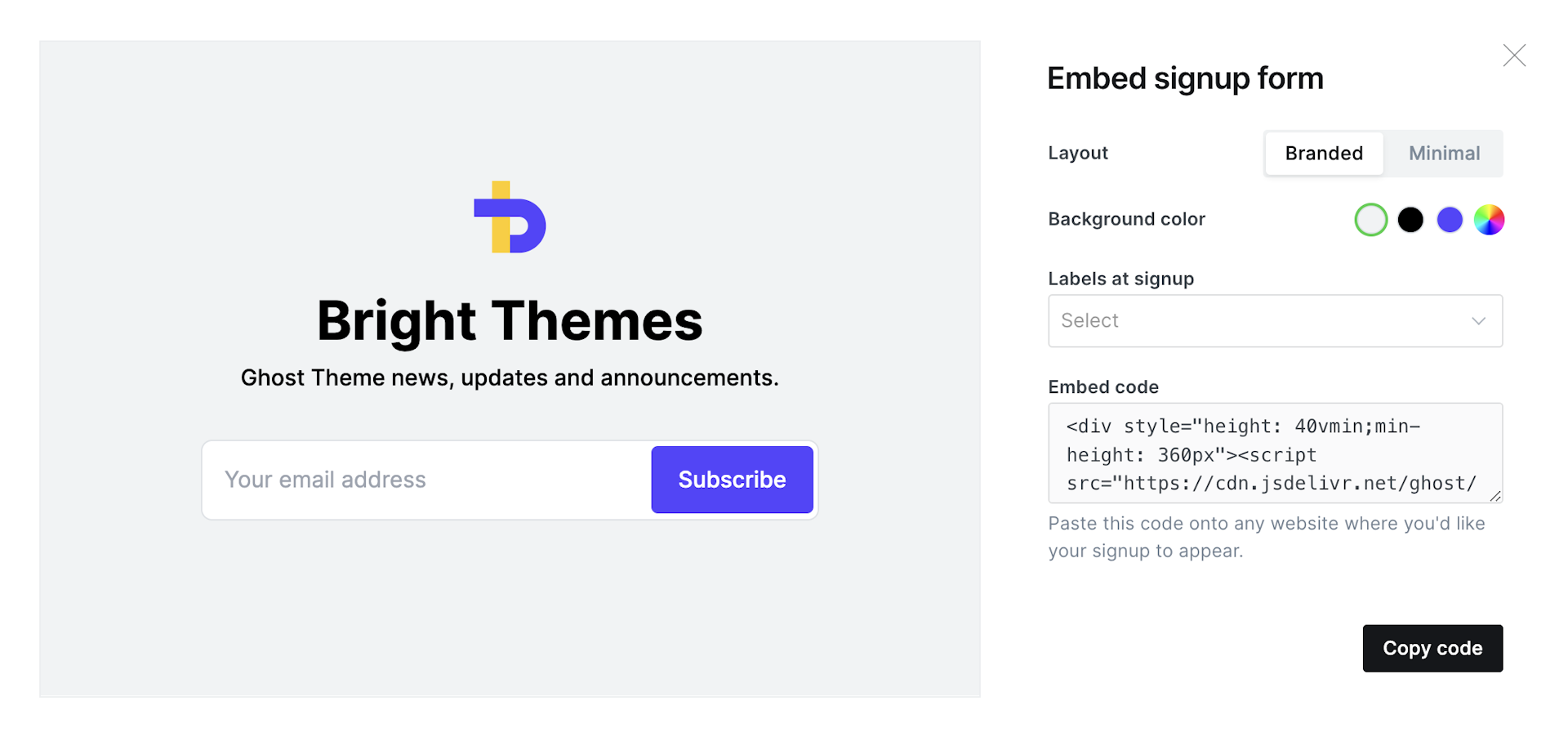
Ghost CMS embed form

Portal translations

Language should never be a barrier between your content and your readers. Portal Translations in Ghost CMS enables you to overcome this obstacle by providing translatable components for the membership and email features in Ghost.

With this feature, you can connect with a broader audience, foster engagement, and drive growth by ensuring that all elements on your website are in your chosen language so your members have a consistent experience.

Translations are in beta and already available in 33+ languages. To enable the feature go to the Settings → Labs menu and enable the Portal Translations toggle, and ensure you have set the correct publication language from the General settings page. If your language is supported, you'll see translated content across your site.

The new Ghost editor

The new Ghost editor is in beta and introduces a suite of powerful tools designed to enhance your content creation process. The new editor includes:

  1. Image editing

Images play a vital role in capturing and engaging your audience. The new Ghost CMS editor incorporates powerful image editing features, enabling you to customize and optimize visuals without leaving the editor.

With the ability to crop, resize, add filters, and adjust brightness and contrast, you can effortlessly enhance your images to create visually stunning content. This integrated image editing functionality eliminates the need for external software, streamlining your workflow and saving valuable time.
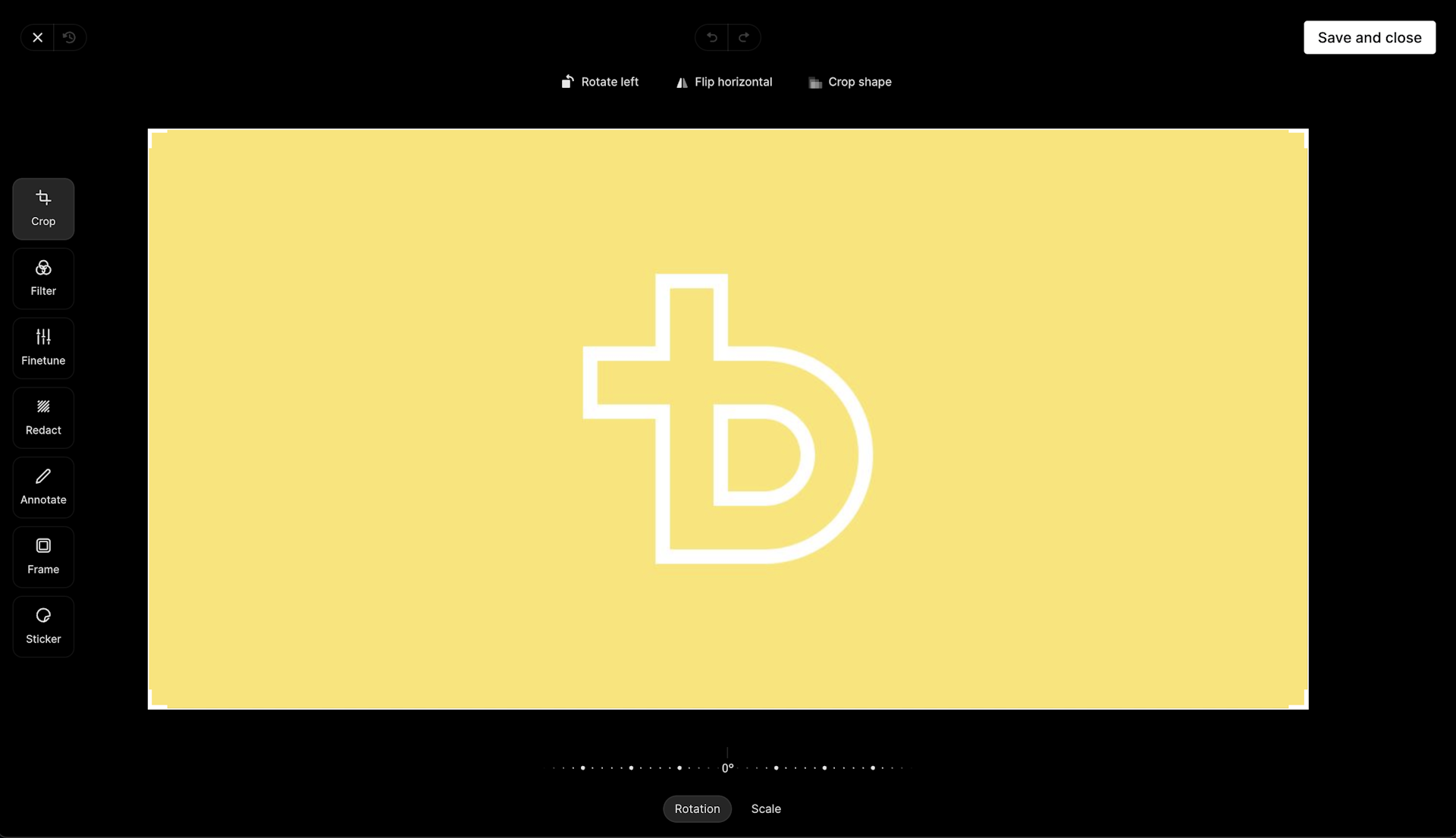
Ghost image editor
Ghost image editor
  1. Post history

As a content creator, tracking changes and accessing previous versions of your posts is crucial. The Ghost CMS editor introduces a comprehensive post history feature, allowing you to view and restore previous versions of your content effortlessly.

With a detailed revision log, you can compare changes, revert to a specific version. This feature promotes collaboration, facilitates accurate content updates, and provides peace of mind, knowing that you can always revert to an earlier iteration if needed.

  1. Bookmarker extension

Ideas can strike at any moment, and the new Bookmarker extension simplifies the process of collecting and curating your inspirations. This handy browser extension seamlessly integrates with the Ghost CMS editor, enabling you to save web pages, articles, and snippets of text with a single click.

By capturing valuable references and inspirations directly from your browsing experience, the Bookmarker extension ensures that you never lose a valuable resource or idea.


To access the beta version of the new Ghost editor, go to Settings → Labs and turn on the Ghost editor (beta) toggle.

Duplicating posts

Creating new content from scratch can be time-consuming, especially when you want to maintain a consistent structure or format. Ghost CMS now simplifies this process by introducing the ability to duplicate posts. With just a few clicks, you can replicate an existing post, including its title, content, tags, and metadata.

This feature is particularly useful when you want to repurpose successful articles or emails or create templates for recurring content. By leveraging the power of post duplication, you can save valuable time, maintain consistency across your publication, and focus on creating fresh, engaging content.

To duplicate a post all you need to do is right-click on a post to open the edit menu and select Duplicate.

Bulk actions on posts

As your publication grows, managing a large number of posts can become a daunting task. Ghost CMS recognizes this challenge and introduces the bulk actions feature.

With bulk actions, you can perform various actions on multiple posts simultaneously, reducing the need for repetitive manual work. Whether you want to tag, schedule, publish, or delete multiple posts, this feature enables you to execute tasks efficiently and effectively.

By leveraging bulk actions, you can optimize your content management workflow, freeing up time for other important activities such as strategic planning, marketing, or engaging with your audience.
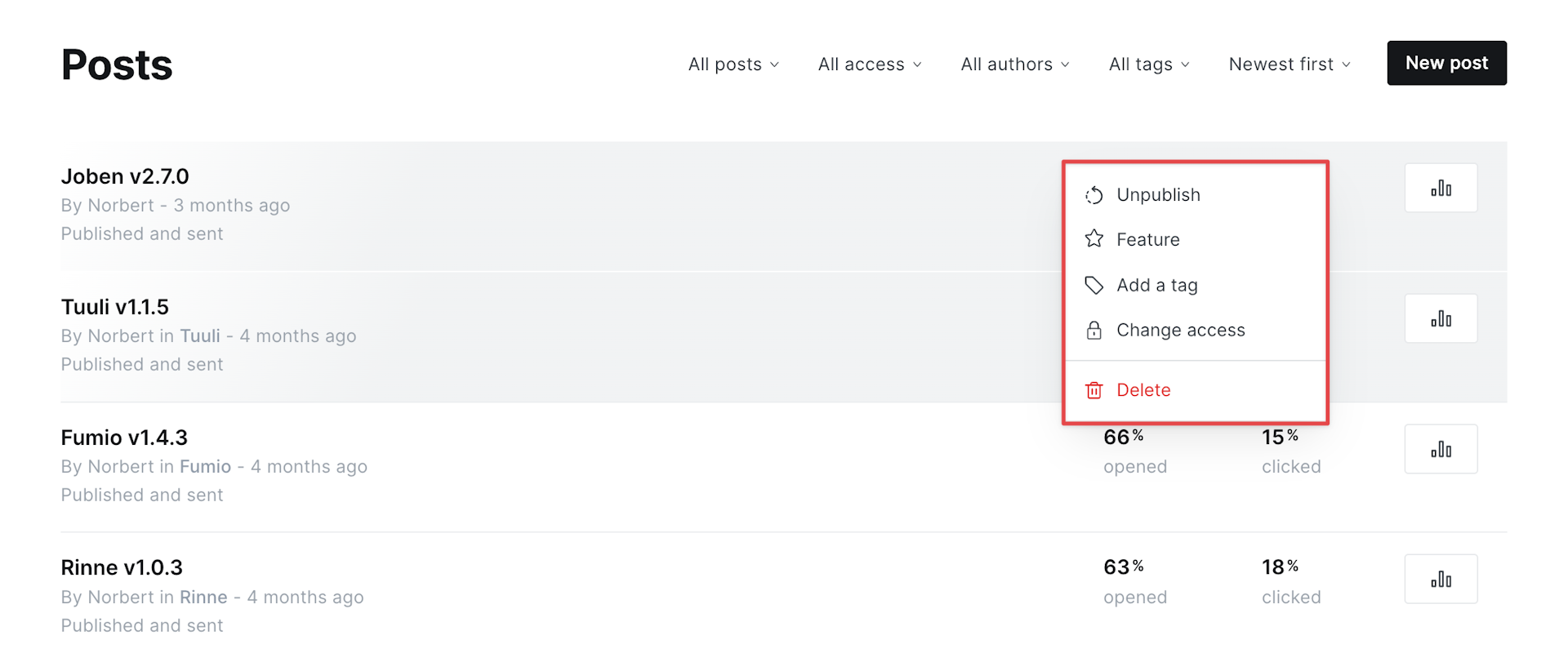
Ghost bulk actions
Ghost bulk actions

To make bulk actions, select the posts you'd like to edit by holding shift or cmd and clicking to select which posts you'd like to update, then right-click to open the bulk edit menu.

Announcement bar

The Announcement Bar is a customizable banner or notification displayed prominently at the top of your Ghost-powered website. It serves as a powerful tool to engage your visitors, convey essential updates, promote special offers, or create a sense of urgency.

The announcement bar is ideal for: conveying important messages, promote limited-time offers or discounts, drive engagement with targeted messages.

To add an announcement, go to Settings → Announcement bar and add your announcement copy, pick a background color, and select the visibility of your announcement.

Conclusion

If you're a content creator or publisher looking for a powerful, user-friendly platform, Ghost CMS is the ultimate tool to bring your vision to life. The latest updates introduced a host of impressive features that empower creators and publishers to take their content to next level.

The embeddable signup forms enable effortless audience growth, while the new Ghost editor improves the writing experience, offering a distraction-free environment. With post bulk actions, managing and organizing content becomes a breeze, saving time and effort for content managers.