





Dev Machine Guard now scans IDE extensions across eight IDE families: Visual Studio Code, Cursor, Windsurf, Antigravity, JetBrains IDEs, Android Studio, Eclipse-based IDEs, and Xcode. Coverage works identically on macOS, Windows, and Linux.
For organizations with mixed developer environments, that means a single inventory and a single risk view across every IDE your team actually uses, including the ones most extension governance tools have historically ignored.
Modern developer machines run dozens of IDE extensions, each with access to source code, environment variables, and the developer's credentials. Most install with broad permissions, most auto-update silently in the background, and very few are inspected after the initial install.
For a long time, the security tooling story around IDE extensions ended at Visual Studio Code. That worked while VS Code was the only meaningful target. It does not work anymore.
Today, your developers are running:
Each of these is a real entry point. A malicious or compromised extension only needs to land in one of them to reach a developer with publishing tokens, SSH keys, and production access.
IDE extension supply chain attacks are no longer hypothetical.
In every one of these incidents, the hardest follow-up question for affected security teams was the same:Which developer machines in our organization actually have this extension installed, in which IDE, and at which version? With expanded IDE coverage, Dev Machine Guard can now answer that question across the full developer fleet, regardless of which editor each developer prefers.
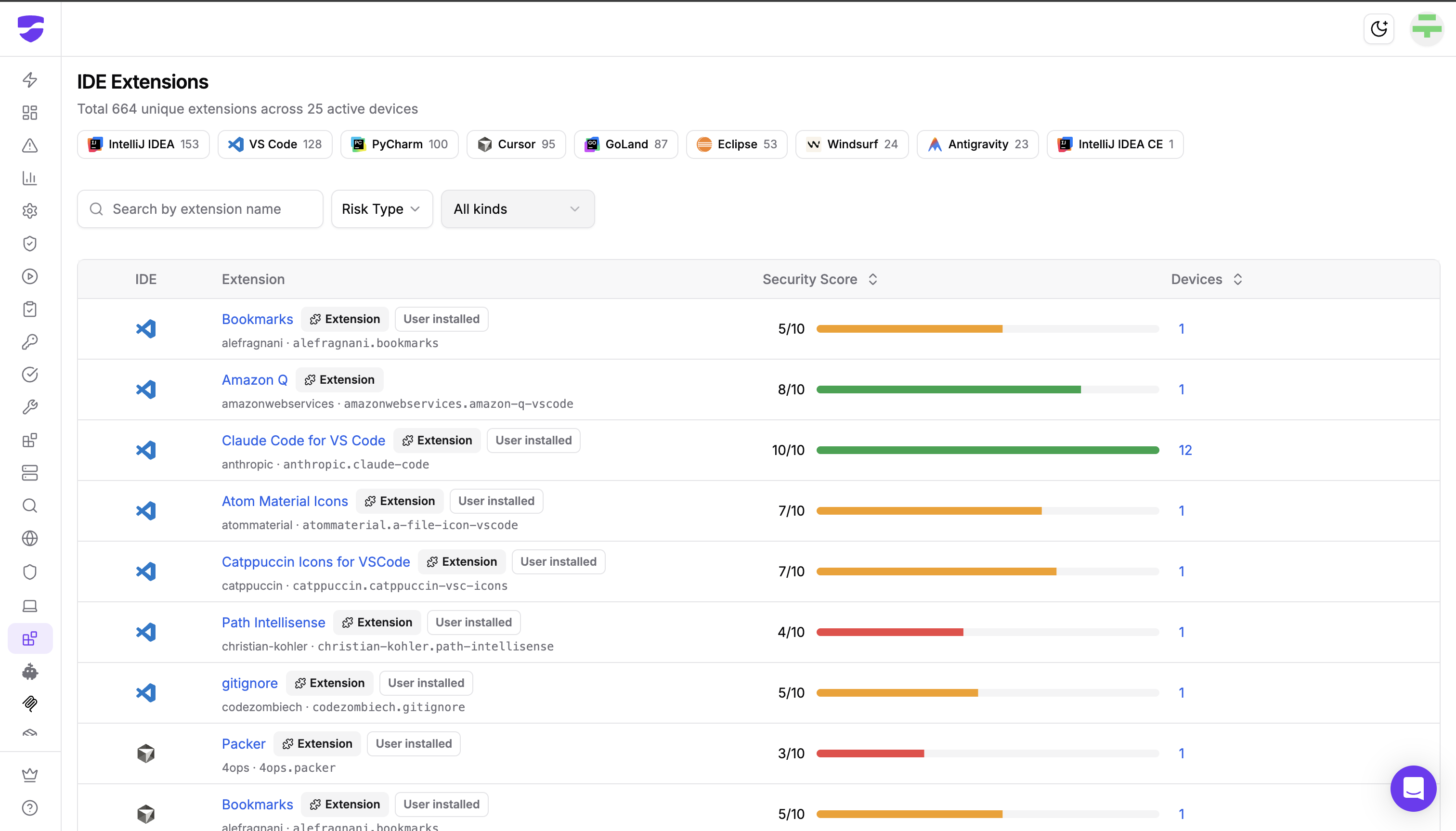
Dev Machine Guard detects extensions installed in the following IDEs on macOS, Windows, and Linux:
The IDE Extensions page in the dashboard shows IDE filter chips so security teams can scope the view to a single IDE, with the total count of unique extensions detected for each.
For every item found on a developer machine, Dev Machine Guard records:
Each extension is assigned a Security Score based on multiple supply chain signals:
The score is rendered as a color-coded bar in the dashboard, with the underlying factors visible so security teams understand not just what an extension's score is, but why.
The Risk Type filter surfaces two categories of known-risky items:
These detections are powered by StepSecurity's supply chain threat intelligence and are updated as new incidents are confirmed.
Every IDE listed above is scanned on macOS, Windows, and Linux. The same engine, the same inventory model, the same Security Score, regardless of where the developer machine sits.
The expanded coverage makes a number of operational workflows possible that were previously partial or impossible:
The following capabilities are currently under development:
These controls will sit on top of the same cross-IDE inventory and Security Score the dashboard already provides, so the rules you write will apply consistently across every IDE family Dev Machine Guard covers.
If you already run Dev Machine Guard, the expanded IDE coverage and Security Score are included automatically. Update to the latest release and your next scan will inventory extensions across every supported IDE.
In community mode, all data stays on the machine. In enterprise mode, the consolidated extension inventory and Security Score flow into the StepSecurity dashboard, where you can filter by IDE, Risk Type, and item kind across the entire fleet.
For the full IDE Extensions feature reference, see the Dev Machine Guard documentation.
Try this interactive demo to see how it works:
Most extension governance tools were built when "IDE" meant "VS Code." Developer fleets have moved on, and the security tooling that protects them has to move with them.
With this release, Dev Machine Guard provides a single, cross-platform inventory of every IDE extension and plugin running across seven IDE families, with built-in scoring and known-bad detection on top.
If you find an IDE we are not yet covering, please open an issue at github.com/step-security/dev-machine-guard/issues. The scanning engine is open source, and detections for new IDEs are added once and benefit every customer.
此内容由惯性聚合(RSS阅读器)自动聚合整理,仅供阅读参考。 原文来自 — 版权归原作者所有。