




During routine security research, we identified a severe intent redirection vulnerability in a widely used third-party Android SDK called EngageSDK. This flaw allows apps on the same device to bypass Android security sandbox and gain unauthorized access to private data. With over 30 million installations of third-party crypto wallet applications alone, the exposure of PII, user credentials and financial data were exposed to risk. All of the detected apps using vulnerable versions have been removed from Google Play.
Following our Coordinated Vulnerability Disclosure practices (via Microsoft Security Vulnerability Research), we notified EngageLab and the Android Security Team. We collaborated with all parties to investigate and validate the issue, which was resolved as of November 3, 2025 in version 5.2.1 of the EngageSDK. This case shows how weaknesses in third‑party SDKs can have large‑scale security implications, especially in high‑value sectors like digital asset management.
As of the time of writing, we are not aware of any evidence indicating that this vulnerability has been exploited in the wild. Nevertheless, we strongly recommend that developers who integrate the affected SDK upgrade to the latest available version. While this is a vulnerability introduced by a third-party SDK, Android’s existing layered security model is capable of providing additional mitigations against exploitation of vulnerabilities through intents. Android has updated these automatic user protections to provide additional mitigation against the specific EngageSDK risks described in this report while developers update to the non-vulnerable version of EngageSDK. Users who previously downloaded a vulnerable app are protected.
In this blog, we provide a technical analysis of a vulnerability that bypasses core Android security mechanisms. We also examine why this issue is significant in the current landscape: apps increasingly rely on third‑party SDKs, creating large and often opaque supply‑chain dependencies.
As mobile wallets and other high‑value apps become more common, even small flaws in upstream libraries can impact millions of devices. These risks increase when integrations expose exported components or rely on trust assumptions that aren’t validated across app boundaries.
Because Android apps frequently depend on external libraries, insecure integrations can introduce attack surfaces into otherwise secure applications. We provide resources for three key audiences:
This analysis reflects Microsoft’s visibility into cross‑platform security threats. We are committed to safeguarding users, even in environments and applications that Microsoft does not directly build or operate. You can find a detailed set of recommendations, detection guidance and indicators at the end of this post to help you assess exposure and strengthen protections.
The Android operating system integrates a variety of security mechanisms, such as memory isolation, filesystem discretionary and mandatory access controls (DAC/MAC), biometric authentication, and network traffic encryption. Each of these components functions according to its own security framework, which may not always align with the others[1].
Unlike many other operating systems where applications run with the user’s privileges, Android assigns each app with a unique user ID and executes it within its own sandboxed environment. Each app has a private directory for storing data that is not meant to be shared. By default, other apps cannot access this private space unless the owning app explicitly exposes data through components known as content providers.
To facilitate communication between applications, Android uses intents[2]. Beyond inter-app messaging, intents also enable interaction among components within the same application as well as data sharing between those components.
It’s worth noting that while any application can send an intent to another app or component, whether that intent is actually delivered—and more broadly, whether the communication is permitted—depends on the identity and permissions of the sending application.
Intent Redirection occurs when a threat actor manipulates the contents of an intent that a vulnerable app sends using its own identity and permissions.
In this scenario, the threat actor leverages the trusted context of the affected app to run a malicious payload with the app’s privileges. This can lead to:
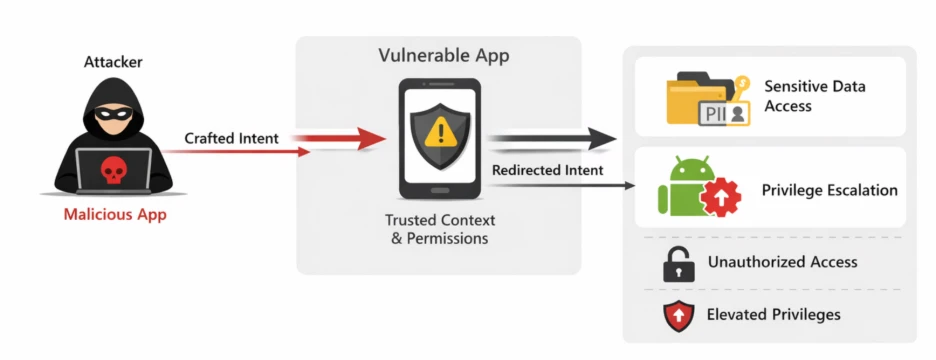
Android Security Team classifies this vulnerability as severe. Apps flagged as vulnerable are subject to enforcement actions, including potential removal from the platform[3].
Developers use the EngageLab SDK to manage messaging and push notifications in mobile apps. It functions as a library that developers integrate into Android apps as a dependency. Once included, the SDK provides APIs for handling communication tasks, making it a core component for apps that require real-time engagement.
The vulnerability was identified in an exported activity (MTCommonActivity) that gets added to an application’s Android manifest once the library is imported into a project, after the build process. This activity only appears in the merged manifest, which is generated post-build (see figure below), and therefore is sometimes missed by developers. Consequently, it often escapes detection during development but remains exploitable in the final APK.
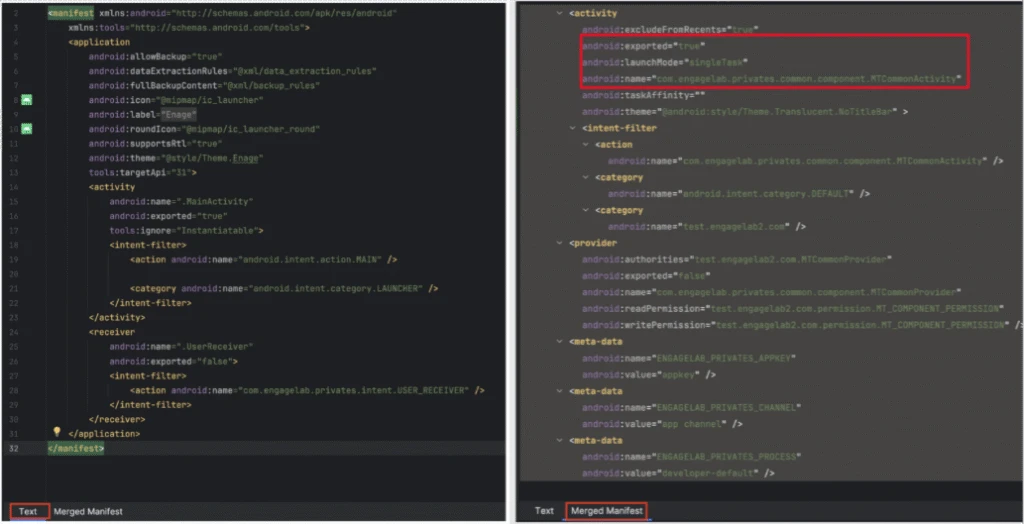
When an activity is declared as exported in the Android manifest, it becomes accessible to other applications installed on the same device. This configuration permits any other application to explicitly send an intent to this activity.
The following section outlines the intent handling process from the moment the activity receives an intent to when it dispatches one under the affected application’s identity.
Intent processing in the vulnerable activity
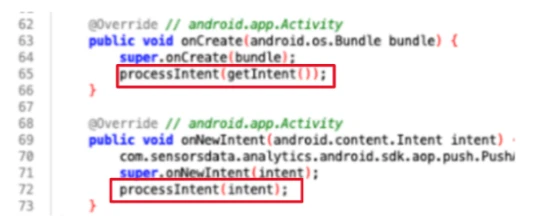
When an activity receives an intent, its response depends on its current lifecycle state:
In the vulnerable MTCommonActivity, both callbacks invoke the processIntent() method.
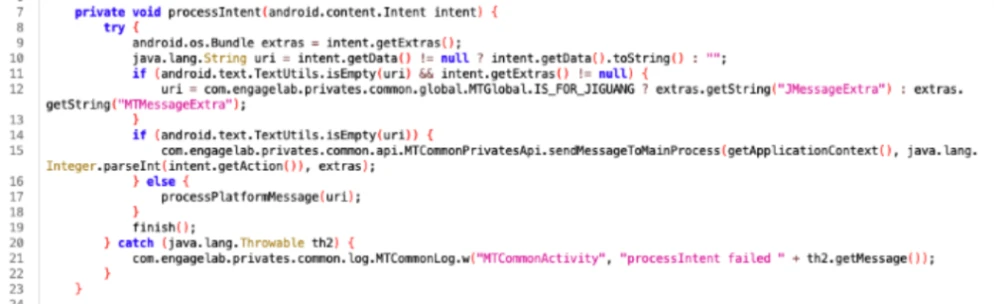
This method (see figure below) begins by initializing the uri variable on line 10 using the data provided in the incoming intent. If the uri variable is not empty, then – according to line 16 – it invokes the processPlatformMessage():
The processPlatformMessage() method instantiates a JSON object using the uri string supplied as an argument to this method (see line 32 below):
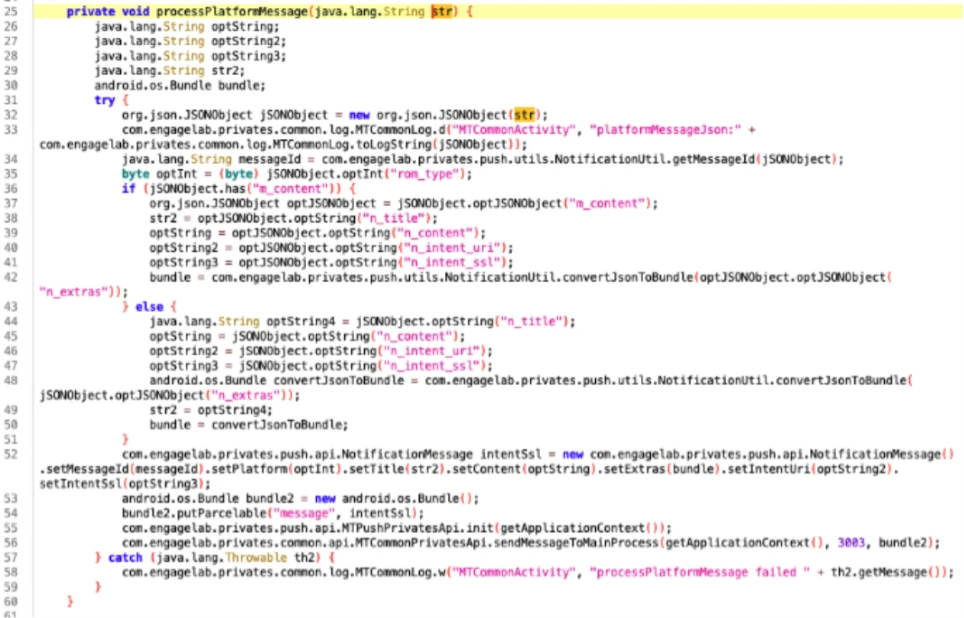
Each branch of the if statement checks the JSON object for a field named n_intent_uri. If this field exists, the method performs the following actions:
An examination of the intentUri field in the NotificationMessage class identified the following method as a relevant point of reference:
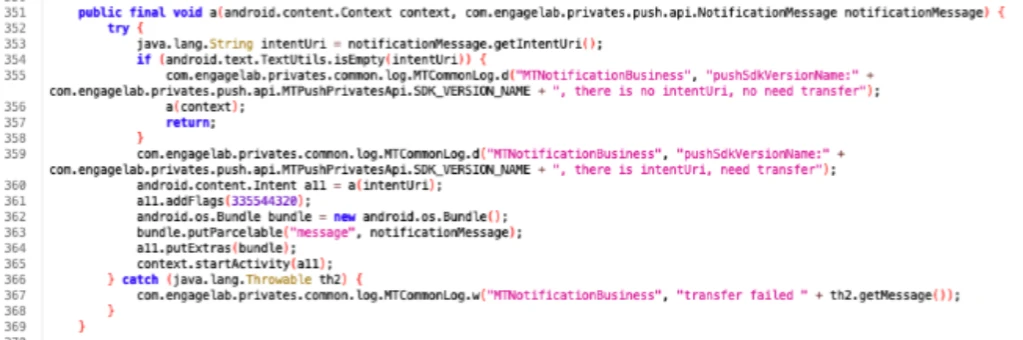
On line 353, the method above obtains the intentUri value and attempts to create a new intent from it by calling the method a() on line 360. The returned intent is subsequently dispatched using the startActivity() method on line 365. The a() method is particularly noteworthy, as it serves as the primary mechanism responsible for intent redirection:
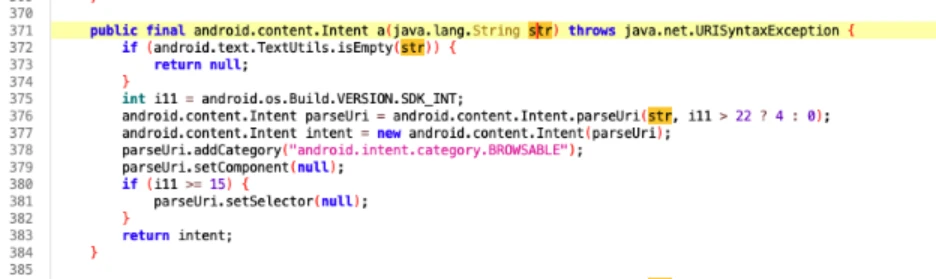
This method appears to construct an implicit intent by invoking setComponent(), which clears the target component of the parseUri intent by assigning a null value (line 379). Under normal circumstances, such behavior would result in a standard implicit intent, which poses minimal risk because it does not specify a concrete component and therefore relies on the system’s resolution logic.
However, as observed on line 377, the method also instantiates a second intent variable — its purpose not immediately evident—which incorporates an explicit intent. Crucially, this explicitly targeted intent is the one returned at line 383, rather than the benign parseUri intent.
Another notable point is that the parseUri() method (at line 376) is called with the URI_ALLOW_UNSAFE flag (constant value 4), which can permit access to an application’s content providers [6] (see exploitation example below).
These substitutions fundamentally alter the method’s behavior: instead of returning a non‑directed, system‑resolved implicit intent, it returns an intent with a predefined component, enabling direct invocation of the targeted activity as well as access to the application’s content providers. As noted previously, this vulnerability can, among other consequences, permit access to the application’s private directory by gaining entry through any available content providers, even those that are not exported.
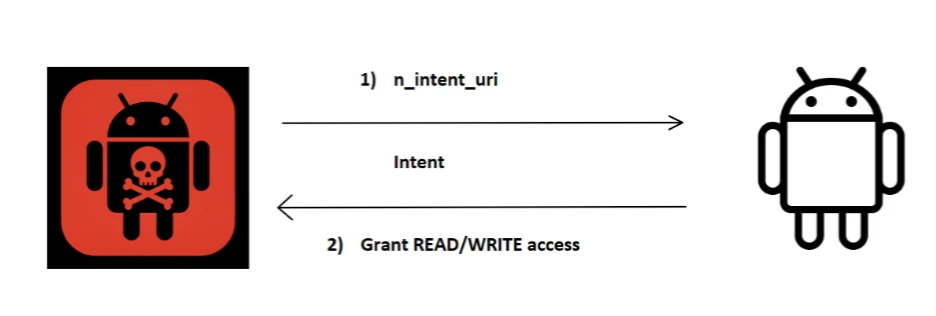
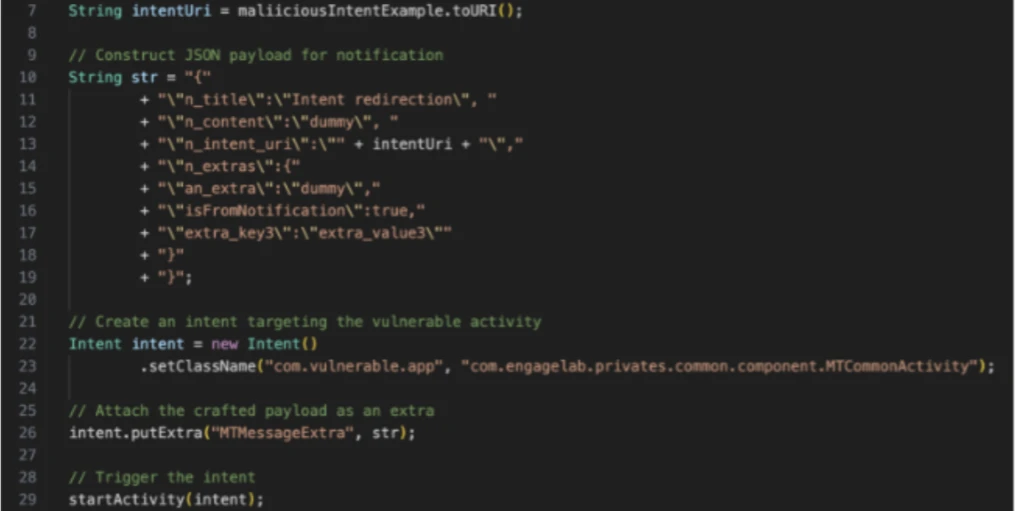
Exploitation starts when a malicious app creates an intent object with a crafted URI in the extra field. The vulnerable app then processes this URI, creating and sending an intent using its own identity and permissions.
Due to the URI_ALLOW_UNSAFE flag, the intent URI may include the following flags;
When combined, these flags grant persistent read and write access to the app’s private data.
After the vulnerable app processes the intent and applies these flags, the malicious app is authorized to interact with the target app’s content provider. This authorization remains active until the target app explicitly revokes it [5]. As a result, the internal directories of the vulnerable app are exposed, which allows unauthorized access to sensitive data in its private storage space. The following image illustrates an example of an exploitation intent:
A significant number of apps using this SDK are part of the cryptocurrency and digital‑wallet ecosystem. Because of this, the consequences of this vulnerability are especially serious. Before notifying the vendor, Microsoft confirmed the flaw in multiple apps on the Google Play Store.
The affected wallet applications alone accounted for more than 30 million installations, and when including additional non‑wallet apps built on the same SDK, the total exposure climbed to over 50 million installations.
Microsoft initially identified the vulnerability in version 4.5.4 of the EngageLab SDK. Following Coordinated Vulnerability Disclosure (CVD) practices through Microsoft Security Vulnerability Research (MSVR), the issue was reported to EngageLab in April 2025. Additionally, Microsoft notified the Android Security Team because the affected apps were distributed through the Google Play Store.
EngageLab addressed the vulnerability in version 5.2.1, released on November 3, 2025. In the fixed version, the vulnerable activity is set to non-exported, which prevents it from being invoked by other apps.
| Date | Event |
| April 2025 | Vulnerability identified in EngageLab SDK v4.5.4. Issue reported to EngageLab |
| May 2025 | Escalated the issue to the Android Security Team for affected applications distributed through the Google Play Store. |
| November 3, 2025 | EngageLab released v5.2.1, addressing the vulnerability |
Android developers utilizing the EngageLab SDK are strongly advised to upgrade to the latest version promptly.
Our research indicates that integrating external libraries can inadvertently introduce features or components that may compromise application security. Specifically, adding an exported component to the merged Android manifest could be unintentionally overlooked, resulting in potential attack surfaces. To keep your apps secure, always review the merged Android manifest, especially when you incorporate third‑party SDKs. This helps you identify any components or permissions that might affect your app’s security or behavior.
Strengthening mobile‑app defenses doesn’t end with understanding this vulnerability.
Take the next step:
Learn more about Microsoft’s Security Vulnerability Research (MSVR) program at https://www.microsoft.com/en-us/msrc/msvr
[1] Mayrhofer, René, Jeffrey Vander Stoep, Chad Brubaker, Dianne Hackborn, Bram Bonné, Güliz Seray Tuncay, Roger Piqueras Jover, and Michael A. Specter. The Android Platform Security Model (2023). ACM Transactions on Privacy and Security, vol. 24, no. 3, 2021, pp. 1–35. arXiv:1904.05572. https://doi.org/10.48550/arXiv.1904.05572.
[2] https://developer.android.com/guide/components/intents-filters
[3] https://support.google.com/faqs/answer/9267555?hl=en
[4] https://www.engagelab.com/docs/
[5] https://developer.android.com/reference/android/content/Intent#FLAG_GRANT_PERSISTABLE_URI_PERMISSION
[6] https://developer.android.com/reference/android/content/Intent#URI_ALLOW_UNSAFE
This research is provided by Microsoft Defender Security Research with contributions from Dimitrios Valsamaras and other members of Microsoft Threat Intelligence.
Review our documentation to learn more about our real-time protection capabilities and see how to enable them within your organization.
此内容由惯性聚合(RSS阅读器)自动聚合整理,仅供阅读参考。 原文来自 — 版权归原作者所有。