





From late April 2026 to mid-June 2026, Microsoft Defender Experts observed increased ACR Stealer activity across customer environments. These campaigns are successfully using ClickFix lures to steal browser credentials, authentication tokens, and sensitive documents from enterprise environments. Successful compromise can expose browser credentials, session tokens, authentication artifacts, and sensitive enterprise data, potentially enabling account compromise, unauthorized access to cloud resources, and follow-on intrusion activity. Security teams should prioritize monitoring for ClickFix lures, suspicious WebDAV activity, obfuscated PowerShell execution, and attempts to access browser credential stores.
ACR Stealer is an information-stealing malware family reportedly offered through a malware-as-a-service (MaaS) model and associated with the rebranding of Amatera Stealer. During this period, two campaigns stand out, together appearing frequently in reviewed recent intrusions. Both begin the same way, with a ClickFix social engineering technique that tricks targets into running the threat actor’s command, but the intrusion chains that follow diverge in how they deliver payloads, establish execution, and evade detection.
The first campaign relies on WebDAV-delivered payloads, staged PowerShell, Python-based loaders and persistence, and, in some intrusions, blockchain-backed dead-drop command-and-control (C2) resolution. The second campaign takes a more fileless route, using MSHTA, obfuscated PowerShell, and steganography-assisted in-memory execution. Despite these differences, both campaigns ultimately pursue the same goal: stealing browser-stored credentials and other sensitive data for exfiltration.
These two campaigns represent some of the most prevalent ACR Stealer delivery campaigns observed by Defender Experts; however, they do not represent the full range of delivery methods used by this malware family. Attribution to ACR Stealer is based on the observed behavior and post-exploitation tradecraft, corroborated by open-source intelligence on the infrastructure associated with this malware family. Additional campaigns, infrastructure patterns, and execution chains are likely active, and organizations should treat the indicators and techniques described here as representative.
Microsoft Defender for Endpoint can help surface both campaigns through behavioral coverage for living-off-the-land execution, suspicious WebDAV and MSHTA activity, obfuscated PowerShell, scheduled-task persistence, in-memory payload execution, and browser credential theft. In this blog, we analyze both campaigns in detail, including their delivery mechanisms, post-exploitation tradecraft, indicators of compromise, hunting opportunities, and guidance to help defenders detect and disrupt related activity in their environments.
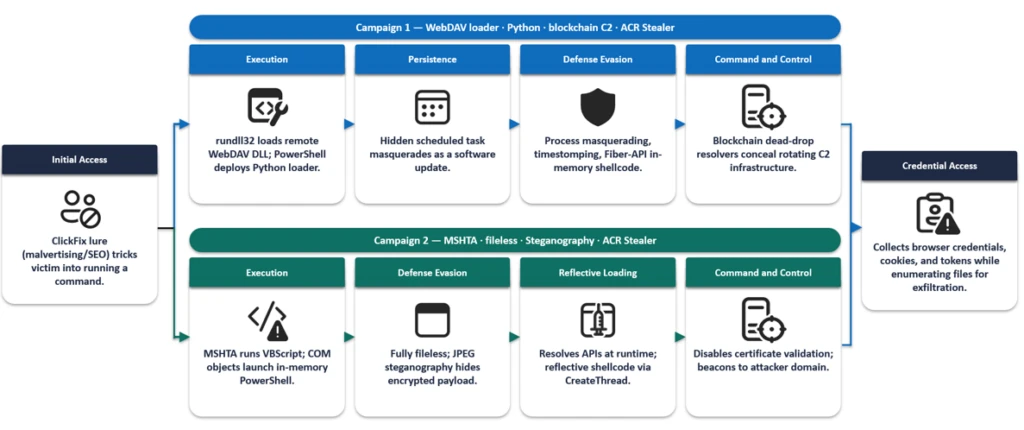
In this campaign, a ClickFix prompt, likely delivered through malvertising or SEO-manipulated search results, instructs the target user to run a command that launches cmd.exe. The command subsequently invokes rundll32.exe to load a DLL from a remote WebDAV share accessed over HTTPS. The WebDAV path commonly uses a GUID-based directory structure and filenames designed to resemble legitimate resources (for example, google.ct), enabling the activity to blend with expected network traffic and evade casual inspection.
We observed three variants of the initial execution command:
Variant 1: Direct rundll32 invocation

Variant 2: pushd-Mounted WebDAV Share

Variant 3: Headless and obfuscated pushd execution

Variants 2 and 3 are notable for their use of pushd, which transparently maps the remote WebDAV share to a temporary local drive prior to execution. This technique allows threat actors to execute remotely hosted content through what appears to be a local path, simplifying payload execution while reducing user awareness. In the more advanced variant, threat actors further enhance stealth by launching commands through conhost.exe –headless, suppressing visible console windows, and employing environment variable obfuscation with delayed variable expansion to conceal critical execution components such as pushd, rundll32, and the remote host name. Combined with minimized or headless execution, these techniques reduce user visibility, complicate static analysis and detection, and enable the infection chain to execute with minimal indication to the victim.
Once rundll32.exe loads the DLL retrieved from the remote server, the malware establishes communication with threat actor-controlled infrastructure and executes a heavily obfuscated PowerShell script. The script employs excessive arithmetic no-ops, dead loops, fake control flow, and randomized variable names to hinder static analysis and evade signature-based detection.
The PowerShell script subsequently deploys another stage that functions as both a malware installer and a persistence mechanism. It:
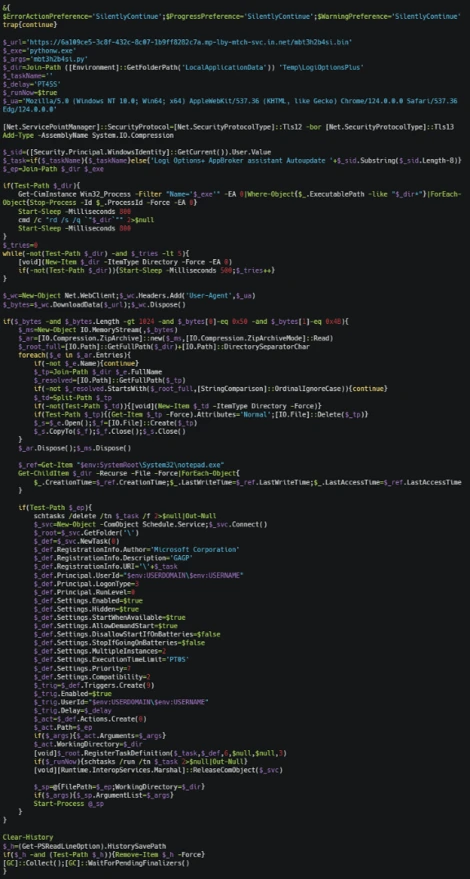
The Python component serves as a heavily obfuscated loader designed to conceal its true functionality until runtime. It employs multiple layers of defense against static analysis, including dynamic API resolution, encoded string reconstruction, junk-data removal, character shifting, string reversal, Base64 decoding, and zlib decompression. These techniques ensure that the embedded payload remains unreadable in its static form and is reconstructed only during execution, significantly hindering signature-based detection and automated analysis.
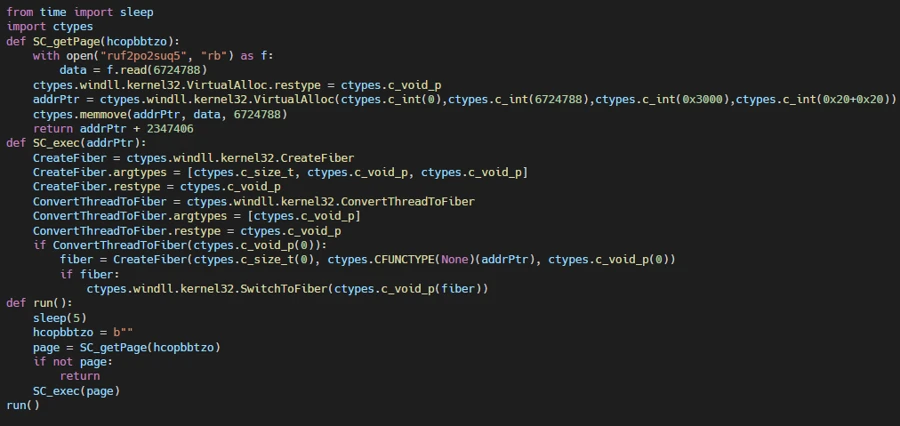
Once decoded, the final-stage payload functions as an in-memory shellcode loader. It extracts an archive file masquerading as a legitimate application installer, reads a file from the archive, and injects the payload into a system process. The loader allocates executable memory using VirtualAlloc, copies the payload into the allocated memory region, and transfers execution through the Windows Fiber API (ConvertThreadToFiber, CreateFiber, and SwitchToFiber). This technique facilitates stealthy in-memory execution while minimizing artifacts written to disk.
The malware (injected code) aggressively harvests information from browser credential stores. It invokes Windows Data Protection API (DPAPI) routines to decrypt locally stored browser passwords, cookies, and authentication tokens. It also enumerates files across the system, targeting PDFs, Microsoft 365 documents, and data stored in enterprise-synchronized directories such as OneDrive and SharePoint. The collected data is subsequently archived, indicating preparation for exfiltration.
A notable variation in this campaign is the use of blockchain services for C2 resolution, utilizing a technique known as EtherHiding. While most intrusions rely on more conventional C2 mechanisms, a subset deploys an additional secondary Python loader that leverages blockchain services as dead-drop resolvers. When this loader executes, it has been observed communicating with public blockchain RPC endpoints and third-party Web3 node infrastructure, likely querying data stored on a decentralized public ledger to retrieve follow-up payloads or a C2 address.
By externalizing C2 information to the blockchain, operators could dynamically update infrastructure without modifying or redeploying the malware, significantly complicating detection and takedown efforts. This behavior was observed across both variants of the campaign.
The second campaign takes a distinctly different approach to both delivery and execution. Where Campaign 1 relies on disk-based artifacts (Python runtime, scheduled tasks, and masquerading binaries), this campaign achieves its objectives almost entirely through fileless, in-memory execution, making it harder to detect through file-based scanning and forensic analysis.
The execution chain begins when the victim, directed through malvertising or SEO-manipulated search results, encounters a ClickFix prompt that triggers a command spawning MSHTA to fetch and execute remote HTA content from an threat actor-controlled domain. The embedded VBScript loader abuses COM objects to decode and execute encoded PowerShell content.

The decoded PowerShell stage employs obfuscation techniques similar to those seen in Campaign 1: randomized variable names, arithmetic no-op operations, dead loops, misleading control flow, and custom encryption routines. Prior to contacting its next-stage infrastructure, the malware generates a victim-specific identifier and disables certificate validation. The retrieved content is executed directly in memory.
A notable technique in this campaign is the use of steganography to conceal malicious content inside a publicly hosted image. Instead of downloading a secondary script (as in Campaign 1), the malware retrieves a JPEG image from an image-hosting service.
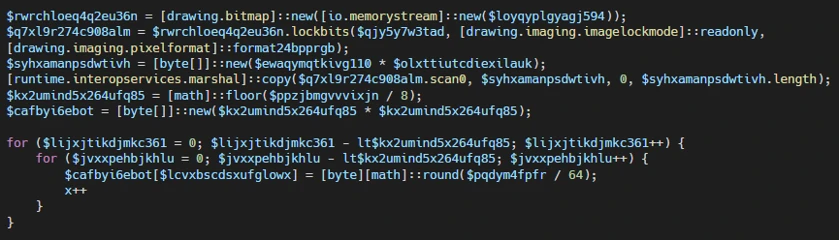
Analysis of the script revealed custom routines that extract an embedded payload from image pixels, decrypt and decompress it, and execute it entirely in memory. The payload dynamically resolves APIs such as LoadLibrary, GetProcAddress, VirtualAlloc, CreateThread, and WaitForSingleObject at runtime to perform reflective shellcode execution. By combining steganography with in-memory execution, the malware minimizes on-disk artifacts and complicates both detection and analysis.
Following execution, the malware accesses credential stores belonging to Chromium-based browsers, including Google Chrome and Microsoft Edge, specifically the Login Data and Web Data databases, alongside Windows DPAPI decryption activity. This behavior indicates attempts to recover stored browser credentials, session cookies, authentication tokens, and other sensitive user information.
The malware also enumerates and accesses multiple high-value PDF documents across Desktop and Downloads locations, suggesting targeted collection of potentially sensitive files. The combination of browser credential harvesting and systematic document access points to an information-stealing objective focused on staging credentials and valuable user data for exfiltration.
Microsoft recommends the following mitigations to reduce the impact of ClickFix lures, script-based payload delivery, credential theft, and post-compromise activity.
Microsoft Defender XDR customers can refer to the list of applicable detections below. Microsoft Defender XDR coordinates detection, prevention, investigation, and response across endpoints, identities, email, and apps to provide integrated protection against attacks like the threat discussed in this blog.
| Tactic | Observed Activity | Microsoft Defender Coverage |
| Execution | – Suspicious MSHTA launch through ClickFix execution – Rundll32 loads remote WebDAV DLL – COM objects launch in-memory PowerShell | Microsoft Defender for Endpoint – Use of living-off-the-land binary to run malicious code – Obfuscated command line was launched – Suspicious process executed PowerShell command – Suspicious process launch by Rundll32.exe Microsoft Defender for Antivirus |
| Persistence | PowerShell creates Scheduled task, masquerading as a software update | Microsoft Defender for Endpoint – Suspicious Scheduled Task Process Launched – Suspicious scheduled task |
| Stealth/Defense Evasion | – Fiber-API in-memory shellcode execution – Reflective shellcode via CreateThread | Microsoft Defender for Endpoint Possible process hollowing |
| Credential Access | Collects browser credentials, cookies, and tokens while enumerating files for exfiltration | Microsoft Defender for Endpoint – Information stealing malware activity – Suspicious DPAPI activity – Possible theft of passwords and other sensitive web browser information |
Microsoft Security Copilot is embedded in Microsoft Defender and provides security teams with AI-powered capabilities to summarize incidents, analyze files and scripts, summarize identities, use guided responses, and generate device summaries, hunting queries, and incident reports.
Customers can also deploy AI agents, including the following Microsoft Security Copilot agents, to perform security tasks efficiently:
Security Copilot is also available as a standalone experience where customers can perform specific security-related tasks, such as incident investigation, user analysis, and vulnerability impact assessment. In addition, Security Copilot offers developer scenarios that allow customers to build, test, publish, and integrate AI agents and plugins to meet unique security needs.
Microsoft Defender XDR customers can use the following threat analytics reports in the Defender portal (requires license for at least one Defender XDR product) to get current information available in the Defender portal about the threat actor, malicious activity, and techniques discussed in this blog. These reports provide the intelligence, protection information, and recommended actions to help prevent, mitigate, or respond to associated threats found in customer environments:
Microsoft Security Copilot customers can also use the Microsoft Security Copilot integration in Microsoft Defender Threat Intelligence, either in the Security Copilot standalone portal or in the embedded experience in the Microsoft Defender portal to get more information about this threat actor.
Microsoft Defender XDR customers can run the following advance hunting queries to find related activity in their networks:
Run the query below to identify suspicious commands executed through ClickFix-based activity observed while delivering this stealer
DeviceRegistryEvents
| where RegistryKey has "RunMRU"
| where (RegistryValueData has_all ("rundll32", "@ssl", " /c ", " start ") and (RegistryValueData matches regex @"\\\\[^\\]+@ssl\\[0-9a-fA-F]{8}-[0-9a-fA-F]{4}-[0-9a-fA-F]{4}-[0-9a-fA-F]{4}-[0-9a-fA-F]{12}\\\w+\.\w+,#1" or
RegistryValueData matches regex @"(?i)pushd \\\\[^\\]+@ssl\\[0-9a-fA-F]{8}-[0-9a-fA-F]{4}-[0-9a-fA-F]{4}-[0-9a-fA-F]{4}-[0-9a-fA-F]{12} "))
or RegistryValueData has_all ("@ssl", " /c ", "conhost --headless ") and RegistryValueData contains "rundll32"
Run the query below to identify scheduled task creation used for persistence by a malicious PowerShell script
DeviceProcessEvents
| where InitiatingProcessFileName =~ "powershell.exe"
| where InitiatingProcessCommandLine has_all ("-Command", "powershell")
| where ProcessCommandLine has_all ("schtasks", " /run /tn ", " Autoupdate ") and ProcessCommandLine matches regex "[0-9]{8}"
Run the query below to identify suspicious MSHTA launch through PowerShell
DeviceProcessEvents
| where InitiatingProcessParentFileName has "explorer.exe"
| where InitiatingProcessFileName =~ "powershell.exe" and InitiatingProcessCommandLine in~ ('"PowerShell.exe" ', '"PowerShell.exe"')
| where ProcessCommandLine has_all ('"mshta.exe" https://') and ProcessCommandLine matches regex "/[0-9]{7}"
The following mapping summarizes the primary tactics and techniques observed across the two ACR Stealer intrusion chains. The mapping is intended to help defenders align observed behaviors with existing detection coverage, response playbooks, and hunting priorities.
| Tactic | Technique | Observed behavior |
| Initial Access | Drive-by Compromise; User Execution | ClickFix lure prompts command execution. |
| Execution | Command and Scripting Interpreter: Windows Command Shell; PowerShell; Python | cmd.exe, PowerShell, and pythonw.exe launch staged payloads. |
| Execution | System Binary Proxy Execution: Rundll32; Mshta | Rundll32 loads WebDAV DLLs; mshta.exe runs remote HTA content. |
| Persistence | Scheduled Task/Job: Scheduled Task | Hidden scheduled task maintains user-logon execution. |
| Defense Evasion | Obfuscated Files or Information; Masquerading; Indicator Removal: Clear Command History | Obfuscation, timestomping, history clearing, and masquerading. |
| Defense Evasion | Obfuscated Files or Information: Steganography | JPEG pixel data hides the encrypted payload. |
| Defense Evasion / Execution | Reflective Code Loading; Process Injection | In-memory shellcode execution via runtime API resolution. |
| Credential Access | Credentials from Web Browsers | Browser stores and DPAPI activity used to recover credentials and tokens. |
| Collection | Data from Local System; Data Staged | PDFs, Office files, and synced enterprise data are staged. |
| Command and Control | Web Service; Dead Drop Resolver | Infrastructure and blockchain RPC endpoints resolve payload or C2 data. |
| Campaign 1 | |
| Indicator | Description |
| looksta[.]icu | C2 domain |
| contrite.quirksturdy[.]icu | C2 domain |
| ux.strainedeasily[.]icu | C2 domain |
| cpppemwjewjoiwejow[.]sale | C2 domain |
| breaksd.wifihot[.]icu | C2 domain |
| walter.filloco[.]icu | C2 domain |
| fast.raidher[.]icu | C2 domain |
| apigrokcloud[.]icu | C2 domain |
| Campaign 2 | |
| enhanceblabber[.]cc | C2 domain |
| deep-harborio[.]com | 1st Stage payload hosting site |
| auramatrixa[.]com | 1st Stage payload hosting site |
| zealpraxis[.]com | 1st Stage payload hosting site |
| prism-vertex[.]com | 1st Stage payload hosting site |
| prism-matrixs[.]com | 1st Stage payload hosting site |
| proton-network[.]com | 1st Stage payload hosting site |
| creativecommunityinfo[.]art | Payload hosting site |
For the latest security research from the Microsoft Threat Intelligence community, check out the Microsoft Threat Intelligence Blog.
To get notified about new publications and to join discussions on social media, follow us on LinkedIn, X (formerly Twitter), and Bluesky.
To hear stories and insights from the Microsoft Threat Intelligence community about the ever-evolving threat landscape, listen to the Microsoft Threat Intelligence podcast.
Review our documentation to learn more about our real-time protection capabilities and see how to enable them within your organization.
此内容由惯性聚合(RSS阅读器)自动聚合整理,仅供阅读参考。 原文来自 — 版权归原作者所有。