





首先,感谢大家一直以来对我这个小破站的关注与支持♥️。自博客成型以来,陆陆续续有网友来询问我博客主题的相关设置。于是我打算在这篇文章中简单拆解一下目前的主题配置,希望能对同为新手的朋友有所帮助,也希望你能在这个过程中摸索出属于自己的博客风格。
我使用的是免费版的 Blocksy 主题,只需在 WordPress 主题商店中搜索 “blocksy” 即可下载安装。
接着,需要安装一个名为 Blocksy Companion 的插件,同样可以在 WordPress 插件商店中直接搜索并安装。
Blocksy 是一个设置简便且具备较高自定义性的主题。如果要详解我如何从“默认”样式调整为现在的样式,过程会略显复杂,加上时间久远,具体配置我也记不太清了 😅。你可以参考 Dayu 的 这篇文章,导入我准备的 dat 文件即可快速还原样式。
虽然我和 Dayu 都使用了 Blocksy 主题,但呈现出的风格各有不同。如果你更喜欢他博客的设计风格,也不妨试试看 😉
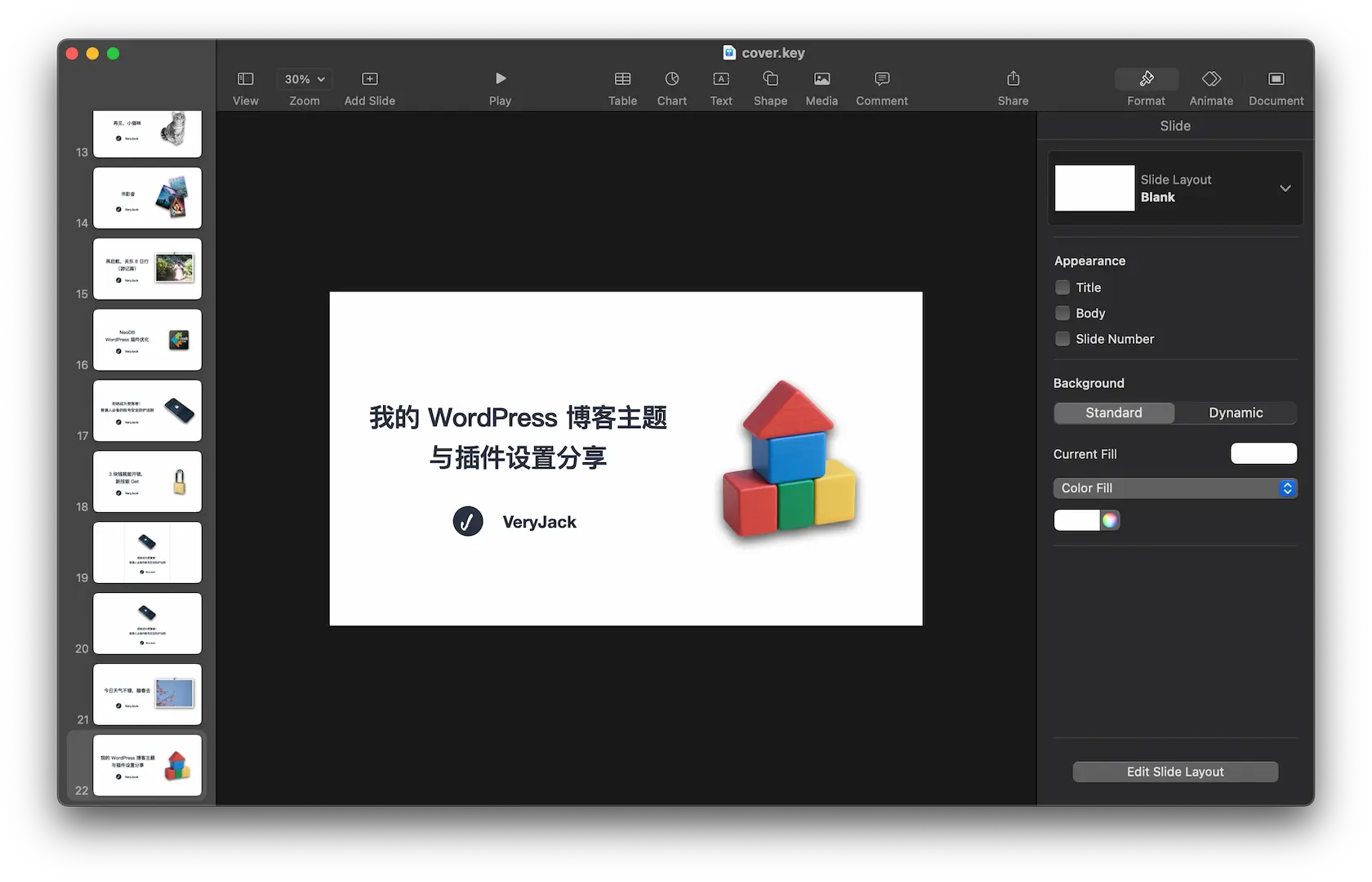
有不少朋友问过我博客文章的封面图是怎么做的,其实每一张封面都是我用 Keynote(苹果自带的演示软件)手动制作的。
我会先制作一个模板文件,之后每次只需修改标题并替换封面中的物体图片即可。
封面中的物体图像,若不是软件图标或商品图,一般来自 Unsplash 这类提供免费图片的站点,或是通过 AI 生成。之后我会用 PhotoShop 或豆包工具抠出主体图像,替换进 Keynote 模板中,整个流程算是比较简单的。
以下是我目前博客中使用的一些插件:
本博客采用小米的 MiSans 字体。
只需在 自定义 – 额外 CSS 中添加以下代码,即可生效:
/* 字体相关css */
@import url("https://font.sec.miui.com/font/css?family=MiSans:400,450:Chinese_Simplify,Latin&display=swap");
@font-face {
font-family: "MiSans", sans-serif;
font-weight: normal;
font-style: normal;
}
*:not([class*="icon"]):not(i) {
font-family: "MiSans" !important;
}
为了实现当前博客的视觉效果,我还在 自定义 – 额外 CSS 中加入了一些样式代码,其中相当一部分是配合深色模式所使用的。
.stackablelink a{
color: #475671
}
/* 说说相关css */
.atk-content {
color: var(--theme-palette-color-3);
}
a.commentsLink{
color: var(--theme-palette-color-3);
border: 1px solid currentcolor;
border-radius:8px;
}
div.atk-comment-count.atk-dropdown-wrap {
color: var(--theme-palette-color-3);
}
button.atk-send-btn {
border-radius: 8px !important;
}
div.atk-main-editor {
border-radius:8px;
}
ul.atk-dropdown.atk-fade-in{
border-radius:8px !important;
}
/* 黑色模式下,搜索页面背景色 */
html.dmb-html-dark [data-header*="type-1"] #search-modal {
background-color: rgba(71, 79, 92, 0.98);
}
/* 黑色模式下,好物页面文字 */
html.dmb-html-dark div.goods-exhibition-title {
color: #475671;
}
html.dmb-html-dark div.goods-exhibition-description {
color: #475671;
}
/* 黑色模式下,应用页面文字 */
html.dmb-html-dark div.app-name {
color: #475671;
}
html.dmb-html-dark p.app-description {
color: #475671;
}
/* 黑色模式下,书影音页面文字 */
html.dmb-html-dark button.neodb-nav-item {
color: #ffffff;
}
html.dmb-html-dark button.neodb-type-item {
color: #ffffff;
}
html.dmb-html-dark button.load-more-button.button {
color: #ffffff;
background-color: #293241;
}
html.dmb-html-dark .neodb-title a {
color: #ffffff !important
}
/* 黑色模式下,友情链接页面文字 */
html.dmb-html-dark a.latest-post-title {
color: #475671
}
html.dmb-html-dark div.friend-card {
background-color: #293241
}/* 黑色模式下,目录颜色 */
html.dmb-html-dark div.rtoc-mokuji-content.frame2.preset1.animation-slide.rtoc_open.default {
background-color: #293241
}
html.dmb-html-dark .rtoc-mokuji-content #rtoc-mokuji-title {
color: #ffffff;
}
html.dmb-html-dark .rtoc-mokuji-content .rtoc-mokuji li>a {
color: #ffffff;
}
/* 文章目录的样式 */
.rtoc-mokuji-content.frame2::before {
border-radius: 8px;
}
button.rtoc_open_close.rtoc_open {
border-radius: 8px;
color: #475671;
}
/* 回复按钮样式 */
a.comment-reply-link {
border-radius: 8px !important;
}
#cancel-comment-reply-link {
border-radius: 8px;
}
此内容由惯性聚合(RSS阅读器)自动聚合整理,仅供阅读参考。 原文来自 — 版权归原作者所有。