





Welcome to this blog series which explores innovative uses of Ubuntu Core. Throughout this series, Canonical’s Engineers will show what you can build with our releases, highlighting the features and tools available to you.
In this blog, Asa Mirzaieva, engineer from the Silicon Alliances team, will show you how to deploy optimised AI models on Renesas RZ/V series hardware using the Dynamically Reconfigurable Processor for AI (DRP-AI).
Deploying AI models for edge inference on specialized MPUs is particularly useful for developers looking to balance high performance with extremely low power consumption. Coupled with Ubuntu Core’s architecture, developers have an end-to-end infrastructure for managing a secure, modular deployment.
By the end of this blog, you’ll know how to package, load, and run AI inference models on Renesas DRP-AI using snaps.
AI inference on Renesas DRP-AI
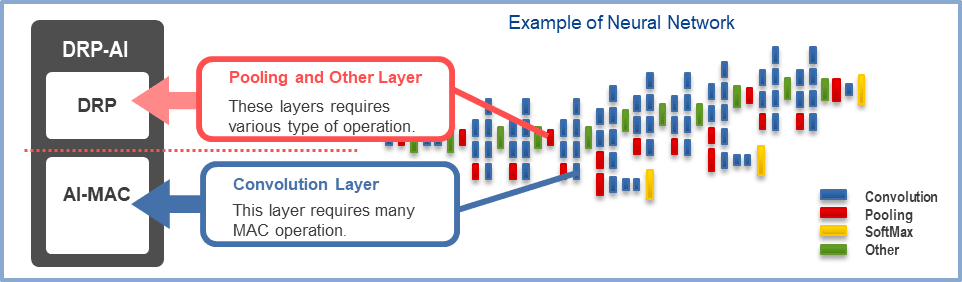
If you aren’t familiar with Renesas’ RZ/V series, the main takeaway is that these microprocessors feature a dedicated AI accelerator called DRP-AI. This dynamically reconfigurable processor accelerates the heavy lifting of neural network inference, such as feature extraction and classification, while maintaining exceptional power efficiency. To fully understand how this acceleration is achieved, we must look at how DRP-AI dynamically reconfigures its internal dataflow to match the network architecture, contrasting sharply with traditional sequential CPU processing.
Packaging and Deploying Edge AI with Ubuntu Core
In a nutshell, running AI workloads at the edge involves preparing the model, integrating it with the runtime and application, and ensuring it can be reliably deployed on target devices, as seen on the diagram below.
The diagram shows this workflow for Renesas RZ/V platforms: development and packaging are done on a host system (such as your laptop or build server running Ubuntu), while deployment targets the RZ/V device running Ubuntu Core.
On this host system, models are compiled with the DRP-AI toolchain and packaged together with the runtime and the application into a snap; this snap is then deployed to the target device as a complete AI solution
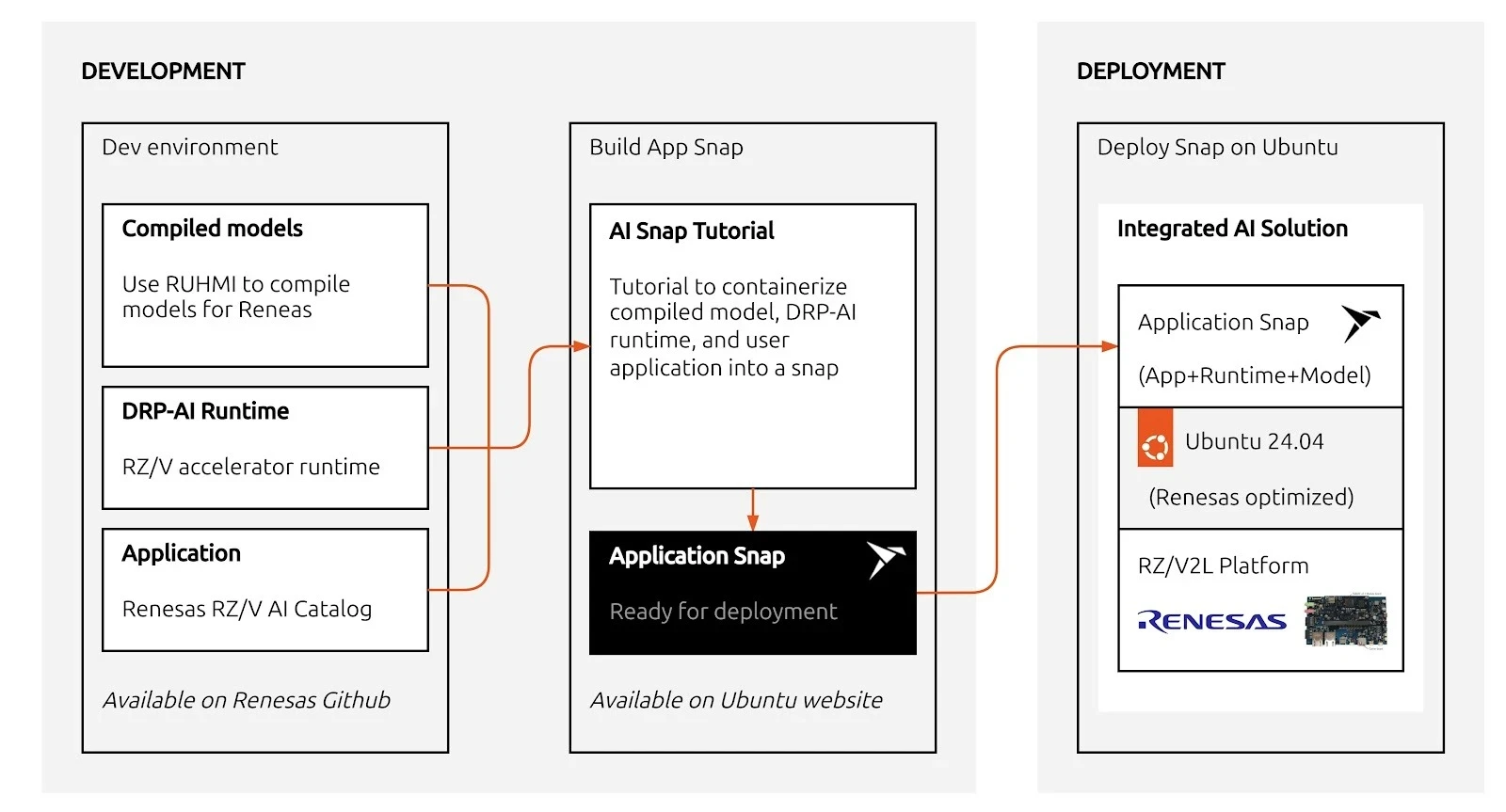
The following sections walk through each step in detail: from model compilation with DRP-AI TVM to packaging and running inference on the device.
Compiling with DRP-AI TVM
Just like other advanced AI pipelines, DRP-AI TVM requires you to compile your model (such as ONNX) to generate Runtime Model Data. The stack leverages the EdgeCortix MERA Compiler Framework to map your AI model into a highly efficient instruction set that the CPU and DRP-AI hardware can process collaboratively.
Because model compilation relies on specific SDKs and the EdgeCortix MERA Compiler Framework, this step is typically performed on a dedicated host machine (or Docker container) and is not handled by our runtime snap.
For step-by-step instructions on how to set up your environment and compile your ONNX models, please refer to the official DRP-AI TVM Compiling Tutorials provided by Renesas.
Once your model has been pruned, optimized, and compiled on your host environment, the next step is getting both the runtime binaries and the compiled model onto your board.
Packaging your AI application in a snap
To run inference securely and reliably, we package the applications into a snap. Canonical has created an example repository, rzv_drp-ai_tvm_snap, which bundles the upstream Renesas example applications so they can be easily installed and managed via snapd.
In the snap, we package three major components:
- The DRP-AI TVM runtime library (libdrp_tvm_rt.so and its dependencies)
- The compiled tutorial application (tutorial_app_v2ml)
- The pre-compiled AI model data (located in the project’s models/ directory)
Thanks to Snapcraft’s advanced tooling, you can cross-compile the entire application for arm64 right from an amd64 host.
Once built, you can transfer your resulting snap to your RZ/V2L board and install it. Currently, accessing hardware interfaces relies on devmode confinement:
sudo snap install --devmode rzv-drp-ai-tvm-examples_*.snapUnder the Hood: The snapcraft.yaml File
The magic behind this secure, cross-compiled package is the snapcraft.yaml file. This single declarative file dictates how the AI application is built and packaged. Here is a simplified snippet of how it orchestrates the three major components:
name: rzv-drp-ai-tvm-examples
base: core24
confinement: devmodeapps:
tutorial-app:
command: usr/bin/launch-tutorial.sh
parts:
tvm-runtime:
plugin: nil
source: [https://github.com/renesas-rz/rzv_drp-ai_tvm.git](https://github.com/renesas-rz/rzv_drp-ai_tvm.git)
override-prime: |
craftctl default
# 1. Install runtime library
cp -a $CRAFT_PART_SRC/obj/build_runtime/v2m/lib/* $CRAFT_PRIME/usr/lib/
# 2. Install the compiled model
cp -a ${CRAFT_PROJECT_DIR}/models/ $CRAFT_PRIME/usr/bin/
tutorial-app:
after: [tvm-runtime]
plugin: cmake
source: ${CRAFT_PROJECT_DIR}/../parts/tvm-runtime/src/apps
override-prime: |
craftctl default
# 3. Install compiled binary
cp -a $CRAFT_PART_BUILD/tutorial_app_v2ml $CRAFT_PRIME/usr/bin/
This configuration maps directly to the major components we discussed:
- Component 1: The Runtime Library: Handled by the tvm-runtime part. It fetches the upstream Renesas DRP-AI TVM source code and copies the pre-built TVM runtime libraries into the snap’s runtime path.
- Component 2: The Compiled Model: Also handled in the tvm-runtime part. The locally prepared AI model data is pulled directly from the project’s models/ folder into the snap so it’s readily available at runtime.
- Component 3: The Tutorial Application: Handled by the tutorial-app part. It uses the cmake plugin to cross-compile the C++ tutorial application specifically for the arm64 architecture, placing the final tutorial_app_v2ml binary into the snap.
Installing the snap
Run the following command after the successful build of the snap (XXX stands for the version).
devmode is required to access the DRP-AI devices from within the snap.
sudo snap install rzv-drp-ai-tvm-examplesXXX.snap --devmodeRunning the Inference Examples
After the snap is installed, running the pre-packaged application is as simple as calling the snap command.
To run the ResNet18/ResNet50 image-classification inference (assuming you’ve provided the compiled model data and input files to the board):
rzv-drp-ai-tvm-examples.tutorial-app
Make sure to use 640×480 bmp images with the default ONNX model.
That’s it! You can completely separate your AI models from your application logic and firmware, providing a modular approach to updates. When you improve your model, Ubuntu Core and the Snap Store will help you deliver these updates reliably and securely over the air.
Thanks to Ubuntu Core, you can just focus on your development and not worry about the infrastructure on how to update devices in the field or maintain system security.
What’s next?
The Renesas DRP-AI accelerator offers a tremendous advantage for edge AI devices, delivering high-speed inference without severe power penalties. Their value for deploying embedded AI devices is indisputable.
Now is your turn. Why don’t you try packaging your optimized DRP-AI models using snaps? Through this, you will see the benefits for yourself of the infrastructure to manage and deploy software at the edge. With Ubuntu Core, you can build your production image with your targeted snaps and hardware. This will empower you to easily flash devices in production lines. Plus, in your image, you can define what user experience you want to bring, keeping your model and intellectual property secure in its sandbox.