








In this comprehensive walkthrough, we'll show you how to set up and configure Cursor AI to connect to a Large Language Model (LLM) running on Runpod. This setup gives you the power of high-performance GPUs for your AI-assisted coding while maintaining the familiar Cursor interface. Not only that, but you'll be able to maintain complete privacy with your data, keeping it entirely on the Runpod platform in a controlled, secure network environment - no concerns about 'free' APIs quietly scraping and training on the potentially sensitive information you send their way.
MCP provides an excellent way to extend Cursor's context and functionality, making it aware of your specific data and workflows. We've written about this before - though there is an important clarification to make.
While MCP servers can run securely on Runpod, the underlying LLM processing your code and queries in that setup can still occur through external providers like OpenAI or Anthropic. For organizations and developers who require complete data privacy—ensuring that no code, comments, or context ever leaves their controlled infrastructure—hosting the LLMs themselves on Runpod is essential. This approach guarantees that your intellectual property, sensitive algorithms, and proprietary code remain entirely within your own computing environment. MCP is an incredibly useful framework, but it is still just a framework - for privacy-conscious developers, you'll need to also host the model in a controlled environment and that's where also setting up a pod to host the model itself comes in.
We have an handy guide on setting up text-generation-webui (oobabooga) on how to download and run an LLM within a convenient UI. This is an extremely quick way to get a model up and running so you can begin tinkering ASAP. Although the GUI and extra features may add some overhead, if you want to test out your connection or work in Cursor, as a single user there is definitely something to be said for this option's simplicity. If you need instructions on how to set up the pod, check out the enclosed guide.
Once the pod is up and running, obtain the URL that the API is running. This is port 5000 on our official template and most community templates.
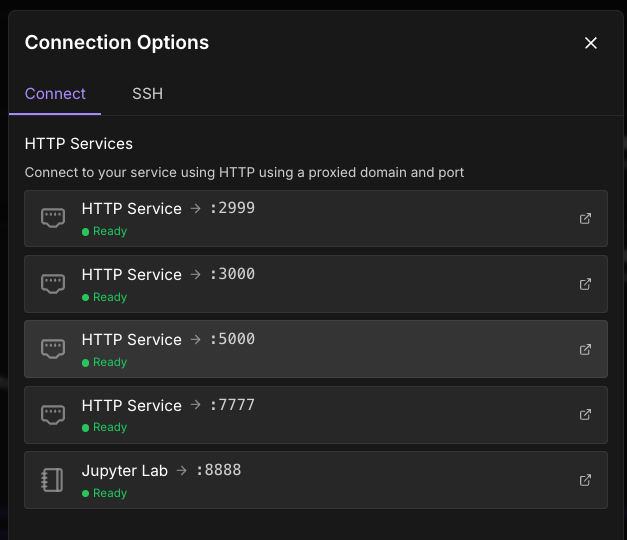
The format for the URL is https://[pod ID]-port].proxy.runpod.net, but if you want a URL to copy and paste going forward you can just click on port 5000 and copy and paste the URL that pops up - in this case, https://im049ethtsiqgb-5000.proxy.runpod.net/
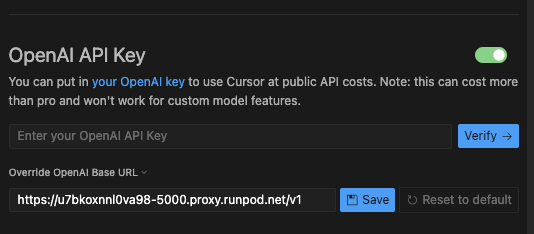
You can then go to Settings -> Cursor Settings -> Models and under OpenAI API Key, enter the proxy URL with /v1 added to the end - e.g. https://u7bkoxnnl0va98-5000.proxy.runpod.net/v1 (no trailing slash - this is important.)
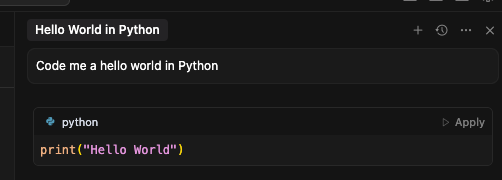
You can then ask Cursor a Hello World question under Ask to verify the connection is working.
If you'd prefer to use a GGUF model, you can also use kobold.cpp in the same way, and we have a guide for that. Quantizations allow you to use a much larger model in the same GPU spec for a pretty manageable performance (perplexity) hit, so if you're experimenting with larger models this may be something you want to explore.
If you're experiencing connection timeouts, first ensure your pod is active, and that that the URL format provided to Cursor ncludes /v1 but has no trailing slash, and check that the proper port (again, usually 5000) is properly exposed in your pod configuration. If you've used one of our community templates, all the ports should be automatically exposed, but if you are experimenting with setting up your own server remember to expose the HTTP ports in the pod configuration.
When encountering model loading errors, confirm that your chosen model fits within your GPU's VRAM limits. Larger models require more memory and take longer to initialize, so allow extra time for the loading process to complete. Monitor your pod's logs through the Runpod interface for specific error messages that can help diagnose the issue.
If you're experiencing slow response times, consider switching to quantized models in GGUF format to reduce memory usage and improve inference speed. Alternatively, upgrading to a higher-tier GPU can significantly improve performance. Experiment with different model sizes to find the right balance between capability and speed for your specific use case.
By hosting your LLM on Runpod, you achieve complete data isolation where your code never leaves your controlled infrastructure. All traffic remains within Runpod's secure environment, providing network security that's superior to cloud-based API services. You maintain a full audit trail with complete visibility into where your data is processed, making it easier to meet regulatory requirements for sensitive codebases. This approach is particularly compliance-friendly for organizations operating under strict data governance policies.
Start Up an LLM Pod on Runpod Today
Running LLMs on Runpod pods provides the perfect balance of performance, privacy, and cost-effectiveness for AI-assisted development. Whether you're a solo developer working on sensitive projects or part of an organization with strict data governance requirements, this setup ensures your code remains private while still leveraging the power of modern AI assistance.
The initial setup investment pays dividends in both peace of mind and performance, giving you complete control over your development AI stack. Start with the Text Generation WebUI approach to get familiar with the workflow, then explore more advanced configurations as your needs evolve.
Ready to get started? Deploy your first Runpod instance and experience truly private AI-assisted coding with Cursor.
Author profile: Brendan McKeag
此内容由惯性聚合(RSS阅读器)自动聚合整理,仅供阅读参考。 原文来自 — 版权归原作者所有。