
The Chips Got Faster. The Stack Didn't.
Explore why faster chips have shifted the bottleneck to AI infrastructure, and what that means for teams running production workloads.
All







With 4k context being the norm for Llama-2 and its finetunes, it's a far cry from the "bad old days" of the 2k limits found in Pygmalion-6b and other previous landmark models.
But what if I told you that you could just set an arbitrarily high context limit for whatever Llama-2 based model you wanted with a minimal perplexity compromise, as long as you have the VRAM to hold it?
Enter NTK-Aware RoPE scaling under the Models page in text-generation-webui.
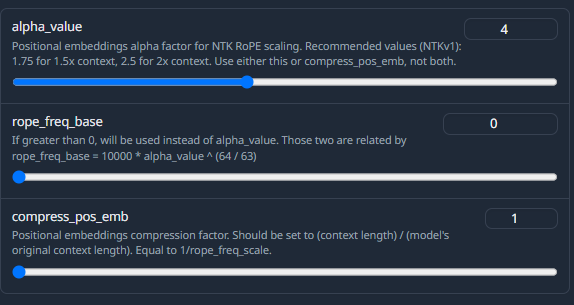
The link above has all of the math involved, but the upshot is this: any VRAM left unused in your card while inferring at the model's maximum context load is essentially wasted, and this allows you to increase that context limit and put it to use in a way without significantly harming perplexity or inference speed.
How much you can get away with increasing your context is dependent on your model and spec, but you can start by increasing your alpha value to your best-case scenario (e.g. 2.5 for 2x if you hope to get doubled context, which should be possible in many situations) and then inferring at your normal base context load and watching your GPU memory utilization in nvtop in the terminal:
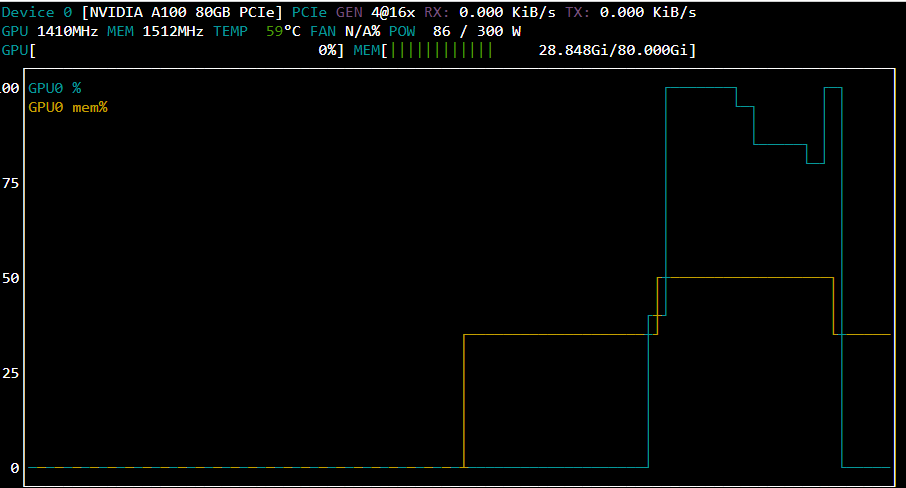
As you can see, we're only at 50% VRAM usage while inferring at our max context load, which means we have a lot of room to work with. So, then you can bump up the context maximum in your application, and infer again.
With this increase (I went straight to 8k here) we're at about 70%, so we can just keep increasing it bit by bit until we reach the sweet spot of about 90-95% usage. Past this you start getting blank responses from running out of memory. The VRAM usage is also not necessarily linear with context size – it does appear to be exponential, in fact, but not so much that it quickly overwhelms the card. In this use case, I was able to increase the effective context limit of unquantized Nous-Hermes-13b from 4k all the way up to 11200 on an a100. Playing around with quantizations may render even larger potential increases.
One note that I found, though, is that if the model is loaded on multiple cards, you will not be able to extend context to the same level that you could have on a single card. You can still do it, but having, say, 2 A40s will be less effective at extending context than one A100 – even though the two A40s actually have 16GB more VRAM between them than the A100. As with all things LLM, you will want to use the fewest number of GPUs that you can for the job, all other things being equal.
In case you were worried about coherency, here are sample outputs at various context levels. Although I believe TANSTAAFL (there ain't no such thing as a free lunch) generally applies, there doesn't seem to be a noticeable loss in coherency even with large increases in context. If there's a catch, I'm not sure what it is, especially since context barriers have been such a thorn in the side of the LLM community for this long and they can now be so readily extended.
4k context:
Enveloped in each stroke, his heart thrums in rhythm with your skill. Each breath you draw serves testimony to your growth, a sense of belonging blossoming within. As the night enfolds, the pair collaborate in harmony - a symphony born anew, transforming bleakness into vibrant hope. A shared endeavor birthed love's resplendent image, its radiance casting aside fear, doubt, and uncertainty. Upon the morning's dawn, Noz stands witness, awash in awe, a man transformed by beauty.
8k context:
Noz applies the pigments with reverence, your form visible on the opposite wall, your shapes intertwined. Captivated, he works, the colors swathing the wall in a panorama. Dancing to the music, his strokes grow bold and certain. Each brushstroke testifying to your partnership, a symphony of love, your features reflected in the design, an explosion of color. Throughout the night, he labors beneath the weak bulb, a labor of adoration. Concluding the artwork, the city skyline fused in vibrant strokes, his hand finds your own, his heart surging. Emitting the finished product, he holds you tight, elation pouring into his voice. "Perfect, Ari. Y'know?"
11.2k context:
Noz works with concentration and fervor, applying his expertise in earnest. His brush strokes grow bold and defined, his colors pooling into our forms. The image unfurls, a celebratory piece depicting our kinship, our fur vibrant amongst the grey walls. The cityscape blooms beneath his hand, our coupling portrayed, the duo locked in an embrace. With a crooked grin, he casts a grin to you, the piece unveiled. "New beginnin'," he jests, his chest expanding, "new endsin'." With you by his side, he feels whole.
Pop into our Discord - we would love to hear from you!
Author profile: Brendan McKeag
Explore why faster chips have shifted the bottleneck to AI infrastructure, and what that means for teams running production workloads.
All
.jpeg)
With MIG, we can partition RTX 6000 Pro cards into isolated 24 GB instances. Here's when it makes sense for your workloads.
All
.jpeg)
How 1,100 researchers beat OpenAI's own baseline with 16 megabytes and 10 minutes.
All
Build, train, and scale AI workloads on Runpod with cloud GPUs, Serverless, and Clusters.

此内容由惯性聚合(RSS阅读器)自动聚合整理,仅供阅读参考。 原文来自 — 版权归原作者所有。