


惯性聚合 高效追踪和阅读你感兴趣的博客、新闻、科技资讯
阅读原文 在惯性聚合中打开

推荐订阅源

cs.CV updates on arXiv.org
T
The Exploit Database - CXSecurity.com
C
CERT Recently Published Vulnerability Notes
Simon Willison's Weblog
T
Tor Project blog
C
CXSECURITY Database RSS Feed - CXSecurity.com
D
DataBreaches.Net
The Hacker News
The Hacker News
有赞技术团队
有赞技术团队
Latest news
Latest news
T
Tailwind CSS Blog
OSCHINA 社区最新新闻
OSCHINA 社区最新新闻
H
Help Net Security
CTFtime.org: upcoming CTF events
让小产品的独立变现更简单 - ezindie.com
T
Threat Research - Cisco Blogs
G
GRAHAM CLULEY
G
Google Developers Blog
W
WeLiveSecurity
Project Zero
Project Zero
WordPress大学
WordPress大学
人人都是产品经理
人人都是产品经理
博客园 - 司徒正美
博客园 - 三生石上(FineUI控件)
MyScale Blog
MyScale Blog
www.infosecurity-magazine.com
F
Full Disclosure
The Last Watchdog
The Last Watchdog
Security Archives - TechRepublic
Attack and Defense Labs
N
News and Events Feed by Topic
博客园 - 【当耐特】
Google DeepMind News
V
Visual Studio Blog
Blog — PlanetScale
Blog — PlanetScale
F
Fortinet All Blogs
PCI Perspectives
PCI Perspectives
小众软件
小众软件
N
News | PayPal Newsroom
罗磊的独立博客
K
KPMG report finds enterprise disconnect between AI and its ROI | CIO
AI
AI
T
Tenable Blog
S
Schneier on Security
O
OpenAI News
The Register - Security
Google DeepMind News
Engineering at Meta
Engineering at Meta
T
Threatpost
Hacker News: Ask HN
Hacker News: Ask HN

Runpod Blog.

DeepSeek V4 in the wild, and how to run it on Runpod New Runpod datacenter now live: AP-IN-1 Track GPU spend across your team with Cost Centers The GPU supply supercycle is here. Here’s what AI builders need to know. Community Spotlight: One-click AI image and video generation on Runpod with SwarmUI | Runpod Blog Community Spotlight: LoRA Pilot Data Prep to Inference Introducing the Runpod Assistant: Manage Your Cloud GPU Resources with Natural Language OpenAI's Parameter Golf: Train the Best Language Model That Fits in 16MB on Runpod LLM inference optimization: techniques that actually reduce latency and cost Pruna P-Video and Vidu Q3 public endpoints now available on Runpod Runpod brand spelling guide Quickstart - Runpod Documentation The AI market looks nothing like the narrative Training StyleGAN3 with Vision-Aided GAN on Runpod How to Connect Cursor to LLM Pods on Runpod for Seamless AI Dev Community Spotlight: How AnonAI Scaled Its Private Chatbot Platform with Runpod Prompt Scheduling with Disco Diffusion on Runpod Runpod's Latest Innovation: Dockerless CLI for Streamlined AI Development Run Your Own AI from Your iPhone Using Runpod Introducing Flash: Run GPU workloads on Runpod Serverless: No Docker required Use Claude Code with your own model on Runpod: No Anthropic account required Avoid Errors by Selecting the Proper Resources for Your Pod What hackers built on Runpod at TreeHacks 2026 Easily Back Up and Restore Your Pod with Cloud Sync + Backblaze B2 The Complete Guide to GPU Requirements for LLM Fine-Tuning AI Guides, Tutorials & GPU Infrastructure Insights | Runpod Your first Claude Code project within Runpod: a complete setup guide 10 billion Serverless requests and counting Building for resilience: Runpod’s response to the AWS us-east-1 outage How to Connect Google Colab to Runpod Founder Series #1: The Runpod Origin Story AMD MI300X vs. NVIDIA H100: Mixtral 8x7B Inference Benchmark How to Run the FLUX Image Generator with ComfyUI on Runpod Run Llama 3.1 405B with Ollama on Runpod: Step-by-Step Deployment How to Run FLUX Image Generator with Runpod (No Coding Needed) How to Use 65B+ Language Models on Runpod Deploy Llama 3.1 with vLLM on Runpod Serverless: Fast, Scalable Inference in Minutes Open Source Video & LLM Roundup: The Best of What’s New Run vLLM on Runpod Serverless: Deploy Open Source LLMs in Minutes Introduction to vLLM and PagedAttention New update to Github integration: release rollback! | Runpod Blog A note to the developers who built Runpod with us Deploy ComfyUI as a Serverless API Endpoint Setting up Slurm on Runpod Clusters: A Technical Guide Building an OCR System Using Runpod Serverless From No-Code to Pro: Optimizing Mistral-7B on Runpod for Power Users Lessons While Using Generative Language and Audio For Practical Use Cases Runpod RoundUp 3 – AI Music and Stock Sound Effect Creation New Navigational Changes To Runpod UI Use alpha_value To Blast Through Context Limits in LLaMa-2 Models Runpod Roundup 5 – Visual/Language Comprehension, Code-Focused LLMs, and Bias Detection Runpod is Proud to Sponsor the StockDory Chess Engine Runpod Roundup 4 – Open Source LLM Evaluators, 3D Scene Reconstruction, Vector Search Meta and Microsoft Release Llama 2 as Open Source SuperHot 8k Token Context Models Are Here For Text Generation How to Manage Funding Your Runpod Account Encrypted Volumes on Runpod: Protect Your Data at Rest How to Run a "Hello World" on Runpod Serverless Runpod AI field notes: December 2025 Faster GitHub Builds: Major Performance Improvements to Our Automated Integration Partnering with Defined AI to Bridge the Data Wealth Gap How to Run Serverless AI and ML Workloads on Runpod How to fine-tune a model using Axolotl Transcribe and translate audio files with Faster Whisper Runpod Achieves SOC 2 Type II Certification: Continuing Our Compliance Journey Orchestrating GPU workloads on Runpod with dstack Exploring Runpod Serverless: Create Workers From Templates DeepSeek V3.1: A Technical Analysis of Key Changes from V3-0324 Deep Cogito Releases Suite of LLMs Trained with Iterative Policy Improvement Wan 2.2 Releases With a Plethora Of New Features Iterative Refinement Chains with Small Language Models The New Runpod.io: Clearer, Faster, Built for What’s Next Introducing Clusters: On-Demand Multi-Node AI Compute Run DeepSeek R1 on Just 480GB of VRAM How Do I Transfer Data Into My Runpod? Spot vs. On-Demand Instances: What’s the Difference? Deploy GitHub Repos to Runpod with One Click Run GGUF Quantized Models Easily with KoboldCPP on Runpod How to Work with GGUF Quantizations in KoboldCPP Introducing Better Forge: Spin Up Stable Diffusion Pods Faster Supercharge Your LLMs with SGLang: Boost Performance and Customization Mastering Serverless Scaling on Runpod: Optimize Performance and Reduce Costs RAG vs. Fine-Tuning: Which Is Best for Your LLM? Run Larger LLMs on Runpod Serverless Than Ever Before – Llama-3 70B (and beyond!) How to Run vLLM on Runpod Serverless (Beginner-Friendly Guide) Embracing New Beginnings: Welcoming Banana.dev Community to Runpod Stable Diffusion + ComfyUI on Runpod: Easy Setup Guide Runpod RoundUp 2 – 32k Token Context LLMs and New StabilityAI Offerings Runpod Roundup: High-Context LLMs, SDXL, and Llama 2 16k Context LLM Models Now Available On Runpod Savings Plans Are Here For Secure Cloud Pods – How To Purchase a Monthly Plan And Save Big Pygmalion-7b from PygmalionAI has been released, and it's amazing Ada Architecture Pods Are Here – How Do They Stack Up Against Ampere? Spin up a Text Generation Pod with Vicuna and Experience a GPT-4 Rival Using OpenPose to Annotate Poses Within Stable Diffusion Set Up a Chatbot with Oobabooga on Runpod Connect VSCode to Your Runpod Instance (Quick SSH Guide) Deploy a Stable Diffusion UI on Runpod in Minutes Google Colab Pro vs. Runpod: Best GPU Cloud for AI Workloads How to Run a GPU-Accelerated Virtual Desktop on Runpod
KoboldAI – The Other Roleplay Front End, And Why You May Want to Use It
Brendan McKeag · 2026-03-11 · via Runpod Blog.

As many blog entries in the past have been written on Oobabooga/text-generation-webui, we would be remiss if we failed to mention there was another much-loved frontend available for use on Runpod that may be of significant value to anyone interested in writing or roleplaying with an AI. KoboldAI comes with its own set of instructions, functions, and quirks, and let's take a fast look at it and show you how to get a new story up and running in no time at all.

Spinning up a KoboldAI Pod on Runpod

Starting up a pod is as easy as ever. Under the Community templates section, find the KoboldAI template and click Deploy, and within a few minutes you're up and running.

Runpod template card for KoboldAI with Deploy and README buttons

Once you load up the pod, if you've used Oobabooga in the past, you may find that the KoboldAI UI is a bit busier. No worries, we will get through it!
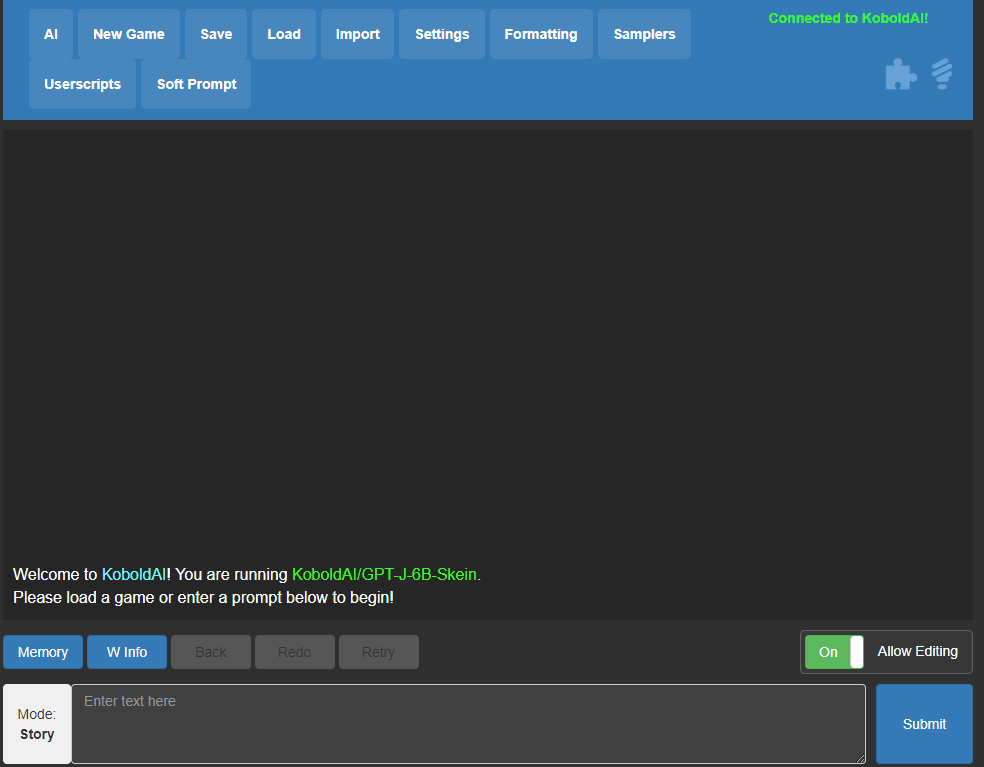
KoboldAI web interface connected and running the GPT-J-6B-Skein model in story mode

Installing a model

One of the nice things about KoboldAI is that rather than having to download files from Huggingface directly, you have a list of models that you can click and install easily. You'll need to get a model loaded to use the front end, of course, and there are a few options to choose from:
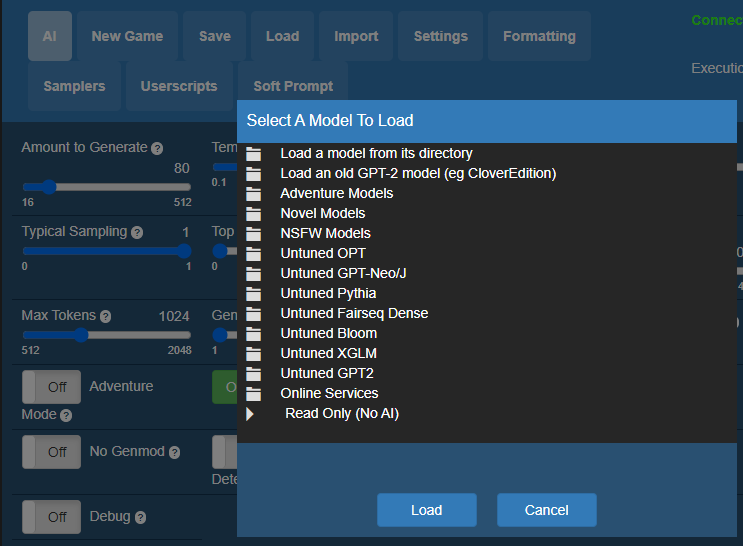
KoboldAI Select A Model To Load menu listing categories like Novel, Adventure, and Untuned models

Adventure models are models that simulate the look and feel of old MUDs or Infocom style adventure games. Interacting with these models generally involves the model giving you a block of text to work with, and then you declare an action, after which the model will then continue the story based on your action.
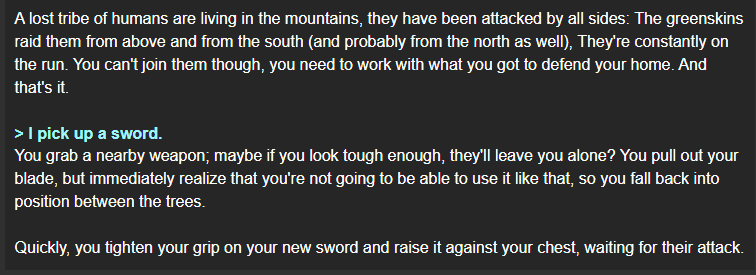
KoboldAI adventure transcript where the player picks up a sword to help defend a mountain tribe

Novel models, on the other hand, are more directed at writing third-person prose, as if you were writing a novel cooperatively with another individual; where the AI will supply a section, then you supply a section, and then the AI does so, and so on.
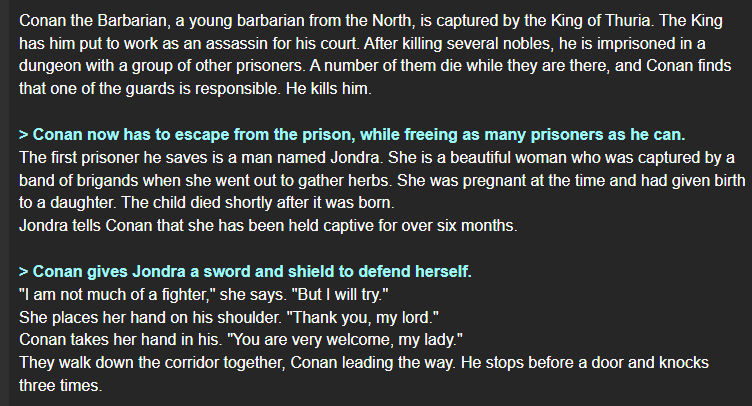
KoboldAI story transcript of a Conan the Barbarian roleplay with player actions highlighted in green

NSFW models.. well, that's out of the context of this blog, and you can use your imagination for those. 🥴

Using the Memory Function

Much like Oobabooga,  KoboldAI has a Memory pad where you can give the bot persistent context to keep in mind throughout the scene. This is very similar to the Character tab within Oobabooga, in that you can provide things that the AI will keep in mind with every prompt, and you can add and edit this dynamically as the scene progresses to keep it apprised of any new pertinent info that it needs to know.
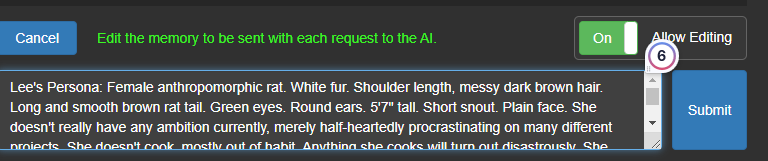
KoboldAI memory editor showing a character persona sent with each request to the AI

Advantages and Disadvantages of KoboldAI over Oobabooga

There's a few compelling reasons that you may prefer KoboldAI, depending on what your use case is.

Context Matters

Like all text generation models, KoboldAI has a token context limit (2048, the same as Oobabooga before their most recent update.) How these two front ends use that context allotment differs, though. After considering all of the persistent fields on the Character tab, Ooba will then start with the most recent log entry, and then travel backwards to incorporate as much text as it can until it fills up its buffer, at which point it essentially forgets everything prior. This can manifest itself in rather silly ways, like when the model seems to forget what a character is wearing even though you told it explicitly a few pages back. So, it essentially remembers everything, for awhile, until it then remembers nothing.  

KoboldAI, on the other hand, uses "smart context" in which it will search the entire text buffer for things that it believes are related to your recently entered text. Although it has its own room for improvement, it's generally more likely to be able to search and find details in what you've written so far. (If you've ever used the long-term-memory extension in Oobabooga, I believe it behaves somewhat akin to this.)

More freedom - and responsibility - to edit output

Unlike Oobabooga, which only allows you to edit the most recent output (and takes more clicks to do it), KoboldAI allows you to edit any part of the output at any time, as if you were sharing a word processor with another person. Because it relies more on the whole of your log than Ooba does, it requires you to routinely edit whatever it outputs until it is exactly what you want it to be. This makes it a bit more involved than Ooba, which you can generally treat more like a roleplay partner with their own sense of agency. KoboldAI expects a bit more handholding, but also gives you more power to do it, with the knowledge that it will also be able to incorporate more of your past history in future outputs.  

Output length

Based on my experimentation, models such as Pygmalion tend to be much more verbose in Oobabooga than in KoboldAI. I tended to get paragraphs and paragraphs with some of the more expressive models, whereas I never got quite so detailed responses within KoboldAI. However, balanced against that is the fact that the long responses in Oobabooga tended to be very overloaded and repetitious, while KoboldAI's tended to be more succinct and to the point. If you want output that's more "punchy" for lack of a better word, then KoboldAI may be your thing.

Conclusion

So which one is right for you?

Having used both, they do different things in ways that are easy and not so easy to describe. But the primary use case between  KoboldAI and Oobabooga is how long you intend to use it for a particular scene.

The big problem I've noticed with Oobabooga is that due to the always on/off nature of its context window, it can be very hard to keep an AI-driven character consistent over a long period of time, since its personality will be largely driven only by its most recent actions. KoboldAI seems to be a lot better at retaining details over a long period of time.

On the other hand, for short scenes, Oobabooga is really good at working within that short period of time. But it does feel like a lot of my interactions and stories within Oobabooga have a very noticeable shelf life, with a large dropoff in enjoyment after it "goes off" for lack of a better term.

So my eventual suggestion would be to try both, with the knowledge that if you plan on writing much longer-term works, the decision shifts towards KoboldAI the longer your story goes – since at least for my taste, Ooba gets extremely immersion breaking when it there's so little long-term stability over how it manages the character.

Have any questions? Feel free to pop into our Discord and ask!

Author profile: Brendan McKeag