







Jane Friedman tries to send an issue of her author newsletter every two weeks or so. And after 15 years of watching the numbers, she's found even that is sometimes infrequent enough for people who just signed up to forget who she is by the time her next issue lands in their inboxes. Her solution is what she calls an autoresponder.
Others might call it an “email automation,” “drip campaign,” or “welcome sequence,” but they’re all (horribly named, for one, but also) the same thing. In Friedman’s case, it’s three emails sent to new subscribers over 10 days to “introduce people to some of the most key posts and information I make available for free.”
Sign up for Tammi Labrecque’s Newsletter Ninja emails, and you’ll see something similar. Her signup confirmation tells you to expect “a quick series of getting-to-know-me emails over the next week or so, starting tomorrow.”
There are many different ways to design a series of emails that are automatically sent in response to specific events. You might give away book teasers to new signups or celebrate when subscribers hit their one-year anniversaries. All that matters is that you create automated campaigns that further your relationships with readers and minimize marketing busywork.
The all-important welcome series
Most newsletter platforms include an option to send a welcome email after someone signs up or confirms a subscription. But that’s a single email that goes out immediately. Like Friedman, you may want multiple welcome emails sent out over days or weeks to familiarize people with your writing.
Another reason to create a multi-message welcome sequence might be a “graduation series” similar to the one indie sci-fi author Matthew Buza describes as “a way to move a person from [my autoresponder] into my main list, but only people who have graduated through my autoresponder.” That way, subscribers only start receiving your regular newsletter after more important introduction emails. For Buza, “The sole goal of the autoresponder is to get the new reader to buy one of my books, leave a review, and opt into my Advanced Review Copy team.”
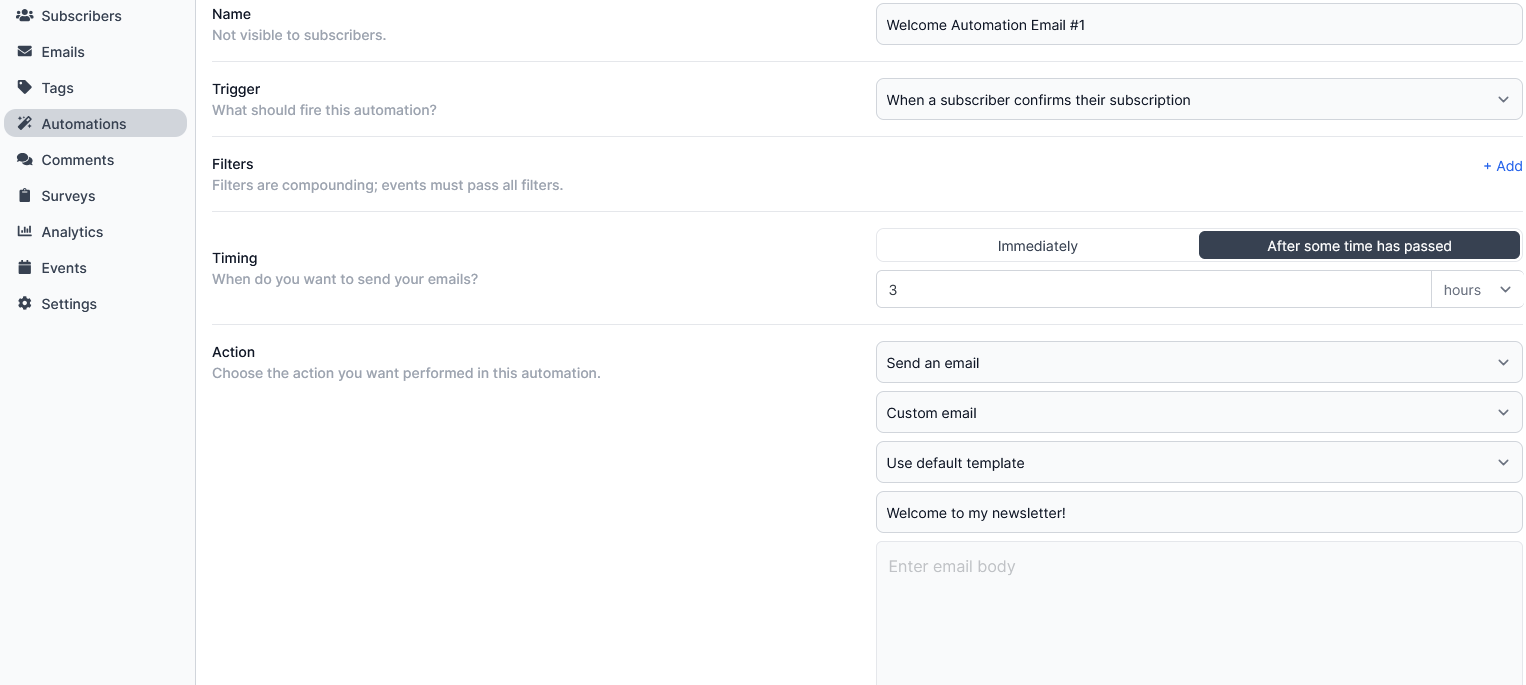
You could build that in Buttondown in a few minutes (or, if you aren’t on Buttondown’s $29/month tier, play with automations at demo.buttondown.com). First, make sure to turn off any default welcome email. Then, open your automations builder and set the trigger to any time a subscriber confirms their subscription. Choose whether you want the action to take place immediately or after a delay, set the action to send an email, and write your first message.
Using the same trigger but with longer delay times, you might draft a graduation series with emails on days one, four, and nine after someone confirms their subscription.
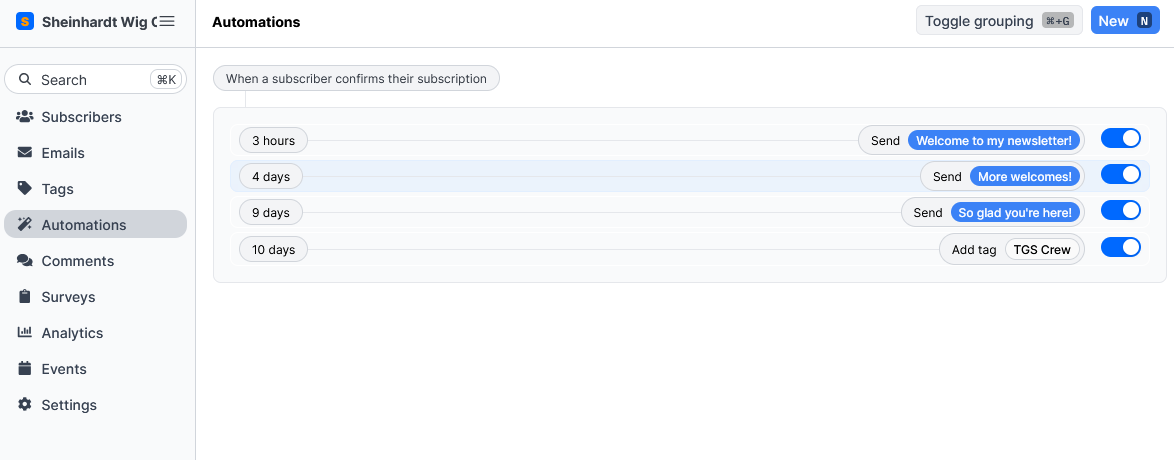
You'd need a way to differentiate subscribers who have and haven't gone through the graduation series. Tags are perfect for this. After the final welcome email on day nine, create an automation that's triggered by a signup confirmation, waits 10 days, and then applies a tag (e.g., Graduated) as the action. When you want to send newsletters that only go to people who've gone through the entire series, send only to subscribers with the Graduated tag.
That’s only the beginning (literally). You can create similar campaigns where templated emails “drip” out at predetermined intervals for anything that fits within the triggers and actions available to you.
The segmentation automation
Now, let’s say you have a few hundred subscribers who had signed up before you set up your welcome series. All you have are their email addresses and, if you’re lucky, their first names. Whomp whomp. The best way to start (ethically!) gathering more data on subscribers in this situation might be an automation triggered when readers click a link or answer a survey.
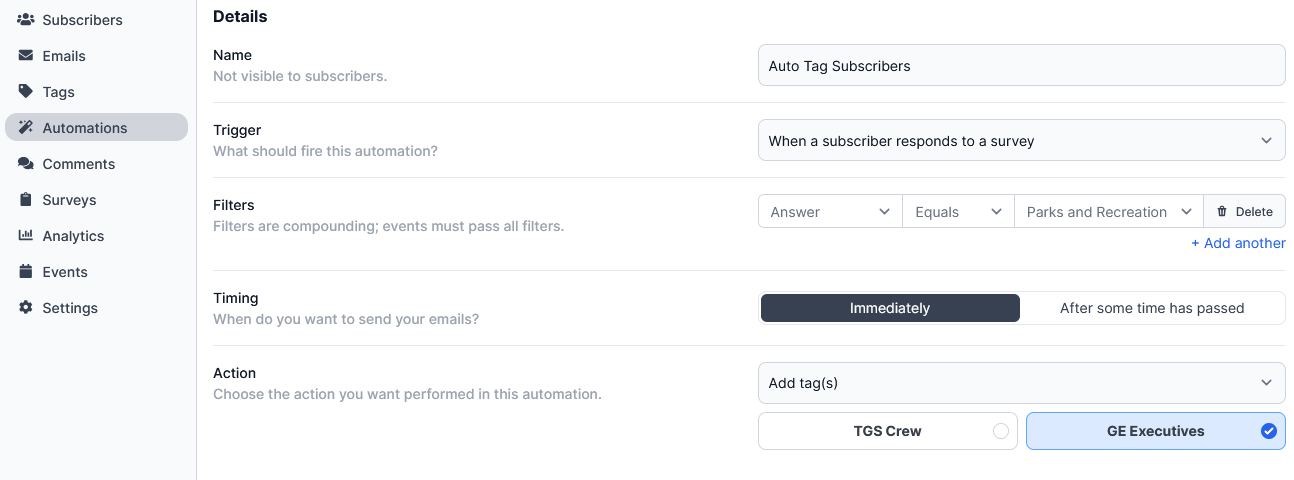
Professional writers, for example, might poll readers about their favorite fiction genre or non-fiction topic. Assuming you have email open and click tracking turned on, you’d set up an automation triggered by a subscriber clicking a link or a survey in your newsletter and set the action to add tag (e.g., reads-urban-fantasy or likes-popscience).
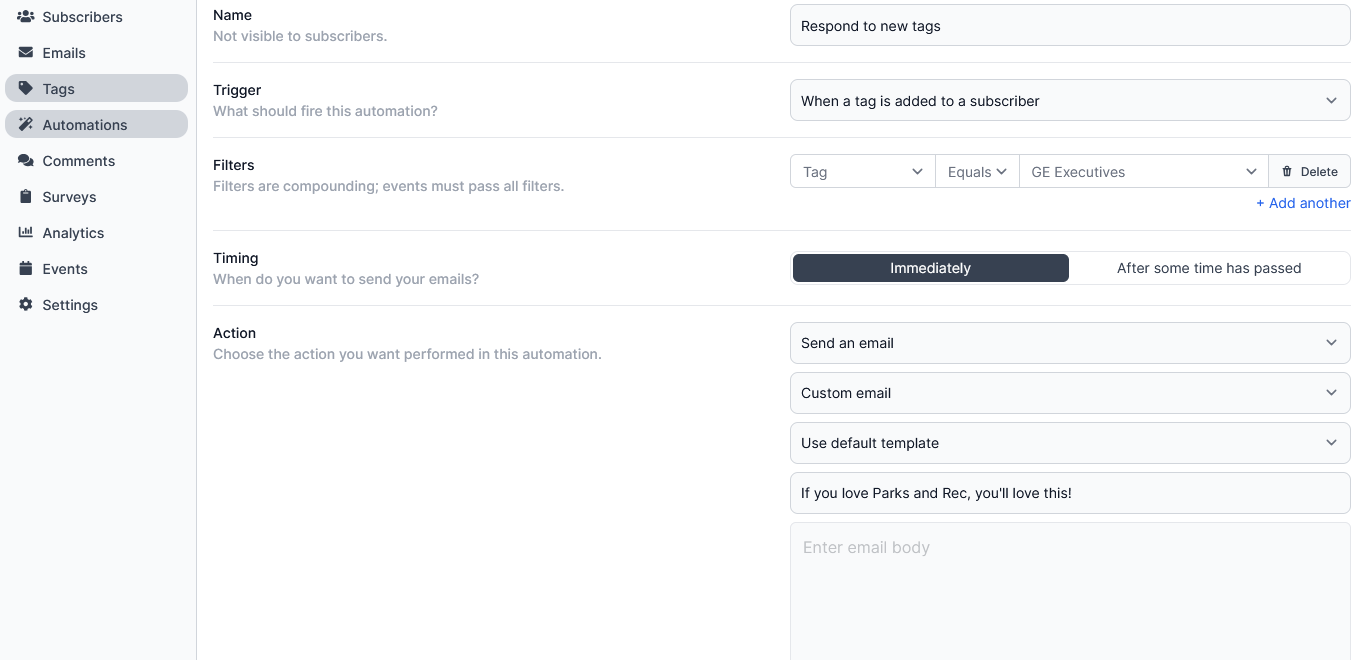
Adding the details to subscriber profiles alone would be enough to inform more targeted launch emails and promotions. But you could take it even further by putting together sequences that fire off whenever a specific tag is added. Maybe you want to automatically send a list of your favorite books in a subgenre (possibly mentioning a fellow author as part of a newsletter swap) or link to all your articles and books relevant to a subscriber’s favorite non-fiction topic.
Using automations to segment your list is a fantastic way to make newsletters more personal and valuable for individual readers without a ton of manual work on your part. What’s more, you can use the same basic flow to keep your newsletter’s performance stats above average and your monthly costs low.
List cleaning automations
Spammers have made newslettering much harder for the rest of us. They spend so much time finding ways to get around blockers and filters that email providers like Google are constantly upping the threshold for what they deem a good-faith sender. If you want to avoid your subscribers’ spam folders, your open and click rates need to be high, and your unsubscribes need to be low.
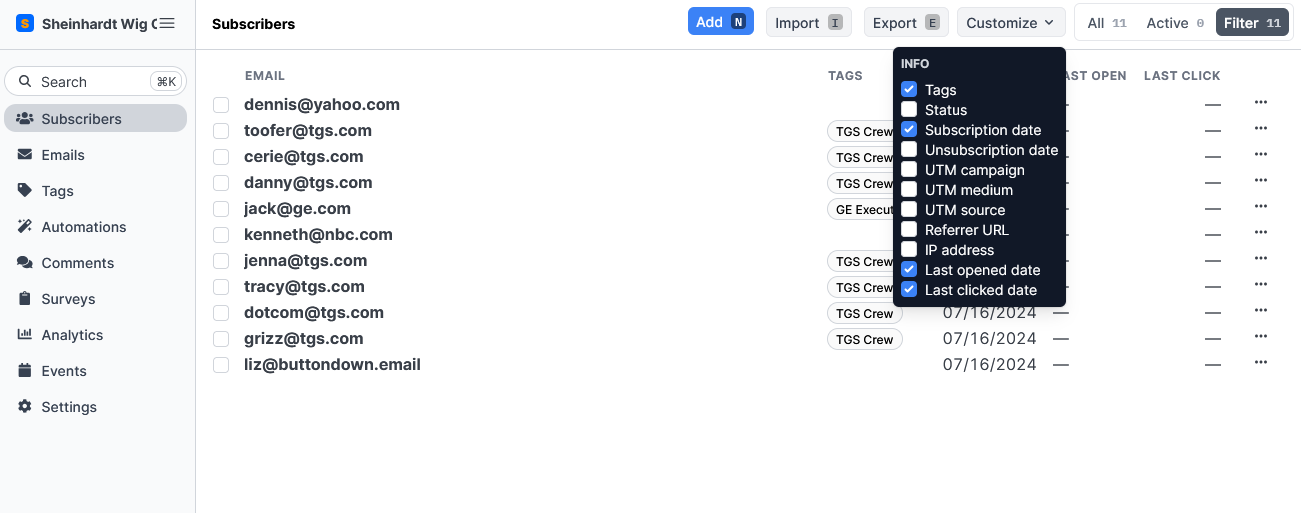
One way to be proactive about that is with a re-engagement series. Once or twice a year, you’d filter your subscribers list to only show people who have been subscribed for at least three months but haven’t opened anything during that time. These are the people at risk of hurting your stats.
Australia-based author Nathan Taylor recommends a “List cull every six months. No good paying for subscribers on your list who don’t add value—but you need to give it a few months for them to demonstrate a clear pattern of not interacting with your content.”
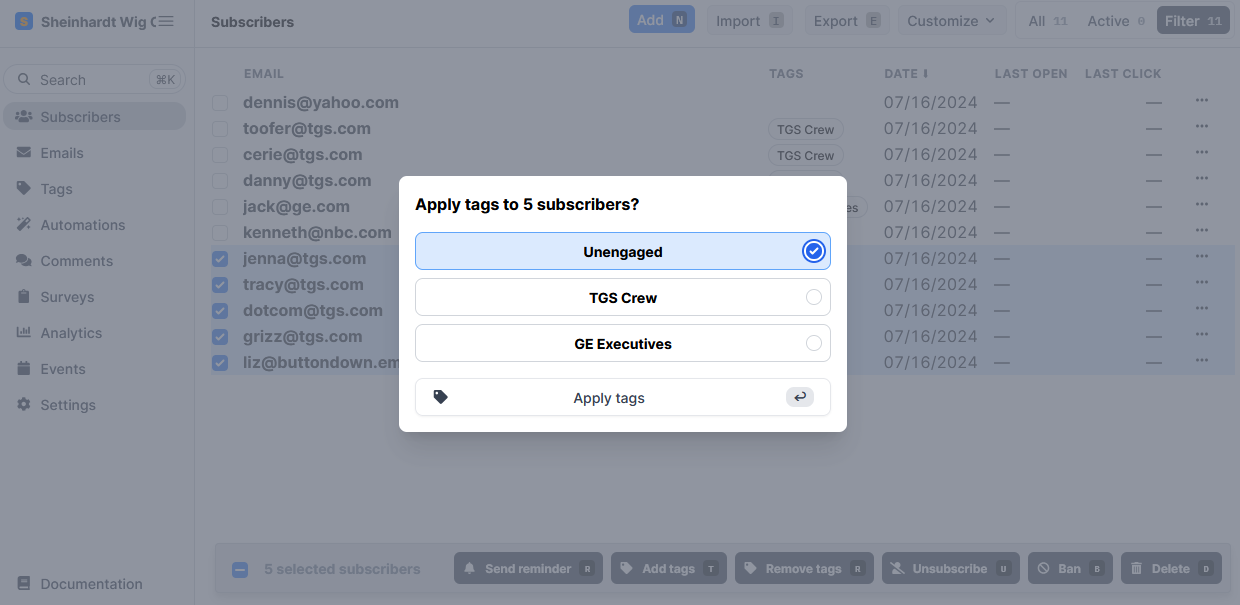
With the sorted and filtered, you could create an Unengaged tag, and bulk add it to anyone who stopped engaging.
At this point, you set a trigger for any time the unengaged tag is added, with an action to send an email. The first message would say something along the lines of “Hey, it looks like you haven’t been opening the newsletter recently, although that may be because you’re blocking trackers, which I totally respect. Since I don’t want to clog up people’s inboxes with emails they’re not opening, I periodically remove anyone from my list who is unengaged. So, if you want to keep receiving my emails, click this link or reply to this email, and I’ll keep you on the list and respect your tracking preferences going forward. Thanks!”
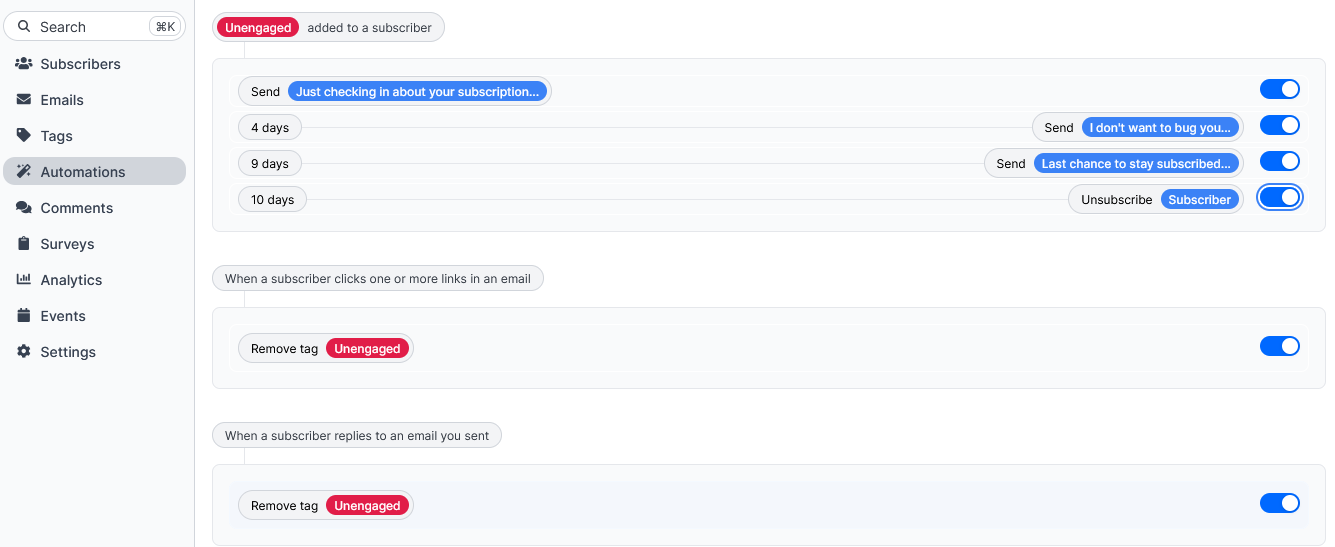
Next up, an automation that removes the unengaged tag from anyone who clicks the link or replies directly. And two more time-delayed reminders sent to anyone with the unengaged tag who didn’t click the link or reply, capped off with a final automation that ends in the Unsubscribe a subscriber action for anyone who never engaged with the series. Bingo, bango, bongo, cleaner, higher-performing lists after a few minutes of bulk tagging.
More time for the writing you love
Self-promotion and marketing yourself is a marathon, not a sprint. It should be challenging but not unbearable; uncomfortable but never all-encompassing. One of the best ways to manage that balance as more and more people begin following your work is with a newsletter that expands your reach without dehumanizing your brand.
Autoresponders are as helpful for that as their moniker is off-putting, especially for professional writers and solopreneurs. They help you deliver timely, relevant welcome messages, personalized recommendations and offers, and polite-as-can-be breakup emails–all while you focus entirely on your novel, blog, journalism, or whatever wonderful thing you’re drafting.