


惯性聚合 高效追踪和阅读你感兴趣的博客、新闻、科技资讯
阅读原文 在惯性聚合中打开

推荐订阅源

让小产品的独立变现更简单 - ezindie.com
人人都是产品经理
人人都是产品经理
Cisco Talos Blog
Cisco Talos Blog
钛媒体:引领未来商业与生活新知
钛媒体:引领未来商业与生活新知
V
V2EX
博客园 - 三生石上(FineUI控件)
Martin Fowler
Martin Fowler
WordPress大学
WordPress大学
D
Docker
S
SegmentFault 最新的问题
博客园 - 聂微东
美团技术团队
Apple Machine Learning Research
月光博客
月光博客
奇客Solidot–传递最新科技情报
奇客Solidot–传递最新科技情报
Last Week in AI
Last Week in AI
M
MIT News - Artificial intelligence
F
Fortinet All Blogs
freeCodeCamp Programming Tutorials: Python, JavaScript, Git & More
The GitHub Blog
The GitHub Blog
GbyAI
GbyAI
L
LangChain Blog
Vercel News
Vercel News
博客园 - 叶小钗
MongoDB | Blog
MongoDB | Blog
Stack Overflow Blog
Stack Overflow Blog
H
Help Net Security
OSCHINA 社区最新新闻
OSCHINA 社区最新新闻
The Cloudflare Blog
Engineering at Meta
Engineering at Meta
T
Threat Research - Cisco Blogs
T
Threatpost
Scott Helme
Scott Helme
T
Tailwind CSS Blog
Latest news
Latest news
Stack Overflow Blog
Stack Overflow Blog
Blog — PlanetScale
Blog — PlanetScale
The Register - Security
罗磊的独立博客
P
Proofpoint News Feed
腾讯CDC
S
Schneier on Security
雷峰网
雷峰网
A
About on SuperTechFans
T
Tenable Blog
F
Full Disclosure
Cyberwarzone
Cyberwarzone
博客园_首页
有赞技术团队
有赞技术团队
K
Kaspersky official blog

文章列表

Compulsive curiosity, or, how I built an infinite idea machine Gift details on the subscriber portal Portal link in the archive nav The physicists who convinced Fermilab to send Brazil's emails First, add no friction: How micropayments lost and subscriptions won Filter subscribers and automations by source Automations, rebuilt What email will look like in the future Filter subscribers by bounce date and reason Email could have been X.400 times better Three features are moving behind the paywall Firewall changes and improvements Put your name and voice into your company newsletter Simplified email address settings Subscription wall Inboxes were overwhelming before we'd even named them The US government tried really hard to screw up email Public postmortem: database connection exhaustion Ask a nerd: what is the best way to unsubscribe from newsletters? Bookshop.org embeds Email was into agents before they were cool Passwordless login Rename metadata keys in bulk A spring cleaning for our legal docs Ask a nerd: what happens when you click the spam button? Passkey support for two-factor authentication How Buttondown's API versioning works Safer defaults for the email creation API How to send email to space How we enabled Content Security Policy for everyone Recovery codes for two-factor authentication Filter sent emails by engagement rate How we migrated to TypeIDs without breaking clients How we check every link in your email Use newsletter metadata in your emails Should we bring back email exploders? Sort and filter by open and click rates Custom click tracking domains More newsletter settings in the API Revamped replies Custom email templates for everyone Simplified cancellation Ask a Nerd: Does email length affect deliverability? The changelog, reborn Swedish localization Forwarding an email is not always straightforward Public descriptions for tags OpenAPI spec for archives How Rodrigo brings a humanistic view to consumer technology Survey responses on the web How Brandon Lucas Green shares his music and supports artists Subscribers can come from anywhere. Even another newsletter platform's form. Your newsletter's archives are more valuable than your list Better tag self-management Smarter automation filters Granular API keys New design settings pages Snippets Ask A Nerd: How does newsletter cadence affect deliverability? Starred views More ways to customize your archives Inbox filtering Mastodon follower analytics Ask a Nerd: What are good open, click, and response rates for an email newsletter? How we migrated our database to PlanetScale Two new archive themes Ask a Nerd: Does attaching files to your newsletter hurt deliverability? Custom buttons now work in Markdown mode Seline and Tinylytics support Unban subscribers Announcement bars for your archives Public postmortem: archive downtime Bang paths, source routing, and how email trips were planned 2025 disposables.app Russian localization Ask a Nerd: Can you improve email deliverability with a personal domain? More locale options How we interview customers at Buttondown Bluesky analytics Minimum viable complexity Reply to conversations How Jeffery Hicks goes behind-the-scenes in his newsletter Changes to our stack in 2025 2026: Emails What the hell is a UTM? Randomize survey answer order TK reminders in the editor Why we insourced analytics Scroll sync in the editor How Kelly Jensen uses Buttondown to discuss key library issues How Jamie Thingelstad uses Buttondown to explore tech topics 2026: Archives Improved filters Keeping feature creep at bay Content Security Policy in archives Open source Sniperl.ink Auto-activating RSS reader subscriptions What the hell is ActivityPub? Gift subscriptions
How we built Buttondown's new docs
Ben Borgers · 2024-05-06 · via

We just launched a rebuilt documentation site, complete with a slew of new content and improved API documentation!

What was wrong with the old site?

Although our previous documentation site has served dutifully, it was starting to show its age:

  1. The codebase wasn’t super extensible — it had this feeling of being somewhat creaky, and that changing anything was a bit of a lost art.
  2. New writing had to be contributed via markdown to the GitHub repository.
  3. API documentation wasn’t super clear and was buried.

However, we noticed that a lot of customers writing in to customer support were referencing having searched the docs for an answer. Sometimes we did have docs on what they were looking for, but the taxonomy and search were failing them. Other times, it was something we really should have documented, but didn’t.

Email newsletters are also a somewhat uniquely thorny prosumer product — there’s a lot of edge cases and varying setups, which warrant good documentation.

Breaking ground on a new site

With a need and interest established, we started working on a new documentation site at the end of last year.

The overarching goal has been to make it easier to establish new content, both for engineers and non-engineers. That means:

  1. It shouldn’t require opening a code editor to contribute.
    1. This helps with non-engineers being able to contribute, but even for developers writing in VS Code isn’t an ideal experience.
  2. It should be clear where in the taxonomy new content should be added.

Making authoring easy

The first point above was solved using Keystatic, a wonderful tool from Thinkmill that bolts a content editing interface onto your website, which ultimately saves files back to your GitHub repository.
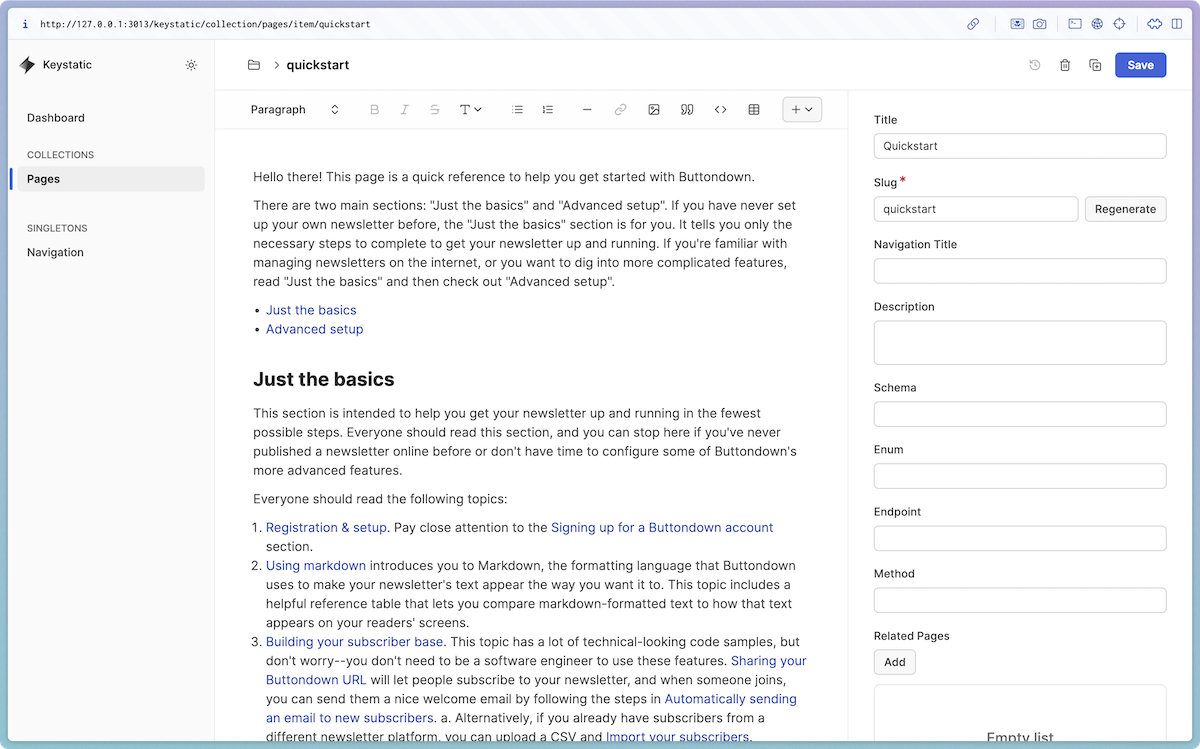
The Keystatic editing interface

Keystatic is super customizable, which allowed us to extend the editor with custom components. Our previous site was written in MDX, so it was important that we had some way of porting over custom components (Keystatic stores its content in Markdoc, so a similar idea).

For example, some of our pages include a “Live Code Block,” which shows code alongside with a live preview of the code’s result:
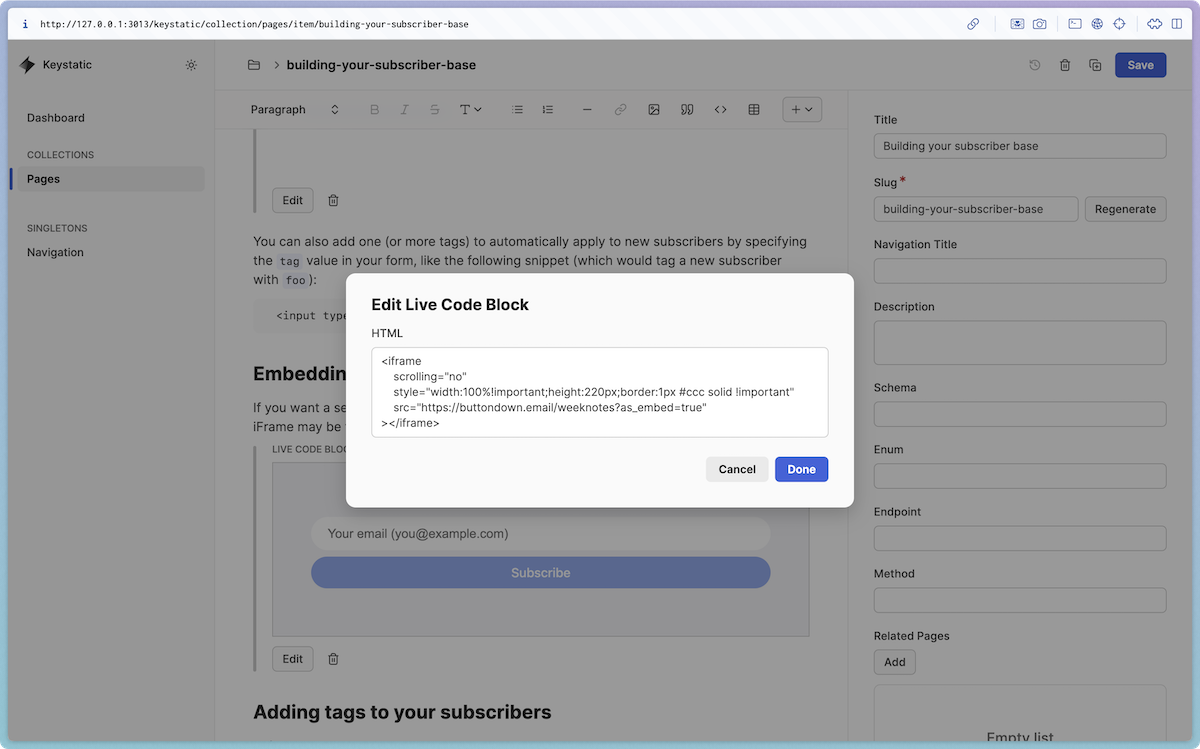
Editing a Live Code Block in Keystatic

In Keystatic it’s super simple to define this component:

liveCodeBlock: component({
  label: "Live Code Block",
  schema: {
    html: fields.text({ label: "HTML", multiline: true }),
  },
  preview(props) {
    return (
      <div
        dangerouslySetInnerHTML={{
          __html: props.fields.html.value,
        }}
      />
    );
  },
}),

And then we separately define how the component should render on the page as a React component:

<iframe
  srcDoc={html}
  title="Live code block"
/>
<Code blocks={[{ language: "html", code: html }]} />

Flattening the taxonomy

Another goal was to make it easier for authors to determine where new pages should go.

Our old docs site had pages grouped into categories in the left sidebar, but the categories were created over time, leading to weasel-y categories like “Advanced Features”.

The URLs of the pages also contained the category, like /advanced-features/surveys, meaning that we couldn’t easily rearrange the categories without breaking links.
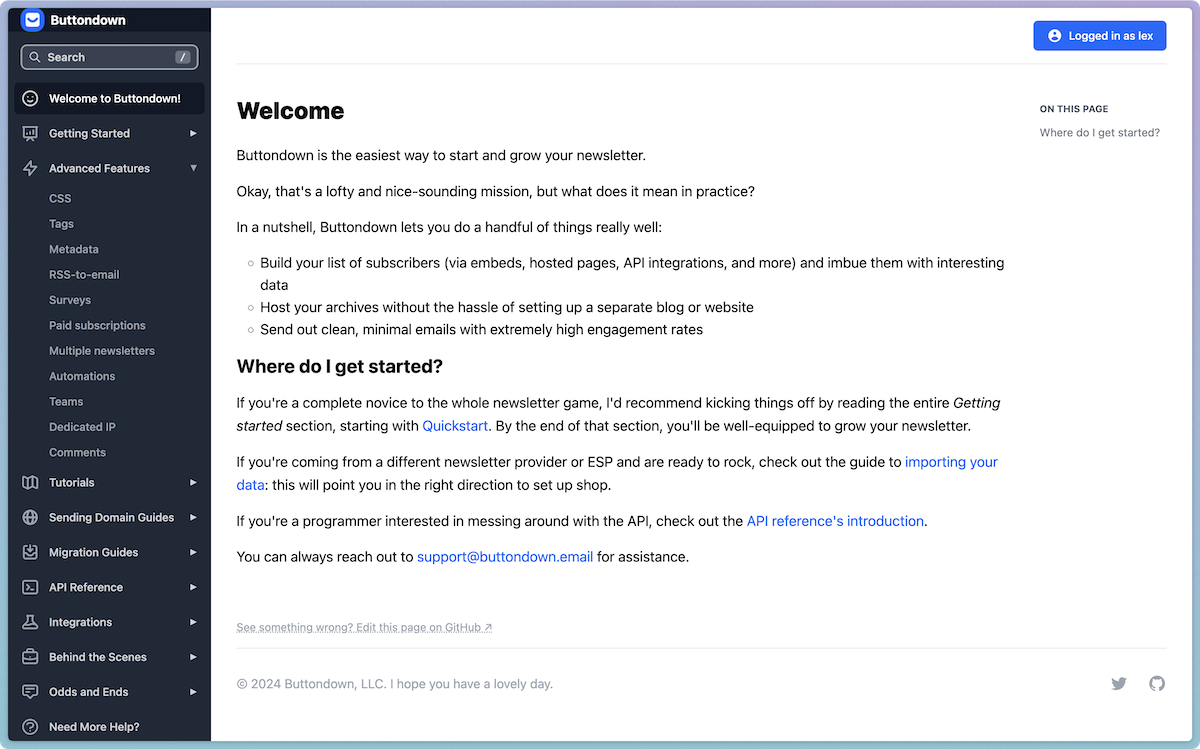
Our old documentation site

In the new docs site, every page is at the root — like /surveys. This means that we can continually rearrange the navigation hierarchy (using a custom Keystatic editing interface!) without breaking any links.
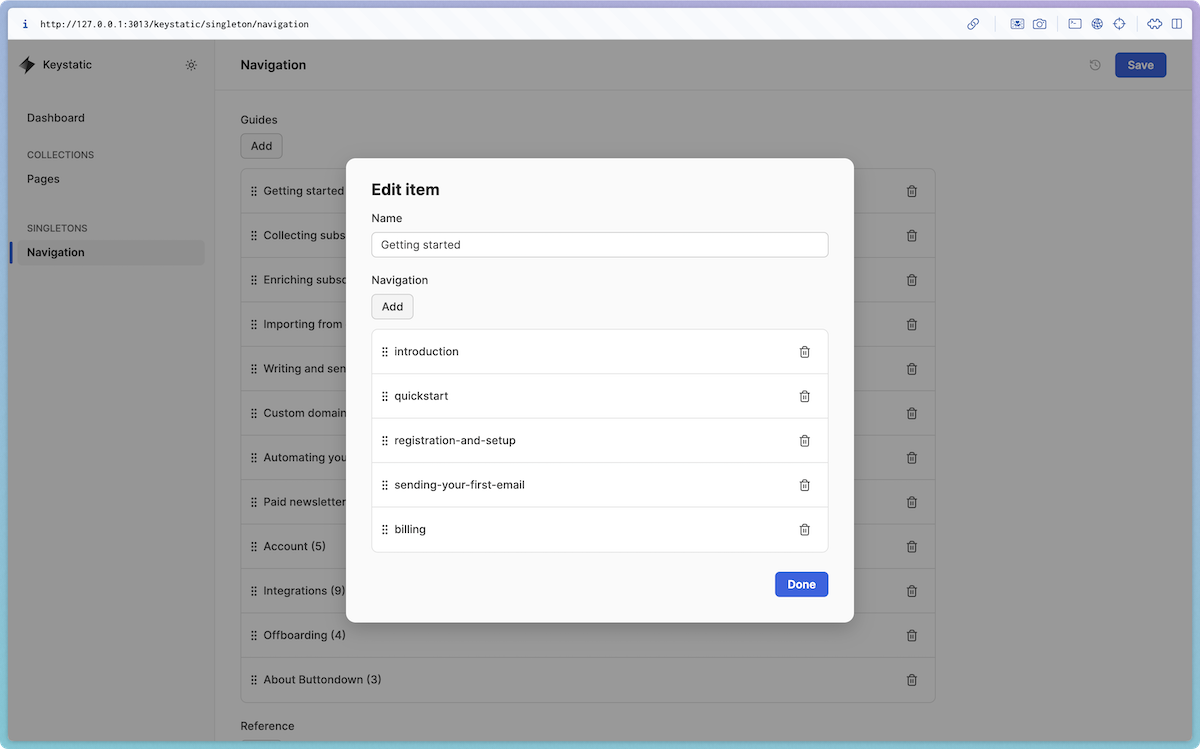
Editing the new documentation site’s navigation hierarchy in Keystatic

We’ve also split out separate sections of the docs: Guides, Reference, and API. It felt strange to mix long-form tutorials and guides (”How to collect metadata for your subscribers”) with more one-off pieces of reference material (”What happens if I edit an automation while it’s active?”).
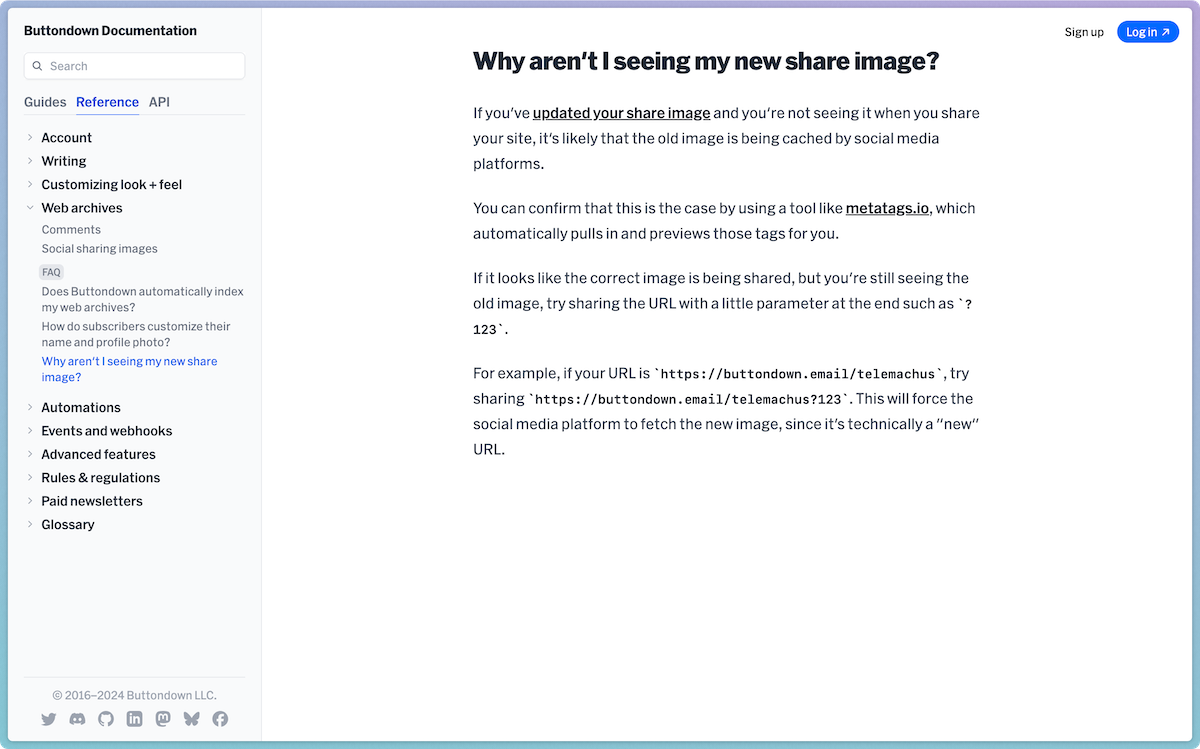
An example of an FAQ page (“Why aren’t I seeing my new share image?”) on the new documentation site

With the taxonomy improved, we can feel better about creating mounds of documentation (big and small), knowing that it all has a reasonable place to go.

Also, we’re still not fully happy with the taxonomy we’ve ended up with and the content will grow over time, so this allows us to rearrange the taxonomy without breaking links in the future.

Help me find stuff

Another problem was that we had documentation on certain topics, but that our search was a bit clunky.

In classic fashion, I did a bit of over-engineering, and we’re now using OpenAI’s vector embeddings to process every bit of writing on the site, and then matching it to search queries by comparing the distance from your query to every piece of writing.

It’s not perfect, but it’s noticeably better at finding results that are semantically similar but not syntactically similar (for example, “image” and “photo”).

Why roll your own documentation site?

There’s a ton of solutions off the shelf, but ultimately, documentation is a core part of Buttondown’s product. One way that we differentiate is by providing a superior customer support experience, and this documentation site paves the way for us to extract more knowledge out of one-off customer support replies and into reusable and into publicly searchable documentation.

We could have used something prebuilt, but our slightly quirky needs (custom components, a custom navigation hierarchy, improved API docs) plus room to grow (vector embeddings search, affordances for related documentation pages and FAQs) mean that we feel more confident and future-proof rolling our own site.