


Along with packing boxes, using inordinate amounts of tape, and loading a truck, moving houses requires a bit of bureaucracy: Notifying the post office of your new coordinates. I used to live there, I now live here, please send all new papers to the new place.
Online, it’s the opposite. Move your domain to a new email service, and your mail will automatically show up. The red tape comes from switching where you send your mail.
The good news: You can always move your email newsletter. You’re not stuck with the domain and email service where your newsletter emanated. It’s just that moving requires the digital equivalent of notifying the post office—only this time, it’s notifying the world that you’re sending from somewhere new.
Your (email) reputation matters most
There’s one thing that makes or breaks your email newsletter: Your reputation score. That’s the one thing most affected when you move your newsletter around.
Your email reputation score is calculated independently by Gmail, Microsoft, MxToolbox, and other email services based on a few factors. If your email checks all of the SPF and DKIM requirements (which we’ll get to below). If people are opening, reading, and replying to your emails. And, most importantly, if your emails are being marked as spam—something that can quickly drag your reputation score down.
And they’re not only watching your email address—they’re watching everyone on your domain and server. “The activity of any senders using a shared IP address affects the reputation of all senders for that shared IP address,” says Gmail’s documentation. (Quick tech lesson: Your domain is your website address, amazon.com, say, if you’re Bezos. And your IP address—for emails, anyhow—is the server address that sends your email messages, 209.85.220.41 if, again, you’re Bezos.)
You could be careful with your emails, but if your colleagues are sending spam—or your newsletter service hosts other newsletters that are spammy—your score could get dragged down with them. That’s one reason Buttondown’s so strict about keeping our quality high; send too many emails that get marked as spam, and we might have to ask you to move.
So you want to send from a reputable service. You want to send from your own domain, when possible, to have control over at least half of your reputation score—which is technical, and a bit intimidating when you’re starting out, which is why you might start with your service’s domain and want to switch later. And at scale (sending 100k+ messages a month), a dedicated IP address for your emails and your emails alone leaves your reputation entirely in your hands.
Consistency matters, too. If your emails are normally sent from one IP address and they start coming from a new address, your score will change. It could improve, if the new IP address has a better reputation, but any chance is cause for scrutiny—which could hurt your deliverability.
But the sender score black box leaves a few hints at the best way to start sending from a new place, what is often called “warming up” a domain or IP address:
TL;DR: Clean your list. Own your address. Notify the registrars. Start slowly.
First, send no spam. Do everything to get people to open and read your emails, and never send emails to anyone who doesn’t really want your messages. Proactively unsubscribe people when they stop engaging.
Then, own as much as possible of your identity. Exports matter; they let you take your subscribers and archives to greener pastures. Domains matter more—they might take a bit of time to earn reputation, but at least you can take them with you.
Next, cross your technical t's and dot your digital i's. Point your domain SPF and DKIM records to your email newsletter service. Point them to the new one, when you move. Double check, ensure everything’s correct.
Finally, start slowly. Email your most engaged readers first. Ask them to reply; those interactions will boost your sender reputation. Then bring in your next most engaged segment, and repeat until you’re migrated.
Odds are, your open and reply rate will drop off a bit, at first. That’s normal, just as it’s normal for your website’s Google rankings to jump around a bit after a Google search update.
Clean up your list
You’ll throw out stuff when you move. So much stuff. Old TV boxes, useless kitchen gadgets, and clothes you haven’t worn in years—along with a cable you’ll inevitably need a week from now.
Your subscribers are great people, and it hurts to see your total subscriber count go down. I know; I have to tell myself not to watch the numbers too closely, too. But recipients who don’t open your emails are dead weight, making you pay to send emails to more people than are actually reading them, and subtly hurting deliverability at the same time.
Google suggests the same: “Periodically send messages to confirm that recipients want to stay subscribed,” it advises, and “Consider unsubscribing recipients who don’t open or read your messages.”
Moving’s as good a time to do it as any.
Before migrating your newsletter, to a new email address or a new service or both, email your subscribers. Ask if they still want to receive your emails. As Selfcare Backpack author Gem wrote when moving to Buttondown: “Who amongst us hasn’t signed up to a newsletter only to let it linger in our inbox? I’d rather not clutter up your email if you’re not getting value out of my writing.”
The bravest step would be to ask them to re-subscribe on your new list. Not necessary, but it would ensure everyone who gets your emails really wants your emails. Or, take a more permissive approach. Add everyone who replies first to your new list. Then filter out everyone who opened this most recent email but didn’t reply, and add them second. Drop off everyone who neither replied nor opened.
Again: You could just export your list and import it at the new location. Buttondown can automatically cleans up people who’ve never opened your emails, and let people change their email address when needed. That covers the basics, at least. But moving’s as good a time for spring cleaning as any.
Set your domain’s SPF, DKIM, and DMARC
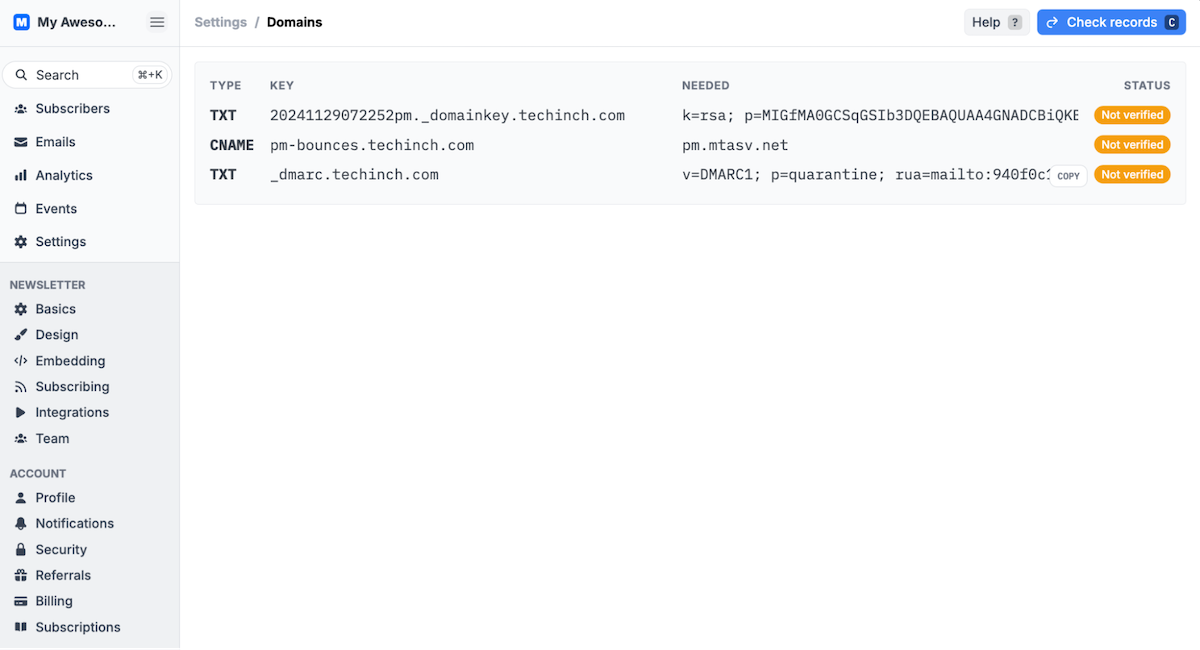
Then check off the technical details. Your email service should tell you what to do; Buttondown will show something similar to the screenshot above. Works the same if you’re adding a new domain for the first time, or moving an existing domain to a new newsletter service—with a few differences.
First, you may need to set your domain’s SPF record, a plain text record on your domain registrar that starts with v=spf1 and lists every server that’s allowed to send email from your domain. You can only have one SPF record per domain—but you can have multiple servers listed in a single domain. Buttondown, sometimes, can handle this for you; check your newsletter service to see if you need to do it.
You can include both your old and new newsletter service in the SPF record, along with Gmail or another mail service you use for normal email on your domain. That gives you an SPF record like v=spf1 include:_spf.google.com include:mailgun.org ~all. You can go back and remove the old service later; for now, best to leave the option open to send from both.
Then, set your DKIM record, a public key in a TXT DNS record that should start something like k=rsa; p=followed by scrambled characters. That lets Gmail and other email servers verify that you allowed this service to send emails from your address. And, again, you can have multiple DKIM records—so instead of overwriting any existing DKIM records for your older newsletter, add the new DKIM records for your new service so both can send emails from you.
Finally, set your DMARC record, a text DNS record that tells email servers what to do with email messages that don’t pass SPF and DKIM verification that starts with v=DMARC1;. This typically will include a custom reply email that servers can send reports if spam seems to be being sent from your email address. You can only have one DMARC record—so if you’re moving newsletter services, set your DMARC record to the settings from your new service. It shouldn’t hurt deliverability from the former service, and should help your new email’s home a bit.
You might also need to add a few other things, depending on your email service. Buttondown has you add a CNAME record with a pm-bounces subdomain to route bounced emails; others could ask you to add an ARC record as well. There’s also CFBL, or “complaint feedback loop,” another thing Buttondown takes care of for you. For the most part, though, SPF, DKIM, and DMARC are the things to worry about.
Sounds technical, but it’s not too bad. Generally, add your domain to your new newsletter service, follow the directions they give, and remember:
- SPF: Merge your records into a single SPF record that starts with v=spf1 and ends with ~all, with every server that you want to send emails from your domain in the middle.
- DKIM: Add every DKIM record individually; you don’t need to delete an old DKIM record to add a new one.
- DMARC: Replace your old DMARC record with the one from your new email newsletter service; never have two DMARC records at the same time.
And if you have a custom IP address ... well, you likely don’t need this guide. You know what to do.
Start slowly—and ask for replies.
Now it’s time to start building your following back up.
Open your new newsletter service—or your existing one, if you’re sticking around but sending from a shiny new domain. Import your cleaned-up subscriber list.
Write your first email. Feels good, right, drafting something new from a new place? Keep it personal, friendly, without any promotions, too many images or links, or anything else that could be perceived as spammy and hurt deliverability. And ask for a reply; try to strike up a conversation, perhaps mentioning the move and that you’d like to hear from them.
Test first; send yourself a preview email, and make sure everything looks good.
Then hit send, and watch your stats. Ideally you’ll have sent emails to fewer people than before, but will get as high or higher open and reply rates than normal. Then slowly ramp it up: Bring in people who open your older emails but didn’t reply, and start trying to get your list growing again with new subscribers. One campaign and happy subscriber and reply at a time, you’ll build up your sender reputation—and will be ever more likely to show up in Gmail’s prime real estate, the Priority Inbox tab.
If you’ve moved to Buttondown, welcome—we hope you love it here, and will stick around for the long term. But if you decide to move—or just want to switch domains, from ours or one of yours to a new one—then at least you’ll know what to do next time to notify the world’s electronic postmasters of your new sending home.