








Metadata is data about data. Your email list contains only two critical bits of data about each subscriber: Their email address and whether they’ve opted into emails. Everything else is metadata, data about them. Their name, location, date they signed up, the source that sent them to your newsletter, details they shared in the signup form, all metadata.
Netflix puts that data to work well. If I signed up today, it could guess I’d have a slight bias towards local movies (data: signup location). If the first thing I watched was the first episode of Better Call Saul, it could remind me this weekend to keep watching—and a month later suggest I binge the next season (data requirements: Watch history).
And onboarding can be ongoing, for new features. A week after my nieces and nephews come to visit, I get a Netflix for Kids email that’d perhaps make parents less likely to churn (data: Kids profile opened, the Baby Shark series in watch history—which, yes, for better or worse, is a real thing).
Putting metadata to work doesn’t take Netflix’s scale (or server spend, estimated at nearly $1 million per day), either. It just takes tying the data you have about your newsletter subscribers together with smart email templates and workflows to put that data to work. That, and a bit of intuition about which bits of data will actually provide value to your newest readers.
Metadata about metadata
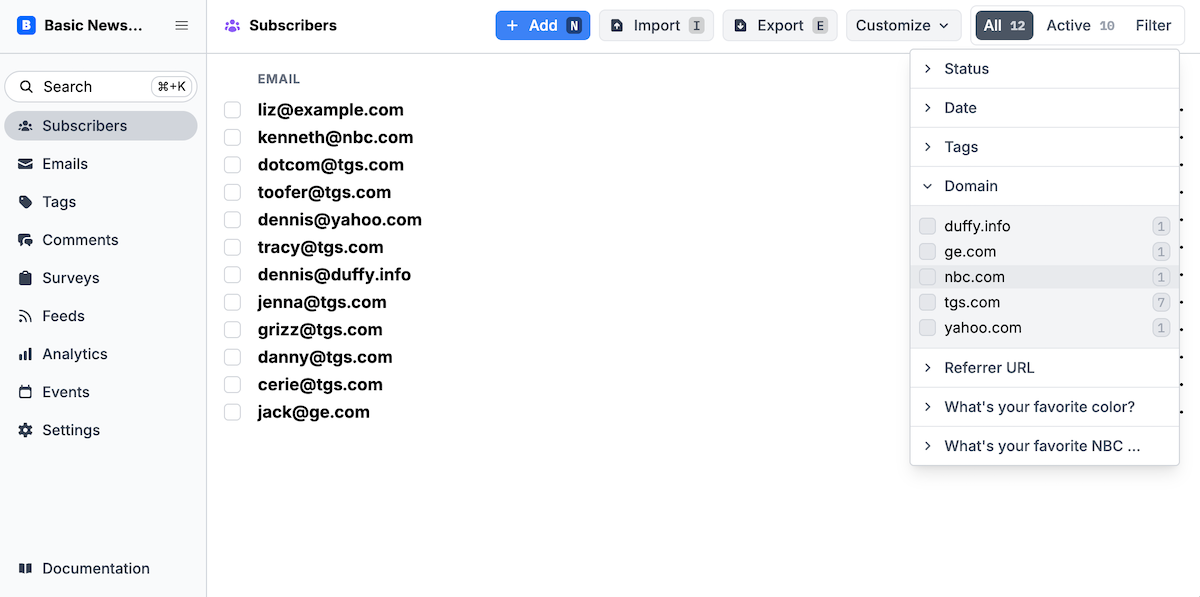
Buttondown filters let you surface subscribers who meet specific criteria
First things first, you’ll need data to work with. Buttondown gathers some for you by default (and if you’re using another CRM or email platform, odds are they include similar data). Each of your newsletter subscribers’ profiles includes their:
- Signup source, to see if they signed up organically, or if they discovered your newsletter from another site
- Email address domain, as a first-pass rubric for where they work or attend university, or even for their technical skills as those with a custom domain are more likely to be technical
- Status, to see who’s double opted-in to your list and who has yet to confirm their subscription
- Signup date, to differentiate between your oldest fans and newest followers
- Deliverability details, their risk score, unsubscribe details (if any), and the last date they opened an email (with the caveat that email tracking can be hit-or-miss)
- IP address, most useful for identifying spammers and bots to keep your lists clean
If you’ve enabled paid subscriptions for your newsletter, Buttondown also tags if readers have paid or not along with their active paid price.
All that metadata, just from a single email address.
Then there’s the metadata you can add on your own. You can tag subscribers in Buttondown. Say you imported subscribers from your old list, or know that a set of folks are your colleagues. Tag them for an easy way to email that subset (or include a custom sign-off for your in-crowd). And, you can add any custom metadata to subscribers.
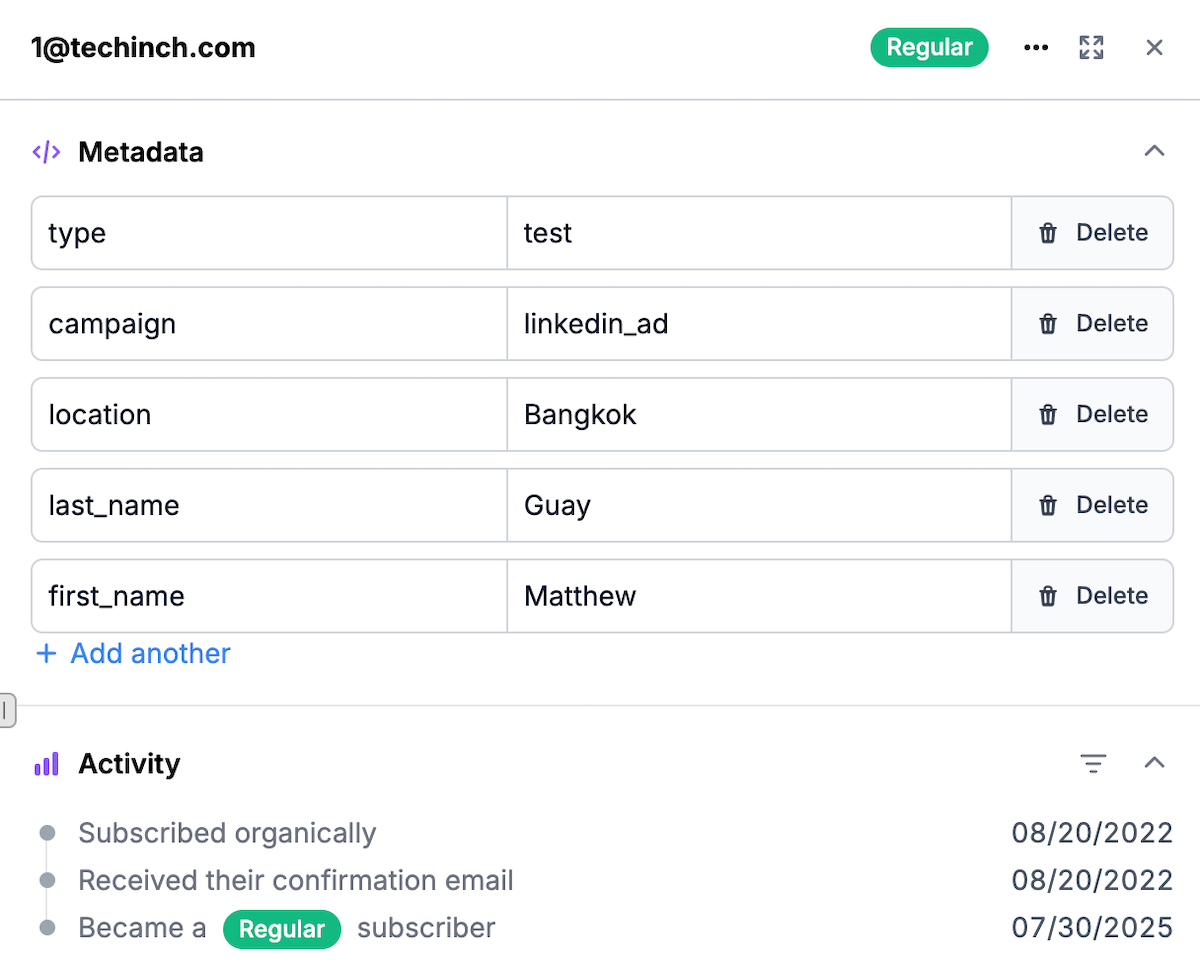
Buttondown’s metadata is like a tiny database filled with the subscriber data you want.
Buttondown’s metadata works like a database with named pairs. Name the metadata you want to gather with a key in the first column—name, location, favorite color, you name it—and then add that subscriber’s details in the next. Rinse and repeat for every subscriber.
Buttondown can automatically gather subscriber metadata in two ways. The easiest is with your subscriber form, where you can include fields to ask new subscribers questions then save their answers directly to Buttondown. The same works in Buttondown’s surveys, where you can add metadata based on responses. Or, if you’re using Buttondown’s API to add new subscribers from your apps or automations, you can gather metadata through Buttondown’s API and webhooks as well. And you can also have Buttondown add metadata from automations—more on that later.
The same feature works with any form you use, too. That’s one of engineer Michael Lee’s favorite Buttondown features: “What’s nice is, you don’t need to use some clunky form builder to capture this metadata, you can use whatever form HTML you want and define the metadata by assigning it to the input element’s name attribute”
Then, it’s time to put all of that metadata to work.
Table stakes: Personalize your emails
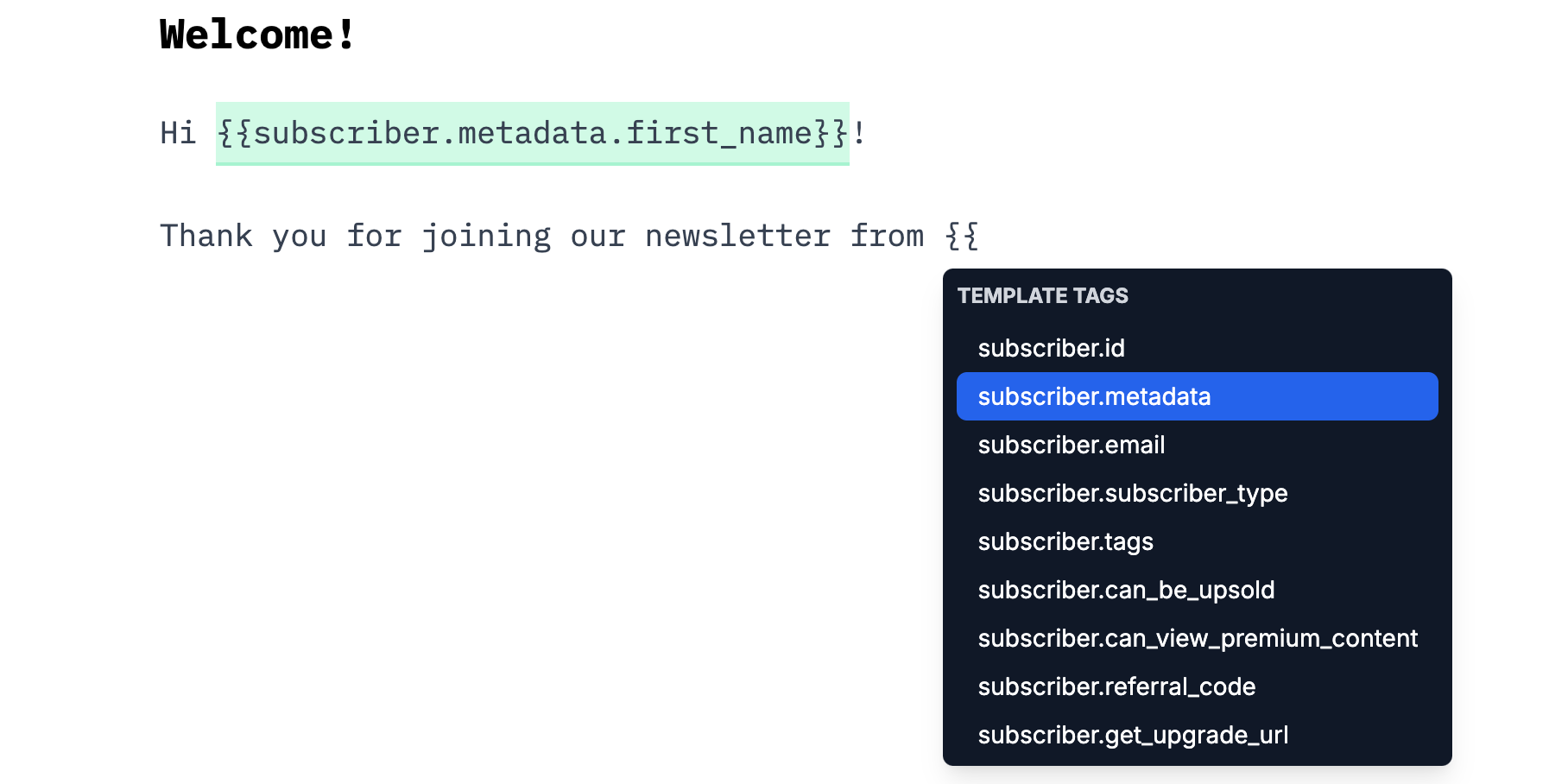
Add template tags to personalize emails with metadata in Buttondown’s editor
The most popular way to personalize onboarding and other emails is with a personalized greeting. That’s an easy way to practice using mustache syntax, with double curly quotes and a metadata value you want to include in the email.
In Buttondown, to personalize email messages with the subscriber’s name, type out your greeting then type double curly brackets like {{ this. Buttondown will then offer a handful of choices. You’ll want to use the metadata option with the name of your first name field, like {{subscriber.metadata.first_name}} if your first name field is first_name.
That works perfectly if your first name field is required so everyone fills it out. If it’s optional, though, some contacts will get a seemingly broken email that says Hi !. The best option is to add an extra word for those without a first name, like Hi there!. Or, you could change the entire greeting, so people with a name receive Hi NAME! while those without a name are greeted with just Hi!.
A quick if/else statement, in curly brackets with percent symbols, takes care of that. Here’s an example for our first name field:
Hi {% if subscriber.metadata.first_name %}{{subscriber.metadata.first_name}}{% else %}there{% endif %}!
This works everywhere you send email in Buttondown, both in your standard update messages, and in automated onboarding emails.
Send each subscriber what they want to read
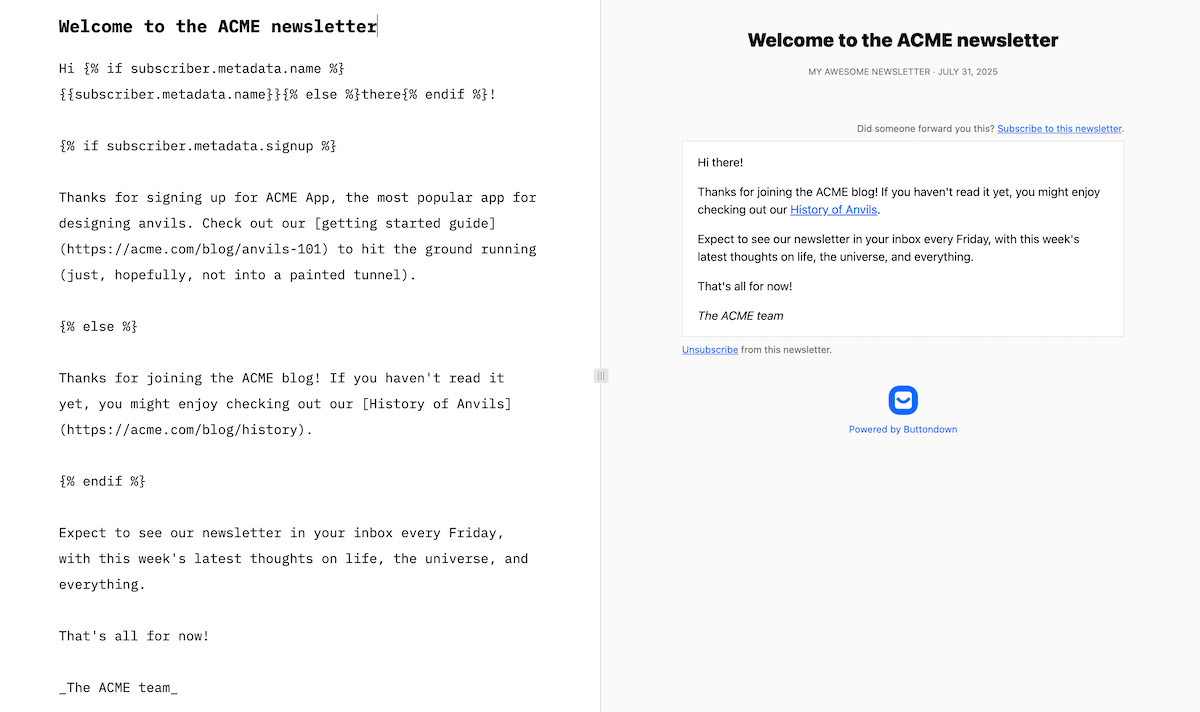
Metadata plus if/else statements lets you customize your whole message per-subscriber
Personalized greetings give your onboarding messages a personal touch, but you can take the same ideas far further.
Go back to your signup form and think through your readers’ intent. Perhaps you have a newsletter for a software company. Some of your subscribers sign up from your blog, and likely are curious lurkers—they want to learn more about your company, hopefully enjoy reading what you publish, but might not actually be a customer yet. Other subscribers, though, opted into your newsletter when they signed up for your software, and might like to know more about your software rather than your more general-interest articles.
All you need is metadata about where your subscribers come from (Buttondown’s source could work, that or you could have your form or automation add metadata to a new subscriber’s profiles), and either customized emails or automations powered by that metadata. Automations would let you have fully separate emails for each audience—which works fine, but also means editing two emails every time you want to change things. Email variables—using the same trick as Hi NAME! and Hi there! would let you simplify down to a single email.
Build out your email, writing the standard personalized greeting and opening text as normal. Then, add an if block that checks if this subscriber came through your software signup process, and add a bit of text with pointers about using your software and links to relevant blog posts. Follow that with an else section that includes more general interest blog posts instead.
Now you’ve got a single onboarding email that covers everyone.
The same idea, taken further, could give you fill-in-the-blank emails that tie your newsletter to subscribers’ interests, powered by metadata.
Ask subscribers which part of the city they live in, to share hyper-local content for your local newsletter with weekly events. Ask customers their favorite color, then have a welcome email that features your products with that color. Ask which plants people are planting, then your gardening newsletter could mention as you’re growing tomatoes to your vegetable gardeners, while saying as you’re growing flowers to your flower horticulturists.
Send people on different onboarding paths based on metadata
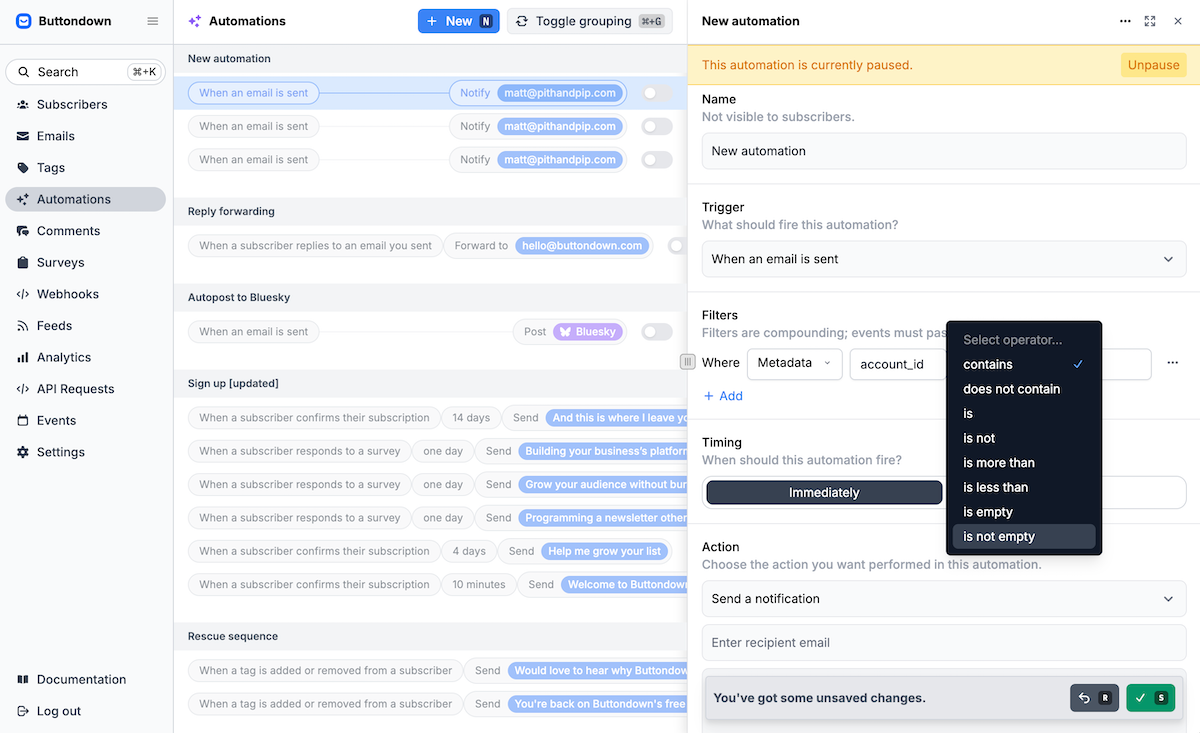
Buttondown automations let you build custom onboarding emails, filtering for specific bits of metadata
Then, it’s time to automate things.
You could manually send an email to each new subscriber—but if so, there’s little point in going to the trouble of automating the personalization away with metadata. Instead, odds are you’ll build your onboarding emails in a Buttondown automation, where you’ll set one email to go out the day they sign up, one a few days after, another a week later, and so on.
Metadata-personalized emails are perfect there. As are fully metadata-powered onboarding sequences.
Say, for instance, your audience speaks multiple languages. Your signup form could have a language selector that saves people’s preferred language to their profile. Then, in your onboarding automation, have Buttondown first check their profile’s language value, and only send the French emails to French speakers, Spanish emails to Spanish speakers, and so on.
The same idea could apply to the voice and tone in your emails. People who subscribe from your YouTube channel likely prefer videos and casual, straightforward, short text, quite opposite of those who subscribed from your longform, deep-dive blog posts. Use subscriber source metadata to sort them each into unique onboarding emails, each written with an eye for that audience.
Or, bring it all together. Route people into unique onboarding paths in larger buckets (YouTubers in one, blog readers in another, say) for the core onboarding emails, but then inside each message, use metadata to further refine the content to subscribers’ interests (with blog readers who signed up from a developer post getting more technical content, and those from business-focused posts getting more advice posts).
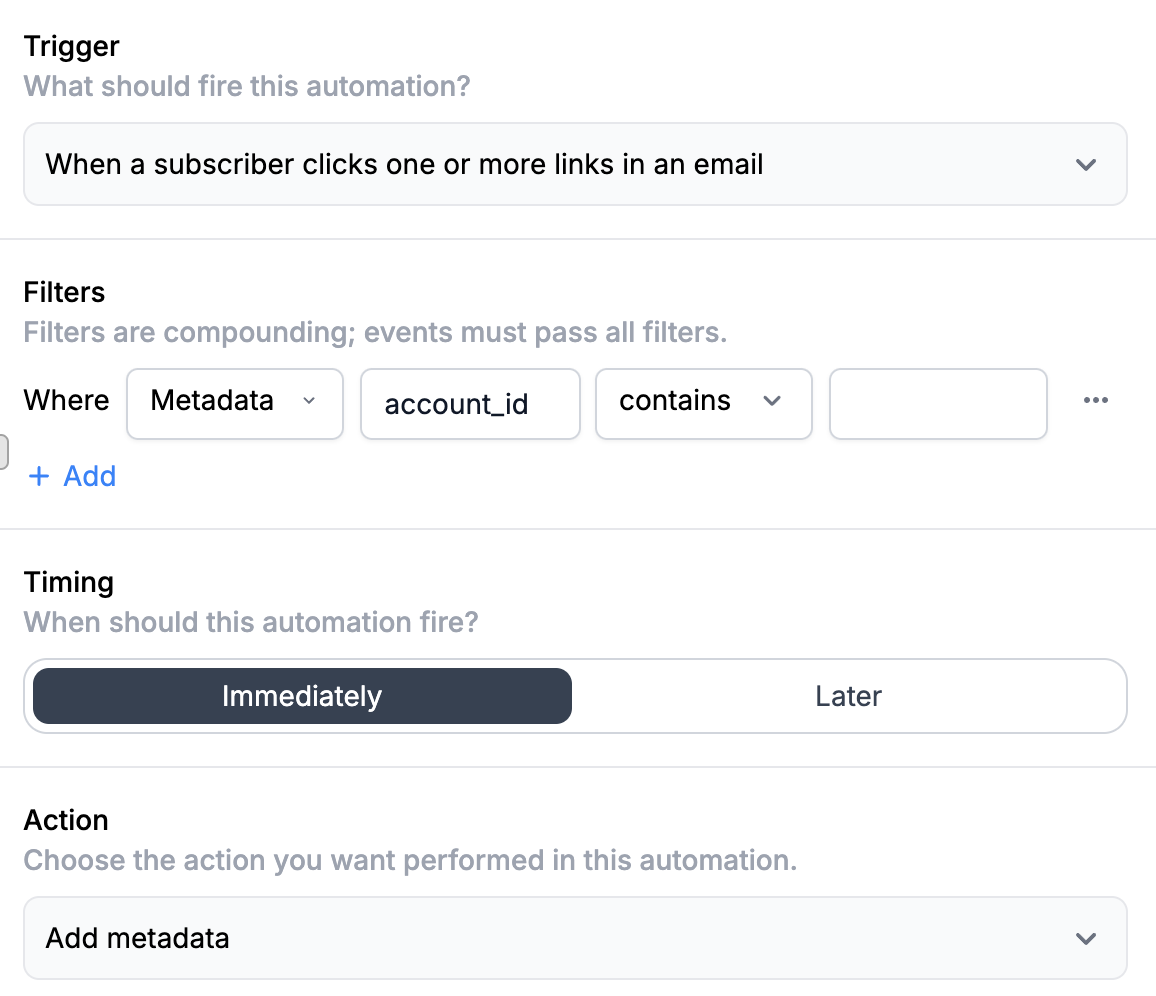
Add metadata to subscribers based on their actions
You can even add more metadata as time goes on. Say you’re building an email-based course that sends out daily lessons. If someone clicks on a link in the email, or replies, then you could assume that they’ve accomplished that day’s task—and could then send them harder assignments tomorrow or give them a personalized shout-out for following through. Have Buttondown’s automation watch for their action, then add metadata to their account, and use that metadata to show an extra bonus section in the next email in the sequence.
Posthog’s team, for example, did something similar to share extra tutorials with readers who hadn’t performed an action yet, powered by their role metadata. “If role_at_organization = marketing, sales or product and a user had not created an action within 12 hours, I’d send them another personal tip,” the team shared. One could build this with the API, adding metadata to subscribers’ profiles if they perform an action in the app. Or, you could do something similar just by assuming if they haven’t clicked a link in the email, they likely also haven’t taken action yet.
It’s all in what you can dream up. Think through what you would do with your emails if you knew everything possible about your audience. Think about the bits of customization and personalization that would bring delight to your readers (and drive positive engagement for your newsletter). One bit of data at a time, you can build a better, metadata-powered view of your readers’ preferences, and use that to tweak emails, build more focused automations, and hopefully win a few friends and influence a few folks along the way.
Now over to you, {{subscriber.metadata.first_name}} in {{subscriber.metadata.location}}!
Your newsletter is your brainchild, your baby. You’ve written enough updates and replied to enough readers to know what resonates with your audience, and what new readers expect to see.
Personalization that feels, well, personal is always a good call. First names for newsletters that are written conversationally feel nice; last names for corporate newsletters (Dear. Mr. Name feels right from a bank or airlines, less so from your favorite writer’s weekly updates). As does using data you requested; people will want to see a payoff when they spent the time telling you they work in HR and enjoy Coldplay concerts and, you know, might enjoy your thoughts on severance and music as a company perk more than engineering management topics.
Use your best judgment. Locations can be good for example, if they offer a benefit to readers (hyper-local details for a local news newsletter, perhaps, or an invitation to a new reader meetup to everyone in the relevant city). They could also feel creepy or forced if dropped in an email out of context (“Thanks for reading from your city...” has Big Brother vibes).
Because if you take things too far, you can hurt your email performance. The Advantage team found that out the hard way. They built detailed emails for every customer segment, plus a more generic email for everyone without as granular of data. And in the end, when they checked the stats, “the simple version – the one we sent to people we couldn’t personalize for – won. By a lot,” shared the team. Partly because the emails felt too smart, and readers felt odd being targeted. Partly because they already knew their audience’s preferences, and so their generic email was their “best of” message that was more likely to appeal to more people.
The trick is to put your experience and ideas together with a bit of metadata to infuse your newsletters with more things your readers care about. Ideally, you’ll end up with emails that feel like they were sent by a friend, with just enough personal touch but not enough that you make readers double-take.