惯性聚合 高效追踪和阅读你感兴趣的博客、新闻、科技资讯
阅读原文 在惯性聚合中打开

推荐订阅源

MyScale Blog
MyScale Blog
WordPress大学
WordPress大学
cs.AI updates on arXiv.org
C
CXSECURITY Database RSS Feed - CXSecurity.com
I
Intezer
V
Visual Studio Blog
Cisco Talos Blog
Cisco Talos Blog
Microsoft Azure Blog
S
Securelist
CTFtime.org: upcoming CTF events
N
News and Events Feed by Topic
Recorded Future
Recorded Future
Simon Willison's Weblog
G
GRAHAM CLULEY
酷 壳 – CoolShell
酷 壳 – CoolShell
L
Lohrmann on Cybersecurity
U
Unit 42
Hacker News: Ask HN
Hacker News: Ask HN
阮一峰的网络日志
阮一峰的网络日志
Vercel News
Vercel News
PCI Perspectives
PCI Perspectives
H
Help Net Security
C
Cisco Blogs
爱范儿
爱范儿
Recent Announcements
Google DeepMind News
小众软件
小众软件
T
Tor Project blog
Exploit-DB.com RSS Feed
Schneier on Security
H
Hackread – Cybersecurity News, Data Breaches, AI and More
www.infosecurity-magazine.com
IT之家
IT之家
J
Java Code Geeks
人人都是产品经理
人人都是产品经理
Spread Privacy
Spread Privacy
T
The Blog of Author Tim Ferriss
Application and Cybersecurity Blog
AI
AI
S
Security @ Cisco Blogs
T
Tenable Blog
Security Archives - TechRepublic
aimingoo的专栏
aimingoo的专栏
Cloudbric
Cloudbric
D
Docker
W
WeLiveSecurity
Hacker News - Newest:
Hacker News - Newest: "LLM"
F
Fortinet All Blogs
The Hacker News
The Hacker News
Help Net Security
Help Net Security

Codrops

The Craft Behind Memorable Digital Experiences: Inside Unseen Studio | Codrops ZERO: The Engineering Behind a Defiant Interactive Narrative | Codrops Meet the Speakers of the First Three.js Conference | Codrops The Architecture Behind Trionn: Coordinating GSAP, Three.js, Lenis, and Web Audio | Codrops Where Stories Become Interactive Worlds: How makemepulse Brings Ideas to Life Across Web, XR, and Beyond | Codrops The Sleepers: Creating an Atmospheric WebGL Experience with Lightweight Techniques Building an Interactive Wave Propagation Cube Grid with Three.js | Codrops Ten Years Away: Designing an Interactive Comic for Studio375’s Tenth Anniversary | Codrops Building a Scroll-Driven 3D Gallery Using a Blender Camera Path with Three.js and GSAP | Codrops From Years of Client Work to a Next.js + Sanity Starter Kit | Codrops Sculpting a Digital Athlete: Capturing Stefanos Tsitsipas Beyond the Court | Codrops Building Persistent Page Transitions with WebGPU and Vanilla JavaScript | Codrops Inside Bisous: Designing an Editorial Experience for Cinematic CGI | Codrops Engineering the Web Experience Behind Shopify’s Spring ’26 Edition: Everywhere | Codrops Shaping Stories into Experience: The Work of Kevin Lam | Codrops Testing What Users Actually See with Vitest and Chromatic | Codrops Podium: Building a Website Where Running Becomes Storytelling | Codrops Designing Beyond the Surface: How DashDigital Turns Complexity into Clarity | Codrops Creative Entrepreneurship: Designing the Machine | Codrops Exploring 3D Image Rotations on Scroll | Codrops Always Building, Always Learning: Cyd Stumpel’s Journey Through the Modern Web | Codrops Designing A Better Lou: Reducing Cognitive Load Through Design, Content, and Systems | Codrops Sketching the Impossible: A 3D Portfolio Built Without a Single 3D Model | Codrops Building Horeca: Advanced Motion Design in Webflow Without the Performance Trade-Offs | Codrops Building an Interactive Digital Stamp Collection with Shaders, Postcards, and Playful Inspection | Codrops No Two Paths Alike: Inside San Rita’s Approach to Digital Experiences | Codrops The Making of the New Lesse Studio Website: Clarity, Performance, and Intentionality | Codrops Creating a Thumbnail Flow Animation with GSAP MotionPath | Codrops Forging Her Own Path: Houmahani Kane’s Journey in Creative Development | Codrops Beaucoup and the Pursuit of Memorable Experiences | Codrops The Future of Emotional Technology: Comfort Websites for Growth and Self-Awareness | Codrops The Never Ending Story: Building a Seamless Infinite Scroll Experience with GSAP & Lenis | Codrops Whooshes, Snaps and Shaders: Adrien Vanderpotte and the Feeling of the Interface | Codrops Building a Scroll-Driven 3D Cube Gallery in Webflow with GSAP | Codrops Creating Scroll-Driven SVG Map Animations with GSAP | Codrops Made With Gsap: Building a Fun Gravity-Based Mouse Trail | Codrops 80s Business Tech and Seamless Scene Transitions: Inside Shader.se’s Scroll-Driven WebGPU Pipeline | Codrops Merlin: The Code Boutique Turning Motion Into Digital Magic | Codrops Designing Ourselves: The New Obys Identity and Website | Codrops Exploring the HTML-in-Canvas Proposal | Codrops Le:mma Studio: Building the Feeling Behind the Screen | Codrops From Shader Uniforms to Clip-Path Wipes: How GSAP Drives My Portfolio | Codrops Reverse-Engineering Claude AI’s Mascot Animations with SVG and GSAP | Codrops Akaru: Crafting Precision-Driven Digital Experiences | Codrops Designing Against the Gallery: A Two-Year Journey to a Layered Portfolio Experience | Codrops Between Human and Machine: Sofia Papadopoulou’s Approach to Augmented Creativity | Codrops More Than a Portfolio: Building a Scroll-Driven 3D World with Something to Say | Codrops Rhumb Studio: Small but Mighty, Shaped by Curiosity | Codrops Susurrus: Crafting a Cozy Watercolor World with Three.js and Shaders | Codrops Building 4WIDE: Turning Distortion, Blur, and Motion into a Coherent Experience | Codrops A Playful Clip Menu with GSAP’s easeReverse | Codrops False Earth: From WebGL Limits to a WebGPU-Driven World | Codrops The Art of Complex Motion: Corentin Bernadou’s World of Shaders and Experimentation | Codrops They Call Me Giulio: The Making of a Cinematic Cyberpunk Portfolio | Codrops Lusion: Where Digital Craft Meets Ambitious Experimentation | Codrops The Exat Microsite: Pushing a Typography Showcase to New Creative Extremes | Codrops A Single DM, a First SOTD, and the Start of Chanh M. Ho’s Creative Journey | Codrops Creating Custom Page Transitions in Astro with Barba.js and GSAP | Codrops R—K ’26: The Thinking and Code Behind a Portfolio Led by Presence | Codrops Building the Maxima Therapy Website: React, GSAP, and Dabbling with AI | Codrops Where Engineering Meets Craft: Edoardo Lunardi’s Obsession with the Details | Codrops Animating 160,000 Cubes in Three.js to Visualize Dithering | Codrops Arnaud Rocca’s Portfolio: From a GSAP-Powered Motion System to Fluid WebGL | Codrops Where Confidence Needs No Decoration: The Malvah.Studio Story | Codrops Motion Highlights #17 | Codrops
Interactive Storytelling for the Web: Building Immersive Stories with Timelines, 3D, and Layered Scenes | Codrops
Bjørn Fjells · 2026-04-20 · via Codrops

I’ve always been fascinated by websites that feel like small worlds you can explore.

Back in 2018, I started a side project called Daily CSS Design, where I built a small visual experiment in code every day. Some were tiny animations. Others became interactive scenes. The goal was simple: to see how much atmosphere and storytelling I could create with just a few visual elements.

That project taught me something important. The experiments people remembered were rarely the most complex ones. They were the ones that hinted at a story — the ones that created a sense of place, curiosity, or discovery.

At the same time, I kept running into the same problem: building these kinds of experiences often meant stitching together a lot of custom code, animation logic, and layout experiments. It was exciting, but it also made this kind of storytelling feel harder to build than it should be.

That idea stayed with me, and it eventually became one of the foundations for Instorier, a tool designed to make this kind of interactive, story-driven web design more approachable.

In this tutorial, I want to show a simple way to think about visual storytelling on the web using three core ingredients: structure, motion, and interaction, then bring them to life with layered visuals and 3D scenes.

To make that concrete, we’ll build a short sci-fi story set on the Moon.

What We’re Building

Using Instorier, we’ll create a page that feels less like a static layout and more like a guided experience, combining scroll-based pacing, layered visuals, and small interactive moments to turn a simple story into something more immersive.

Structure

When I’m building a story-driven page, I like to give each piece of text plenty of room to breathe. Instead of stacking everything too tightly, I treat each paragraph as its own moment in the journey.

In Instorier, I usually start by building that rhythm with a series of full-height sections using Title and Rich Text modules. This creates a more deliberate pace, letting the reader focus on one idea at a time instead of rushing through a dense layout.

For a few key moments, I make the sections double height to create more space for the visuals to unfold in the background. That extra room helps the story feel less like a sequence of blocks and more like an experience with its own tempo.

Timelapse of how to add sections with elements in Instorier

Adding Visual Depth

Once the structure is in place, the next step is to give those sections a stronger sense of atmosphere.

A simple way to do that in Instorier is by adding background elements. For the opening section, I use a Background Image module to establish the setting right away. From there, I adjust its timelines so the image gradually fades out and scales down as the reader scrolls deeper into the page.

It’s a small effect, but it changes how the section feels. Instead of acting as a static backdrop, the image becomes part of the progression of the story.

Adding an Image background element and adjusting its animating using timelines

Adding Interaction

Parallax can add a nice sense of depth, but what really makes a page feel alive is interaction.

In this case, I want the story to respond to the reader, not just move in front of them. One of the simplest ways to do that in Instorier is by adding a 3D scene in the background that reacts to pointer movement or scroll. Even a subtle response can make the page feel less like a flat composition and more like an environment.

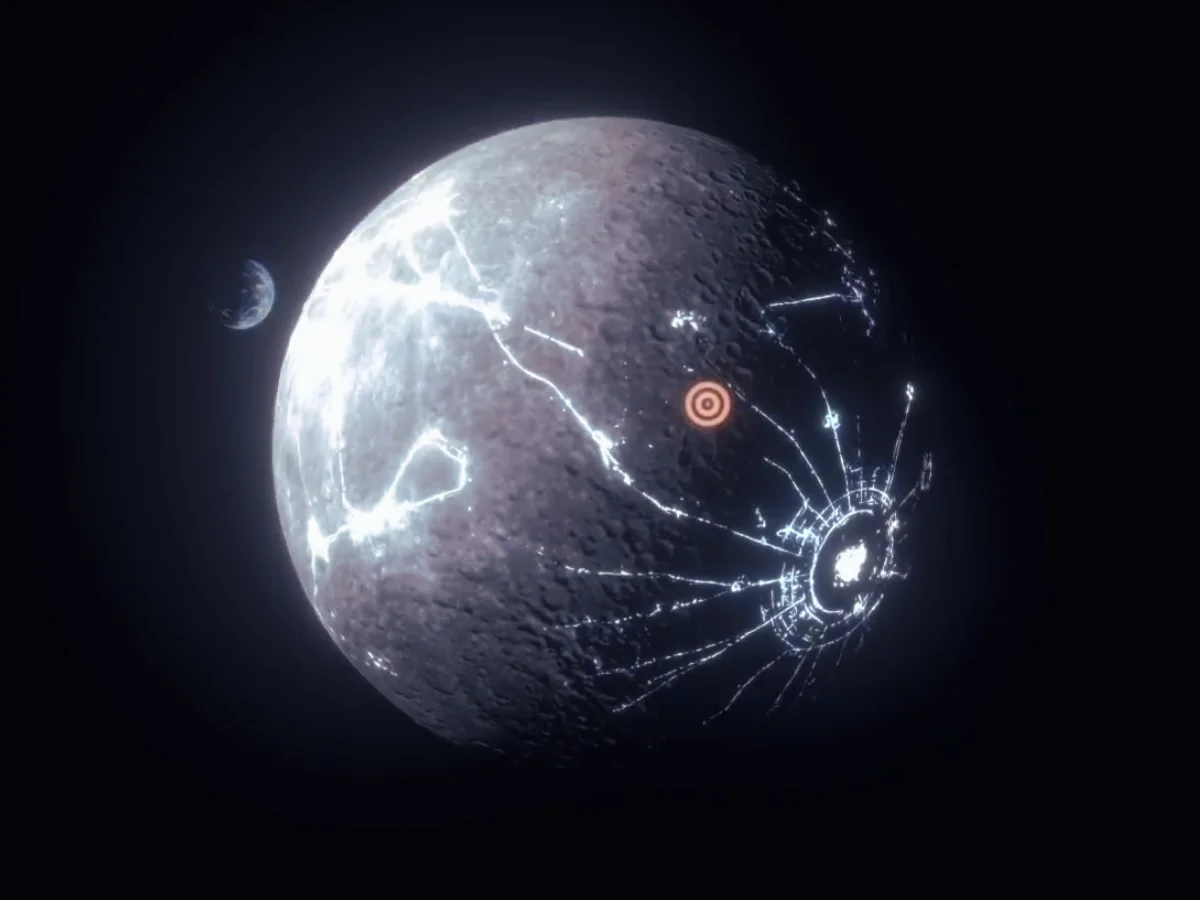
For this part of the story, I wanted to show the dark side of the Moon surrounded by moving lights. To build that, I used a Scene Background element and added a sphere with a moon texture as the base. From there, the scene can be animated so it slowly rotates and shifts with the user’s movement, creating a more immersive effect.

This kind of interaction doesn’t need to be complex to work well. The goal is simply to make the reader feel a little more present inside the scene.

Timelapse of how to use the 3D Scene Creator to animate a moon with lights on the dark side

Building the Transition

To move the story forward, I wanted the reader to stop observing the Moon from a distance and begin entering it. For that, I added a hotspot over one of the craters, turning it into a small invitation to explore.
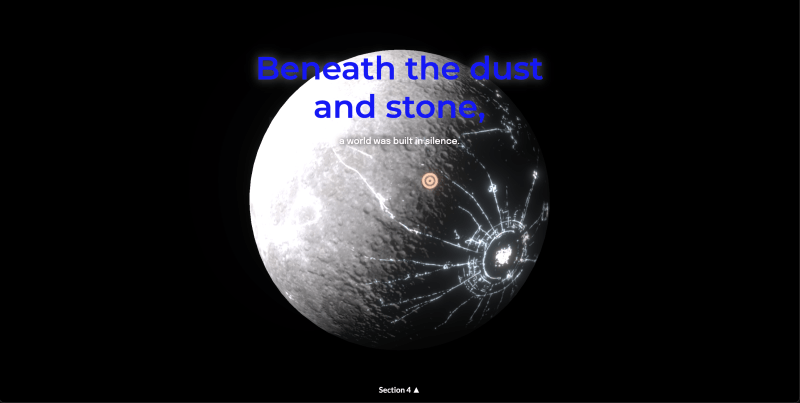
To build the crater itself in Instorier, I combined an image with a depth map. The diffuse texture gives us the visible surface detail, while the depth texture adds a sense of volume and relief, making the crater feel more dimensional.
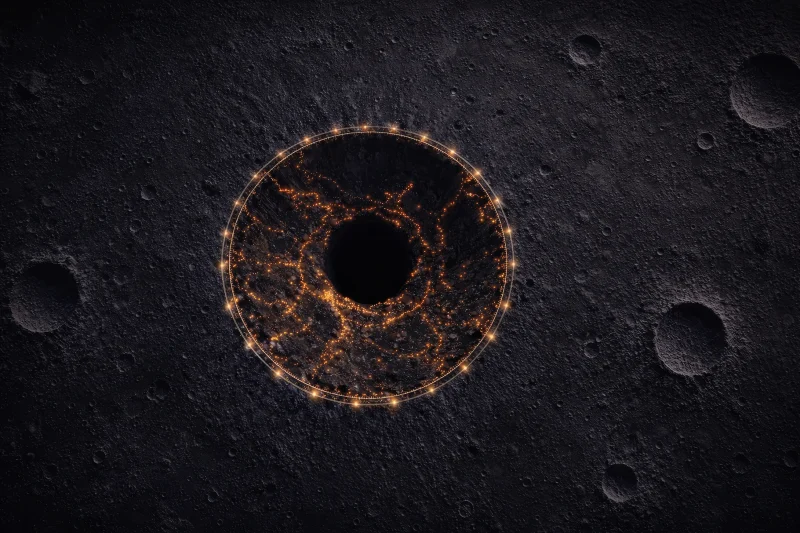
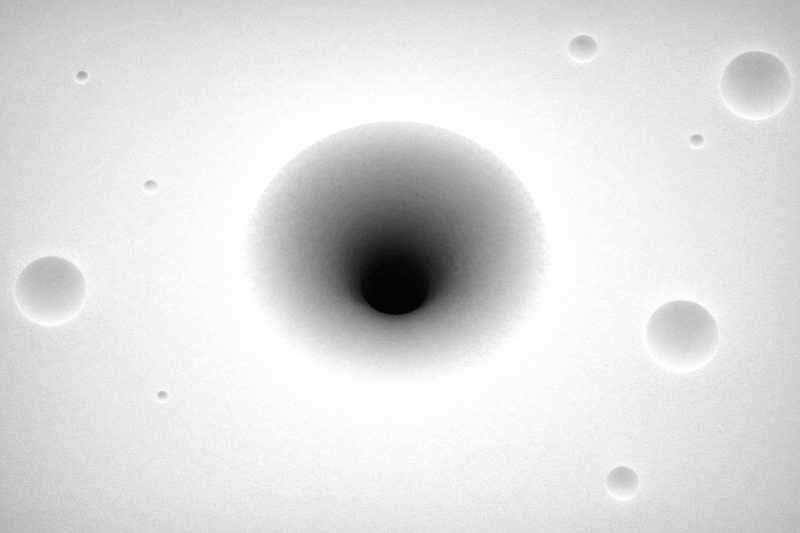
Crater diffuse texture
Crater depth texture
The crater with the depth added together with shader nodes that increase the brightness of the lights.

Diving Inside

For the next visual, the idea is to move directly into the center of the crater, then use a fade to transition from the lunar surface into the cave interior.

The cave scene itself is actually quite simple. It’s built from a ground texture, a few habitat 3D models, and some atmospheric effects like fog and glow to give the space a more mysterious, otherworldly feeling.

What matters here is the contrast. After the openness of the Moon’s surface, the cave immediately feels more enclosed, more intimate, and more alive — like we’ve crossed from landscape into story.

How to move 3D models in Instorier’s Scene Creator

Final Scene

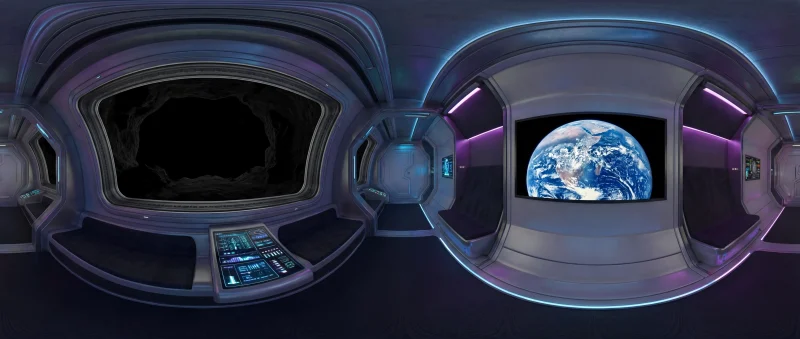
The final scene was even simpler to make. I asked Nano Banana Pro to generate a 360° image, then mapped it onto a sphere surrounding the reader.

Prompt: “Create a futuristic interior in a moon pod with a monitor showing the Earth. No people. Outside the window, it should be very dark, almost like a cave. Equirectangular 360 projection.

360° image generated using Nano Banana Pro

And here is the result:

Check out the final result.

Bringing the Story Together

What makes this kind of storytelling work is not just animation, 3D scenes, or scroll effects on their own. It’s the way structure, motion, and interaction support each other.

The reader scrolls. The environment responds. Each visual reveals the next part of the story.

When those pieces are designed together, the website starts to feel less like a page and more like a small experience, something people don’t just visit, but remember.

That’s exactly the kind of work Instorier is built to support. It gives you a way to explore story driven design with scroll based pacing, 3D scenes, and interactive moments, without needing to stitch everything together from scratch. The nice part is that it’s easy to experiment with: you can try Instorier for free, publish up to 3 stories, and use its library of images, 3D models, and other design assets as you build.

If this approach feels interesting to you, I’d encourage you to try building something small of your own, a landing page, a visual essay, a product story, or just a simple scene to explore an idea. You can also check out our tutorials section and examples on the site to see different starting points and get a feel for what’s possible.

And if you do try it, I’d genuinely love to hear what you think. Feedback, experiments, and different ways of using these ideas are always interesting, especially from people building for the web every day.