惯性聚合 高效追踪和阅读你感兴趣的博客、新闻、科技资讯
阅读原文 在惯性聚合中打开

推荐订阅源

Attack and Defense Labs
V
Visual Studio Blog
云风的 BLOG
云风的 BLOG
爱范儿
爱范儿
Hugging Face - Blog
Hugging Face - Blog
GbyAI
GbyAI
有赞技术团队
有赞技术团队
J
Java Code Geeks
小众软件
小众软件
WordPress大学
WordPress大学
T
The Blog of Author Tim Ferriss
OSCHINA 社区最新新闻
OSCHINA 社区最新新闻
钛媒体:引领未来商业与生活新知
钛媒体:引领未来商业与生活新知
酷 壳 – CoolShell
酷 壳 – CoolShell
B
Blog
U
Unit 42
大猫的无限游戏
大猫的无限游戏
G
Google Developers Blog
I
InfoQ
Engineering at Meta
Engineering at Meta
F
Fortinet All Blogs
IT之家
IT之家
博客园 - Franky
腾讯CDC
罗磊的独立博客
雷峰网
雷峰网
M
MIT News - Artificial intelligence
博客园 - 司徒正美
A
About on SuperTechFans
SecWiki News
SecWiki News
Project Zero
Project Zero
T
Tenable Blog
The Last Watchdog
The Last Watchdog
Security Latest
Security Latest
Google DeepMind News
C
Cyber Attacks, Cyber Crime and Cyber Security
PCI Perspectives
PCI Perspectives
博客园 - 【当耐特】
C
Check Point Blog
F
Full Disclosure
MongoDB | Blog
MongoDB | Blog
H
Help Net Security
Google Online Security Blog
T
Tor Project blog
T
Threat Research - Cisco Blogs
AI
AI
cs.AI updates on arXiv.org
Application and Cybersecurity Blog
美团技术团队
Spread Privacy
Spread Privacy

Frederick's Blog

通过 1Panel 部署 Astro 站点到服务器——公开仓库篇 | Frederick's Blog 用违背道德的行为,抨击合理的事实? | Frederick's Blog 博客三周年:缝缝补补的过去 | Frederick's Blog 观纪录片《苏轼》(下) | Frederick's Blog 观纪录片《苏轼》(上) | Frederick's Blog 《南京照相馆》:在战争的废墟上,显影人性的底片 | Frederick's Blog 观影 |《南京照相馆》 | Frederick's Blog 算法竞赛:为什么要写总结? | Frederick's Blog OI 赛制的实用工具 | Frederick's Blog 算法竞赛:拥有一个顺手的 IDE · Windows 篇 | Frederick's Blog 博客两周年,换框架? | Frederick's Blog 数据备份太重要了 | Frederick's Blog WeChat(微信国际服务)与微信(国内服务)的《隐私协议》的天壤之别(其中最让人愤怒的) | Frederick's Blog 题解 | 字符串反转 | Frederick's Blog 题解 | 素数环 | Frederick's Blog Codesign:高效设计的秘诀 | Frederick's Blog Github:设置两步验证(2FA) | Frederick's Blog
Windows 7 终端开启右键粘贴 | Frederick's Blog
2025-07-17 · via Frederick's Blog

什么,你的 Windows 7 电脑不支持右键粘贴?我来帮你

2025年7月17日

前言

暑假集训的时候我们搬到了蔡家,由于蔡家没钱,使用的是 1GB 内存的 Windows 7 电脑。

但是这个问题有个奇怪的问题:终端不支持右键粘贴,甚至连 Shift + Insert 都用不了太垃圾了。

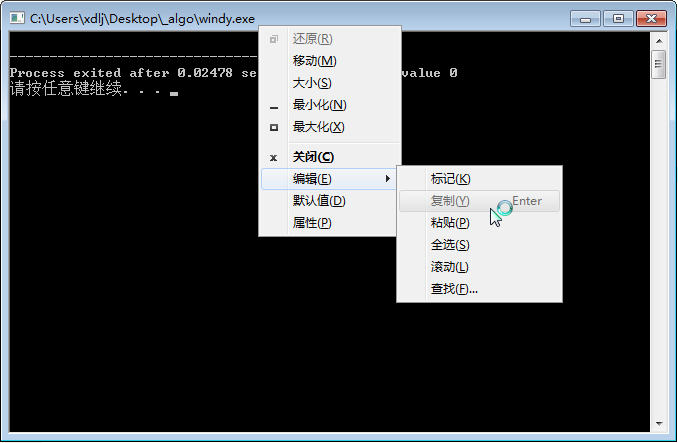
这对于需要频繁粘贴样例的题目极其的不友好,需要手动的点击标题栏选择粘贴。所以我们应该做点什么让他方便点。
img

▲ 未设置时粘贴的步骤

好在这只是一个 Windows 的设置问题,所以很好解决。

解决方案

很简单,首先随意打开一个终端或者跑一个程序(用 Windows 控制台运行的那种)

注意:当运行不同的控制台程序时(如 cmd 或你自编译的东西)可能需要重新设置

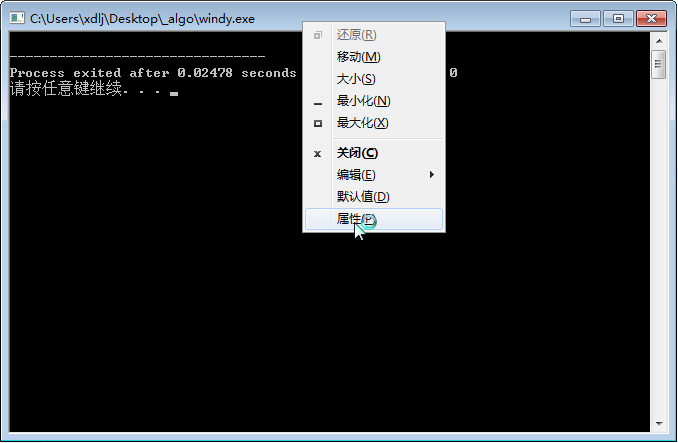
然后右键单击标题栏,点击“属性”
img

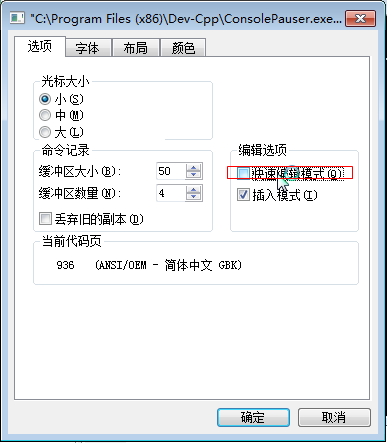
勾选“快速编辑模式”

3DE54223-DB67-4029-B051-A9F4E0E2DDCA.png

完成,现在你就可以在终端里右键粘贴啦!