


惯性聚合 高效追踪和阅读你感兴趣的博客、新闻、科技资讯
阅读原文 在惯性聚合中打开

推荐订阅源

V
Visual Studio Blog
Recent Announcements
雷峰网
雷峰网
The GitHub Blog
The GitHub Blog
罗磊的独立博客
月光博客
月光博客
J
Java Code Geeks
A
About on SuperTechFans
Microsoft Security Blog
D
Docker
OSCHINA 社区最新新闻
OSCHINA 社区最新新闻
F
Fortinet All Blogs
U
Unit 42
C
Check Point Blog
Martin Fowler
Martin Fowler
有赞技术团队
有赞技术团队
博客园 - 叶小钗
Cyber Security Advisories - MS-ISAC
酷 壳 – CoolShell
酷 壳 – CoolShell
Blog — PlanetScale
Blog — PlanetScale
大猫的无限游戏
大猫的无限游戏
让小产品的独立变现更简单 - ezindie.com
阮一峰的网络日志
阮一峰的网络日志
MyScale Blog
MyScale Blog

Kotlin : A concise multiplatform language developed by JetBrains | The JetBrains Blog

Kotlin 2.4.20 Released - The JetBrains Blog Kotlin Toolchain 0.12: Multiplatform Library Publishing, Wasm Apps, and More - The JetBrains Blog Signatures, be true: domain errors and functional handling in Kotlin - The JetBrains Blog Klibs.io Grows to 4,200+ KMP Projects With Smarter Discovery and New AI Integrations - The JetBrains Blog Exploring Compose HTML for Server Side Rendering - The JetBrains Blog Programming Language Migration 2025: Why Developers Switch Kodee’s Kotlin Roundup: Birthday Wishes, Shipaton 2026, and the New Kotlin AI Benchmark - The JetBrains Blog Know Kotlin? Ship It Everywhere and Win at Shipaton 2026 - The JetBrains Blog Qodana 2026.2: More Security, Better Coverage, Less Configuration - The JetBrains Blog Secure Your APIs: OAuth2 and JWT for Beginners - The JetBrains Blog KotlinLLM is Going Open Source  - The JetBrains Blog Kotlin Turns 15: Celebrate the Kotlin Effect - The JetBrains Blog The History of Kodee, Kotlin’s Mascot - The JetBrains Blog Introducing the Kotlin Benchmark for AI Coding Agents - The JetBrains Blog In Conversation With the Golden Kodee Winners - The JetBrains Blog Kotlin Comes to BlueJ - The JetBrains Blog Kodee’s Kotlin Roundup: Kotlin Turns 15, Kotlin 2.4.0, and the Kotlin Toolchain - The JetBrains Blog Kotlin Notebook Sunset - The JetBrains Blog Kotlin Toolchain 0.11: The Next Step for Amper - The JetBrains Blog Kotlin 2.4.0 Released | The Kotlin Blog Koog 1.0 Is Out: Stable Core, Better Interop, and Multiplatform Observability | The JetBrains AI Blog KotlinConf’26 Keynote Highlights: Advances in Language Design, Tooling, AI-Driven Workflows, and Multiplatform Development | The Kotlin Blog Introducing a Security Support Policy for the Kotlin Standard Library | The Kotlin Blog Official Kotlin Support for Visual Studio Code Is Now Available in Alpha | The Kotlin Blog Built for Productivity: What the Data Finally Shows About Kotlin | The Kotlin Blog A New Default Project Structure for Kotlin Multiplatform | The Kotlin Blog Help Shape the Future of Kotlin in the Age of AI | The Kotlin Blog Compose Multiplatform 1.11.0 Is Now Available | The Kotlin Blog The Road to Name-Based Destructuring | The Kotlin Blog JetBrains 推出的 Kotlin 专业认证现已登陆 LinkedIn Learning | The Kotlin Blog
Compose Multiplatform 1.12.0 Released - The JetBrains Blog
Elvira Mustafina · 2026-08-26 · via Kotlin : A concise multiplatform language developed by JetBrains | The JetBrains Blog
Kotlin logo

A concise multiplatform language developed by JetBrains

Multiplatform Releases

Compose Multiplatform 1.12.0 is out! This version brings new tooling for AI assistants, improvements to web resource management, and finer control over desktop window states.

Here are the highlights of this release:

  • MCP server for AI agents in Compose Hot Reload
  • Automatic font fallback for web
  • v2 version of the window and dialog API for desktop

For a complete overview of the changes, check out What’s new in Compose Multiplatform 1.12.0 or the release notes on GitHub.

Get Started with Compose Multiplatform

MCP server for AI agents in Compose Hot Reload

Compose Hot Reload now ships with an experimental Model Context Protocol (MCP) server that connects AI coding agents to your running application.

Using the MCP server, an agent can trigger reloads, take screenshots, inspect the semantic tree, simulate clicks and text input, and read application logs. In practice, this means the agent can verify the results of its own edits. It can confirm that the reload succeeded, inspect the rendered UI, catch a runtime exception, and iterate – all without you describing what’s on screen.
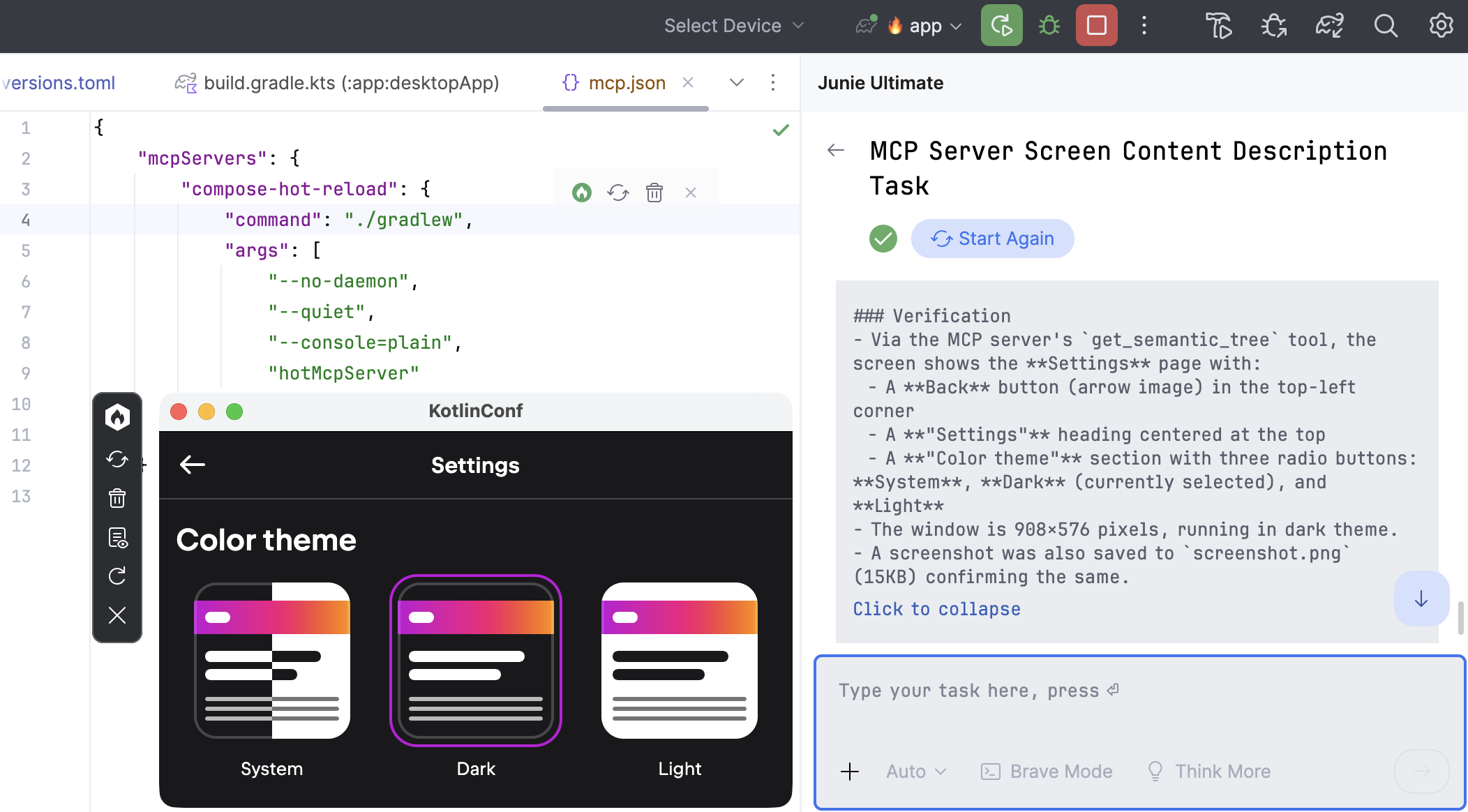
AI agent uses the MCP server

For the full list of available tools and instructions on connecting your agent, see the Compose Hot Reload documentation.

Try Compose Hot Reload

Automatic font fallback for web

Compose Multiplatform for web now handles characters that your application’s fonts don’t cover. When it encounters an unresolved character during rendering, it downloads the matching Noto font subset on demand and recomposes the affected text. As a result, Japanese, Arabic, Devanagari, and emoji render correctly without you having to bundle fonts for them.
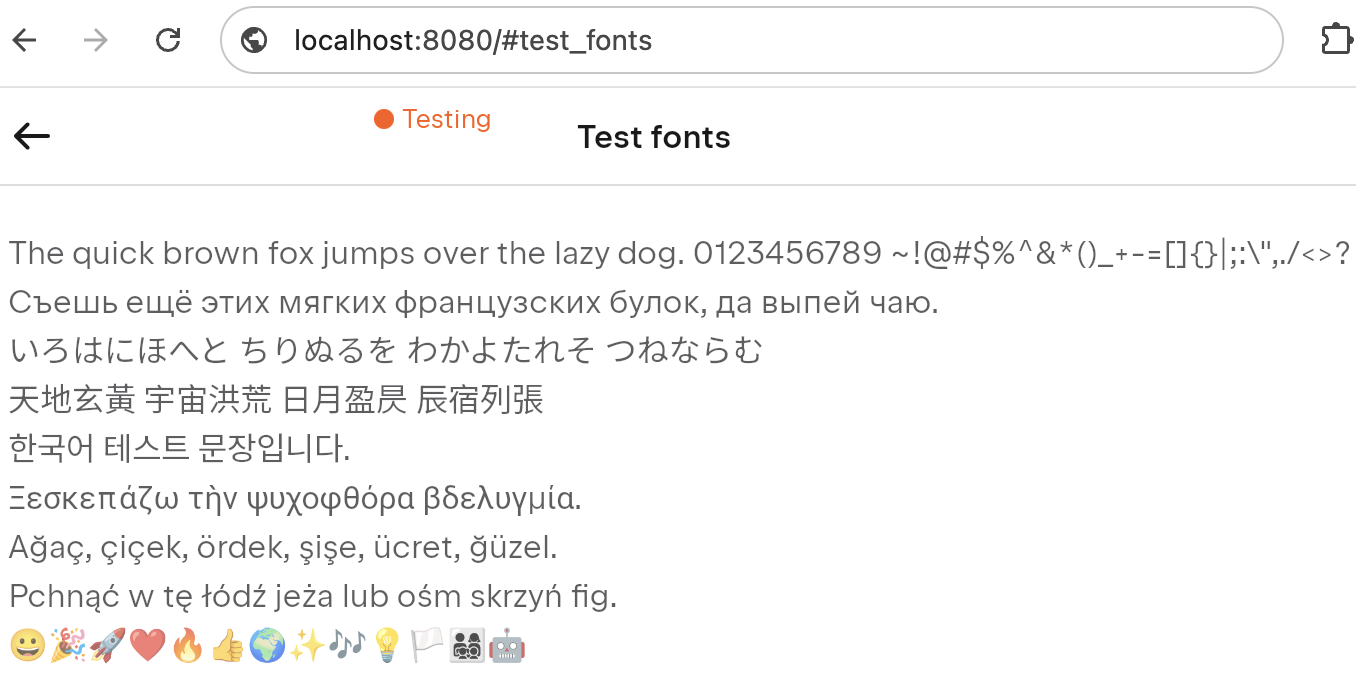
Testing fonts

Window and dialog v2

This release introduces an experimental v2 API for WindowState and DialogState in the androidx.compose.ui.window.v2 package. It gives you finer control over how windows and dialogs are positioned and sized. You can:

  • Select the screen a window appears on.
  • Provide custom positioning and sizing logic, including logic based on the content’s intrinsic size.
  • Set minimum and maximum window sizes.
  • Position dialogs relative to their parent window.

The v2 API also makes the asynchronous nature of window state changes explicit: It distinguishes the state you request from the state the window currently has.

For example, to center a window and give it a fixed size, use WindowPositionProvider and WindowSizeProvider:

val windowState = rememberWindowState(
    initialBoundsProvider = WindowBoundsProvider(
        positionProvider = WindowPositionProvider.CenteredOnScreen,
        sizeProvider = WindowSizeProvider.Fixed(DpSize(400.dp, 200.dp))
    )
)

With the v2 API, you can also use WindowSizeProvider.Unconstrained to size the window to its content initially, while still letting that content expand with fillMaxSize() when the user enlarges the window:

WindowBoundsProvider(
    positionProvider = WindowPositionProvider.CenteredOnScreen,
    sizeProvider = WindowSizeProvider.Unconstrained
)

See the Window and dialog v2 documentation for the full details.


Update your dependencies, try out the new APIs, and let us know what you think about Compose Multiplatform 1.12.0.

For everything that didn’t make it into this post, check out the full release notes or What’s new.

Subscribe to Kotlin Blog updates

Discover more