


惯性聚合 高效追踪和阅读你感兴趣的博客、新闻、科技资讯
阅读原文 在惯性聚合中打开

推荐订阅源

N
Netflix TechBlog - Medium
V
Vulnerabilities – Threatpost
Google Online Security Blog
Hugging Face - Blog
Hugging Face - Blog
L
LINUX DO - 热门话题
云风的 BLOG
云风的 BLOG
P
Proofpoint News Feed
D
Docker
C
Cyber Attacks, Cyber Crime and Cyber Security
MyScale Blog
MyScale Blog
P
Palo Alto Networks Blog
T
Tenable Blog
P
Privacy International News Feed
Google DeepMind News
小众软件
小众软件
Cisco Talos Blog
Cisco Talos Blog
aimingoo的专栏
aimingoo的专栏
Cyber Security Advisories - MS-ISAC
A
Arctic Wolf
C
Cybersecurity and Infrastructure Security Agency CISA
C
Cisco Blogs
T
Threat Research - Cisco Blogs
NISL@THU
NISL@THU
The Hacker News
The Hacker News
Project Zero
Project Zero
AWS News Blog
AWS News Blog
Simon Willison's Weblog
cs.CL updates on arXiv.org
T
Threatpost
V
Visual Studio Blog
The GitHub Blog
The GitHub Blog
The Cloudflare Blog
Last Week in AI
Last Week in AI
Jina AI
Jina AI
Cyberwarzone
Cyberwarzone
The Register - Security
C
CXSECURITY Database RSS Feed - CXSecurity.com
Vercel News
Vercel News
D
Darknet – Hacking Tools, Hacker News & Cyber Security
MongoDB | Blog
MongoDB | Blog
U
Unit 42
Scott Helme
Scott Helme
A
About on SuperTechFans
WordPress大学
WordPress大学
F
Fortinet All Blogs
大猫的无限游戏
大猫的无限游戏
G
GRAHAM CLULEY
Latest news
Latest news
让小产品的独立变现更简单 - ezindie.com
S
Schneier on Security

智朋的个人博客

Anki 笔记读取器 使用 PyQt 制作简易软件简明笔记 制作 Anki 插件简明笔记 LaTeX 图片背景 eso-pic 宏包 残余应力 Excel 操作指南 Word 操作指南 Mermaid 甘特图 QHUMaster 使用指南 QHUMaster 使用指南
文件树目录
coffeelize 一个工程师的存档点 · 2024-06-16 · via 智朋的个人博客

文件树目录

发表于 更新于 本文字数: 344 阅读时长 ≈ 1 分钟

新建文本文件,将以下两种方式中的任意一种粘贴到文本中,并保存为 bat 格式双击运行即可

1
2
3
4
5
6
echo off & color 0A
echo 当前目录:"%cd%" >fileTree.txt
tree /f >>fileTree.txt
echo 目录树已生成,按任意键查看。
pause>nul
start fileTree.txt
1
tree /f > tree_output.txt
  • 如果只想输出文件夹信息,加 /a 参数
  • 如果想输出文件夹下的文件名,加 /f 参数

或者不新建文件,在文件夹中,按住 Shift 右键,在此处打开 powershell,然后粘贴代码 tree /f > tree_output.txt 即可
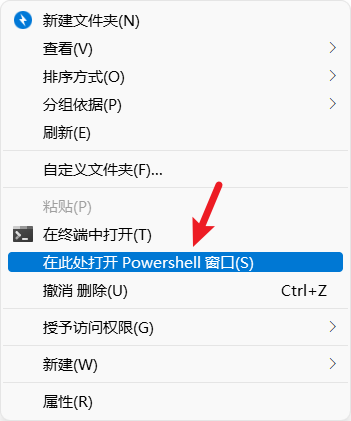
image.png

在当前文件夹搜索栏左侧的路径下,直接敲入 CMD,回车即可