








Let me start with; there is no perfect security. Your goal is to make it as difficult as possible to 'break in', so it is simply not worth it. There is a balance between security and usability, and you must find a good middle ground.
I keep it as short as possible and focus on the 'what' and 'why', not the 'how'. There are many ways to achieve the goals, but this is a topic for itself, and depends on the circumstances.
Unfortunately, anyone is, and yes, ANYONE can become a victim of a cybercrime. Cybercrime is highly lucrative, and criminals become more creative every year. Automation makes it simple to find easy targets or attack a large group of targets.
I'll try to provide you with enough information for safe internet use. If you feel overwhelmed, tackle one topic at a time, and keep improving. It is never too late to care about your online security.
If you only take away these five things, I will be more than happy. These steps alone take your security to the next level and are crucial. I'll go into more detail later in the post.
The rest of the post contains the reasoning, examples, and further points.
Archive and delete the account of the service. The account can't get hacked if it does not exist.
You lose control over the account when you share your credentials. Even if you trust the other side, you often enough do not have control over the security measurements of the other site. If you need to share credentials, change them as soon as the other site doesn't need them anymore.
The theory is to treat the secondary email as some kind of password. Communicate 'contact@yourdomain.com' publicly, keep 'wehjcejn@anotherdomain.org' private, and use this second email address only for logins. It is up to you how far you go: different alias, different domain, different account, different provider,...
Having separate email addresses has multiple benefits, but the most important is that brute-force attacks and other methods with your public email address are pointless. The attacker needs the private email address and your password (and your MFA, obviously).
Name of your first pet? Keyboard. Childhood nickname? 1513sd_!rg. Be creative.
Answering security questions truthfully makes you vulnerable to social engineering attacks. If you answer them truthfully, the attacker could gather information via social media and other platforms to answer those 'security questions'. Please keep in mind to document your fake answers in a secure place and do backups.
Summarized: Generate and store a random and unique 16+ characters password for every account in your password manager.
Account breaches are inevitable. There will be leaks, and user data will go public, which is out of your control. Vulnerabilities, rogue employees, misconfiguration, and a thousand ways how that can happen.
Imagine you have the same email and password on every service. If only one service leaks your credentials, attackers gain access to all your accounts. As mentioned before, automation makes it easy to find out and lock you out quickly.
Having a unique password for every service limits the damage to the breached service. Another benefit is that you do not have to change the credentials of all accounts if a single service leaks your credentials.
Side note: variations of a secure password don't count. securepassword1, securepassword2 and securepassword3 might be unique, but not secure. Just generate them randomly with your password manager.
Obligatory xkcd comic:
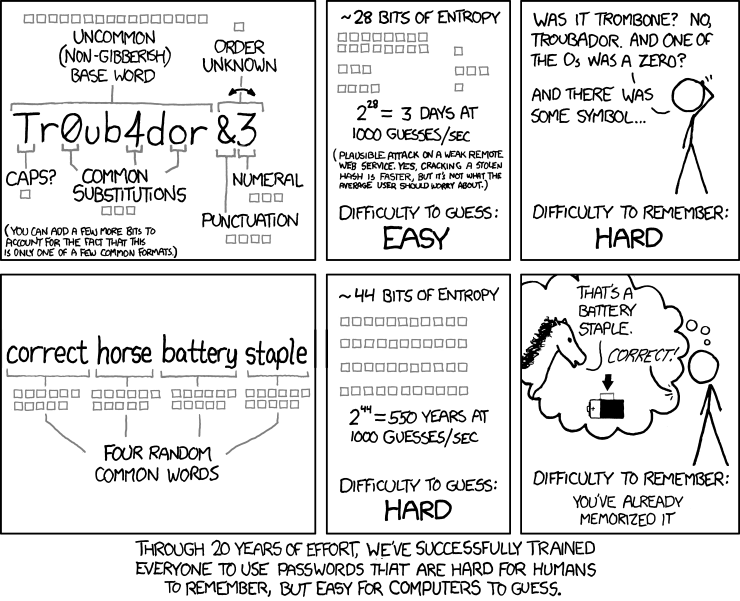
Complexity is good, length is great, and the combination of both is king. No matter the complexity, every password with less than 10 characters should be considered insecure. 12+ characters is a must, and I'd instead recommend 16+ characters. And why not more? - If you use a password generator, nothing speaks against a 30+ character password.
Side note: passphrases are great too, and they can be used for temporary passwords, where copy and paste is not an option. dolphin chase mall nightmare as a passphrase is secure enough, and easy to remember or share over the phone (I know, I know, not best practice, but sometimes there is no other way).
There are various solutions for every use case. Know your needs: offline availability, mobile-friendly, self-hosted or managed solution, open-source or proprietary, and so on.
Every solution has pros and cons. Knowing them is half the battle.
Important: Do regular backups of your password database. Most services provide such option, and use it. Don't forget to keep them encrypted.
I think I've mentioned it before, but just to be sure: generate random and long passwords. Using personal information for password creation makes it easy to guess.
The same applies to passphrases; firstname lastname 2022 is long, but not secure (assuming the attacker knows a little more).
Self-explanatory; even the password manager needs a master password, which should not be written on a post-it and stuck on the monitor.
Companies love - or sometimes have - to force their employees to change their passwords every n months. Anyone who had to endure it knows that this rather encourages bad password choices: winter2022,spring2023,summer2023, and so on.
It does not hurt to change passwords regularly, but it is not worth the hassle, and you should be fine if you follow the other tips.
This authentication method requires the user to provide two or more factors to access the desired service. Those factors can be: knowledge (something you know (e.x. pin, password, security question)), possession (something you have (e.x. security token, security key, second device)), and inherence (something you are (e.x. fingerprint, iris)).
MFA protects you from various attacks and risks. Even if the attacker knows your email/username and password, they wouldn't be able to log into your account without the second factor.
Side note: this applies to digital and hardware access.
I won't go into detail, but here are some ways of biometric authentications: fingerprint scanning, facial recognition, voice recognition, iris/retinal scan, vein scan, hand geometry, and there are many more.
I've read somewhere that biometric features should be considered usernames rather than passwords and I agree.
First, they are more or less not private. There are multiple presentations in which they show how to get enough information of a fingerprint from a picture (!) to reconstruct it, and successfully authorize a login with it. (I can't find the link to the video, sorry!) Second, you can't change it. You can't change your fingerprint, your iris, and so on.
A 'password' that is not private and cannot be changed is not secure.
There are more security, accessibility and privacy concerns, but those a out of scope of this post.
Important: I cannot stress enough how important backups are. Even though MFA is a must and brings your online security to the next level, there is a legit risk of getting locked out if you lose access to the second factor.
I might be paranoid, but the internet can be a dangerous place. As the police would say: 'everything you say can and will be used against you'. This section relates to targeted rather than automated attacks.
In the time of social media - we do not speak enough about oversharing. The danger of getting doxed, or getting targeted increases with every piece of information you share. The easiest example would be if someone brags about cryptocurrency earnings, and would immediately get targeted by group X, that specializes in certain attacks.
Something you can do is lie, share wrong information about yourself, use an alias, and so on. It depends on the platform, but regularly deleting old posts can prevent further information gathering in the future.
Be skeptical and keep in mind: the internet does not forget.
The best security strategy is worthless if someone clicks and downloads anything negligently.
It also applies here: be skeptical. If it is too good to be true, it often is.
To provide some examples: 2 ways to deal with suspicious messages would be to, first, verify the request over a different channel and do not use the contact information of the suspicious message. Like asking your boss over the phone, if you really should send the money to this new client - just in case his email account is compromised. Second, if you receive a suspicious message of service provider X, do not click on any links. Instead, open your browser, login to provider X's service, and confirm the request there, or simply call them. Only click on links if it is necessary.
Side note: suspicious can be everything you did not expect or is out of the norm.
Being careful is an important part of being secure online.
Keep your operating system, browser, antivirus, and everything else up-to-date. I cannot stress enough how important that is.
Use firewalls, antivirus, and ad-blockers to block unwanted connections and content.
Encrypt everything you can to limit the damage of a security incident and protect your critical data.
Do regular backups to prevent data loss. That includes hardware damage, mal-/ransomware, theft, and so on. Store them in a secure place.
So, VPN services. In the end, it is a paid man-in-the-middle that masks/hides your activity from your ISP and your origin from the destination. But everything you hide from the ISP can be seen by the chosen VPN provider. It is simply a shift of trust.
I personally would recommend the use of a VPN, since the benefits outweigh the risks, but a VPN is not the high-end security solution that many providers promise to deliver. You cann download malware, your credit card information can be stolen, and you can still be tracked.
Do your research. There are good and bad VPN providers, and NEVER use free VPN or proxy providers!
In the end, I have to mention Tor. Tor routes your traffic through of network of nodes and makes it almost to track back. It is an important tool, but I am afraid that a detailed description is out of the scope of this post.
So, I hope I could provide some new ideas on how to protect your online activity. Just start with the five most important points that I showed at the start, and tackle other topics later. And keep in mind, there is no perfect security, just making it more complex, and limiting the damage in case of a security incident.
Feel free to reach out to send questions, more tips, different topics, and so on. I'd appreciate your feedback. The guide will be updated accordingly.
此内容由惯性聚合(RSS阅读器)自动聚合整理,仅供阅读参考。 原文来自 — 版权归原作者所有。