

惯性聚合 高效追踪和阅读你感兴趣的博客、新闻、科技资讯
阅读原文 在惯性聚合中打开

推荐订阅源

U
Unit 42
L
LangChain Blog
Cyber Security Advisories - MS-ISAC
Y
Y Combinator Blog
钛媒体:引领未来商业与生活新知
钛媒体:引领未来商业与生活新知
J
Java Code Geeks
有赞技术团队
有赞技术团队
B
Blog
奇客Solidot–传递最新科技情报
奇客Solidot–传递最新科技情报
V
V2EX
Apple Machine Learning Research
让小产品的独立变现更简单 - ezindie.com
WordPress大学
WordPress大学
OSCHINA 社区最新新闻
OSCHINA 社区最新新闻
阮一峰的网络日志
阮一峰的网络日志
The Cloudflare Blog
Martin Fowler
Martin Fowler
H
Hackread – Cybersecurity News, Data Breaches, AI and More
M
MIT News - Artificial intelligence
Recent Announcements
D
DataBreaches.Net
The GitHub Blog
The GitHub Blog
博客园 - Franky
小众软件
小众软件

Ittavern.com

Wimage - Hosting Open-Source Image Uploader with Podman and external S3 Storage Switching from Hugo to picopaper Encryption using SSH Keys with age in Linux Sending nginx Logs to Loki with Grafana Alloy How to: Cisco ISE backup to SFTP repository with public key authentication Dummy IP & MAC Addresses for Documentation & Sanitization Deploying ISSO Commenting System for Static Content using Docker Generate a Vanity v3 Hidden Service Onion Address with mkp224o ssh-audit Primer - Audit your SSH Server mtr - More Detailed Traceroute - Network Troubleshooting My Personal Backup Strategy - August 2024 iperf3 - User Authentication with Password and RSA Public Keypair Adding a trash can to Linux with trash-cli Bandwidth Measurement using netcat on Linux Getting started with rsync - Comprehensive Guide Cron Jobs on Linux - Comprehensive Guide with Examples SSH Server Hardening Guide v2 Port Knocking with knockd and Linux - Server Hardening Getting started with rclone - Data transmission Getting started with dig - DNS troubleshooting Getting started with Fail2Ban on Linux Getting started with netcat on Linux with examples URL explained - The Fundamentals Troubleshooting Asking The Right Questions Create tmux layouts using bash scripts Getting started with tcpdump - Ittavern.com Curl on Linux - Reference Guide Getting started with nmap scripts My Offsite Backup - March 2023 Getting started with iperf3 - Network Troubleshooting
ETag in nginx - Simple Resource Caching
2025-10-20 · via Ittavern.com

An ETag (Entity Tag) is an HTTP response header that identifies a version of a resource. This allow efficient caching by providing the client a method to check for a new version before downloading.

In general, the ETag is based on the file’s last modification time and size and usually handled by the reverse-proxy. This is called the weak ETag/ weak validation.

Alternative, there is a strong or content-based Etag that hashes the resources and provides a new version with every change. In most cases, the application has to manage the Etag.

Weak ETag headers can have the prefix W/ - this is optional and often only displayed with the initial 200 HTTP response and not the 304 HTTP response.
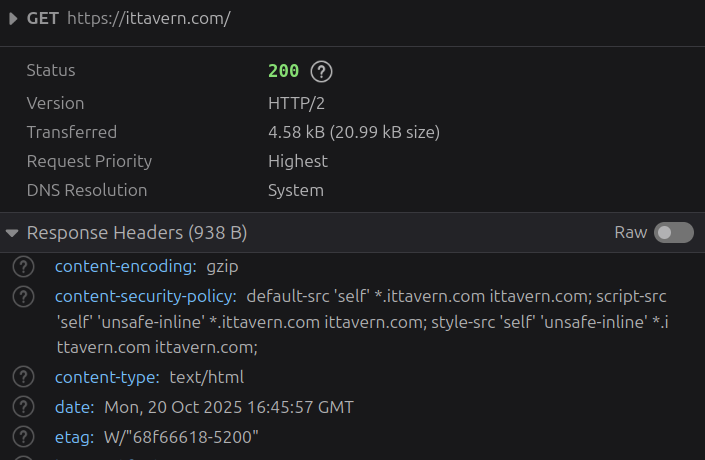
/images/blog/etag-browser-weak.png

More information in the RFC9110 8.8.1 - Weak versus Strong.


Enabling ETag in nginx #

Enabling (weak) ETags in nginx is simple - add the following config to the http, server or location block to enable ETag headers.

[...]
  etag on;
  add_header Cache-Control "no-cache" always;
[...]

The config can be overwritten in a more specific block, in case you want to change the caching for images or other resources.

Check syntax with sudo nginx -t and reload the nginx config.

That is it.

Testing it with curl #

In this article we are going to do some testing with curl. The ETag header can be seen in the browser dev tools as well.

curl -I https://ittavern.com

HTTP/2 200 
server: nginx
date: Mon, 20 Oct 2025 15:42:14 GMT
content-type: text/html
content-length: 20665
last-modified: Sat, 18 Oct 2025 20:55:34 GMT
vary: Accept-Encoding
etag: "68f3fec6-50b9"
[...]

This ETag won't change as long as the size (content-length) or time of last modification (last-modified) of the resources changes.

We now can check the resource again with the ETag to check for changes.

curl -H 'If-None-Match: "68f3fec6-50b9"' -I https://ittavern.com

HTTP/2 304 
server: nginx
date: Mon, 20 Oct 2025 16:24:47 GMT
last-modified: Sat, 18 Oct 2025 20:55:34 GMT
etag: "68f3fec6-50b9"
[...]

The 304 HTTP code stands for Not Modified.


This is how it looks in the browser
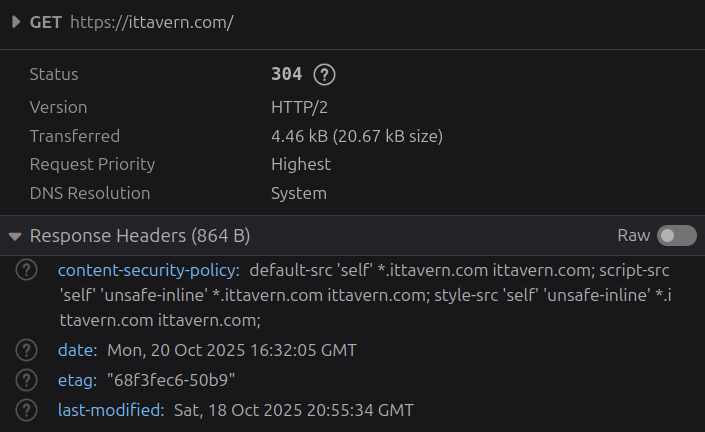
/images/blog/etag-browser.png