




I won't go into technical details, but rather talk about the organization and reasoning behind my current backup strategy. I'll post an update with the technical aspect as soon as I finish the todo list.
As always, feel free to share your feedback and questions in the comments section below.
For reference, my previous strategy from last year and my General Backup Guide.
This strategy focuses on the most important data I have. This includes family pictures from the last 20 years, various cryptographic keys, passwords and MFA tokens, notes and documents, and much more. Losing files is not an option, which makes a good backup strategy essential.
To make a long story short, here are some goals:
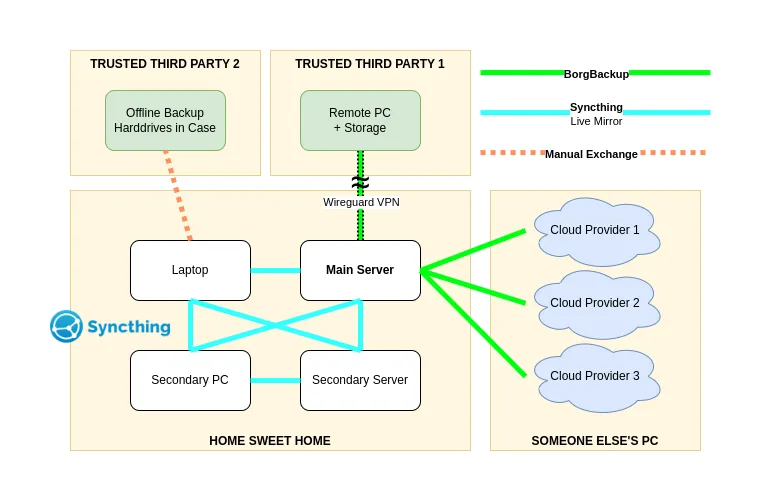
This is a simplified overview of my strategy. I've chosen to remove certain information from the chart for obvious reasons. I'll go into more detail in the following sections.
At the moment, everything is done manually as I am working on a decent process that I want to automate. I may change or add cloud providers over time, but this is the rough plan for the near future.
As mentioned before, only important stuff is backed up. I then created two categories: frequently changed/accessed and rarely changed/accessed (long-term storage).
Examples of frequently used data are passwords and MFA, keys, coding projects, configuration files, etc. - currently about 2 GB. Examples of rarely used data include family pictures, old projects, family backups, etc - which is currently about 170 GB.
I am still in the process of adding and removing data and I see this as an ongoing and never ending process as many things will change over time.
For all backups I'm using borgbackup. I am familiar with it and it allows me to store my backups encrypted, compressed and easily recoverable. The keyfiles and associated passphrase are stored locally. By default, borg stores the keyfiles at the remote location, but I've decided to keep them local to increase security. The keyfiles and passphase are required to access a borg repository.
There is currently no fixed schedule as I know when big changes have been made and a backup is needed. I plan to automate this at some point, but for now it's all I need.
Almost all frequently used data is mirrored to local devices via Syncthing. I don't really consider it a backup, as human error is a huge risk factor, but it's still part of the plan as it prevents data loss in case of hardware failure. Poor man's distributed RAID?
All remote sites support borg and are only accessible via SSH. There are a lot of providers out there and I think I'll stick with three for now.
At the moment I have a fairly slow upload speed at home which is the bottleneck. The initial upload took a couple of hours per provider, but borg de-dublicates everything from here, which will save a lot of time for all subsequent backup runs.
Question: What happens if your upload is faster than the trusted third party's download? - Just keep this in mind before you DOS that party's Internet access.
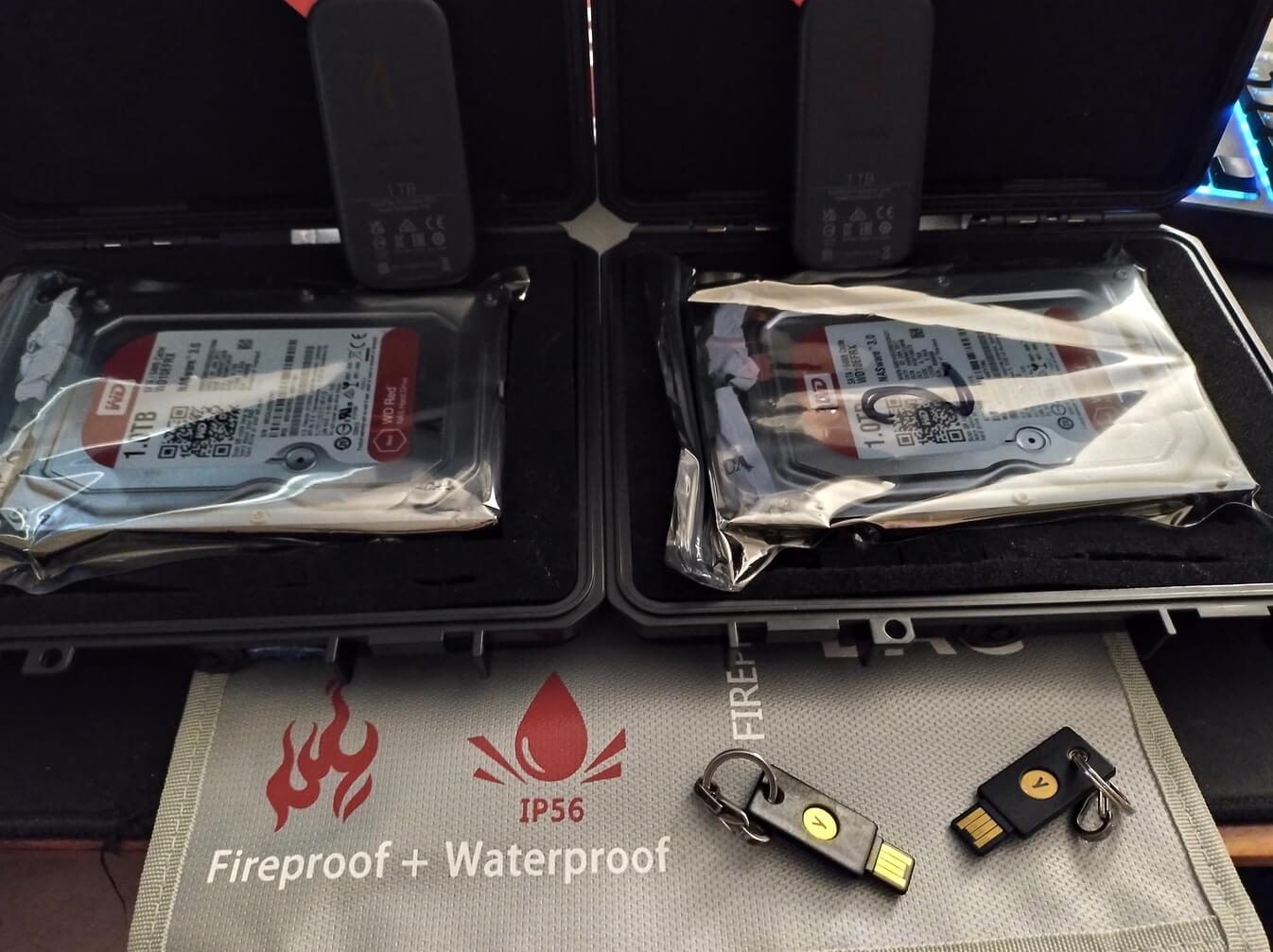
Each case contains a 1TB SSD, 1TB 3.5" HDD and a spare Yubikey. The case itself has anti-shock padding and things can't move when the case is closed. After the backups are done with borg, I put all the drives in antistatic bags with silica drybags. Then I fix everything with a cable binder, put a seal on it - to make sure nobody opens it - and put the case in a flame and water resistant bag.
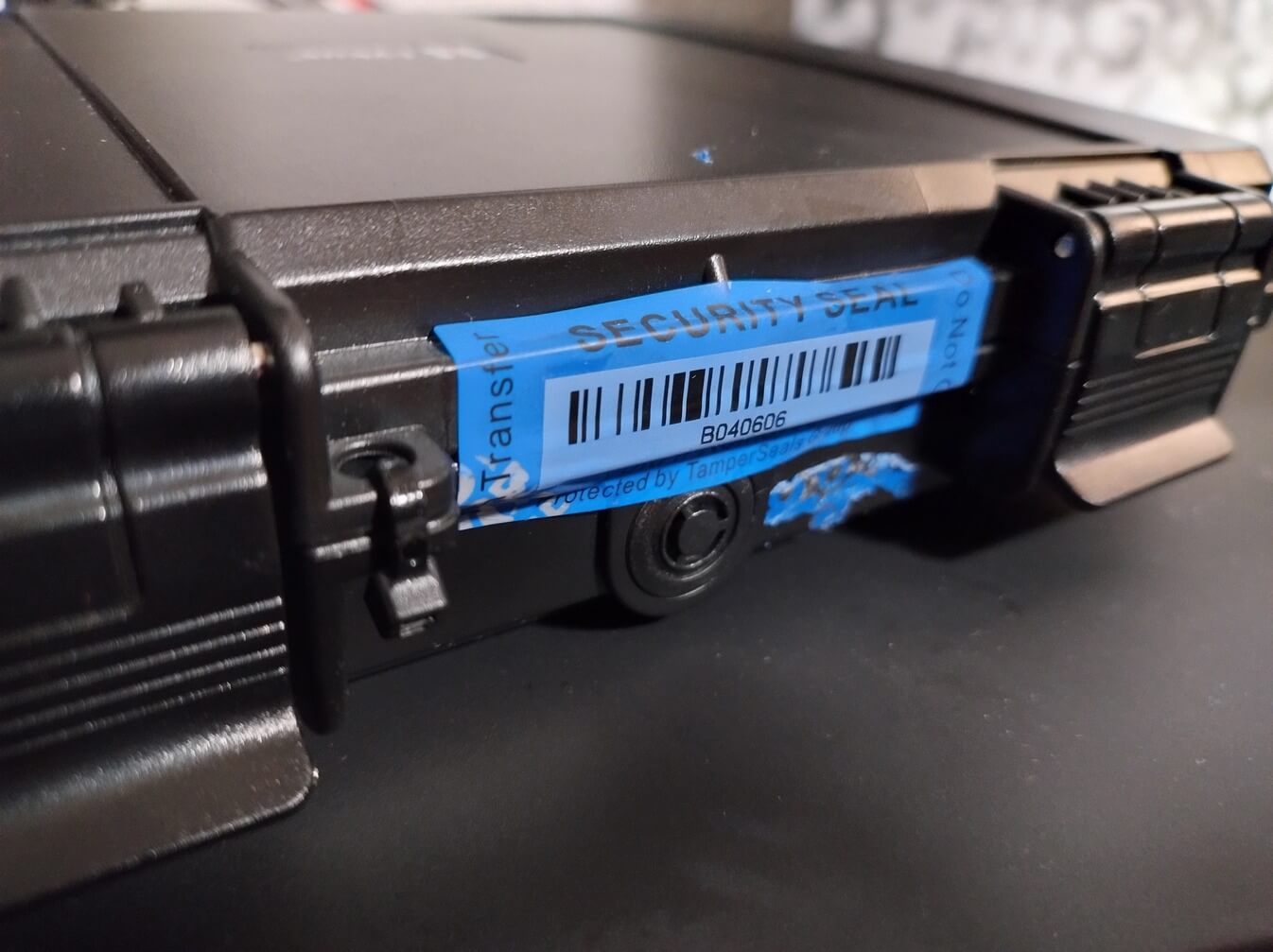
Something I think is a bit overkill, but fun to work on and improve over time. In the end, it won't hurt anything but my wallet.
Everything is documented with drawio and simple text files. Each backup contains an encrypted LUKS container with the manual and further instructions. Since I am still in the process of getting everything done, it is not finished or pretty and not worth sharing. I'll go into more detail when I share the technical part.
Even though the recovery process is working, I know that I need to improve certain things to make everything final. There are still many open what-if scenarios that I need to address and document. For now, I'm set and happy, but I don't need to spend so much time and energy just to have some flaws in my strategy. The recovery process will be a big part of the technical follow up post.
The plan is to keep these backups running for a long time. To ensure this, regular checks are essential.
At the moment I don't have a list and I check it from time to time, but I plan to implement a fixed schedule and automate certain tasks.
Even though the first backup is done, there is a lot of room for improvement. I plan to automate things like most backups, do health checks of the hardware, check the software in use for updates, and so on. Once I automate things, some form of monitoring, alerting, and logging is required.
Besides automation, I need to rework my local server where the data is currently stored. Add a RAID level and harden it a bit more. This is part of my homelab rework, but that is another topic.
Something I haven't mentioned yet is the backup retention time. Right now there is no need to delete any backup as borg de-dublicates everything, but there will be a need to delete data or entire backups. I think time will tell what makes the most sense.
I'm pretty happy with the current setup and have been sleeping much better since the first backup. It is not perfect, but working on it is fun, challenging, and a constant reminder to keep an eye on my most important data.
此内容由惯性聚合(RSS阅读器)自动聚合整理,仅供阅读参考。 原文来自 — 版权归原作者所有。