








A rogue DHCP server is an unauthorized DHCP server that distributes knowingly or unknowingly wrong or malicious information to clients that send DHCP discover packets within a network. The following section lists some examples of rogue DHCP servers.
Side note: Every network should have measures to prevent a rogue DHCP server from causing trouble. I'll list some methods at the end of this post.

Some signs of having a rogue DHCP server on your network are listed below:
I won't go into too much detail on how DHCP is. In a nutshell, DHCP stands for Dynamic Host Configuration Protocol and allows automatic assigning of IP addresses to devices and provides more information about the network, like the default gateway, subnet mask, DNS server, NTP server, and more.
The 'DORA' process is essential and should be basic knowledge when a DHCP troubleshooting session starts.

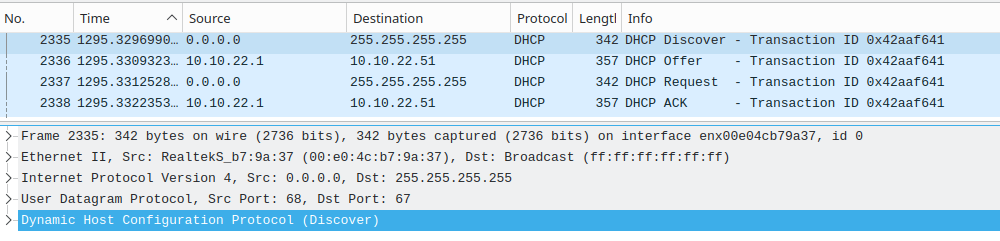
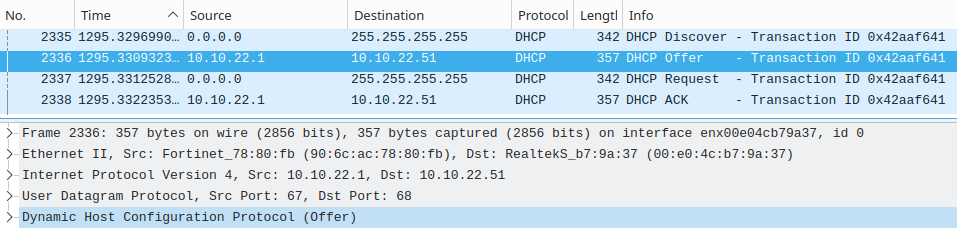
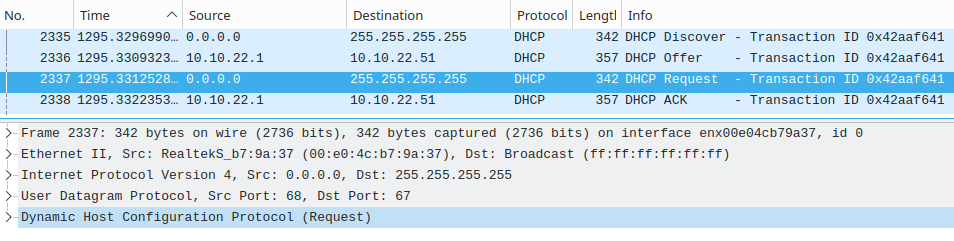
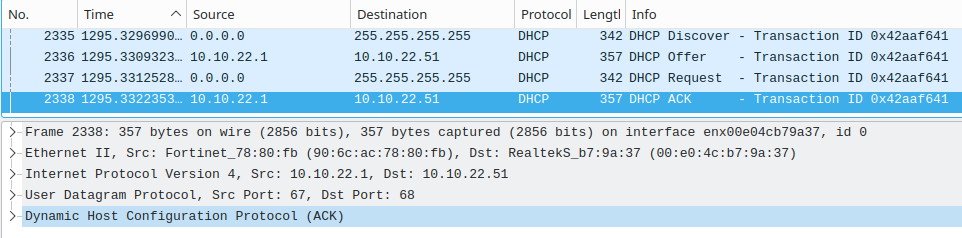
The following screenshots show a rough overview of the DORA process. Since this is not the main topic of this post, we don't need to go into detail.
DHCPDISCOVER
DHCPOFFER
DHCPREQUEST
DHCPACK
So, enough theory; let us detect the rouge DHCP server.
There are various ways to detect a rogue DHCP server. Some work on the client or network level, or both.
In the following sections, we assume that we only have one legitimate DHCP server on an IPv4 network. Larger environments can have multiple of course, but this is not relevant, and the following detection methods work even if you have multiple servers.
Side note: You can release the old and request a new IP on Windows via command line ipconfig /release and ipconfig /renew and on Linux with sudo dhclient -v -r and sudo dhclient -v. Don't forget to specify the interface if you use multiple.
It is important that the packet capture is taken on a client or intermediate device on the same network as the suspected rogue DHCP server. Wireshark and tcpdump are common tools to do so, and intermediate devices have their own tools.
You should look for UDP traffic on ports 67 and 68. It makes it easier to detect rogue DHCP servers if you are familiar with the above-mentioned 'DORA' process. Having multiple 'Offer' packets for a single 'Discover' packet from 1 or more IPs is an indicator for a rogue DHCP server. We have to keep IP spoofing in mind. Another option is to check on the server side: does the authorized DHCP server sends more than usual 'Offers' without receiving a 'Request'? - This is somewhat vague, but it could help to find a rogue DHCP server.
You can find more DHCP display filters for Wireshark in this post.
sudo nmap -sU -p 67 -d 10.10.20.0/24-sU - limits scan to UDP ports-p 67 - destination port-d - optional: increase debug level.-dd for even more information10.10.20.0/24 - your network[...]
Completed UDP Scan at 23:22, 0.24s elapsed (2 total ports)
Overall sending rates: 16.82 packets / s, 470.93 bytes / s.
Nmap scan report for _gateway (10.10.20.1)
Host is up, received arp-response (0.00041s latency).
Scanned at 2023-02-06 23:21:58 CET for 2s
PORT STATE SERVICE REASON
67/udp open|filtered dhcps no-response
MAC Address: 90:6C:AC:78:80:FB (Fortinet)
Final times for host: srtt: 406 rttvar: 3765 to: 100000
[...]
This gives you a quick overview of your network.
The required NSE script broadcast-dhcp-discover should be installed by default together with nmap. More information to the script can be found in the official documentation.
Side note: If you are using Linux, you can find the interface's name with ip -br a or ip -br l.
sudo nmap --script broadcast-dhcp-discover -e eth0de:ad:c0:de:ca:fe. Decent threat actors will sort those requests out to stay undetected. It is recommended to change the MAC address like in the following commands.sudo nmap --script broadcast-dhcp-discover --script-args broadcast-dhcp-discover.mac=aa:bb:cc:dd:ee:ff -e enp0s31f6sudo nmap --script broadcast-dhcp-discover --script-args broadcast-dhcp-discover.mac=random -e enp0s31f6Sample output
user@pleasejustwork:~$ sudo nmap --script broadcast-dhcp-discover --script-args broadcast-dhcp-discover.mac=aa:bb:cc:dd:ee:ff -e enp0s31f6
[sudo] password for kuser:
Starting Nmap 7.80 ( https://nmap.org ) at 2023-02-06 17:22 CET
Pre-scan script results:
| broadcast-dhcp-discover:
|   Response 1 of 2:
|     IP Offered: 10.10.20.57
|     DHCP Message Type: DHCPOFFER
|     Server Identifier: 10.10.20.1
|     IP Address Lease Time: 7d00h00m00s
|     Subnet Mask: 255.255.255.0
|     Router: 10.10.20.1
|     Domain Name Server: 9.9.9.9, 149.112.112.112
|     Renewal Time Value: 3d12h00m00s
|_    Rebinding Time Value: 6d03h00m00s
|   Response 2 of 2:
|     IP Offered: 192.168.178.242
|     DHCP Message Type: DHCPOFFER
|     Server Identifier: 192.168.178.51
|     IP Address Lease Time: 2m00s
|     Renewal Time Value: 1m00s
|     Rebinding Time Value: 1m45s
|     Subnet Mask: 255.255.255.0
|     Broadcast Address: 192.168.178.255
|     Domain Name Server: 192.168.178.51
|_    Router: 192.168.178.1

WARNING: No targets were specified, so 0 hosts scanned.
Nmap done: 0 IP addresses (0 hosts up) scanned in 1.23 seconds
For more information about nmap visit the nmap guide or other nmap posts.
The following event logs on the authorized Windows DHCP server can indicate a rogue DHCP server on a network.
| Event ID | Source | Message |
|---|---|---|
| 1042 | Microsoft-Windows-DHCP-Server | The DHCP/BINL service running on this computer has detected a server on the network. If the server does not belong to any domain, the domain is listed as empty. The IP address of the server is listed in parentheses. |
| 1098 | Microsoft-Windows-DHCP-Server | Unreachable Domain |
| 1100 | Microsoft-Windows-DHCP-Server | Server Upgraded |
| 1101 | Microsoft-Windows-DHCP-Server | Cached authorization |
| 1103 | Microsoft-Windows-DHCP-Server | Authorized(servicing) |
| 1105 | Microsoft-Windows-DHCP-Server | Server found in our domain |
| 1107 | Microsoft-Windows-DHCP-Server | Network failure |
| 1109 | Microsoft-Windows-DHCP-Server | Server found that belongs to DS domain |
| 1110 | Microsoft-Windows-DHCP-Server | Another server was found |
| 1111 | Microsoft-Windows-DHCP-Server | Restarting rogue detection |
The source can be found on microsoft.com.
You can check the logs regularly or add those events to your monitoring solution.
Microsoft provided a tool to detect rogue DHCP servers, but this blog post from 2009 is no longer available. But thanks to archive.org we can find the blog post and download the 'RogueChecker' there.
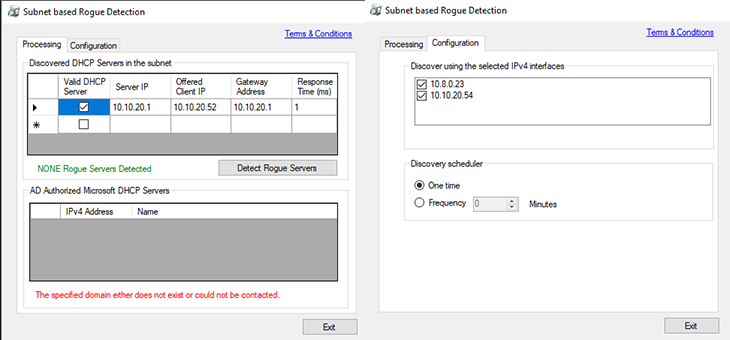
Installed it on Windows 10 and it seems to work.
Especially in larger networks, this often enough is not a solution, but I thought it would still be noteworthy. Disable the legitimate DHCP server in some way, release the IP on the client and ask for another IP. You shouldn't get a new legitimate IP address! - In case you receive a new IP address, the chances are high that there is a rogue DHCP server.
You can now check the DHCP server on the client and use other methods to find the rogue DHCP server on your network.
There are many solutions that cover the detection of rogue DHCP servers, but not all companies have the capacities to maintain such a system. Therefore, we do not need to go into detail, but it is still worth mentioning.
Detecting is one thing; preventing any damage from a rouge DHCP server is another. This post focuses on detection, but I thought it won't hurt to list some prevention measurements.
此内容由惯性聚合(RSS阅读器)自动聚合整理,仅供阅读参考。 原文来自 — 版权归原作者所有。