






In this post, I'll try to explain the syntax and use of an URL and the difference between URI, URL, URN, and URC.
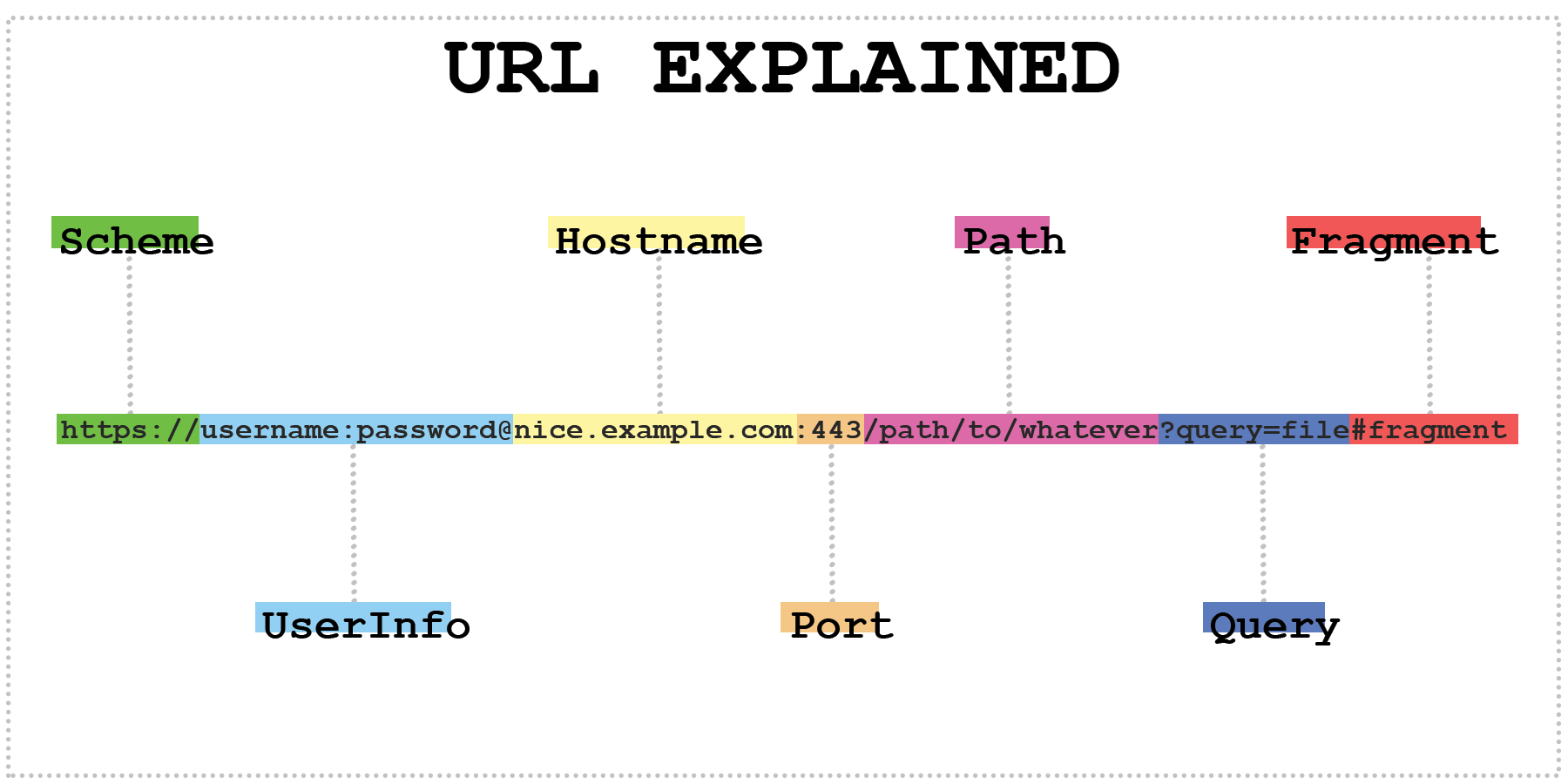
This will be our example for this post:
https://username:password@www.example.com:443/path/to/page.html?query=file#fragment
The format of this URL is built upon the URI generic syntax that looks like this [2]:
URI = scheme ":" ["//" authority] path ["?" query] ["#" fragment]
Noted that the 'authority' can have the following syntax:
authority = [userinfo "@"] host [":" port]
More information follow in the following sections.
Always required, but often hidden by the application, e.x. most commonly in browsers as http or https is the default and implied.
https://
ssh://
tel://
Also commonly called 'protocol', which is an indicator of how the resource can be accessed.
The official register of URI scheme names is maintained by IANA at http://www.iana.org/assignments/uri-schemes. IANA will show registered and reserved schemes that were never registered [1].
There is a large - but now retired - list of Public registered and un-registered Schemes by Dan Connolly. And a large and unknown number of private schemes are used for internal use within companies only.
RFC4395 explains the registration procedures and provides some guidelines. The old versions were RFC2717 for the registrations and RFC2718 for the guidelines.
As a side note, the double slashes were a choice of Tim Berners-Lee, which he regrets since they have no other purpose.
The UserInfo is optional, and often enough gets discarded by applications. Most browsers will ignore that information or warn you since it is a security risk.
An example where it is used normally:
ssh://username@example.com:2222
This is the host section. It can be the same system, a hostname, an IP, or a domain.
ldap://[2001:db8::10]/c=GB?objectClass?one # it is required to put the IPv6 address into square bracketshttps://ittavern.com/url-explained-the-fundamentals/vnc://10.10.20.57:5900Just a short digression into the world of domains.
www.example.com # full domain namewww # subdomainexample # second-level domain (SDL)com # top-level domain (TDL), also called domain suffixe” or “domain extension.” . # reference: root zone, won't go into detailA second-level domain must only contain letters (a-z), numbers (0-9), and dashes ('-'), but must not start with a dash. Furthermore, domains are case-insensitive, which means ITTAVERN.COM is the same as ittavern.com. The max length of the second-level domain is 63 characters. Subdomans are subject to the same rules, but can additionally contain underscores (_) - it is not recommended, but some services requiere it. For example some SRV DNS of Microsoft `_sipfederationtls._tcp.example.com. Browser can accept it, but there is no guarantee.
Each string between the dots is called label, and the maximum length of one label is 63 characters. The max length of a full domain name is 253 characters, including the dots.
There are currently almost 1500 TLDs registered. 1470 TLDs at the time of the creation of this post, to be more specific.
kuser@pleasejustwork:~$ curl https://data.iana.org/TLD/tlds-alpha-by-domain.txt | sed '1d' | wc -l
  % Total    % Received % Xferd  Average Speed   Time    Time     Time  Current
                                 Dload  Upload   Total   Spent    Left  Speed
100  9828  100  9828    0     0  11506      0 --:--:-- --:--:-- --:--:-- 11494
1470
The list of all TLDs can be found in the docs of IANA.
There are two kinds of TLDs - Generic top-level domain (gTLD) like .com .info .net and Country-code top-level domain (ccTLD) like .nl .de .us and some combinations like .co.uk or .com.au.
Many schemes have a default port number, allowing most programs to hide the port number to avoid confusion for their users. http has port 80, https has port 443, ssh has port 22, and so on. The same applies to the transport protocol, for example, TCP or UDP. They are required, but most applications hide them, if the default port is being used, e.x. browsers hide the :443 and show :10443 if the used protocol is https.
The path is a hierarchical naming system of subdirectories or subfolders and files, goes from left to right and is required. Unlike domains, the path is case-sensitive!
https://ittavern.com/images/logo.pnghttps://ittavern.com/random-post/https://duckduckgo.com # the path is missing, but implies the root directory /As a side note, the first example leads to an image, and in the second example, you might have noticed that the file is missing. The browser will open the random-post subfolder and the webserver is so configured that it provides the browser with a pre-definded file. Those files are Usually called index.html, but that can vary from setup to setup. That is also called 'Pretty URLs.'
Carries optional parameters that can be used on the server or client site. Commonly use cases are referrer information, variables, option settings, and so on. The delimiters between parameters are & and ;.
https://www.twitch.tv/randomstream1231?referrer=raid # on Twitch it shows where the viewer is coming fromhttps://youtu.be/dQw4w9WgXcQ?t=4 # on Youtube, it tells the client where to start the videohttps://youtu.be/dQw4w9WgXcQ?list=PLi9drqP&t=9 # multiple parameters containing the playlist and timestampFragments are optional references for a specific location within a resource. For example, HTML anchors like this in HTML files.
https://ittavern.com/url-explained-the-fundamentals/#fragments
Until now, every URL was an absolute URL. Relative URLs are often enough just the Path and require a reference or base URL to work.
/de-DE/same-page-different-lang/img/logo.pngURI stands for Uniform Resource Identifier and is a unique string of characters to identify anything and is used by web technologies. URIs may be used to identify anything logical or physical, from places and names to concepts and information. [2]
URIs are the superset of URLs (Uniform Resource Locator), URNs (Uniform Resource Name), and URCs (Uniform Resource Characteristic). For example, every URL is a URI, but not every URI is an URL. That being said, in practice, URI and URL are often used interchangeably.
The different subsets have different tasks: an URN identifies an item, an URL lets you know how to locate and access an item, and URC points to specific metadata of this item. Examples can be found in the specific sections.
URL stands for Uniform Resource Locator and specifies where an identified resource is available and the mechanism for accessing it. Further details can be found above.
Identifies a resource by a unique and persistent name without any location
urn:isbn:n-nn-nnnnnn-n # to identify a book by its ISBN numberurn:uuid:39ab000da-3f9a-abe2-1337-123456789abc # globally unique identifierurn:publishing:book # an XML namespace that identifies the document as a type of bookSide note: isbn - like in the first example - is an URN namespace identifier (NID) and not an URN scheme nor a URI scheme [1]. It was mentioned that some people would call the NID (see the following list) an URI scheme, equivalent to the URL, which is not correct.
URC stands for Uniform Resource Characteristic or Uniform Resource Citation. According to Wikipedia, the former is the currently used name.
An URC points to the metadata of a resource rather than the resource itself. A quick example would be an URC that points to the source code of a homepage:
view-source:http://example.com/
That said, there was never a final standard produced, and URCs were never widely adopted.
此内容由惯性聚合(RSS阅读器)自动聚合整理,仅供阅读参考。 原文来自 — 版权归原作者所有。