
惯性聚合 高效追踪和阅读你感兴趣的博客、新闻、科技资讯
阅读原文 在惯性聚合中打开

推荐订阅源

F
Full Disclosure
V
Vulnerabilities – Threatpost
Attack and Defense Labs
N
News and Events Feed by Topic
SecWiki News
SecWiki News
S
Security @ Cisco Blogs
Schneier on Security
B
Blog
TaoSecurity Blog
TaoSecurity Blog
The Last Watchdog
The Last Watchdog
H
Hacker News: Front Page
Hacker News - Newest:
Hacker News - Newest: "LLM"
博客园_首页
D
Docker
cs.AI updates on arXiv.org
Y
Y Combinator Blog
W
WeLiveSecurity
N
News and Events Feed by Topic
F
Fortinet All Blogs
PCI Perspectives
PCI Perspectives
WordPress大学
WordPress大学
CTFtime.org: upcoming CTF events
www.infosecurity-magazine.com
Recent Announcements
Forbes - Security
Forbes - Security
T
Tailwind CSS Blog
Hacker News: Ask HN
Hacker News: Ask HN
爱范儿
爱范儿
腾讯CDC
Last Week in AI
Last Week in AI
月光博客
月光博客
C
Cybersecurity and Infrastructure Security Agency CISA
P
Proofpoint News Feed
Help Net Security
Help Net Security
V
V2EX
C
Cyber Attacks, Cyber Crime and Cyber Security
C
CXSECURITY Database RSS Feed - CXSecurity.com
H
Heimdal Security Blog
L
LINUX DO - 最新话题
GbyAI
GbyAI
The Hacker News
The Hacker News
罗磊的独立博客
S
SegmentFault 最新的问题
H
Hackread – Cybersecurity News, Data Breaches, AI and More
博客园 - 【当耐特】
cs.CL updates on arXiv.org
V2EX - 技术
V2EX - 技术
Cyber Security Advisories - MS-ISAC
O
OpenAI News
OSCHINA 社区最新新闻
OSCHINA 社区最新新闻

Comments for TrueNAS – Open Enterprise Storage

How to Set Up and Install TrueNAS CORE Yes, You Can (Still) Virtualize TrueNAS TrueNAS enables Container Storage and Kubernetes | TrueNAS - Open Enterprise Storage TrueNAS 12.0-U2 is Released | TrueNAS - Open Enterprise Storage OpenZFS 2.0 Ships First on TrueNAS | TrueNAS - Open Enterprise Storage TrueNAS 12.0-U1 is Scheduled for early December | TrueNAS - Open Enterprise Storage iXsystems TrueNAS M60 Recognized as SDC Awards Storage Hardware Innovation of the Year Finalist | TrueNAS - TrueNAS 12.0 is Released! The TrueNAS Mini X and Mini X+ are here! Cross-Site Disaster Recovery with TrueNAS TrueNAS SCALE Release Plan | TrueNAS - Open Enterprise Storage iXsystems Unveils Industry's Fastest OpenZFS Storage System with Launch of TrueNAS M60 | TrueNAS - Open TrueNAS 12.0 BETA2 Showcases Performance Improvements | TrueNAS - Open Enterprise Storage Be One of the First to Test Drive TrueNAS 12.0 BETA | TrueNAS - Open Enterprise Storage TrueNAS is Multi-OS New-New TrueNAS Logo Unveiled | TrueNAS - Open Enterprise Storage Recession Proof Storage | FreeNAS 11.3-U3.1 Now Available - Issue #80 | TrueNAS - Open Enterprise Storage Open Source Infrastructure is Recession-Proof | TrueNAS - Open Enterprise Storage Understanding How OpenZFS Keeps Your Data Safe | TrueNAS - Open Enterprise Storage You Can Influence the TrueNAS CORE Roadmap! | TrueNAS - Open Enterprise Storage TrueNAS CORE is the new FreeNAS Setting Up Users, Permissions, and ACLs on FreeNAS | TrueNAS - Open Enterprise Storage TrueNAS Updates for VMware vSphere 7 | TrueNAS - Open Enterprise Storage How to Set Up Windows SMB Shares on FreeNAS | TrueNAS - Open Enterprise Storage FreeNAS and TrueNAS are Unifying Introducing the FreeNAS Mini E+ and All-Flash Minis | TrueNAS - Open Enterprise Storage Plex Permissions in FreeNAS 11.3 | TrueNAS - Open Enterprise Storage Latest TrueNAS and FreeNAS Release Delivers Wizards, Plugins, and Accelerated Replication | TrueNAS - Open How To Back Up Google Drive to FreeNAS | TrueNAS How To Enable Wireguard on FreeNAS 11.3 | TrueNAS - Open Enterprise Storage The Official FreeNAS Hardware Guide | TrueNAS - Open Enterprise Storage December 11 Plugins Update: ClamAV Fix & CloudStack FreeNAS Mini Black Friday Sale Starts Now! - Issue #73 | TrueNAS - Open Enterprise Storage Breaking Down the FreeNAS Mini E! | TrueNAS TrueCommand Shifts to Prime Time | TrueNAS - Open Enterprise Storage AMD EPYC 7002 Powers Scalable TrueNAS Solutions FreeNAS and TrueNAS 11.3 make their Debuts October 30 Plugins Update | TrueNAS - Open Enterprise Storage Overview of Datasets and Snapshots in FreeNAS | TrueNAS - Open Enterprise Storage September 13 Plugins Update | TrueNAS - Open Enterprise Storage August 27 Plugin Updates: Security & Version Fixes July 24 Plugins Update | TrueNAS - Open Enterprise Storage Mount a TrueNAS or FreeNAS Share to a Docker Host | TrueNAS - Open Enterprise Storage TrueNAS Updates for VMware vSphere | TrueNAS - Open Enterprise Storage July 10 Plugins Update | TrueNAS - Open Enterprise Storage June 26 Plugins Update | TrueNAS - Open Enterprise Storage Open ZFS vs. Btrfs | and other file systems | TrueNAS - Open Enterprise Storage ZFS vs. OpenZFS Backup Evolved: Asigra Plugin for FreeNAS Back Up Plugins and Jails on FreeNAS | TrueNAS Take Command of Your NAS Fleet with TrueCommand™ | TrueNAS - Open Enterprise Storage Next Batch of Updated Plugins and How to Recover from Failed Plugin Updates | TrueNAS - Open Enterprise Run S3 Object Storage on FreeNAS and TrueNAS | TrueNAS - Open Enterprise Storage February Plugin Updates & New Plugins for Testing Why SATA-DOMs Are Better than USB Drives for Booting Up Your FreeNAS System | TrueNAS - Open Enterprise Six Metrics for Measuring ZFS Pool Performance Part 2 | TrueNAS - Open Enterprise Storage Six Metrics for Measuring ZFS Pool Performance Part 1 | TrueNAS - Open Enterprise Storage TrueNAS M-Series Certified for Veeam Backup FreeNAS 11.1 is Now Available for Download! | TrueNAS FreeNAS 11.0 Released with VM & S3 Storage Support To SLOG or not to SLOG: How to best configure your ZFS Intent Log | TrueNAS - Open Enterprise Storage vCenter Web Client Plug-in for TrueNAS Now Available | TrueNAS - Open Enterprise Storage The ZFS ZIL and SLOG Demystified | TrueNAS - Open Enterprise Storage FreeNAS: A Worst Practices Guide | TrueNAS - Open Enterprise Storage FreeNAS Hardware Guide III: Pools, Performance & Cache FreeNAS vs TrueNAS FreeNAS 8.0.1‑RELEASE & Official Documentation Released
Sync Files to Dropbox with TrueNAS or FreeNAS
iX Team · 2019-02-22 · via Comments for TrueNAS – Open Enterprise Storage

Dropbox is one of the most common file-sharing services around, with over 500 million registered users and 400 billion pieces of content. The platform makes it easy to upload content, share links to files, and has free and business versions so organizations can tailor how they wish to implement.
Syncing FreeNAS or TrueNAS with Dropbox has many advantages:

  • Organizations may have a particular dataset on their local NAS accessible via Dropbox for external partners, remote users, or those on a business trip.
  • Individuals or organizations using Dropbox as a business solution may have local backups of Dropbox files so Dropbox space can be freed up periodically, risk-free.
  • Developers using Dropbox for online assets can easily publish and archive deliverables by copying to a NAS share and letting the NAS handle the upload to Dropbox.
  • Users might want to use a Dropbox auto-update folder without having to install Dropbox on their computer or mobile device.

Step 1: Go to your Dropbox account, click on the three dots on the lower right-hand side, and choose Developers. Click Create apps to open the DBX platform and create an app. This process is needed to create a unique access token which FreeNAS and TrueNAS use to identify the account and files. 

Step 2: After the app is created, generate the key by clicking Generate access token. 
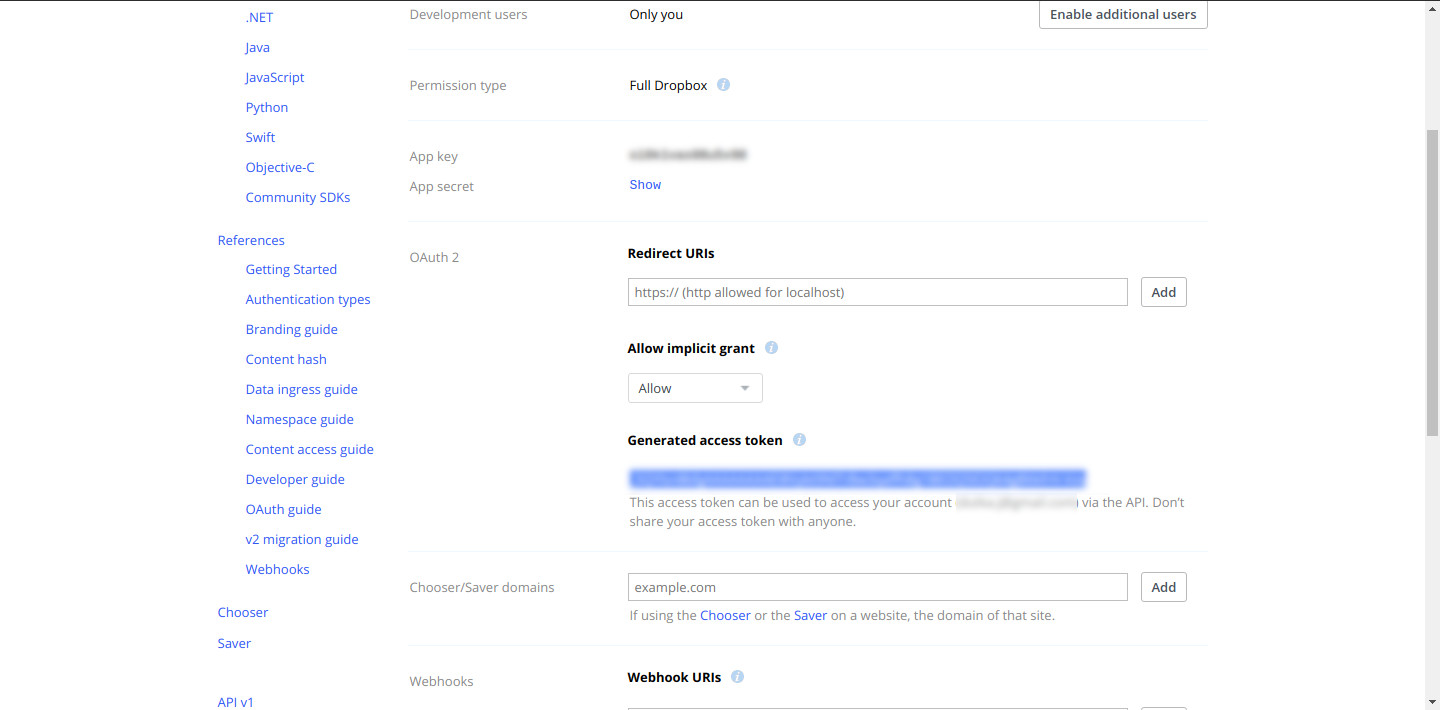
Generate access token wizard
Step 3: In the FreeNAS or TrueNAS web interface set up your Cloud Credentials under System ➡️ Cloud Credentials. Select Dropbox from the menu and copy in your access token.

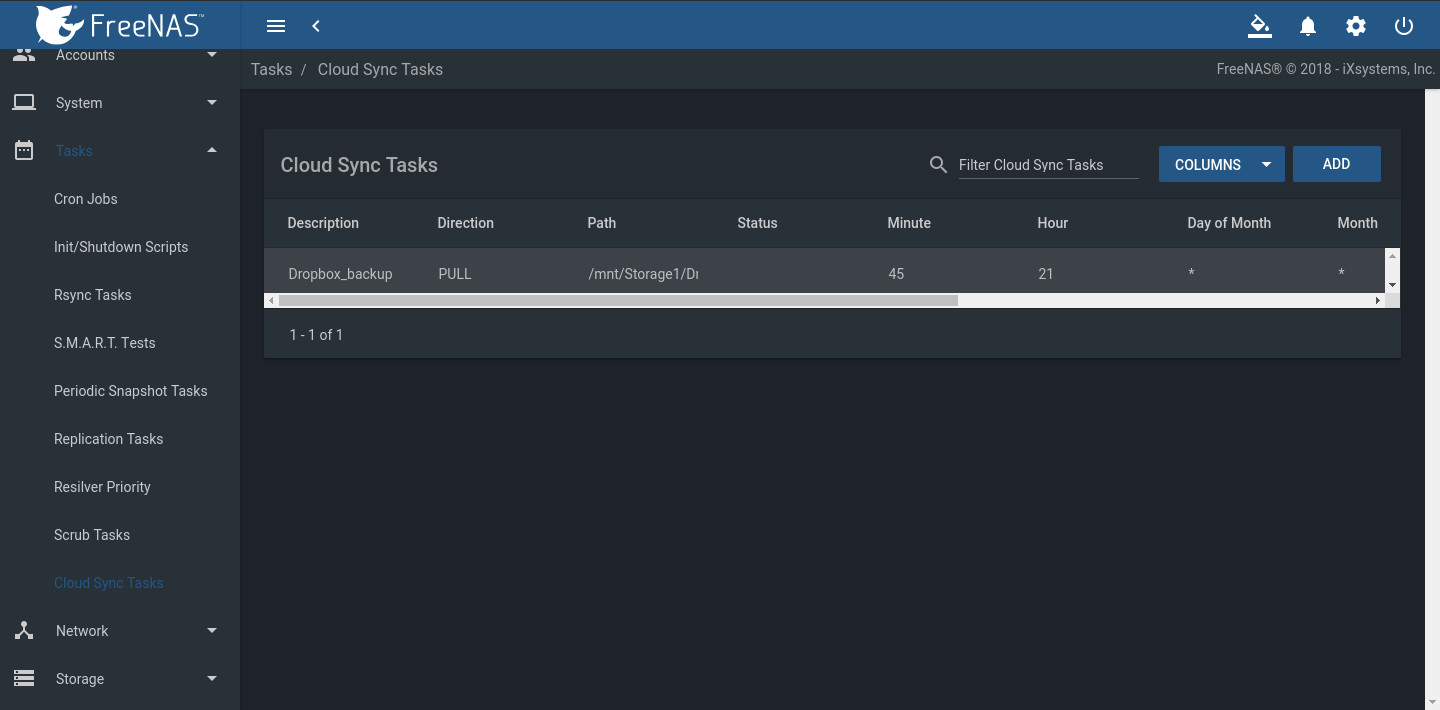
Step 4: Save, then go to the Tasks section. Under Cloud Sync Tasks, select your Dropbox account and schedule a sync task. Select the folder on the FreeNAS or TrueNAS system. This can be an existing dataset to sync to Dropbox or a new dataset to back up files in your Dropbox share.
Note: Set the kind of sync needed (Push or Pull) and how to transfer the content: Sync, Copy, or Move.
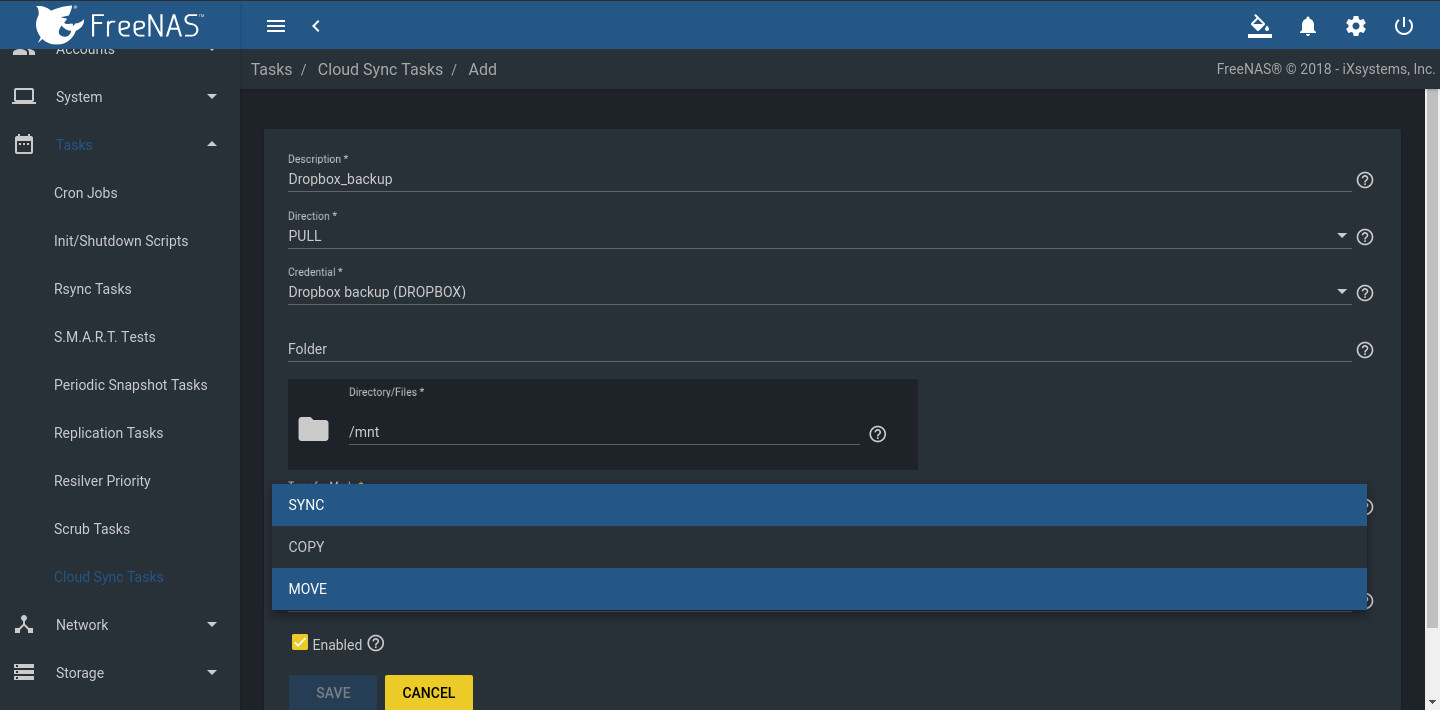
  • Sync copies any changes from the source system to the destination.
  • Copy copies new files. Files deleted on the host are not deleted on the destination.
  • Move copies files to the destination, then deletes them from the source after the transfer is complete.

Tasks section on FreeNAS Dashboard

Step 5: The Cloud Sync is ready to run at the set time. In the example, FreeNAS is the backup target for a Dropbox account, providing several good features:
  • A FreeNAS or TrueNAS likely has far more capacity than the Dropbox account.
  • Files are protected in case users delete them from the account accidentally.
  • Snapshots can protect files from malware.
  • The dataset can be shared over SMB, NFS, WebDAV, or AFP to a local network for faster access.

selecting Cloud Sync Tasks
Step 6: Check the files. In this example, the Cloud Sync pulled files from Dropbox to the FreeNAS dataset. Creating an SMB, NFS, or WebDAV share of the dataset makes it possible to see if the files are available.  If the transfer is set to push data from the FreeNAS or TrueNAS to Dropbox, log in to Dropbox to verify that the files uploaded correctly. 
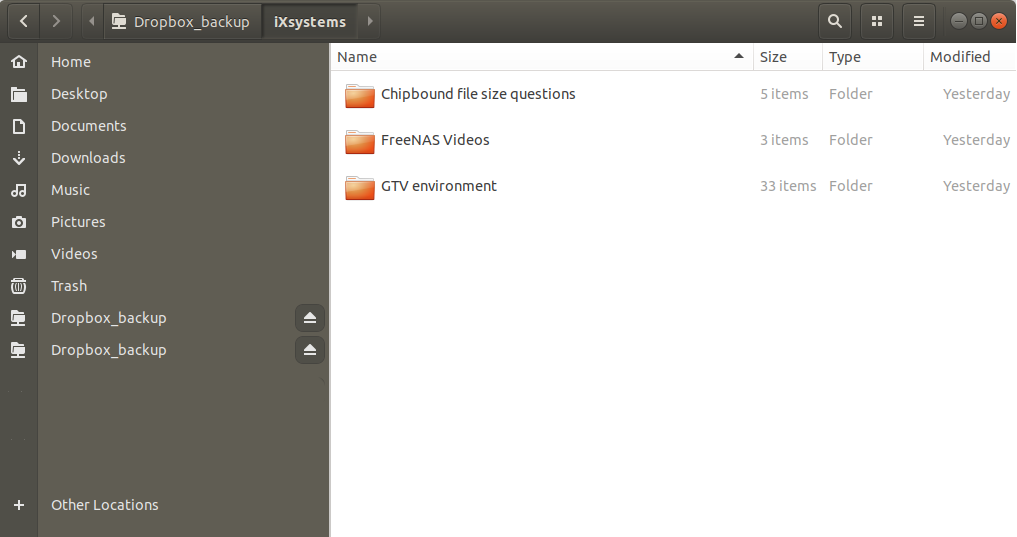
files uploaded