










Please find below photos showing Lenovo ThinkPad X220 disassembly and mSATA SSD upgrade. WiFi is also easily upgradeable (make sure to get whitelisted card or modified BIOS) Lastly, 2.5″ SSD is upgradeable without even opening up the case 😉
My preference to have an integrated SSD (using mSATA) as well as a drive in the 2.5″ bay. This allows for easy backups and some redundancy in the event of drive failure. It also allows for separation of programs (and boot device) from data (non-bootable) if desired.
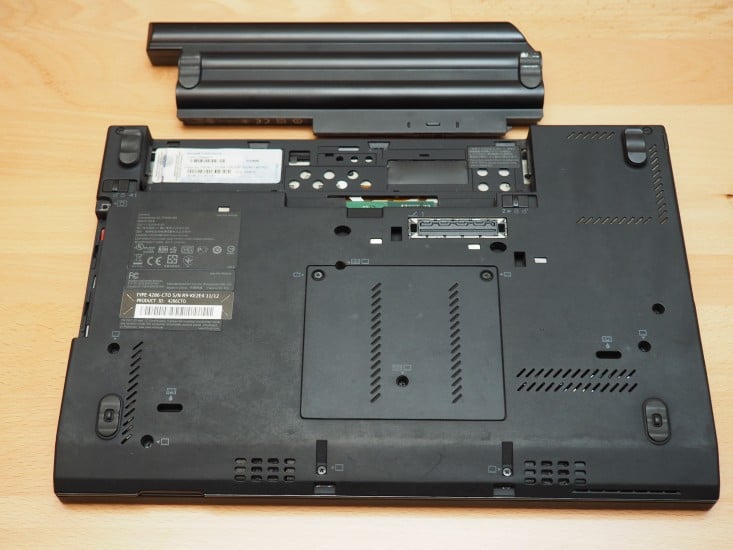
Disconnect power and remove battery before starting
NOTE: The X230, and I believe the X240, are both basically identical to upgrade.
I hope the photos are helpful and I also recommend checking the service manual for disassembly instructions and diagrams 🙂
WIFI NOTE: currently (as of 2016/01/11) I do not recommend using the colored antenna cables for WiFi, rather just use the white (grey) and black as shown in the service manual or if your X220 shipped with three WiFi antennas, use the appropriate cables.
Top Search Terms:
- x230 teardown (7)
- x220 back panel (4)
- lenovo x230 disassembly (3)
- x220 teardown (2)
- lenovo x22 disamble (1)
- lenivo x220 teardown (1)
- how to upgrade msata thinkpad x240 (1)
- how ro disassemble a lenovo x230 (1)
- dissasemblu thinkpad x230 (1)
- disassembling thinkpad x220 (1)