

惯性聚合 高效追踪和阅读你感兴趣的博客、新闻、科技资讯
阅读原文 在惯性聚合中打开

推荐订阅源

Cyber Security Advisories - MS-ISAC
U
Unit 42
H
Help Net Security
博客园_首页
雷峰网
雷峰网
CTFtime.org: upcoming CTF events
博客园 - 【当耐特】
Recent Announcements
Recorded Future
Recorded Future
aimingoo的专栏
aimingoo的专栏
爱范儿
爱范儿
C
CXSECURITY Database RSS Feed - CXSecurity.com
The Cloudflare Blog
S
Security @ Cisco Blogs
M
MIT News - Artificial intelligence
Cyberwarzone
Cyberwarzone
Cisco Talos Blog
Cisco Talos Blog
Spread Privacy
Spread Privacy
The GitHub Blog
The GitHub Blog
酷 壳 – CoolShell
酷 壳 – CoolShell
K
Kaspersky official blog
MyScale Blog
MyScale Blog
阮一峰的网络日志
阮一峰的网络日志
C
CERT Recently Published Vulnerability Notes
V
Vulnerabilities – Threatpost
WordPress大学
WordPress大学
C
Cisco Blogs
G
Google Developers Blog
N
News and Events Feed by Topic
P
Palo Alto Networks Blog
Apple Machine Learning Research
Schneier on Security
博客园 - 聂微东
Security Latest
Security Latest
Security Archives - TechRepublic
O
OpenAI News
云风的 BLOG
云风的 BLOG
IT之家
IT之家
PCI Perspectives
PCI Perspectives
Microsoft Security Blog
NISL@THU
NISL@THU
小众软件
小众软件
Scott Helme
Scott Helme
大猫的无限游戏
大猫的无限游戏
L
LINUX DO - 最新话题
Microsoft Azure Blog
Simon Willison's Weblog
N
News and Events Feed by Topic
F
Fortinet All Blogs
The Last Watchdog
The Last Watchdog

J.D. Hodges

Mac Prices Went Up June 2026: What Changed and What to Buy How to Set Up a SSH Connection in Claude Code Desktop How to Enable Wake-on-LAN on Synology NAS | Quick Guide Is the BCBS Settlement Payment Email Legit? (May 2026) How to Fix the VMware Workstation "mksSandbox" Crash (ISBRendererComm Error) - J.D. Hodges How to Check Your Codex Usage on ChatGPT (Plus and Pro) MacBook Neo GPU vs Snapdragon X2, Radeon, Arc, RTX 5060 ThinkPad History: IBM 700C to Lenovo AI Workstations Codex /goal: How It Works, Setup, and What I Tested The BeBox: BeOS Hardware, Photos, and the Apple Deal That Wasn't Unable to Load Usage Limits in Claude? Use /usage Mother-In-Law Method for Claude Code Review (Honest Take) Best Laptop for Claude Code (2026) Best Way to Cook Corn on the Cob | Milk and Butter Boil Best Computer for ChatGPT (2026) | Laptops, Desktops, Budget Picks How to Use GPT-5.5 Today via Your Codex Subscription Remove McAfee WebAdvisor on Windows: Stop the Popup Codex Sandbox Error on Ubuntu 24.04: The AppArmor Fix WD19TBS Mouse Lag Fix: Dell Firmware Update Worked Claude Opus 4.6 vs 4.7 Max: WordPress Task Graded Claude Code Opus 4.7: Terminal + VS Code Upgrade Instructions Claude Code Rate exceeded. - J.D. Hodges Chuwi MiniBook X vs MacBook Neo: The $399 Laptop That Refuses to Throttle - J.D. Hodges Meta Muse Spark: The Honest Scorecard (3 Wins Out of 20) Who Reads This Blog? Traffic by OS - J.D. Hodges Can MacBook Neo Run Claude Code? $599 Benchmark Test Minisforum MS-01 Proxmox Review: 2 Months Off-Grid on Solar Claude vs ChatGPT vs Gemini for Coding: Real Benchmark Results Claude Code /buddy: How to Preview, Hatch, and Reroll Your Terminal Pet Claude code source code analysis - J.D. Hodges
How to Check Codex Usage: CLI Status Line and Web Page
J.D. H. · 2026-05-18 · via J.D. Hodges

Codex CLI feature protip /statusline

TL;DR: There are a few ways to check your ChatGPT Codex usage, including: the web analytics page (covered in yesterday’s post) and the Codex CLI’s own status line, which can put live 5-hour and weekly percentages right at the bottom of your terminal session. The CLI method is easy to miss if you don’t have it enabled, thankfully it is super easy and configurable with the slash command /statusline.
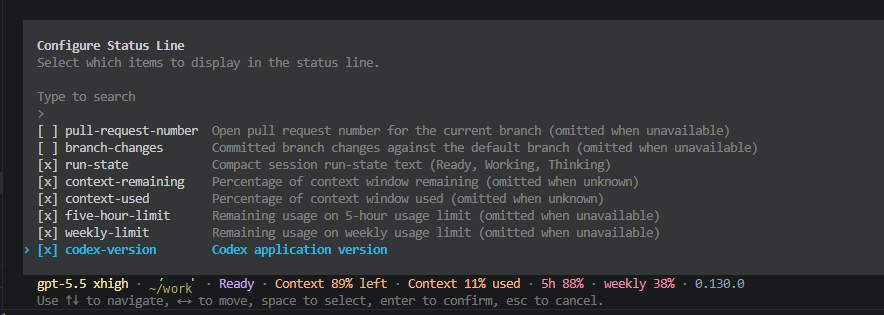
Codex CLI Configure Status Line menu with five-hour-limit and weekly-limit options checked, plus live status line at the bottom reading gpt-5.5 xhigh, Ready, Context 89% left, 5h 88%, weekly 38%
Codex CLI’s /statusline menu. Toggle the items you want, then press Enter to save. The preview at the bottom shows the resulting status line live.

What Exactly Is the Codex CLI Status Line?

It is a single text line that Codex CLI renders at the bottom of your interactive session. You can enable a variety of features but for usage tracking, the useful part is this: there are two opt-in items called five-hour-limit and weekly-limit that show your remaining quota as a percentage, refreshed as you go. That means fewer trips (or maybe never) to the analytics page while you are working.

How To Turn On the 5-Hour and Weekly Indicators?

  1. Open Codex CLI in your terminal. By running codex
  2. At the prompt, type /statusline and hit Enter. The “Configure Status Line” menu opens.
  3. Use the arrow keys to navigate. Spacebar toggles the [ ] checkbox for each item. Toggle on at minimum five-hour-limit and weekly-limit.
  4. Press Enter to save. If you Esc out without pressing Enter, your changes are discarded.

That last step trip might trip people up. The menu does not auto-save when you toggle. You have to confirm with Enter, the same key you used to open the menu. Once saved, the new status line is live immediately at the bottom of your Codex session.

If you prefer config-as-code over a TUI, the same items can be set in ~/.codex/config.toml under tui.status_line. The slash-command menu is just the friendly front end for that config. 👍

What Each Item on the Menu Does

Item What it shows
run-state Ready, Working, or Thinking
context-remaining Percentage of context window remaining
context-used Percentage of context window used
five-hour-limit Remaining usage on the 5-hour bucket
weekly-limit Remaining usage on the weekly bucket
codex-version Codex application version (mine is 0.130.0)
pull-request-number Open PR number for the current branch, when one exists
branch-changes Committed branch changes against the default branch

The PR-related items only render when they apply, so they do not clutter the line on non-git sessions. 

Tip

The status line shows live percentages but not the reset timestamps or your credit balance. For “when does my window roll over” and “do I have credits banked,” use the web analytics page. The linked walkthrough also covers the rate card numbers for Plus and Pro.

Some Cool Aspects of the Web Usage Analytics Page

The CLI status line is a quick glance tool. Super handy for keeping current status in view but not great for trends etc, the web page at https://chatgpt.com/codex/cloud/settings/analytics has a lot more stuff:

  • Exact reset timestamps for both buckets, such as “Resets 10:16 PM”
  • Credits remaining balance and a button to top up
  • The upgrade prompt and pricing shown on the analytics page
  • Usage breakdown by client (CLI, Extension, Cloud, Code review)