惯性聚合 高效追踪和阅读你感兴趣的博客、新闻、科技资讯
阅读原文 在惯性聚合中打开

推荐订阅源

V
V2EX
爱范儿
爱范儿
Martin Fowler
Martin Fowler
T
The Blog of Author Tim Ferriss
B
Blog RSS Feed
博客园 - 聂微东
G
GRAHAM CLULEY
Engineering at Meta
Engineering at Meta
Threat Intelligence Blog | Flashpoint
WordPress大学
WordPress大学
Scott Helme
Scott Helme
AI
AI
S
Security Affairs
T
Threat Research - Cisco Blogs
M
MIT News - Artificial intelligence
T
Troy Hunt's Blog
H
Hackread – Cybersecurity News, Data Breaches, AI and More
人人都是产品经理
人人都是产品经理
AWS News Blog
AWS News Blog
T
Threatpost
Cyberwarzone
Cyberwarzone
www.infosecurity-magazine.com
U
Unit 42
V
Vulnerabilities – Threatpost
J
Java Code Geeks
博客园 - Franky
月光博客
月光博客
Blog — PlanetScale
Blog — PlanetScale
NISL@THU
NISL@THU
D
Docker
小众软件
小众软件
N
News and Events Feed by Topic
Microsoft Security Blog
Y
Y Combinator Blog
A
Arctic Wolf
D
DataBreaches.Net
云风的 BLOG
云风的 BLOG
Forbes - Security
Forbes - Security
量子位
PCI Perspectives
PCI Perspectives
美团技术团队
K
KPMG report finds enterprise disconnect between AI and its ROI | CIO
I
InfoQ
Security Archives - TechRepublic
有赞技术团队
有赞技术团队
腾讯CDC
P
Proofpoint News Feed
S
Security @ Cisco Blogs
G
Google Developers Blog
C
Cisco Blogs

Hsu Yeung 的博客

三圣花市 | Hsu Yeung 的博客 网站支持 Live Photo 图片展示 | Hsu Yeung 的博客 梦 | Hsu Yeung 的博客 周末午餐 | Hsu Yeung 的博客 张家界 | Hsu Yeung 的博客 话剧《寻她芳踪·张爱玲》 | Hsu Yeung 的博客 博客自动生成文章目录 | Hsu Yeung 的博客 灭螂行动! | Hsu Yeung 的博客 张靓颖成都演唱会 | Hsu Yeung 的博客 最近对博客做的一些微调总结 | Hsu Yeung 的博客 Windows 上安装 Lua | Hsu Yeung 的博客 SpringBoot 中使用 RedisTemplate 存取整数值的坑 | Hsu Yeung 的博客 SQL JOIN 中 ON 与 WHERE 的区别 值得记录的一些工作近况 | Hsu Yeung 的博客 周传雄成都演唱会 | Hsu Yeung 的博客 并行操作导致获取数据库连接超时 | Hsu Yeung 的博客 风信子 | Hsu Yeung 的博客 Linux 安装并配置 Nginx | Hsu Yeung 的博客 使用 logrotate 切割 nginx 日志 郁金香土培结果 | Hsu Yeung 的博客 MySQL LEFT JOIN 右表有多条数据但只取最新的一条 | Hsu Yeung 的博客 获取数据库锁等待超时问题 | Hsu Yeung 的博客 从零开始挑选相机 | Hsu Yeung 的博客 郁金香 | Hsu Yeung 的博客 我的第一束花 | Hsu Yeung 的博客 快乐的一周 | Hsu Yeung 的博客 重庆,来了 | Hsu Yeung 的博客 散步 | Hsu Yeung 的博客 Git 工作区、暂存区、版本库之间的关系 | Hsu Yeung 的博客 Collectors.toMap() 操作 value 为 null 的情况 AOP 记录请求参数时序列化异常问题 | Hsu Yeung 的博客 第一次参加演唱会 | Hsu Yeung 的博客 MySQL FIND_IN_SET 函数的使用 | Hsu Yeung 的博客 自动拆箱机制导致编译失败 | Hsu Yeung 的博客 最近 | Hsu Yeung 的博客 夜爬龙泉山 | Hsu Yeung 的博客 在 Windows 上安装多个版本 JDK 并切换使用的版本 安装 Windows Terminal 和 gsudo 记录 意外的奖励 | Hsu Yeung 的博客 记第一次修热水器 | Hsu Yeung 的博客 在 Windows 电脑上调试 iPhone Safari 浏览器的网页 给网站加上 RSS | Hsu Yeung 的博客 打雷了 | Hsu Yeung 的博客 豉汁蒸排骨 | Hsu Yeung 的博客 我的 2022 年 | Hsu Yeung 的博客 如何使用 Git 给代码打 tag | Hsu Yeung 的博客 记一次有趣的上班经历 | Hsu Yeung 的博客 我记得 | Hsu Yeung 的博客 Spring 新增或修改请求 header 参数 | Hsu Yeung 的博客 Spring 事务传播机制 | Hsu Yeung 的博客 在家自制“周黑鸭” | Hsu Yeung 的博客 晚餐 | Hsu Yeung 的博客 如何解决逻辑删除与数据库唯一约束冲突 | Hsu Yeung 的博客 [转]漫画赏析:Linux 内核到底长啥样 | Hsu Yeung 的博客 数据库逻辑设计之三大范式通俗理解 | Hsu Yeung 的博客 计算机中的大小端是指什么 | Hsu Yeung 的博客 MySQL 学习笔记 | Hsu Yeung 的博客 [转]《玉子市场》的人物魅力 | Hsu Yeung 的博客 Linux 安装 Redis | Hsu Yeung 的博客 Linux 安装 MySQL | Hsu Yeung 的博客 Linux 安装 JDK | Hsu Yeung 的博客 [转]Thymeleaf 表达式工具类 | Hsu Yeung 的博客 Shell 基础入门介绍 | Hsu Yeung 的博客 Linux 中的软链接和硬链接 | Hsu Yeung 的博客 MySQL 将某些字段的值排在最前或最后 | Hsu Yeung 的博客 数据结构与算法学习笔记 | Hsu Yeung 的博客 Visual Studio Code 如何编写运行 C 程序?
网站支持展示 B 站 iframe 视频
2025-04-14 · via Hsu Yeung 的博客

1. 使用方法

在评论时如果想要嵌入 iframe 视频,可以使用以下语法:

!bv{{这里替换成你想要分享的 iframe 代码}}

最终会被渲染为如下 HTML 代码:

<div class='bilibili-aspect-ratio'>
  你想要分享的 iframe 代码
</div>

为了大家访问页面时有更好的加载速度以及使用体验,网站对于带 src 属性的资源是支持了懒加载的,而通过 iframe 方式分享 B 站视频的时候,页面加载完成视频就会自动播放(手机上不会),使用懒加载就可以避免这个问题,使其出现在视窗里的时候才会加载具体的资源。使用懒加载的方式也很简单,只需要将链接里的 src 属性修改为 data-src 即可(以后预计会支持匹配 iframe 中的 src 然后自动替换成 data-src,这样就不需要用户自己手动操作了)。
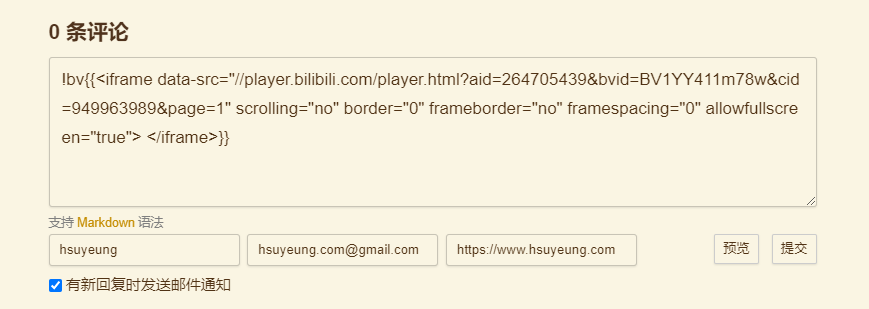

2. 使用示例

输入评论内容
输入评论内容
点击预览
点击预览
评论出来的效果
评论出来的效果

3. 为什么要做这个

iframe 分享代码实际上 B 站已经提供了,但是直接嵌入页面样式很难看,所以我们需要做的就是给 iframe 加上一点样式,使其自适应大小。

一开始是想的自己在写文章的时候自己手写 HTML 标签加上样式就好了,于是就有了如下的代码:

<div class='bilibili-aspect-ratio'>
  <iframe src="//player.bilibili.com/player.html?aid=904641287&bvid=BV1pP4y1i7Xh&cid=949961021&page=1" 
        scrolling="no" 
        border="0" 
        frameborder="no" 
        framespacing="0" 
        allowfullscreen="true">
  </iframe>
</div>

CSS:

/* 哔哩哔哩视频适配 */
.bilibili-aspect-ratio {
  position: relative;
  width: 100%;
  height: 0;
  padding-bottom: 75%;
  margin: 3% auto;
  text-align: center;
}

.bilibili-aspect-ratio iframe {
  position: absolute;
  width: 100%;
  height: 100%;
  left: 0;
  top: 0;
}

但是后来愈发觉得麻烦,每次都要自己写 HTML 代码很烦,于是就想着扩展一下 marked.js 的语法,让我能简单的输入一些字符就能渲染出上面的那一串代码。这样不仅自己写文章时方便一些,别人评论留言的时候如果想要嵌入 iframe 视频也会略微简单一些。

4. 原理

实际上就是按照 Marked 文档 扩展了 marked 的语法。而 marked.js 的原理其实也很简单,就是通过大量的正则表达式来不断地匹配输入的文本,然后再按照匹配的规则渲染成对应的自定义的 HTML 代码。

文档给的例子已经很详细了,我们要做的无非就是写自己的正则,然后将匹配到的内容提取出来再渲染成前面提到的那段 HTML 代码即可。这里就不展开介绍了,直接放扩展代码。

const caret = /(^|[^\[])\^/g
const _iframeCode = /<iframe(([\s\S])*?)<\/iframe>/

function edit(regex, opt) {
  regex = typeof regex === 'string' ? regex : regex.source
  opt = opt || ''
  const obj = {
    replace: (name, val) => {
      val = val.source || val
      val = val.replace(caret, '$1')
      regex = regex.replace(name, val)
      return obj
    },
    getRegex: () => {
      return new RegExp(regex, opt)
    }
  }
  return obj
}

const bilibiliPlayer = {
  name: 'bilibiliPlayer',
  level: 'block',
  start(src) {
    return src.match(/!bv[^!bv\n]/)?.index
  },
  tokenizer(src, tokens) {
    let rule = /^!bv?\{\{\s*(iframeCode)?\s*\}\}/
    rule = edit(rule)
            .replace('iframeCode', _iframeCode)
            .getRegex()
    const match = rule.exec(src)
    if (match) {
      const token = {
        type: 'bilibiliPlayer',
        raw: match[0],
        text: match[0].trim(),
        iframeCode: match[1],
        tokens: []
      }
      this.lexer.inline(token.text, token.tokens)
      return token
    }
  },
  renderer(token) {
    return `
          <div class='bilibili-aspect-ratio'>${token.iframeCode}</div>
      `
  }
}

marked.use({extensions: [bilibiliPlayer]})