惯性聚合 高效追踪和阅读你感兴趣的博客、新闻、科技资讯
阅读原文 在惯性聚合中打开

推荐订阅源

T
Tenable Blog
Last Week in AI
Last Week in AI
P
Proofpoint News Feed
Engineering at Meta
Engineering at Meta
H
Help Net Security
F
Fortinet All Blogs
MyScale Blog
MyScale Blog
宝玉的分享
宝玉的分享
让小产品的独立变现更简单 - ezindie.com
博客园 - 司徒正美
量子位
N
Netflix TechBlog - Medium
Apple Machine Learning Research
小众软件
小众软件
Recorded Future
Recorded Future
博客园 - 三生石上(FineUI控件)
Vercel News
Vercel News
aimingoo的专栏
aimingoo的专栏
I
InfoQ
Microsoft Security Blog
Scott Helme
Scott Helme
The Last Watchdog
The Last Watchdog
cs.AI updates on arXiv.org
IT之家
IT之家
AI
AI
WordPress大学
WordPress大学
Security Archives - TechRepublic
Google Online Security Blog
U
Unit 42
V2EX - 技术
V2EX - 技术
MongoDB | Blog
MongoDB | Blog
Schneier on Security
博客园 - Franky
H
Heimdal Security Blog
奇客Solidot–传递最新科技情报
奇客Solidot–传递最新科技情报
Jina AI
Jina AI
W
WeLiveSecurity
P
Privacy & Cybersecurity Law Blog
Cloudbric
Cloudbric
B
Blog RSS Feed
N
News | PayPal Newsroom
S
Securelist
Threat Intelligence Blog | Flashpoint
I
Intezer
Hacker News - Newest:
Hacker News - Newest: "LLM"
CTFtime.org: upcoming CTF events
博客园_首页
罗磊的独立博客
H
Hackread – Cybersecurity News, Data Breaches, AI and More
雷峰网
雷峰网

虹墨空间站

浏览器直接访问正常,过了负载均衡就崩了?只因响应头里多了个空格 Claude Code 怎样快速消耗 token 去掉高德地图开屏广告 解决 Claude Code 安装或更新后 claude.exe 无法运行、claude native binary not installed Windows 11 26H1 显示所有托盘图标 OpenClaw 安装与配置 盘点手里的电子产品传家宝 基于 7z 的 NAS 到网盘备份解决方案,支持增量、分卷、加密、压缩 卸载百度网盘智能看图 CDN 方式引入 Monaco Editor 在线工具 - 富文本转 Markdown 2025 年了,安卓平板上什么第三方九键输入法最好用? 鸿蒙 PC 编译运行 Electron 应用 Android 强制锁定屏幕旋转方向
bat 脚本打印输出彩色文字
iMaeGoo · 2025-08-06 · via 虹墨空间站

要在 Windows 批处理脚本中打印彩色内容,通常的方式是 echo [32mHello World[0m,但这种方式需要输入特殊字符 ESC(ASCII 码为 27),我试过 Alt+027 的快捷键却怎么也打不出来这个字符,而且这种方式各个颜色的编码也很不好记,分享一种更简单的方法!

https://learn.microsoft.com/en-us/powershell/module/microsoft.powershell.utility/write-host

1
2
3
4
5
6
7
8
9
10
11
12
13
14
15
16
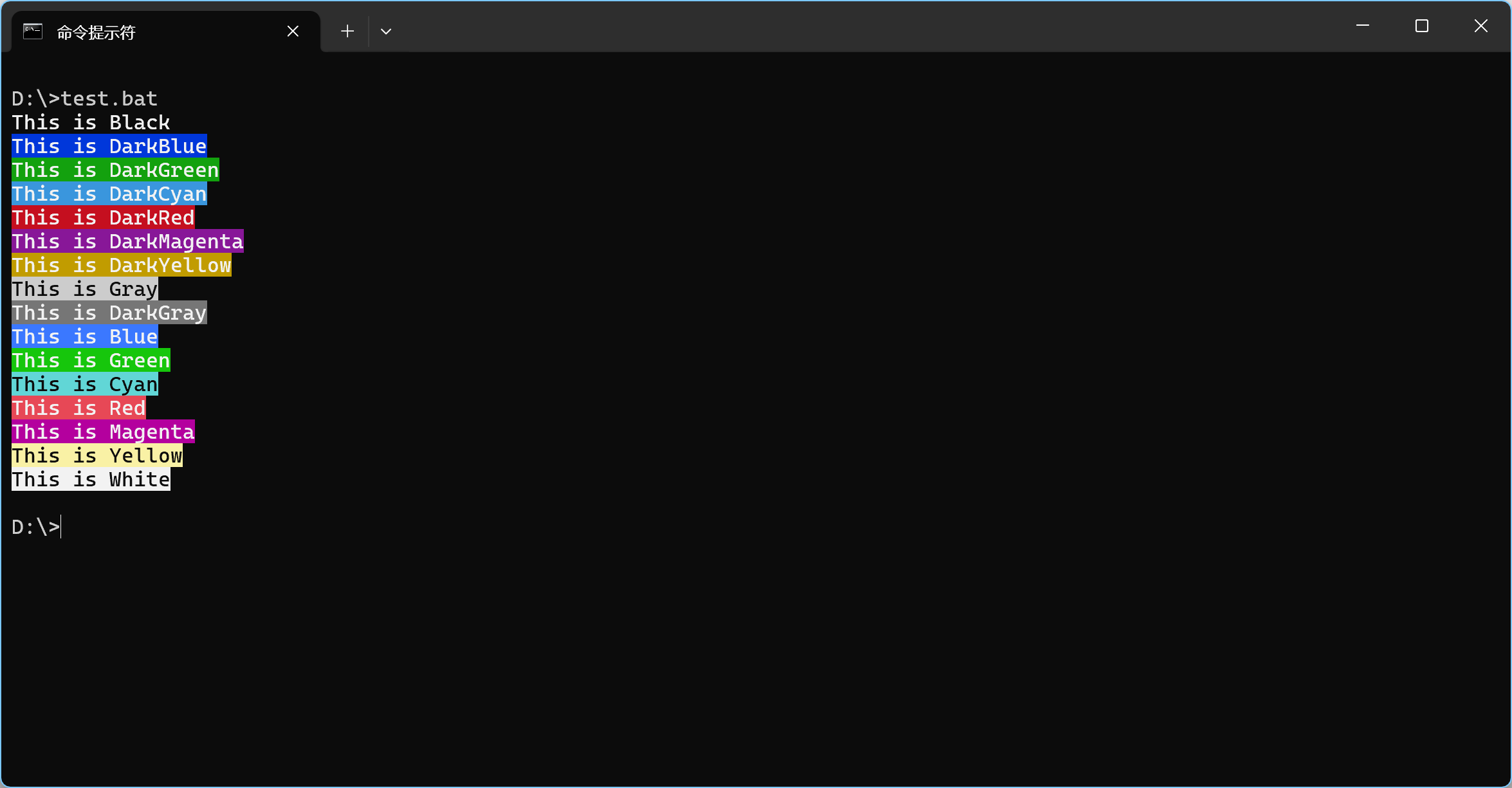
powershell -Command "Write-Host 'This is Black' -ForegroundColor White -BackgroundColor Black"
powershell -Command "Write-Host 'This is DarkBlue' -ForegroundColor White -BackgroundColor DarkBlue"
powershell -Command "Write-Host 'This is DarkGreen' -ForegroundColor White -BackgroundColor DarkGreen"
powershell -Command "Write-Host 'This is DarkCyan' -ForegroundColor White -BackgroundColor DarkCyan"
powershell -Command "Write-Host 'This is DarkRed' -ForegroundColor White -BackgroundColor DarkRed"
powershell -Command "Write-Host 'This is DarkMagenta' -ForegroundColor White -BackgroundColor DarkMagenta"
powershell -Command "Write-Host 'This is DarkYellow' -ForegroundColor White -BackgroundColor DarkYellow"
powershell -Command "Write-Host 'This is Gray' -ForegroundColor Black -BackgroundColor Gray"
powershell -Command "Write-Host 'This is DarkGray' -ForegroundColor White -BackgroundColor DarkGray"
powershell -Command "Write-Host 'This is Blue' -ForegroundColor White -BackgroundColor Blue"
powershell -Command "Write-Host 'This is Green' -ForegroundColor White -BackgroundColor Green"
powershell -Command "Write-Host 'This is Cyan' -ForegroundColor Black -BackgroundColor Cyan"
powershell -Command "Write-Host 'This is Red' -ForegroundColor White -BackgroundColor Red"
powershell -Command "Write-Host 'This is Magenta' -ForegroundColor White -BackgroundColor Magenta"
powershell -Command "Write-Host 'This is Yellow' -ForegroundColor Black -BackgroundColor Yellow"
powershell -Command "Write-Host 'This is White' -ForegroundColor Black -BackgroundColor White"

其中单引号内是打印的文字内容,ForegroundColor 参数传文字颜色,BackgroundColor 参数传背景颜色,直接传颜色名字,非常方便。

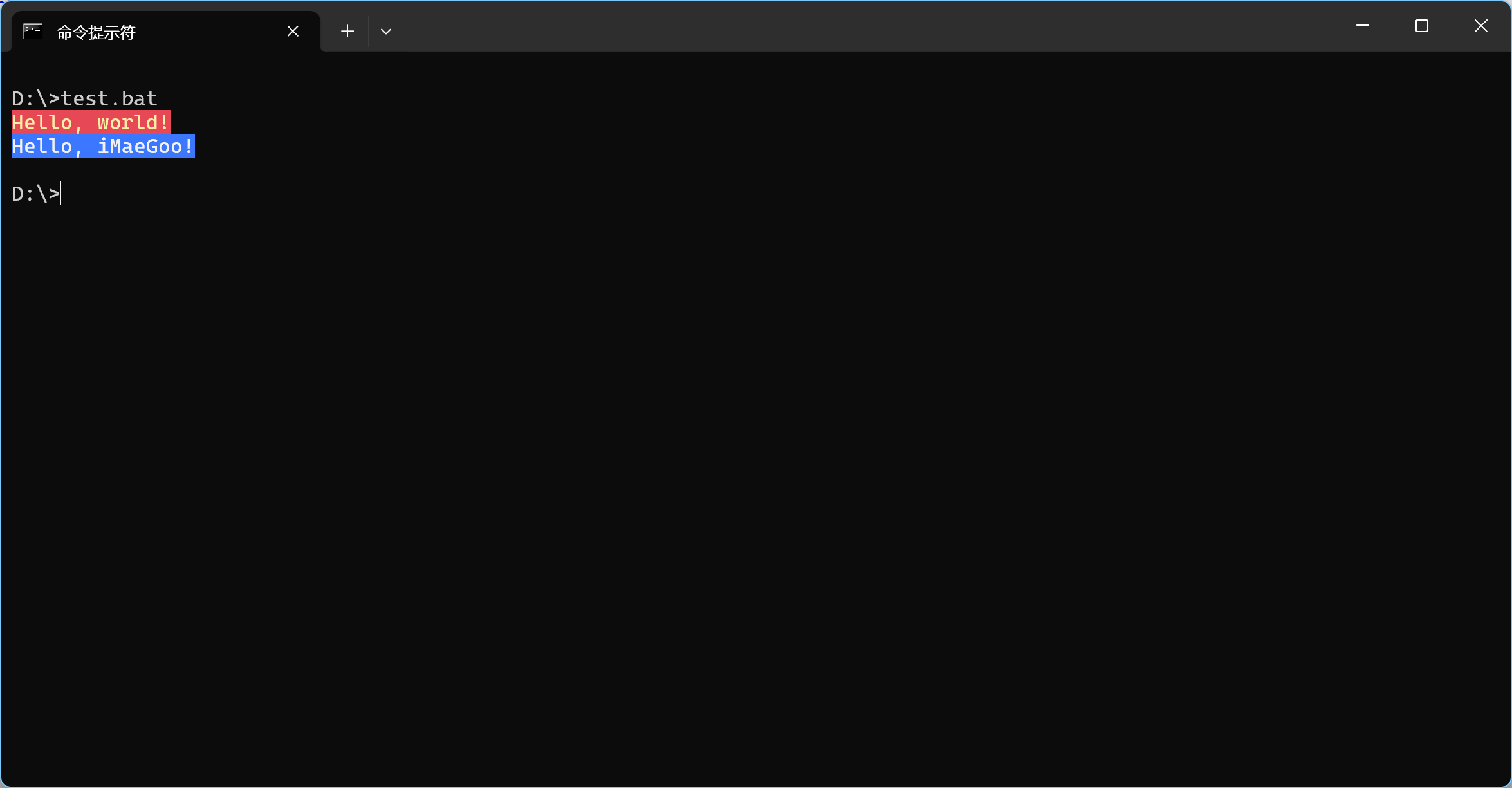
如果在批处理中使用,可以定义一个函数,调用起来更简洁。

1
2
3
4
5
6
7
8
9
@echo off

call :print "Hello, world!" Yellow Red
call :print "Hello, iMaeGoo!" White Blue
exit /b 0

:print
powershell -Command "Write-Host '%1' -ForegroundColor %2 -BackgroundColor %3"
goto:eof

效果