

惯性聚合 高效追踪和阅读你感兴趣的博客、新闻、科技资讯
阅读原文 在惯性聚合中打开

推荐订阅源

aimingoo的专栏
aimingoo的专栏
雷峰网
雷峰网
博客园 - 叶小钗
V
V2EX
博客园 - Franky
博客园_首页
小众软件
小众软件
Microsoft Security Blog
The GitHub Blog
The GitHub Blog
A
About on SuperTechFans
H
Hackread – Cybersecurity News, Data Breaches, AI and More
阮一峰的网络日志
阮一峰的网络日志
WordPress大学
WordPress大学
Blog — PlanetScale
Blog — PlanetScale
J
Java Code Geeks
T
The Blog of Author Tim Ferriss
U
Unit 42
Microsoft Azure Blog
月光博客
月光博客
S
SegmentFault 最新的问题
B
Blog RSS Feed
博客园 - 【当耐特】
D
Docker
N
Netflix TechBlog - Medium

Louis C Deng's Blog

RoPE: Properties, Patterns, and Long-Context Behavior CS336 Assignment 1: Large Language Model Training and Inference CS231n Lecture Note: Generative Models CS231n Lecture Note: Self-Supervised Learning CS231n Lecture Note: Large Scale Distributed Training 自動微分 | DIY 實現自己的 PyTorch From RNNs to Transformers CS231n Lecture Note VII: Recurrent Neural Networks Uncovering Batch & Layer Normalization CS231n Lecture Note VI: CNN Architectures and Training CS231n Lecture Note V: Convolution Neural Networks Basics Demystifying Softmax Loss: A Step-by-Step Derivation for Linear Classifiers Backpropagation: A Vector Calculus Perspective CS231n Lecture Note IV: Neural Networks and Backpropagation CS231n Lecture Note III: Optimization CS231n Lecture Note II: Linear Classifiers CS231n Lecture Note I: Image Classification CSAPP Cache Lab II: Optimizing Matrix Transposition CSAPP Cache Lab I: Let's simulate a cache memory! CS188 Search Lecture Notes III CS188 Search Lecture Notes II CS188 Search Lecture Notes I RECAP2025: 留白 CSAPP Bomb Lab 解析 x64 暫存器速查表 CSAPP Data Lab 解析 矩陣的 Modified Gram Schmidt 方法 聊一聊位掩碼(Bit Mask) 整數溢位與未定義行為 快速排序 幾種劃分方法討論
How to Use TouchID for Sudo Commands on macOS
Louis C Deng · 2026-01-25 · via Louis C Deng's Blog

If you are a developer or power user on a Mac, you probably type your password into the terminal dozens of times a day using sudo. If your Mac has a TouchID sensor, you can save time and keystrokes by configuring your terminal to accept your fingerprint instead of your password.

Here is a quick guide on how to set it up.

Step 1: Edit the Sudo Configuration

The safest way to edit system files is using the command line. Open your terminal and run the following command:

1
sudo -e /etc/pam.d/sudo

This will open the configuration file in your default editor (usually Vim or Nano).

Step 2: Add the TouchID Module

You will see a list of authentication rules. You need to add a specific line to the very top of the list, right under the first comment.

Add this line:

1
2
auth       sufficient     pam_tid.so

Your file should now look something like this:

1
2
3
4
5
6
7
# sudo: auth account password session
auth sufficient pam_tid.so
auth sufficient pam_smartcard.so
auth required pam_opendirectory.so
account required pam_permit.so
password required pam_deny.so
session required pam_permit.so

Save the file and exit the editor.

Step 3: Test It Out

Open a new terminal tab and try running a command like sudo ls. You should immediately see a prompt asking for your TouchID fingerprint.
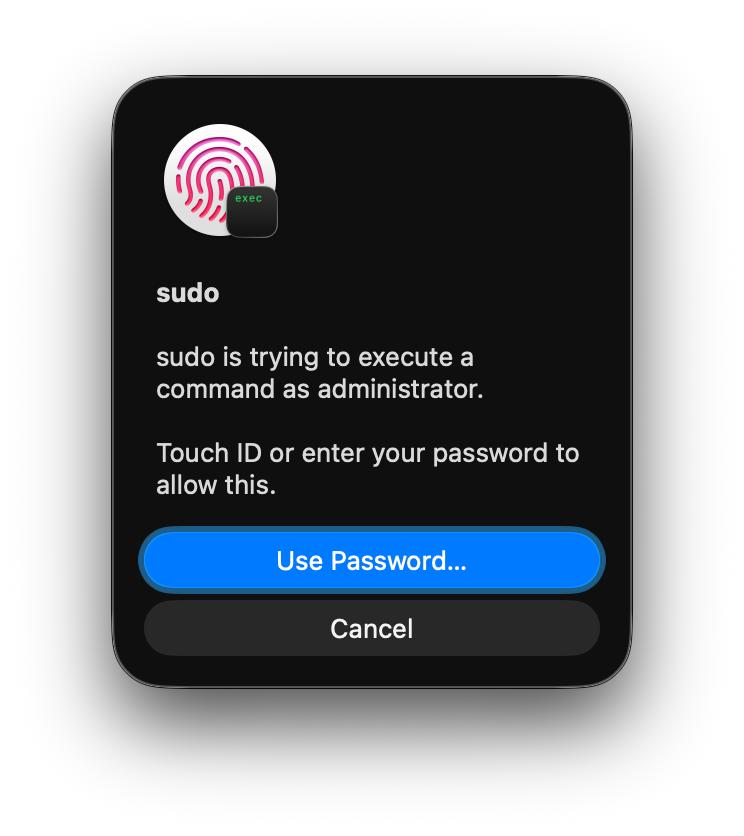
IMAGE 2026-01-25 19_07_14.jpg

If you hit Cancel, or if you are accessing the machine via SSH, it will simply fall back to asking for your password as usual.

Troubleshooting for iTerm2 Users

If you use the default macOS Terminal app, you are done. However, if you use iTerm2, this feature might not work immediately due to how iTerm handles sessions.
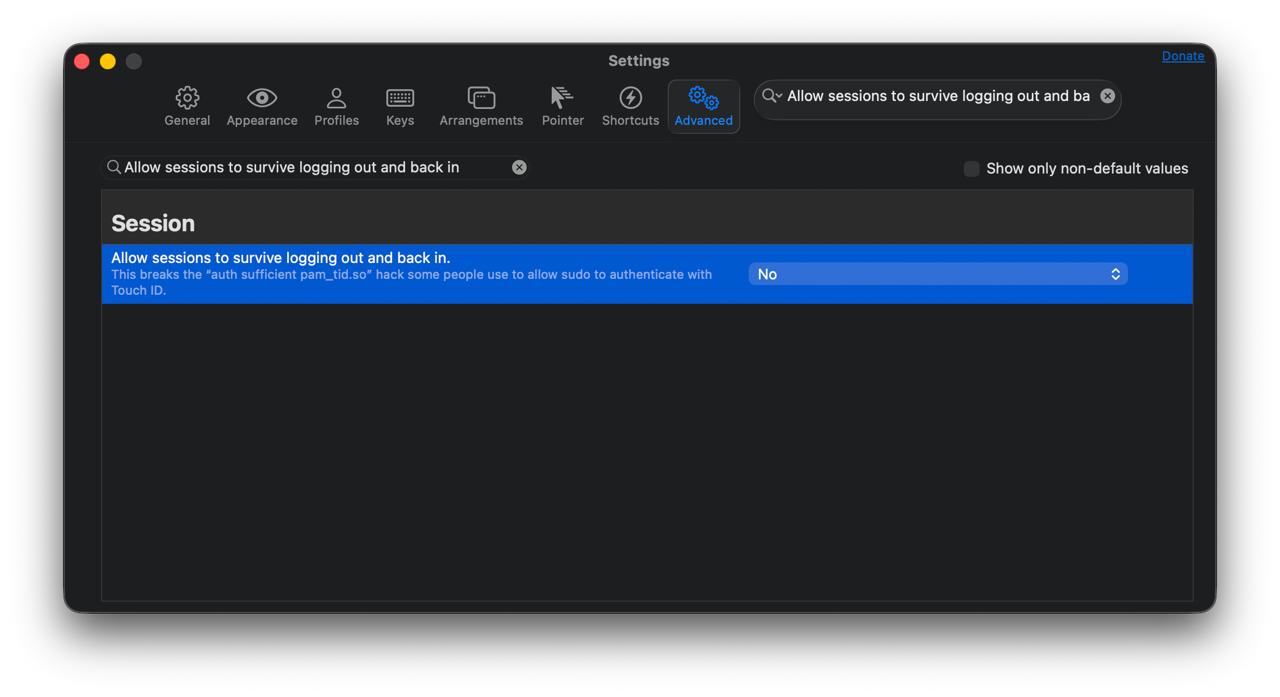
IMAGE 2026-01-25 19_07_12.jpg

To fix this:

  1. Open iTerm2 Preferences.
  2. Go to the Advanced tab.
  3. Scroll to the Session heading.
  4. Find “Allow sessions to survive logging out and back in” and set it to No.

Alternatively, you can install the pam_reattach module if you need to keep that specific iTerm feature enabled.

A Note on macOS Updates

Be aware that major macOS system updates often reset the /etc/pam.d/sudo file. If TouchID stops working after you update your Mac, simply follow these steps again to re-add the line.