




惯性聚合 高效追踪和阅读你感兴趣的博客、新闻、科技资讯
阅读原文 在惯性聚合中打开

推荐订阅源

博客园_首页
PCI Perspectives
PCI Perspectives
H
Help Net Security
爱范儿
爱范儿
奇客Solidot–传递最新科技情报
奇客Solidot–传递最新科技情报
雷峰网
雷峰网
S
Secure Thoughts
Jina AI
Jina AI
Attack and Defense Labs
大猫的无限游戏
大猫的无限游戏
K
KPMG report finds enterprise disconnect between AI and its ROI | CIO
OSCHINA 社区最新新闻
OSCHINA 社区最新新闻
S
Security @ Cisco Blogs
阮一峰的网络日志
阮一峰的网络日志
D
Darknet – Hacking Tools, Hacker News & Cyber Security
Recent Commits to openclaw:main
The Hacker News
The Hacker News
The Last Watchdog
The Last Watchdog
T
Tor Project blog
小众软件
小众软件
钛媒体:引领未来商业与生活新知
钛媒体:引领未来商业与生活新知
博客园 - 叶小钗
博客园 - 【当耐特】
G
Google Developers Blog
Hacker News - Newest:
Hacker News - Newest: "LLM"
C
Cyber Attacks, Cyber Crime and Cyber Security
C
Cisco Blogs
T
The Blog of Author Tim Ferriss
I
Intezer
S
Schneier on Security
S
Securelist
W
WeLiveSecurity
C
Cybersecurity and Infrastructure Security Agency CISA
P
Palo Alto Networks Blog
Scott Helme
Scott Helme
Project Zero
Project Zero
Google Online Security Blog
T
Threatpost
cs.CL updates on arXiv.org
Engineering at Meta
Engineering at Meta
Blog — PlanetScale
Blog — PlanetScale
V
Visual Studio Blog
Last Week in AI
Last Week in AI
cs.CV updates on arXiv.org
人人都是产品经理
人人都是产品经理
Y
Y Combinator Blog
A
Arctic Wolf
GbyAI
GbyAI
H
Hackread – Cybersecurity News, Data Breaches, AI and More
L
LangChain Blog

Deno

Deno 2.8 | Deno Claw Patrol: an open-source security firewall for agents | Deno Fresh 2.3: Zero JS by default, View Transitions, and Temporal support | Deno Deno 2.7: Temporal API, Windows ARM, and npm overrides | Deno Build a dinosaur runner game with Deno, pt. 6 | Deno Build a dinosaur runner game with Deno, pt. 5 | Deno Deno Deploy is Generally Available | Deno Introducing Deno Sandbox | Deno Build a dinosaur runner game with Deno, pt. 4 | Deno Build a dinosaur runner game with Deno, pt. 3 | Deno Build a dinosaur runner game with Deno, pt. 2 | Deno React / Next.js Denial-of-Service Vulnerability: Deno Deploy users protected | Deno Deno 2.6: dx is the new npx | Deno Build a dinosaur runner game with Deno, pt. 1 | Deno React Server Functions / Next.js Vulnerability: Deno Deploy users protected | Deno My highlights from the new Deno Deploy | Deno Deno's Other Open Source Projects | Deno How Deno protects against npm exploits | Deno Help Us Raise $200k to Free JavaScript from Oracle | Deno Deno 2.5: Permissions in the config file | Deno Fresh 2.0 Graduates to Beta, Adds Vite Support | Deno Deno 2.4: deno bundle is back | Deno JavaScript™ Trademark Update | Deno What's coming to JavaScript | Deno A brief history of JavaScript | Deno Reports of Deno's Demise Have Been Greatly Exaggerated | Deno An Update on Fresh | Deno How Plaid migrated 100 services to a new database platform 5x faster with Deno | Deno Deno 2.3: Improved deno compile, local npm packages, and more | Deno Add JSR packages with pnpm and Yarn | Deno Zero-config Debugging with Deno and OpenTelemetry | Deno Exploring Art with TypeScript, Jupyter, Polars, and Observable Plot | Deno Deno v Oracle Update 3: Fighting the JavaScript Trademark | Deno Build a custom RAG AI agent in TypeScript and Jupyter | Deno How to get deep traces in your Node.js backend with OTel and Deno | Deno toranoana.deno #20 登録受付中(2025年3月14日) | Deno Node just added TypeScript support. What does that mean for Deno? | Deno The Dino 🦕, the Llama 🦙, and the Whale 🐋 | Deno Publish a lint rule, get a prize | Deno Deno 2.2: OpenTelemetry, Lint Plugins, node:sqlite | Deno If you're not using npm specifiers, you're doing it wrong | Deno How Deno's documentation is evolving | Deno Oracle justified its JavaScript trademark with Node.js—now it wants that ignored | Deno Introducing the JSR open governance board | Deno Intro to Wasm in Deno | Deno Announcing OpenAI on JSR | Deno Deno in 2024 | Deno Goodbye WinterCG, welcome WinterTC | Deno Build a SolidJS app with Deno | Deno Run your Next.js SSR app on Deno Deploy | Deno Solve Advent of Code 2024 with Deno and Win Prizes! | Deno Deno v. Oracle: Canceling the JavaScript Trademark | Deno Deno 2.1: Wasm Imports and other enhancements | Deno Build a Typesafe API with tRPC and Deno | Deno Self-contained Executable Programs with Deno Compile | Deno Build a Database App with Drizzle ORM and Deno | Deno Introducing your new JavaScript package manager: Deno | Deno Announcing Growthbook on JSR | Deno Build an Astro site with Deno | Deno How to convert CommonJS to ESM | Deno Announcing Deno 2 | Deno The Final Touches: What’s New In v2.0.0-rc.10 | Deno Announcing Stable V8 Bindings for Rust | Deno Deno 2.0 Release Candidate | Deno Secure, efficient private npm registries with Cloudsmith and Deno | Deno Painting the Plane as We Fly It: Designing JSR | Deno Introducing Web Cache API support on Deno Deploy | Deno Deno 1.46: The Last 1.x Release | Deno Protect your cloud spend with new Deno Deploy spend limits | Deno What we got wrong about HTTP imports | Deno Benchmarking AWS Lambda Cold Starts Across JavaScript Runtimes | Deno Announcing Supabase on JSR | Deno Deno 1.45: Workspace and Monorepo Support | Deno Introducing KV Backup for Deno Subhosting | Deno A Gentle Intro to TypeScript | Deno Announcing Hono on JSR | Deno How We Made the Deno Language Server Ten Times Faster | Deno How the Guardian uses Deno to audit accessibility and performance across their 2.7 million articles | Deno Introducing More Flexible Domain Association for Deno Subhosting | Deno The stabilization process of the Standard Library has begun | Deno Deno 1.44: Private npm registries, improved Node.js compat, and performance boosts | Deno How we built a secure, performant, multi-tenant cloud platform to run untrusted code | Deno The Deno Standard Library is now available on JSR | Deno How to document your JavaScript package | Deno Your Low Code Solution Needs an Escape Hatch | Deno Deno 1.43: Improved Language Server performance | Deno How Slack used Deno to save months of engineering effort in launching their new platform | Deno JSR Is Not Another Package Manager | Deno Announcing the Hookdeck SDK on JSR | Deno Announcing the Neon Serverless Driver on JSR | Deno An intro to TSConfig for JavaScript Developers | Deno How we built JSR | Deno How Netlify used Deno Subhosting to build a successful edge functions product | Deno Introducing Simpler Project Creation in Deno Deploy | Deno Deno 1.42: Better dependency management with JSR | Deno Introducing deployctl, the command line interface for Deno Deploy | Deno Introducing JSR - the JavaScript Registry | Deno How to add Monaco to a Next.js app and securely run untrusted user code | Deno Survey Results and Roadmap | Deno Deno 1.41: smaller deno compile binaries | Deno
Node.js's Config Hell Problem | Deno
Andy Jiang · 2023-08-09 · via Deno

Config often gets in the way of developer productivity when building with Node.js. But Deno’s zero config, batteries included approach means you can be productive immediately.

When you spin up a Node repo of any flavor, your root directory quickly fills with config files. For example, in the latest version of Next.js, you get next.config.js, eslintrc.json, tsconfig.json, and package.json.

Add styling, and you’ll have postcss.config.js and tailwind.config.js too.

Need middleware? Add middleware.ts. Want error monitoring? Add sentry.server.config.js, sentry.client.config.js, and sentry.edge.config.js. Plus, your env files, Git files, and your Docker files…

Before you know it, your repo might look like:
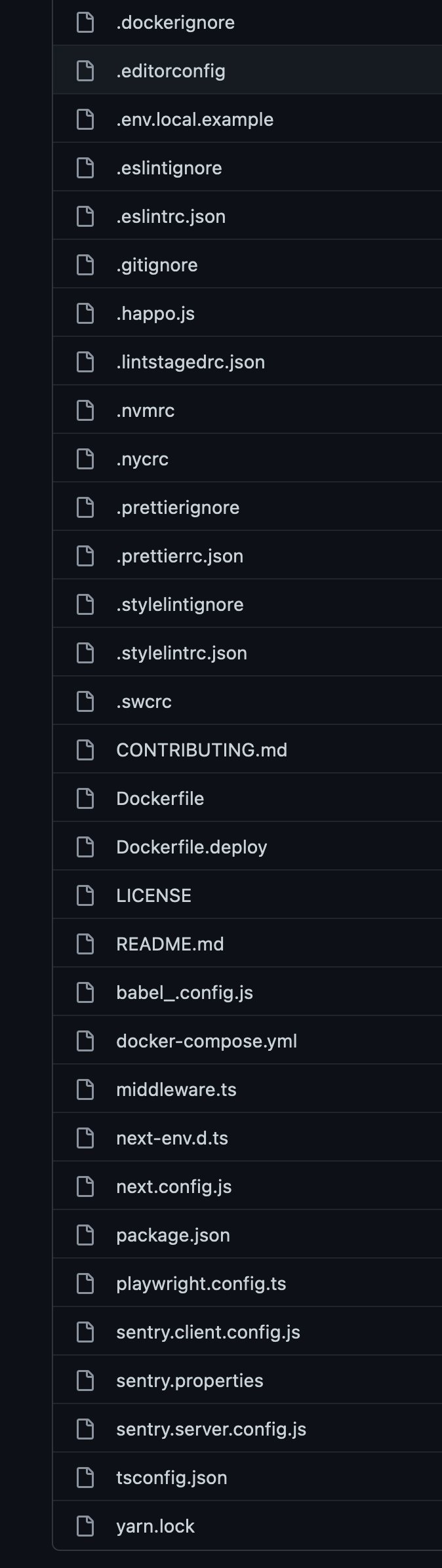
30 config files in your root

All software requires configuration. You need some way to set up the projects, tools, plugins, and software you’re using. But how did we get to the point where we need 30 files to run one project? How did we find ourselves in Config Hell?

And how do we get out of it?

Config, but with smart defaults

Software is not one-size-fits-all — all users have slightly different needs. Configuration gives users flexibility to derive maximum value based on their use cases.

But config as the first step to using software is a bad user experience.

Take adding TypeScript to an existing Next.js project. First, we need to install TypeScript and the types:

npm install --save-dev typescript @types/react @types/node

Then we need to create our own tsconfig.json:

Then what? If you’re just starting with TypeScript, you don’t know what configuration you want, so you do what any self-respecting developer would do: steal a config from Stack Overflow:

{
  "compilerOptions": {
    "target": "es5",
    "lib": ["dom", "dom.iterable", "esnext"],
    "allowJs": true,
    "skipLibCheck": true,
    "esModuleInterop": true,
    "allowSyntheticDefaultImports": true,
    "strict": true,
    "forceConsistentCasingInFileNames": true,
    "module": "esnext",
    "moduleResolution": "node",
    "resolveJsonModule": true,
    "isolatedModules": true,
    "noEmit": true
  },
  "include": ["next-env.d.ts", "**/*.ts", "**/*.tsx"],
  "exclude": ["node_modules"]
}

Tired of manually adding TypeScript support to your projects? Try Deno, where TypeScript is natively supported.

And this is just to add TypeScript.

Effective software anticipates what its users are trying to accomplish by being opinioned with smart defaults. These “preset settings” are designed to provide an optimized experience for most users without the need for manual configuration. The settings are still available, but they’re only exposed when absolutely necessary.

Asking users to configure software before they can use it can damage goodwill and trust users have for your brand. Imagine you are using Gmail the first time and are greeted with this:
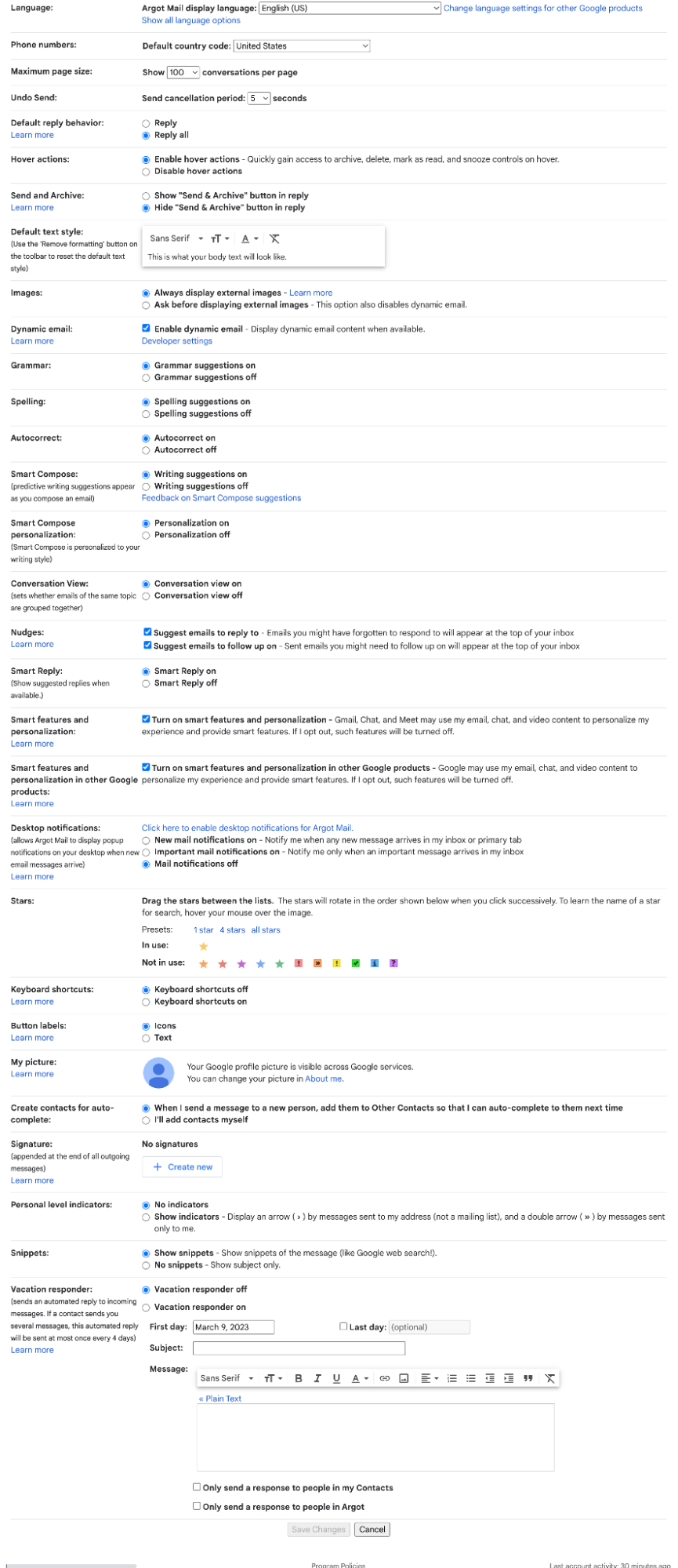
Gmail endless config options in its settings

You’d suddenly be happy with your old hotmail account.

Smart defaults first; config later.

What are all those config files?

Let’s go back to that list above. What are all those files setting up?

  • Ignore files (dockerignore, eslintignore, gitignore, prettierignore, styleignore): they’re used by tools to exclude certain files and directories from operations. They’re helpful to maintain a clean environment and efficient processes.
  • Run command files (eslintrc.json, lintstagedrc.json, nvmrc, nycrc, stylelintrc.json, prettierrc.json, swcrc): Run command (rc) config files specify settings or parameters when running certain commands, such as eslint, lint-staged, and more.
  • Package files (package.json, yarn.lock): these provide important information about dependencies and scripts for automation, allowing consistent management of the project’s environment.
  • Next.js files (middleware.ts, next-env.d.ts, Next.config.js, tsconfig.json): these files manage the settings and configuration of a Next.js application.
  • Docker (Dockerfile, Dockerfile.deploy, docker-compose.yml): these files manage the configuration for automating the deployment and scaling of applications within containers.
  • Other (editorconfig, happo.js, babel.config.js, playwright.config.ts, sentry.client.config.js, sentry.server.config.js, sentry.properties, ): these files are configuration files that customize and manage various aspects of development environments, as well as third-party tools and libraries.

Next.js. Docker. Sentry. Happo. ESLint. npm. Yarn. Playwright. Babel. VSCode. SWC. Stylelint. Prettier. NVM. NYC. lint-staged. Git.

These are hardly esoteric tools. They’re a common collection of what you need to deploy a Next.js application to production. And to do so, you’ll need ~30 config files.

Why?

The JavaScript ecosystem is (mostly) unopinionated

Though today Node.js is primarily used to build websites and applications, it began with relatively modest intentions: to use event-driven architecture to enable asynchronous I/O. As Node’s popularity grew, JavaScript was suddenly used for everything: interacting with browser/DOM, the filesystem and Unix, build systems, bundling, transpiling, and so on.

The broad utility of JavaScript is reflected in the over 2 million modules on the npm registry. To be useful, JavaScript modules must support an increasing number of frameworks, meta frameworks, build tools, etc. to be able to slot into any project, for any workflow, in any situation. And the most direct approach is to keep the module “unopinionated” with an extensive config file that exposes complexities needed to work with any framework, tools, or stack.

As more tools are added to a Node.js project, config files not only devolve into cruft, but also impede developer productivity.

Making the complex simple

Software is a means to an end. Effective software gets out of the user’s way and lets them accomplish their task quickly.

Node.js, built as an asynchronous I/O, event-driven JavaScript runtime, didn’t anticipate it would be instrumental in revolutionizing web development (one out of every three new web pages or apps touches Node). But when a developer uses Node to build something new, they often spend a non-trivial amount of time pulling together their preferred stack and workflow — setting up TypeScript, their favorite testing framework, their favorite build process, etc.

But what if we were building for the web and could be productive immediately?

That’s how we approach building Deno, a web-native runtime with zero config and smart defaults so you start your next project and be productive immediately. It comes with native TypeScript support so you don’t need to spend time setting that up. Deno ships with a robust toolchain with built-in formatting, linting, testing, and more, so you don’t need to setup your own. Finally, Deno uses web compatible APIs, so if you’re already building for the web, you’re already familiar with Deno.

Programming is about managing complexity and making the complex simple is not requiring a configuration step.

🍋 Did you know? Fresh just got fresher.

Be sure to check out the release notes for Fresh 1.3, the latest iteration of the next-gen web framework for Deno.