


惯性聚合 高效追踪和阅读你感兴趣的博客、新闻、科技资讯
阅读原文 在惯性聚合中打开

推荐订阅源

L
LINUX DO - 热门话题
Exploit-DB.com RSS Feed
S
Security @ Cisco Blogs
W
WeLiveSecurity
N
News and Events Feed by Topic
Security Archives - TechRepublic
V2EX - 技术
V2EX - 技术
TaoSecurity Blog
TaoSecurity Blog
L
LINUX DO - 最新话题
Cloudbric
Cloudbric
S
Secure Thoughts
Recent Commits to openclaw:main
C
CXSECURITY Database RSS Feed - CXSecurity.com
Forbes - Security
Forbes - Security
奇客Solidot–传递最新科技情报
奇客Solidot–传递最新科技情报
T
The Blog of Author Tim Ferriss
博客园 - 【当耐特】
NISL@THU
NISL@THU
F
Full Disclosure
博客园_首页
Blog — PlanetScale
Blog — PlanetScale
腾讯CDC
B
Blog
cs.AI updates on arXiv.org
B
Blog RSS Feed
Jina AI
Jina AI
N
News | PayPal Newsroom
G
Google Developers Blog
P
Proofpoint News Feed
雷峰网
雷峰网
Threat Intelligence Blog | Flashpoint
P
Proofpoint News Feed
PCI Perspectives
PCI Perspectives
H
Heimdal Security Blog
GbyAI
GbyAI
Project Zero
Project Zero
Hacker News - Newest:
Hacker News - Newest: "LLM"
Y
Y Combinator Blog
S
Schneier on Security
Hacker News: Ask HN
Hacker News: Ask HN
S
Security Affairs
P
Privacy & Cybersecurity Law Blog
Attack and Defense Labs
美团技术团队
T
Threat Research - Cisco Blogs
T
Threatpost
The Hacker News
The Hacker News
C
Cisco Blogs
Last Week in AI
Last Week in AI
Google DeepMind News

Deno

Deno 2.8 | Deno Claw Patrol: an open-source security firewall for agents | Deno Fresh 2.3: Zero JS by default, View Transitions, and Temporal support | Deno Deno 2.7: Temporal API, Windows ARM, and npm overrides | Deno Build a dinosaur runner game with Deno, pt. 6 | Deno Build a dinosaur runner game with Deno, pt. 5 | Deno Deno Deploy is Generally Available | Deno Introducing Deno Sandbox | Deno Build a dinosaur runner game with Deno, pt. 4 | Deno Build a dinosaur runner game with Deno, pt. 3 | Deno Build a dinosaur runner game with Deno, pt. 2 | Deno React / Next.js Denial-of-Service Vulnerability: Deno Deploy users protected | Deno Deno 2.6: dx is the new npx | Deno Build a dinosaur runner game with Deno, pt. 1 | Deno React Server Functions / Next.js Vulnerability: Deno Deploy users protected | Deno My highlights from the new Deno Deploy | Deno Deno's Other Open Source Projects | Deno Help Us Raise $200k to Free JavaScript from Oracle | Deno Deno 2.5: Permissions in the config file | Deno Fresh 2.0 Graduates to Beta, Adds Vite Support | Deno Deno 2.4: deno bundle is back | Deno JavaScript™ Trademark Update | Deno What's coming to JavaScript | Deno A brief history of JavaScript | Deno Reports of Deno's Demise Have Been Greatly Exaggerated | Deno An Update on Fresh | Deno How Plaid migrated 100 services to a new database platform 5x faster with Deno | Deno Deno 2.3: Improved deno compile, local npm packages, and more | Deno Add JSR packages with pnpm and Yarn | Deno Zero-config Debugging with Deno and OpenTelemetry | Deno Exploring Art with TypeScript, Jupyter, Polars, and Observable Plot | Deno Deno v Oracle Update 3: Fighting the JavaScript Trademark | Deno Build a custom RAG AI agent in TypeScript and Jupyter | Deno How to get deep traces in your Node.js backend with OTel and Deno | Deno toranoana.deno #20 登録受付中(2025年3月14日) | Deno Node just added TypeScript support. What does that mean for Deno? | Deno The Dino 🦕, the Llama 🦙, and the Whale 🐋 | Deno Publish a lint rule, get a prize | Deno Deno 2.2: OpenTelemetry, Lint Plugins, node:sqlite | Deno If you're not using npm specifiers, you're doing it wrong | Deno How Deno's documentation is evolving | Deno Oracle justified its JavaScript trademark with Node.js—now it wants that ignored | Deno Introducing the JSR open governance board | Deno Intro to Wasm in Deno | Deno Announcing OpenAI on JSR | Deno Deno in 2024 | Deno Goodbye WinterCG, welcome WinterTC | Deno Build a SolidJS app with Deno | Deno Run your Next.js SSR app on Deno Deploy | Deno Solve Advent of Code 2024 with Deno and Win Prizes! | Deno Deno v. Oracle: Canceling the JavaScript Trademark | Deno Deno 2.1: Wasm Imports and other enhancements | Deno Build a Typesafe API with tRPC and Deno | Deno Self-contained Executable Programs with Deno Compile | Deno Build a Database App with Drizzle ORM and Deno | Deno Introducing your new JavaScript package manager: Deno | Deno Announcing Growthbook on JSR | Deno Build an Astro site with Deno | Deno How to convert CommonJS to ESM | Deno Announcing Deno 2 | Deno The Final Touches: What’s New In v2.0.0-rc.10 | Deno Announcing Stable V8 Bindings for Rust | Deno Deno 2.0 Release Candidate | Deno Secure, efficient private npm registries with Cloudsmith and Deno | Deno Painting the Plane as We Fly It: Designing JSR | Deno Introducing Web Cache API support on Deno Deploy | Deno Deno 1.46: The Last 1.x Release | Deno Protect your cloud spend with new Deno Deploy spend limits | Deno What we got wrong about HTTP imports | Deno Benchmarking AWS Lambda Cold Starts Across JavaScript Runtimes | Deno Announcing Supabase on JSR | Deno Deno 1.45: Workspace and Monorepo Support | Deno Introducing KV Backup for Deno Subhosting | Deno A Gentle Intro to TypeScript | Deno Announcing Hono on JSR | Deno How We Made the Deno Language Server Ten Times Faster | Deno How the Guardian uses Deno to audit accessibility and performance across their 2.7 million articles | Deno Introducing More Flexible Domain Association for Deno Subhosting | Deno The stabilization process of the Standard Library has begun | Deno Deno 1.44: Private npm registries, improved Node.js compat, and performance boosts | Deno How we built a secure, performant, multi-tenant cloud platform to run untrusted code | Deno The Deno Standard Library is now available on JSR | Deno How to document your JavaScript package | Deno Your Low Code Solution Needs an Escape Hatch | Deno Deno 1.43: Improved Language Server performance | Deno How Slack used Deno to save months of engineering effort in launching their new platform | Deno JSR Is Not Another Package Manager | Deno Announcing the Hookdeck SDK on JSR | Deno Announcing the Neon Serverless Driver on JSR | Deno An intro to TSConfig for JavaScript Developers | Deno How we built JSR | Deno How Netlify used Deno Subhosting to build a successful edge functions product | Deno Introducing Simpler Project Creation in Deno Deploy | Deno Deno 1.42: Better dependency management with JSR | Deno Introducing deployctl, the command line interface for Deno Deploy | Deno Introducing JSR - the JavaScript Registry | Deno How to add Monaco to a Next.js app and securely run untrusted user code | Deno Survey Results and Roadmap | Deno Deno 1.41: smaller deno compile binaries | Deno Webhooks suck, but here are alternatives | Deno
How Deno protects against npm exploits | Deno
Andy Jiang · 2025-09-30 · via Deno

Two major security breaches happened in npm this month: the @ctrl/tinycolor package (along with 40+ packages across multiple maintainers and 2+ million weekly downloads) was compromised likely via a hijacked postinstall script, and debug, chalk, among 18 other packages totaling billions of weekly downloads via a phishing email attack. These security exploits have happened and will continue to happen to the world’s largest open source registry due to Node/npm’s reckless approach to dependency management (your Node app and npm have unfettered access to everything — your filesystem, the internet, environment variables, etc. — when you install them).

However, there is hope. You can use Deno to run your Node apps (without any code change) to help mitigate these security vulnerabilities.

Node and npm’s unfettered access

Node.js and npm’s default security model is very permissive. When you run npm install or import a package in Node, any code in that package (even deeply nested depdencies) runs with full access to your system by default. This includes install scripts like postinstall hooks, which npm executes automatically. Someone even showed that running npm install on a compromised package could execute an npx command that exfiltrates your entire bash history to a remote server without any special privileges or consent needed.

This “run everything with no limits” approach means a single malicious dependency can, for examlpe, scan your filesystem for API keys and upload them to a remote server, as what happened in the tinycolor attack.

Secure by default

Deno, designed explicitly with security in mind, approaches permissions opposite of Node. By default, Deno executes code in a sandbox with no OS access. Unless you explicitly grant permission, a Deno program cannot:

  • read or write files to your file system
  • open network connections or send/receive data over the network
  • access environment variables
  • spawn subprocesses to run other programs

That means if you run or install some third-party code with Deno, it will block access to reading or writing to your local system, environment variables, or your network. Deno won’t let code escalate privileges at runtime either: the developer must deliberately opt-in. With Deno, you get a powerful safety net that lets you run untrusted or new code with much less fear of it doing harm.

Granting explicit access to your Deno program is simple via permission flags:

Permission it grants Flag Shorthand
Read access to the file system --allow-read -R
Write access to the file system --allow-write -W
Network access --allow-net -N
Access to environment variables --allow-env -E
Run subprocesses --allow-run none
All permissions (disable sandbox) --allow-all -A

You can even get more granular over the control you have over Deno’s access. For instance, you can give partial access to the file system:

deno --allow-read=/path/to/specific/file.txt your_script.ts

Or even allow access to only a single network endpoint:

deno --allow-net=api.stripe.com app.ts

And if juggling permission flags clutters your command line, you can define multiple permission sets in your deno.json that you can invoke with --permission-set (or -P). This is great if your permissions vary among running your app, running tests, deno compile, and so on.

We’re continuing to improve on our security features. For instance, we will soon ship a filter to only install npm packages of a certain age.

Opt into postinstall scripts with --allow-scripts

Deno can also be used as a package manager, with deno add, deno install, deno outdated and deno remove. However, unlike npm, Deno doesn’t automatically run postinstall scripts.

To permit specific packages to run their postinstall scripts, use the --allow-scripts flag:

deno install --allow-scripts=npm:sqlite3

This command will allow npm:sqlite3 to run its postinstall script, while blocking others. This setup gives you more control over which scripts, if any, can execute, protecting your system for potentially harmful or untrusted code.

Security through transparency

Deno can log every permission a program uses for auditing. By setting the environment variable DENO_AUDIT_PERMISSIONS to a file path, you get a detailed log of all permission checks and uses:

{
  "v": 1,
  "datetime": "2025-09-05T12:12:35Z",
  "permission": "env",
  "value": "FOO"
}
{
  "v": 1,
  "datetime": "2025-09-05T12:14:18Z",
  "permission": "read",
  "value": "data.csv"
}
{
  "v": 1,
  "datetime": "2025-09-05T12:14:26Z",
  "permission": "write",
  "value": "log.txt"
}

This means you could run a new module with auditing on and see exactly what it tried to do (a great way to catch unexpected behaviors). For even more observability, you can enable environment variable DENO_TRACE_PERMISSIONS=1 to include stack traces for where in the code the access was attempted.

A standard library for JavaScript

Another main criticism of npm is the proliferation of micro-libraries, which creates sprawling yet brittle dependency trees where a single library can compromise the entire project (see left-pad incident). You can reduce the surface area of vulnerability by minimizing dependencies: writing your own function or using a standard library.

Deno has been developing and maintaining the Standard Library for the past five years, which includes over 40 packages meant covering a wide variety of use cases, such as data manipulation, javascript functionalities, web-related logic, and general utilities.
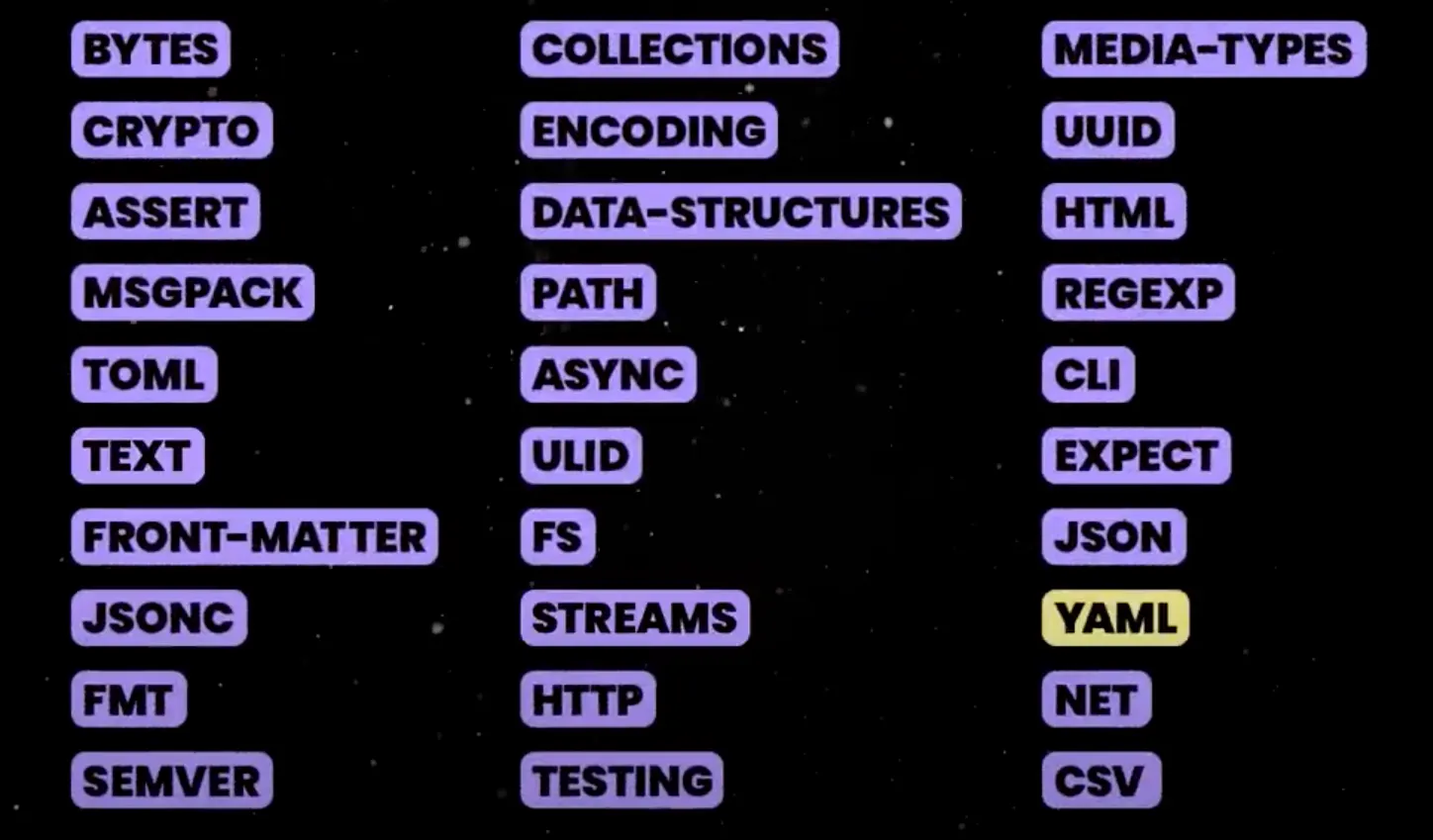
Deno standard library modules

Learn more about the Deno standard library in our 3 minute YouTube video or see examples of each package in this tweet thread.

Using the standard library can minimize dependency bloat and improve security vulnerabilities in supply chain attacks.

JSR: a modern package registry

JSR modernizes the JavaScript package registry through offering first-class TypeScript support, cross-runtime and environment support, many other developer experience improvements, as well as improved security tools to help authors and users better safeguard against potential supply chain attack vectors.

During the module publishing process, authors will always be prompted to authorize their JSR account. This additional authorization layer is an added protection to ensure that the right author is publishing the module.

In addition, when a package is published via GitHub Actions, JSR automatically creates provenance statements for package users to understand the security and trustworthiness of a package. This added layer of verification helps users determine the safety of using packages from JSR.
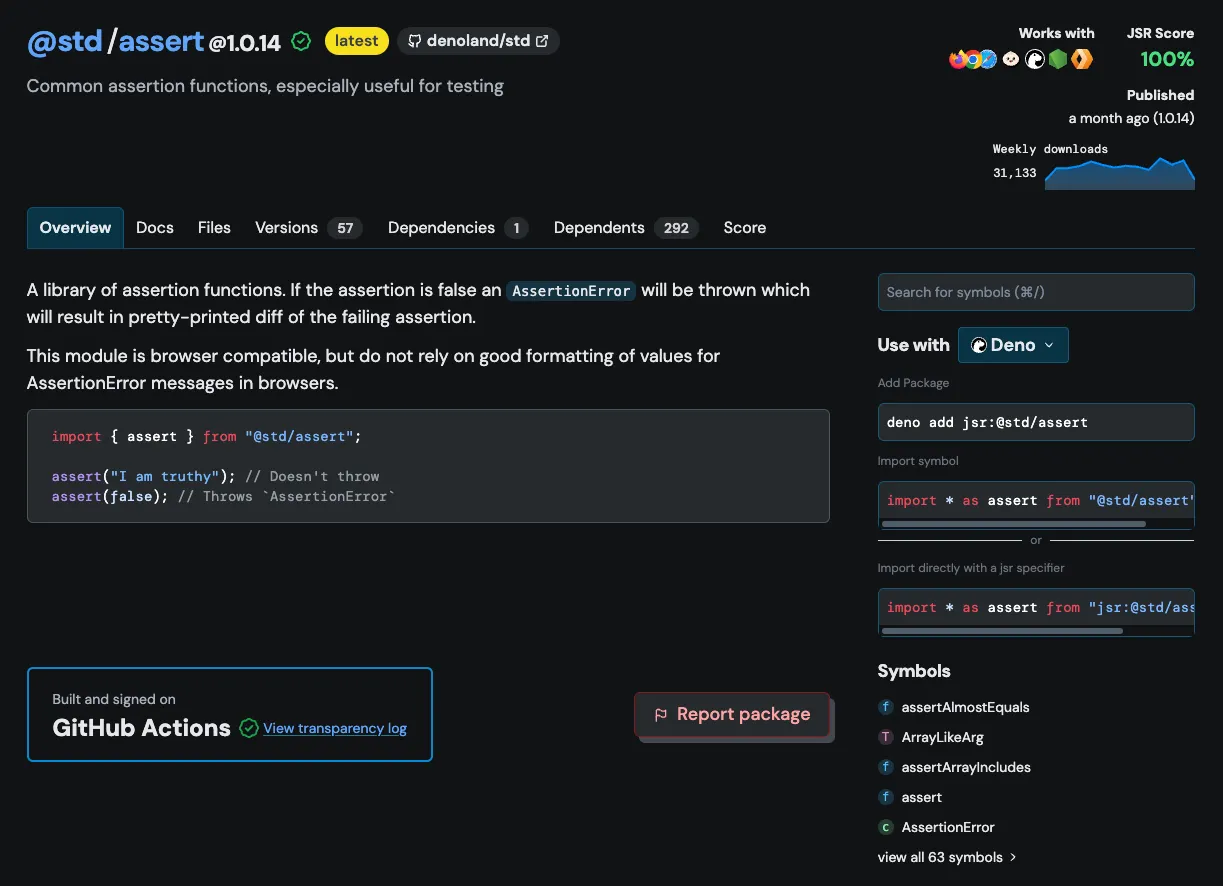
JSR automatic provenance statement

Provenance statement and transparency log can be viewed on the bottom left of the package page on JSR.

Deno’s secure sandbox in the real world

Aside from our own Deno Deploy and Subhosting where we’re constantly executing untrusted code, there are many examples where Deno’s secure-by-default model makes it a great candidate for safe execution of code.

Since so much code now is LLM-generated, being able to execute said code safely has emerged as a top priority for agentic developers. LangChain Sandbox as well as Pydantic AI’s MCP server have both created solutions for running untrusted Python code, built with Pyodide and Deno. (here’s how you can do it yourself).

Not just Python either. LMStudio, a local LLM application, uses Deno to execute LLM-generated JavaScript and TypeScript in a secure sandboxed environment.

What’s next

No single tool eliminates supply-chain risk, but stronger defaults help. Deno’s model of explicit permissions and ongoing security features is one way to make running JavaScript a little safer.