


Deno 1.13 has been tagged and released with the following features and changes:
self.structuredClone()If you already have Deno installed, you can upgrade to 1.13 by running
If you are installing Deno for the first time, you can use one of the methods listed below:
curl -fsSL https://deno.land/x/install/install.sh | sh


iwr https://deno.land/x/install/install.ps1 -useb | iex


brew install deno


scoop install deno


choco install deno
The native HTTP server API in this release is now a stable API. Out of the box Deno is now capable of efficiently serving HTTP/1.1 and HTTP/2 traffic. The system exposes the Hyper web server as a JavaScript API that will feel familiar to many web developer.
Since it was first introduced as an unstable API in Deno 1.9 many bugs have been fixed. For the past few weeks we have been serving many millions of requests to https://deno.land from servers powered by this new API. Through this dogfooding we are now confident that the native HTTP API is compatible and stable enough for general purpose use.
for await (const conn of Deno.listen({ port: 4500 })) {
  (async () => {
    for await (const { respondWith } of Deno.serveHttp(conn)) {
      respondWith(new Response("Hello World"));
    }
  })();
}
If you are currently using std/http we encourage you to upgrade to the native
HTTP server. std/http will be available in std for a few more releases, but
will be removed soon. A guide for migration will be available in the manual
soon. If you are using a recent version of oak,
your application will seamlessly switch to using the native HTTP server after
upgrading to Deno 1.13.
The built-in server-side WebSocket support is still marked unstable, but
available
since 1.12
via the Deno.upgradeWebSocket() function.
For an introduction to the new API, please take look at the manual entry.
self.structuredClone()The HTML spec authors (thanks Surma)
recently added
a new self.structuredClone function. It exposes the structured clone algorithm
used for message passing between web workers and MessagePort in a simple,
idiomatic, and synchronous API. Previously it was not possible to make a
synchronous structured clone of an object.
The structured clone algorithm can deep clone JavaScript values and supports circular object references. For more info on structured cloning, visit MDN.
import { assert } from "https://deno.land/std@0.104.0/testing/asserts.ts";


const foo = { bar: "baz" };
foo.foo = foo;


const clone = self.structuredClone(foo);

assert(clone !== foo);
assert(clone.bar === "baz");
assert(clone.foo === clone);

console.log("All assertions passed!");
Try it yourself:
deno run https://deno.com/blog/v1.13/structured_clone.js
Deno is the first runtime to ship this new feature, but it will likely be landing in Chrome and Firefox within the next few releases. We are excited to continue collaboration with standards bodies and browser vendors to unify and streamline the server side and client side JavaScript ecosystems.
Thanks to @crowlKats for implementing this feature.
This release introduces a new DENO_TLS_CA_STORE environment variable that can
be used to switch which certificate authorities Deno trusts for TLS. Up until
this release, Deno has only supported trusting the bundled Mozilla root CA
store, and individual additional certificates with the --cert flag.
This is a hindrance for users running Deno in networks that proxy TLS connections using self-signed TLS certificates to re-sign traffic. These TLS certificates are often installed into the system root trust store by network administrators.
Deno now has the ability to use the system root CA store by setting the
environment variable DENO_TLS_CA_STORE=system. On macOS certificates are
loaded from the keychain, on Windows they are loaded from the system certificate
store, and on Linux the system CA bundle is read from well known paths on disk.
Specifying this argument will disable the builtin CA store.
More info on DENO_TLS_CA_STORE can be found in the manual:
https://docs.deno.com/runtime/manual/getting_started/setup_your_environment#environment-variables
Thanks to Justin Chase for implementing this feature.
Deno 1.13 adds a new flag called --unsafely-ignore-certificate-errors. This
flag allows to disable SSL certificate verification.
Note that this is a dangerous setting. You should not use this flag to silence certificate errors. Disabling TLS certificate verification (ignoring certificate errors) makes TLS pointless because it allows MITM attacks. Data sent over a TLS connection is not confidential if the certificate has not been verified and trusted.
When you encounter TLS errors, instead of using this flag you should make sure
the certificate for the CA that signed the servers TLS certificate is added to
Deno’s root trust store. You can use the --cert flag to do this for one off
certificates.
If you are inside of a corporate network that proxies all TLS connections with a
self signed certificate, that certificate is generally installed into your
system root CA store. To tell Deno to use this, globally set the
DENO_TLS_CA_STORE=system environment variable. In many cases this will fix
your TLS issues, without disabling certificate validation.
The --unsafely-ignore-certificate-errors flag optionally accepts a list of
hostnames for which the verification should be disabled. If no argument is
provided then no verification of certificates is preformed. This is very
insecure, and should not be used. This flag impacts both internal Deno functions
(eg. downloading dependencies), as well as runtime APIs like fetch,
WebSocket, or Deno.connectTls.
Starting Deno with this flag will always print a warning message:
$ deno run --allow-net --unsafely-ignore-certificate-errors fetch.ts
DANGER: TLS certificate validation is disabled for all hostnames
...
$ deno run --allow-net --unsafely-ignore-certificate-errors=localhost fetch.ts
DANGER: TLS certificate validation is disabled for: localhost
...Thank you to TheAifam5 who contributed this feature.
WebCrypto APIsThis release adds some more functionality to the WebCrypto APIs:
crypto.subtle.importKey() and crypto.subtle.exportKey() now support
importing and exporting raw HMAC keys.crypto.subtle.verify() now supports verifying signatures created from HMAC
keys.Thanks to Divy Srivastava for implementing this feature.
Refactoring code actions are now available for JavaScript and TypeScript files. These provide refactors for common tasks, like extracting code to functions and constants, or moving code to new files. There is nothing you need to do to make them available, as they will be provided to your editor.
Thanks to Jean Pierre for contributing the feature.
The language server added the setting deno.cache which can be set via your
editor. This configures the language server to use a specific path to the cache
directory for Deno. This is similar to the DENO_DIR environment variable which
can be used when starting Deno from the command line.
This is ideal in situations where you want to separate out cache directories while developing code, possibly checking in a cache directory as part of your project.
There were several other minor enhancements, like improving the diagnostics information available, fixing problems when using import maps, and fixing an issue that caused detached language server process to not self terminate.
This release brings two significant improvements to the REPL (deno repl):
The export keyword before functions, classes or TypeScript types will now be
ignored. This is useful for when you copy paste some snippet of code from a
module into the REPL. Previously the REPL would error on the export syntax.
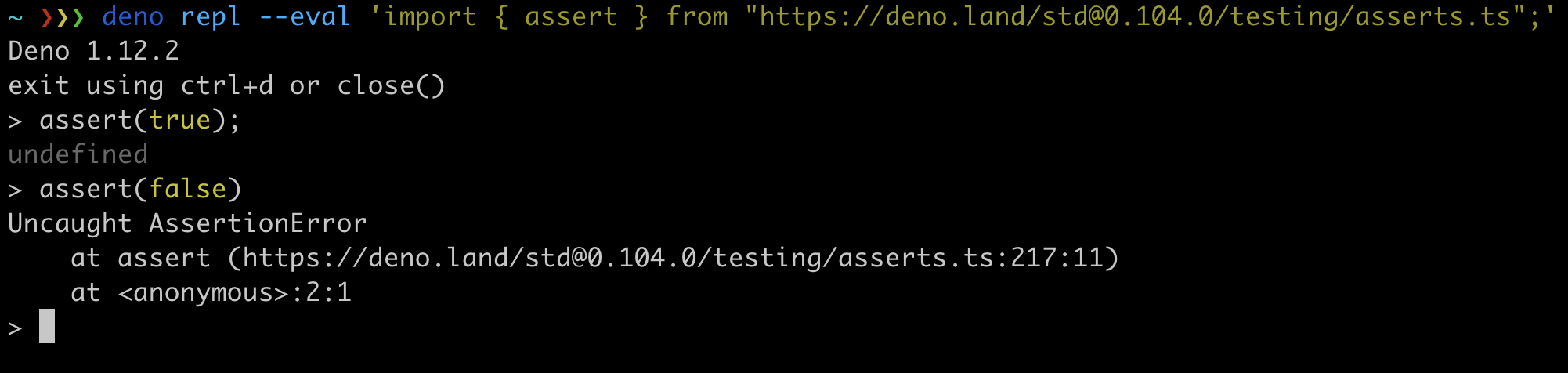
--eval flagThe REPL now has an --eval flag. This allows you to run some code in the JS
runtime before the user is dropped into a REPL. This is useful for importing
some code you commonly use in the REPL, or modifying the runtime in some way:
navigator.hardwareConcurrency APIThe navigator.hardwareConcurrency web API is added in this release, replacing
the unstable Deno.cpuInfo() API. It can be used to retrieve the number of
logical CPU cores a machine has. A machine with 4 hardware cores and
simultaneous multithreading (Intel® Hyper-Threading) has 8 logical cores. This
is often used to determine how many web workers should be spawned for a worker
pool for most efficient use of resources.
console.log(navigator.hardwareConcurrency);
More documentation is available on MDN.
Thanks to Divy Srivastava for implementing this feature.
This release updates V8 to version 9.3. This release introduces two new JavaScript language features and we have also made these new features available via the built-in TypeScript type libraries:
Error has a new cause property that can be used to chain errors:
const parentError = new Error("parent");
const error = new Error("parent", { cause: parentError });
console.log(error.cause === parentError);
Object.hasOwnObject.hasOwn is an easier-to-reach-for alias for
Object.prototype.hasOwnProperty.call.
Object.hasOwn({ prop: 42 }, "prop");
The full release notes can be found on the v8 blog.
deno infoDeno ships with a built-in dependency inspector available as deno info
command. The inspector shows a tree of dependencies for any given entry module.
Starting with 1.13 type declarations that are referenced using
/// <reference lib="...">, // @deno-types directives or X-TypeScript-Types
headers will be shown in the tree view.
writeFileThis release adds support for specifying an abort signal in writeFile. This
allows you to terminate the writing of a file if it turns out that the file is
too large, or takes too long to write to disk.
const aborter = new AbortController();
const data = new UInt8Array(32 * 1024 * 1024);
Deno.writeFile("./super_large_file.txt", { signal: aborter.signal })
  .then((data) => console.log("File write:", data.length))
  .catch((err) => console.error("File write failed:", err));
setTimeout(() => aborter.abort(), 1000);
Thank you to Benjamin Gruenbaum who contributed this feature.
In Deno 1.10 we introduced
a feature that allows to type check example code in JSDoc
comments, following up
on that, Deno 1.13 adds support for type checking examples in code blocks in
Markdown files. deno test --doc will now include *.md files and type check
all code blocks with js, jsx, ts, tsx attributes. You can opt-out of the
type checking by adding ignore attribute, eg. ts, ignore.
Deno uses this feature to ensure code examples in the standard library and in the manual are up to date.
Thank you to Casper Beyer who contributed this feature.
A new option called clearEnv has been added to Deno.RunOptions. It allows to
spawn a subprocess with “clear” environment, ie. environmental variables from
parent process will not be included in the child process.
This is an unstable feature and requires --unstable flag to use.
Thanks to @crowlKats for implementing this feature.
This release brings an update to Deno.permissions API, which can now accept
URLs in addition to strings when querying for “read”, “write” and “run”
permissions. URLs are now also accepted in the permission configuration for
Deno.test and web workers.
await Deno.permissions.query({
  name: "read",
  path: new URL(".", import.meta.url),
});
await Deno.permissions.query({
  name: "write",
  path: new URL(".", import.meta.url),
});
await Deno.permissions.query({
  name: "run",
  command: new URL(".", import.meta.url),
});
Thanks to @crowlKats for implementing this feature.
Deno shipped with a native plugin system that allowed you to open a dynamic Rust
library using Deno.openPlugin() API and call “ops” defined in that library.
Although the ideas behind that system were great, we faced many technical
challenges arising mainly from lack of ABI stability in Rust.
In 1.13 the native plugins system was replaced with a more general FFI API that
allows you to call libraries written in languages other than Rust directly from
Deno - effectively Deno.openPlugin() was replaced by Deno.dlopen().
Note that this is the first iteration of new API, it’s considered unstable and
requires --unstable API to use it. We’re planning to add support for more
types that can cross the language boundary in the future releases.
Here’s an example showing how to call a C function from Deno:
int add_numbers(int a, int b) {
  return a + b;
}
Compile file as a shared library:
// unix
cc -c -o add.o add.c
cc -shared -W -o libadd.so add.o
// windows
cl /LD add.c /link /EXPORT:libadd
Call the shared library from Deno:
let libSuffix = "so";

if (Deno.build.os == "windows") {
  libSuffix = "dll";
}

const libName = `add_numbers.${libSuffix}`;
const dylib = Deno.dlopen(libName, {
  "add_numbers": { parameters: ["i32", "i32"], result: "i32" },
});

console.log(dylib.symbols.add_numbers(123, 456));
Run it:
deno run --allow-ffi --unstable ffi.js
579
Thanks to Elias Sjögreen for implementing this feature.
Over the last few months, the folks over at Chrome have been working on a new
modern WebSocket API based on web streams. The new API is called
WebSocketStream. It is a successor to the existing WebSocket API that is
based on events.
Using streams solves a long standing issue with the existing WebSocket API: backpressure. Events could be dispatched as fast as the browser wants, without giving the developer any way to pause event dispatch. This meant it is easy to overload the JS thread if you do some computation on every event.
The new API solves this by using a ReadableStream as its receiving
(readable) end, and a WritableStream as its sending (writable) end.
Because a developer always has to “request” the next item from the stream, the
browser can’t flood the script with events unasked.
The old API also had a "close" event that was dispatched when the stream
closes. This has been replaced with a Promise that resolves when the stream is
closed. This makes code using the new WebSocketStream integrate more
effectively with async/await.
Here is a side by side example of the old API versus the new API. The new API is at the top, and the old API at the bottom. The example sends a message to a remote server, and then will print out all messages received from the server.
const wss = new WebSocketStream("wss://example.com");
const { writable, readable } = await wss.connection;


const writer = writable.getWriter();
await writer.write("Hello server!");


for await (const message of readable) {
  console.log("new message:", message);
}
const ws = await new Promise((resolve, reject) => {
  const ws = new WebSocket("wss://example.com");
  ws.onerror = (e) => {
    reject(new Error(e.message));
  };
  ws.onopen = (e) => {
    resolve(ws);
  };
});


ws.onerror = (e) => {
  console.error("connection closed:", e.code, e.reason);
};


ws.send("Hello server!");


ws.onmessage = (e) => {
  console.log("new message:", e.data);
};
The API is still in the prototyping stage, with a proper specification yet to be
written (there is an explainer however). We have decided to
implement the API in --unstable to start collecting some feedback from
developers before the API is finalized and ships in browsers. Please report back
any ergonomic issues on the Deno issue tracker, or the issue tracker in the
explainer repository.
More info can also be found in this web.dev post.
Thanks to @crowlKats for implementing this feature.
此内容由惯性聚合(RSS阅读器)自动聚合整理,仅供阅读参考。 原文来自 — 版权归原作者所有。