

惯性聚合 高效追踪和阅读你感兴趣的博客、新闻、科技资讯
阅读原文 在惯性聚合中打开

推荐订阅源

阮一峰的网络日志
阮一峰的网络日志
IT之家
IT之家
H
Heimdal Security Blog
Jina AI
Jina AI
宝玉的分享
宝玉的分享
博客园 - 【当耐特】
让小产品的独立变现更简单 - ezindie.com
爱范儿
爱范儿
T
Tailwind CSS Blog
OSCHINA 社区最新新闻
OSCHINA 社区最新新闻
Apple Machine Learning Research
有赞技术团队
有赞技术团队
酷 壳 – CoolShell
酷 壳 – CoolShell
WordPress大学
WordPress大学
AWS News Blog
AWS News Blog
C
Cisco Blogs
Cisco Talos Blog
Cisco Talos Blog
钛媒体:引领未来商业与生活新知
钛媒体:引领未来商业与生活新知
freeCodeCamp Programming Tutorials: Python, JavaScript, Git & More
D
Darknet – Hacking Tools, Hacker News & Cyber Security
The Hacker News
The Hacker News
The Cloudflare Blog
Hugging Face - Blog
Hugging Face - Blog
cs.CL updates on arXiv.org
T
Threatpost
S
Securelist
P
Privacy International News Feed
C
CXSECURITY Database RSS Feed - CXSecurity.com
博客园 - 聂微东
博客园 - 叶小钗
J
Java Code Geeks
V
V2EX
博客园 - Franky
Spread Privacy
Spread Privacy
K
Kaspersky official blog
C
Cyber Attacks, Cyber Crime and Cyber Security
Simon Willison's Weblog
Project Zero
Project Zero
大猫的无限游戏
大猫的无限游戏
S
SegmentFault 最新的问题
C
Cybersecurity and Infrastructure Security Agency CISA
C
CERT Recently Published Vulnerability Notes
Latest news
Latest news
NISL@THU
NISL@THU
罗磊的独立博客
W
WeLiveSecurity
Google DeepMind News
奇客Solidot–传递最新科技情报
奇客Solidot–传递最新科技情报
博客园_首页
V
Visual Studio Blog

Deno

Deno 2.8 | Deno Claw Patrol: an open-source security firewall for agents | Deno Fresh 2.3: Zero JS by default, View Transitions, and Temporal support | Deno Deno 2.7: Temporal API, Windows ARM, and npm overrides | Deno Build a dinosaur runner game with Deno, pt. 6 | Deno Build a dinosaur runner game with Deno, pt. 5 | Deno Deno Deploy is Generally Available | Deno Introducing Deno Sandbox | Deno Build a dinosaur runner game with Deno, pt. 4 | Deno Build a dinosaur runner game with Deno, pt. 3 | Deno Build a dinosaur runner game with Deno, pt. 2 | Deno React / Next.js Denial-of-Service Vulnerability: Deno Deploy users protected | Deno Deno 2.6: dx is the new npx | Deno Build a dinosaur runner game with Deno, pt. 1 | Deno React Server Functions / Next.js Vulnerability: Deno Deploy users protected | Deno My highlights from the new Deno Deploy | Deno Deno's Other Open Source Projects | Deno How Deno protects against npm exploits | Deno Help Us Raise $200k to Free JavaScript from Oracle | Deno Deno 2.5: Permissions in the config file | Deno Fresh 2.0 Graduates to Beta, Adds Vite Support | Deno Deno 2.4: deno bundle is back | Deno JavaScript™ Trademark Update | Deno What's coming to JavaScript | Deno A brief history of JavaScript | Deno Reports of Deno's Demise Have Been Greatly Exaggerated | Deno An Update on Fresh | Deno How Plaid migrated 100 services to a new database platform 5x faster with Deno | Deno Deno 2.3: Improved deno compile, local npm packages, and more | Deno Add JSR packages with pnpm and Yarn | Deno Zero-config Debugging with Deno and OpenTelemetry | Deno Exploring Art with TypeScript, Jupyter, Polars, and Observable Plot | Deno Deno v Oracle Update 3: Fighting the JavaScript Trademark | Deno Build a custom RAG AI agent in TypeScript and Jupyter | Deno How to get deep traces in your Node.js backend with OTel and Deno | Deno toranoana.deno #20 登録受付中(2025年3月14日) | Deno Node just added TypeScript support. What does that mean for Deno? | Deno The Dino 🦕, the Llama 🦙, and the Whale 🐋 | Deno Publish a lint rule, get a prize | Deno Deno 2.2: OpenTelemetry, Lint Plugins, node:sqlite | Deno If you're not using npm specifiers, you're doing it wrong | Deno How Deno's documentation is evolving | Deno Oracle justified its JavaScript trademark with Node.js—now it wants that ignored | Deno Introducing the JSR open governance board | Deno Intro to Wasm in Deno | Deno Announcing OpenAI on JSR | Deno Deno in 2024 | Deno Goodbye WinterCG, welcome WinterTC | Deno Build a SolidJS app with Deno | Deno Run your Next.js SSR app on Deno Deploy | Deno Solve Advent of Code 2024 with Deno and Win Prizes! | Deno Deno v. Oracle: Canceling the JavaScript Trademark | Deno Deno 2.1: Wasm Imports and other enhancements | Deno Build a Typesafe API with tRPC and Deno | Deno Self-contained Executable Programs with Deno Compile | Deno Build a Database App with Drizzle ORM and Deno | Deno Introducing your new JavaScript package manager: Deno | Deno Announcing Growthbook on JSR | Deno Build an Astro site with Deno | Deno How to convert CommonJS to ESM | Deno Announcing Deno 2 | Deno The Final Touches: What’s New In v2.0.0-rc.10 | Deno Announcing Stable V8 Bindings for Rust | Deno Deno 2.0 Release Candidate | Deno Secure, efficient private npm registries with Cloudsmith and Deno | Deno Painting the Plane as We Fly It: Designing JSR | Deno Introducing Web Cache API support on Deno Deploy | Deno Deno 1.46: The Last 1.x Release | Deno Protect your cloud spend with new Deno Deploy spend limits | Deno What we got wrong about HTTP imports | Deno Benchmarking AWS Lambda Cold Starts Across JavaScript Runtimes | Deno Announcing Supabase on JSR | Deno Deno 1.45: Workspace and Monorepo Support | Deno Introducing KV Backup for Deno Subhosting | Deno A Gentle Intro to TypeScript | Deno Announcing Hono on JSR | Deno How We Made the Deno Language Server Ten Times Faster | Deno How the Guardian uses Deno to audit accessibility and performance across their 2.7 million articles | Deno Introducing More Flexible Domain Association for Deno Subhosting | Deno The stabilization process of the Standard Library has begun | Deno Deno 1.44: Private npm registries, improved Node.js compat, and performance boosts | Deno How we built a secure, performant, multi-tenant cloud platform to run untrusted code | Deno The Deno Standard Library is now available on JSR | Deno How to document your JavaScript package | Deno Your Low Code Solution Needs an Escape Hatch | Deno Deno 1.43: Improved Language Server performance | Deno How Slack used Deno to save months of engineering effort in launching their new platform | Deno JSR Is Not Another Package Manager | Deno Announcing the Hookdeck SDK on JSR | Deno Announcing the Neon Serverless Driver on JSR | Deno An intro to TSConfig for JavaScript Developers | Deno How we built JSR | Deno How Netlify used Deno Subhosting to build a successful edge functions product | Deno Introducing Simpler Project Creation in Deno Deploy | Deno Deno 1.42: Better dependency management with JSR | Deno Introducing deployctl, the command line interface for Deno Deploy | Deno Introducing JSR - the JavaScript Registry | Deno How to add Monaco to a Next.js app and securely run untrusted user code | Deno Survey Results and Roadmap | Deno Deno 1.41: smaller deno compile binaries | Deno
Fresh 1.5: Partials, client side navigation and more | Deno
Marvin Hagem · 2023-10-10 · via Deno

Today, we’re happy to announce the 1.5 release of Fresh, the fast, Deno-native framework for building full stack web applications.

This release contains a brand new approach to client-side navigation that we’re calling Partials. Using HTML attributes, you can configure your Fresh apps to replace HTML in an already-loaded page using server-rendered markup, without a page reload. This style of navigation makes your app feel much more responsive, and prevents losing state in your client-side island components across page turns.

In addition to Partials, Fresh 1.5 contains a number of improvements and bug fixes aimed at supporting complex UI development patterns.

Ready to try it out? You can start a new Fresh project by running this command:

deno run -Ar https://fresh.deno.dev

You can also update an existing project by running the following command in your project folder:

deno run -Ar https://fresh.deno.dev/update .

Here’s an overview of what’s new in 1.5. Read on for all the details, plus what to expect in the next iteration of Fresh.

Fresh 1.5 at a glance

  • ⚡️ Faster client-side navigation with Partials Replace HTML in a page with partial server-rendered HTML. Granular control over what markup is replaced, and support for returning multiple partials in a single request.
  • 💅 Easier active link styling Fresh will add HTML attributes to links that could be styled differently to represent a current page or section, a common web app feature.
  • 🛠️ Custom esbuild targets Configure frontend build targets for esbuild, allowing you more granular control over browser support.
  • 🕵️‍♀️ Analyze bundle files Using the newly exposed metafile.json from esbuild, you can analyze the contents of your frontend build visually.
  • 🪲 New error overlay You don’t often introduce bugs, but when you do - we’ve made them easier to read.
  • 🏝️ Quality of life improvements & bug fixes A few small improvements we hope you’ll enjoy.

Client side navigation with partials

Traditionally, client side navigation is a tricky thing to get right in web development. It usually requires lots of boilerplate and a new data loading strategy. For Fresh we wanted to solve this in a way that doesn’t require developers to change how they build websites and applications.

With Fresh 1.5 we’re releasing a new concept called Partials that makes Fresh apps feel more app-like by blending client and server-side navigation. The idea behind Partials is that you can mark areas in your page that change on navigation and Fresh will only update those. And the best part: Island state is kept intact.

Notice how the search bar island on the Fresh documentation page doesn’t flicker anymore when navigating between pages.

To make this work, we only needed to change two things in our code:

  1. Add the f-client-nav attribute to a container element to make any links below that node opt into client side navigation and partials
  2. Wrap the main content area with a <Partial name="content">...</Partial> component

And boom! We now have full client side navigation in our documentation! The full changes can be seen in this PR.

- import { asset, Head } from "$fresh/runtime.ts";
+ import { asset, Head, Partial } from "$fresh/runtime.ts";

  // ...snip

  export default function DocsPage(props: PageProps<Data>) {
    return (
-     <div class="flex flex-col min-h-screen">
+     <div class="flex flex-col min-h-screen" f-client-nav>
-       <Content page={props.page} />
+       <Partial name="docs-main">
+         <Content page={props.page} />
+       </Partial>
      </div>
    )
  }

Behind the scenes, Fresh fetches the new page and only pulls out the relevant content out of the HTML response.

Granular partial modifications

We can optimise this pattern even further by opting into more granular partial modifications with the f-partial attribute.

- <a href="/docs/routes">Routes</a>
+ <a href="/docs/routes" f-partial="/partials/docs/routes">Routes</a>

When the link is clicked, we’ll navigate to /docs/routes as expected, but fetch the new content from /partials/docs/routes instead. In our case this can be a slimmed down HTML page that only returns the main content and bypasses rendering the outer document directly on the server.

export default function DocRoute() {
  return (
    <Partial name="content">
      {}
    </Partial>
  );
}

Applying multiple Partials in one single HTTP response

A neat aspect of partials in Fresh is that a response can return as many partials as desired. That way you can update multiple unrelated areas on your page in one single HTTP response. A scenario where this is useful are online shops for example.

export default function AddToCart() {
  return (
    <>
      <Partial name="cart-items" mode="append">
        {}
      </Partial>
      <Partial name="total-price">
        <p>Total: {totalPrice}</p>
      </Partial>
    </>
  );
}

Specifying the replacement mode

You may have noticed in the previous example that we used a new mode="append" prop on the <Partial> component. The default mode is to always replace the contents of a partial, but with the mode prop you can specify how you’d like the content to be integrated into the active page. We’ve added three distinct merge modes:

  • replace - Swap out the content of the existing partial (default)
  • prepend - Insert the new content before the existing content
  • append - Insert the new content after the existing content

Personally, we’ve found that the append mode is really useful when you have an UI which displays log messages or similar list-like data. Head on over to our documentation to learn more about Partials.

One thing we always wanted to make easier is to style active links. Most code bases we have seen so far forward the current url through a lot of components to be able to check if the href attribute of an <a>-element should be styled in a way to show that it’s the current page.

The thing is that Fresh already knows what the current URL is and can do this automatically for you. No need to manually pass along the current url. With Fresh 1.5 we’ll add the following two attribute to links:

  • data-current - Added to links with an exact path match
  • data-ancestor - Added to links which partially match the current URL

Here is an example of how these can be styled with CSS:


a[data-current] {
  color: green;
}


a[data-ancestor] {
  color: peachpuff;
}

…and with twind:


<a href="/foo" class="[data-current]:text-green-600">...</a>


<a href="/foo" class="[data-ancestor]:font-bold">...</a>

Custom build targets

Internally, Fresh passes the generation of optimized frontend assets to esbuild , which has a pretty cool “target” feature which allows you to specify the minimum browser versions you want to support. esbuild takes that and tries to convert newer JavaScript construct not supported in the specified range to something these older engines support. Since every project has different requirements, it was long overdue to expose that in our configuration.


export default defineConfig({
  build: {
    target: ["chrome99", "firefox99", "safari15"],
  },
});

Head over to the esbuild documentation for a full list of possible target values.

Analyzing bundle files

With Fresh 1.5 we expose esbuild’s metafile.json file which can be used to analyze and inspect what modules are actually shipped to the browser. This file can be generated by running the build task of your project.

After the build is finished, you can inspect the meta file on https://esbuild.github.io/analyze/ which is provided by the esbuild project itself.

Thanks to Tiago Gimenes for adding this to Fresh!
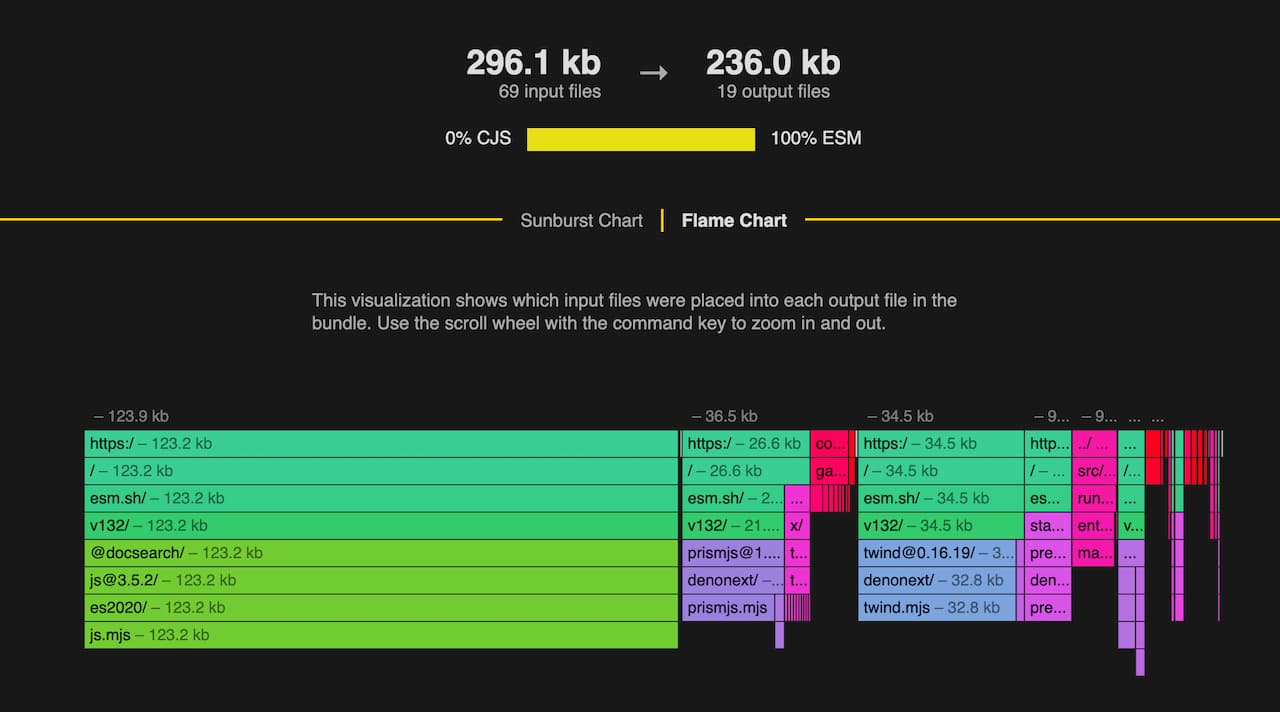
Bar chart of the modules included in the assets for the fresh website.

Error overlay

We’ve spent a bit of time improving the developer experience as well. Fresh 1.5 will now render a proper error overlay and try its best to show you where the error originated from. Rest assured, this is only visible in when you run dev.ts.
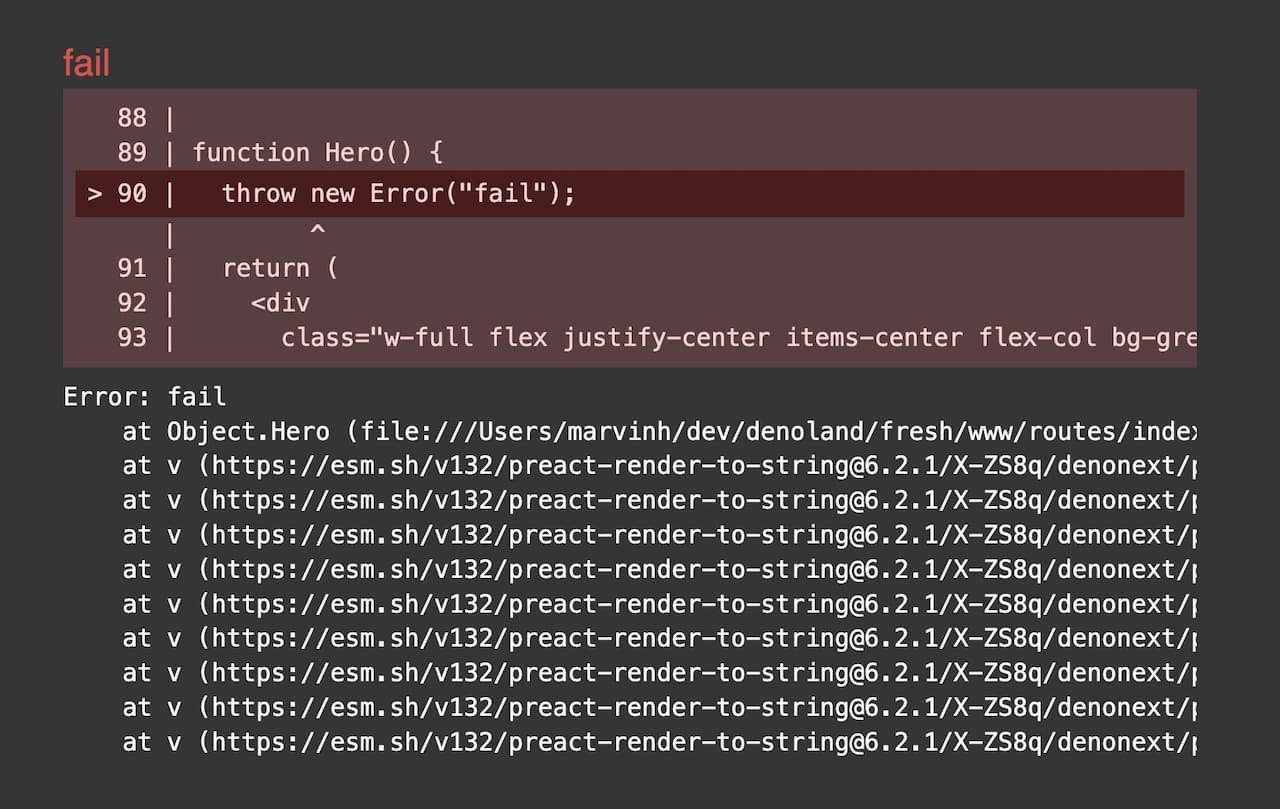
The error overlay in browser shows you an excerpt of where it occured, the stack trace, as well as the error message.

Errors shown in the terminal will show you a visual indicator of where the error happened as well:
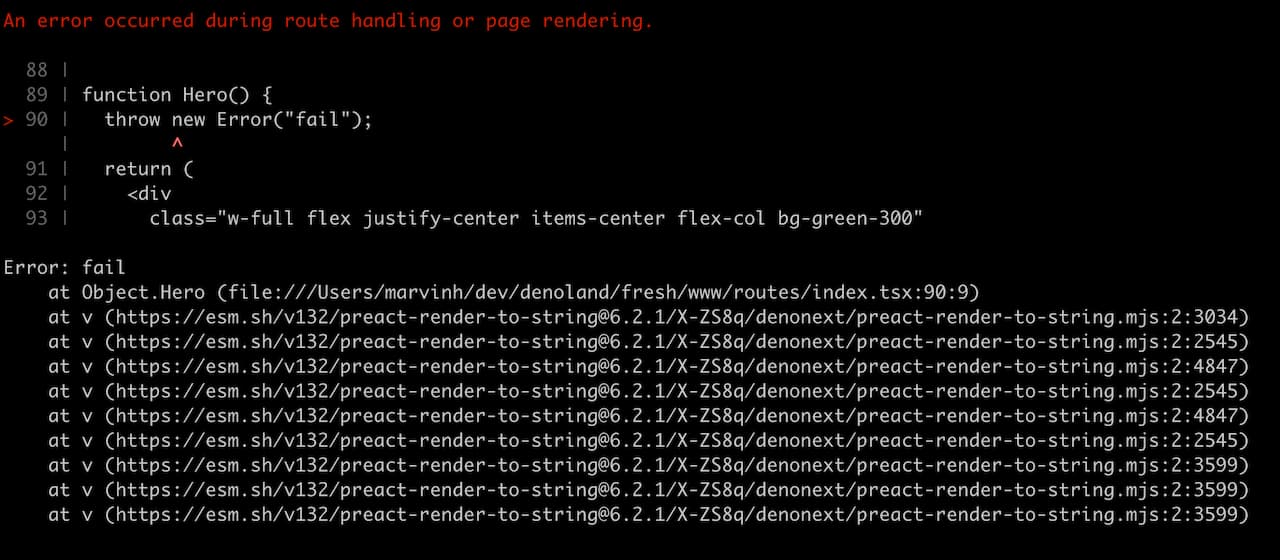
The terminal prints an excerpt of the surrounding area of where the stack trace points to.

It’s a minor thing, but is has proven already useful for myself working on Fresh directly.

Other noteworthy features

  • Inline scripts automatically get a nonce value, which makes using Content-Security Policy headers nicer
  • The Deno KV OAuth plugin was moved into the Fresh repository as it’s a first class supported plugin - Thanks to Asher Gomez and Michael Herzner for adding this!
  • The plugin API received a buildStart and buildEnd hook that is called when building respectively. We consider these two experimental as we’ll start exposing more things in the plugin API in the very near future and these might change.

What’s on the horizon?

With support for partials, we’re very close to shipping the View Transitions API as well. We’re also eager to make partials even more awesome! Other areas we’re thinking is new additions to our plugin API and much more.

Like in the past cycles you can follow the next iteration plan on GitHub.