



Deno 1.20 has been tagged and released with the following new features and changes:
deno benchdeno taskdeno testAbortSignal.timeout()If you already have Deno installed, you can upgrade to 1.20 by running:
If you are installing Deno for the first time, you can use one of the methods listed below:
curl -fsSL https://deno.land/x/install/install.sh | sh


iwr https://deno.land/x/install/install.ps1 -useb | iex


brew install deno


scoop install deno


choco install deno
While not a directly user facing feature, when your code is executed, it often needs to communicate between the Javascript engine (V8) and the rest of Deno, which is written in Rust.
In this release we have optimized our communication layer to be up to ~60% faster - we have leveraged Rust proc macros to generate highly optimized V8 bindings from existing Rust code.
The macro optimizes away deserialization of unused arguments, speeds up metric collection and provides a base for future integration with the V8 Fast API, which will further improve performance between Javascript and Rust.
Previous versions of Deno used a common V8 binding along with a routing mechanism to call into the ops (what we call a message between Rust and V8). With this new proc macro, each op gets its own V8 binding thus eliminating the need for routing ops.
Here are some baseline overhead benchmarks:
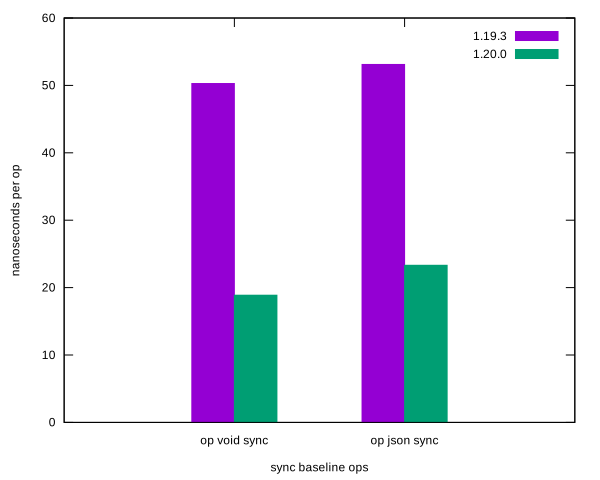
Overall thanks to this change and other optimizations, Deno 1.20 improves base64 roundtrip of 1mb string from ~125ms to ~3.3ms in Deno 1.19!
For more details, dive into this PR.
Deno’s native HTTP server now supports auto-compression for response bodies. When a client request supports either gzip or brotli compression, and your server responds with a body that isn’t a stream, the body will be automatically compressed within Deno, without any need for you to configure anything:
import { serve } from "https://deno.land/std@0.140.0/http/server.ts";

function handler(req: Request): Response {
  const body = JSON.stringify({
    hello: "deno",
    now: "with",
    compressed: "body",
  });
  return new Response(body, {
    headers: {
      "content-type": "application/json; charset=utf-8",
    },
  });
}

serve(handler, { port: 4242 });
Internally, Deno will analyze the Accept-Encoding header, plus ensure the
response body content type is compressible and automatically compress the
response:
> curl -I --request GET --url http://localhost:4242 --H "Accept-Encoding: gzip, deflate, br"

HTTP/1.1 200 OK
content-type: application/json; charset=utf-8
vary: Accept-Encoding
content-encoding: gzip
content-length: 72
date: Tue, 15 Mar 2022 00:00:00 GMT
There are a few more details and caveats. Check out Automatic Body Compression in the manual for more details.
deno benchBenchmarking your code is an effective way to identify performance issues and
regressions and this release adds new deno bench subcommand and Deno.bench()
API. deno bench is modelled after deno test and works in similar manner.
First, let us create a file url_bench.ts and register a benchmark test using
the Deno.bench() function.
url_bench.ts
Deno.bench("URL parsing", () => {
  new URL("https://deno.land");
});
Second, run the benchmark using the deno bench subcommand (--unstable is
required for now, since it is a new API).
deno bench --unstable url_bench.ts
running 1 bench from file:///dev/url_bench.ts
bench URL parsing ... 1000 iterations 23,063 ns/iter (208..356,041 ns/iter) ok (1s)

bench result: ok. 1 passed; 0 failed; 0 ignored; 0 measured; 0 filtered out (1s)
By default, each registered bench case will be run 2000 times: first a thousand warmup iterations will be performed to allow the V8 JavaScript engine to optimize your code; and then another thousand iterations will be measured and reported.
You can customize number of warmup and measure iterations by setting
Deno.BenchDefinition.warmup and Deno.BenchDefinition.n respectively:
Deno.bench({ warmup: 1e5, n: 1e6 }, function resolveUrl() {
  new URL("./foo.js", import.meta.url);
});
To learn more about deno bench visit
the manual.
We plan to add more features to deno bench in the near future, including:
We are also looking for feedback from the community to help shape the feature and stabilize it.
deno taskDeno 1.20 adds a new task runner to provide a convenient way of defining and executing custom commands specific to the development of a codebase. This is similar to npm scripts or makefiles, and is designed to work in a cross platform way.
Say we had the following command that was used often in our codebase:
deno run --allow-read=. scripts/analyze.jsWe could define this in a Deno configuration file:
{
  "tasks": {
    "analyze": "deno run --allow-read=. scripts/analyze.js"
  }
}
Then when in a directory that automatically resolves this configuration file,
tasks may be run by calling deno task <task-name>. So in this case, to execute
the analyze task we would run:
Or a more complex example:
{
  "tasks": {


    "npm:publish": "BUILD=prod deno task npm:build && cd dist && npm publish",

    "npm:build": "deno run -A scripts/build_npm_package.js"
  }
}
The syntax used is a subset of POSIX like shells and works cross platform on
Windows, Mac, and Linux. Additionally, it comes with a few built-in cross
platform commands such as mkdir, cp, mv, rm, and sleep. This shared
syntax and built-in commands exist to eliminate the need for additional cross
platform tools seen in the npm ecosystem such as
cross-env,
rimraf, etc.
For a more detailed overview see the manual.
Note that deno task is unstable and might drastically change in the future. We
would appreciate your feedback to help shape this feature.
Previously, specifying an
import map
file required always providing the --import-map flag on the command line.
deno run --import-map=import_map.json main.tsIn Deno 1.20, this may now be specified in the Deno configuration file.
{
  "importMap": "import_map.json"
}
The benefit is that if your current working directory resolves a configuration
file or you specify a configuration file via --config=<FILE>, then you no
longer need to also remember to specify the --import-map=<FILE> flag.
Additionally, the configuration file serves as a single source of truth. For
example, after upgrading to Deno 1.20 you can move your LSP import map
configuration to deno.json (e.g. in VSCode you can move the
"deno.importMap": "<FILE>" config in your editor settings to only be in your
deno.jsonc config file if you desire).
Secure HTTPS requests require certificate and private key information to support
the TLS protocol to secure those connections. Previously Deno only allowed the
certificate and the private key to be stored as physical files on disk. In this
release we have added cert and key options to Deno.listenTls() API and
deprecated certFile and keyFile.
This allows users to load the PEM certificate and private key from any source as a string. For example:
const listener = Deno.listenTls({
  hostname: "localhost",
  port: 6969,
  cert: await Deno.readTextFile("localhost.crt"),
  key: await Deno.readTextFile("localhost.key"),
});
A new Deno namespace API was added in this release: Deno.upgradeHttp(). It is
unstable and requires the --unstable flag to be used.
You can use this API to perform an upgrade of the HTTP connection, which allows to implement higher level protocols based on HTTP (like WebSockets); the API works for TCP, TLS and Unix socket connections.
This is a low level API and most users won’t need to use it directly.
An example using TCP connection:
import { serve } from "https://deno.land/std@0.140.0/http/server.ts";

serve((req) => {
  const p = Deno.upgradeHttp(req);


  (async () => {
    const [conn, firstPacket] = await p;
    const decoder = new TextDecoder();
    const text = decoder.decode(firstPacket);
    console.log(text);

    conn.close();
  })();


  return new Response(null, { status: 101 });
});
This release adds ability to use global statics in Foreign Function Interface API.
Given following definitions:
#[no_mangle]
pub static static_u32: u32 = 42;

#[repr(C)]
pub struct Structure {
  _data: u32,
}

#[no_mangle]
pub static static_ptr: Structure = Structure { _data: 42 };
You can now access them in your user code:
const dylib = Deno.dlopen("./path/to/lib.so", {
  "static_u32": {
    type: "u32",
  },
  "static_ptr": {
    type: "pointer",
  },
});

console.log("Static u32:", dylib.symbols.static_u32);

console.log(
  "Static ptr:",
  dylib.symbols.static_ptr instanceof Deno.UnsafePointer,
);

const view = new Deno.UnsafePointerView(dylib.symbols.static_ptr);
console.log("Static ptr value:", view.getUint32());
Thank you to Aapo Alasuutari for implementing this feature.
deno testIn v1.19 we introduced
better errors for ops and resource sanitizers in Deno.test.
This is a very useful feature for debugging testing code that has leaks of ops
or resources. Unfortunately after shipping this change we received reports that
performance of deno test degraded noticeably. The performance regression was
caused by excessive collection of stack traces and source mapping of code.
Without a clear way to not incur performance hit for users who do not need these
detailed error messages with traces, we decided to disable tracing feature by
default. Starting with v1.20, the sanitizers will collect detailed tracing data
only with --trace-ops flag present.
In case your test leaks ops and you did not invoke deno test with
--trace-ops you will be prompted to do so in the error message:
Deno.test("test 1", () => {
  setTimeout(() => {}, 10000);
  setTimeout(() => {}, 10001);
});
$ deno test ./test.ts
Check ./test.ts
running 1 test from ./test.ts
test test 1 ... FAILED (1ms)

failures:

test 1
Test case is leaking async ops.

- 2 async operations to sleep for a duration were started in this test, but never completed. This is often caused by not cancelling a `setTimeout` or `setInterval` call.

To get more details where ops were leaked, run again with --trace-ops flag.

failures:

    test 1

test result: FAILED. 0 passed; 1 failed; 0 ignored; 0 measured; 0 filtered out ([WILDCARD])

error: Test failed
Running again with --trace-ops will show where the leaks occurred:
$ deno test --trace-ops file:///dev/test.ts
Check file:///dev/test.ts
running 1 test from ./test.ts
test test 1 ... FAILED (1ms)

failures:

test 1
Test case is leaking async ops.

- 2 async operations to sleep for a duration were started in this test, but never completed. This is often caused by not cancelling a `setTimeout` or `setInterval` call. The operations were started here:
    at Object.opAsync (deno:core/01_core.js:161:42)
    at runAfterTimeout (deno:ext/web/02_timers.js:234:31)
    at initializeTimer (deno:ext/web/02_timers.js:200:5)
    at setTimeout (deno:ext/web/02_timers.js:337:12)
    at test (file:///dev/test.ts:4:3)
    at file:///dev/test.ts:8:27

    at Object.opAsync (deno:core/01_core.js:161:42)
    at runAfterTimeout (deno:ext/web/02_timers.js:234:31)
    at initializeTimer (deno:ext/web/02_timers.js:200:5)
    at setTimeout (deno:ext/web/02_timers.js:337:12)
    at test (file:///dev/test.ts:5:3)
    at file:///dev/test.ts:8:27


failures:

    test 1

test result: FAILED. 0 passed; 1 failed; 0 ignored; 0 measured; 0 filtered out ([WILDCARD])

error: Test failedAbortSignal.timeout(ms)Aborting an AbortSignal after a certain amount of time has passed is a common
pattern. For example:
const controller = new AbortController();
setTimeout(() => controller.abort(), 2_000);
const signal = controller.signal;

try {
  const result = await fetch("https://deno.land", { signal });

} catch (err) {
  if (signal.aborted) {

  } else {
    throw err;
  }
}
To simplify this pattern, WHATWG introduced a new
AbortSignal.timeout(ms) static method. When called, this will create a new
AbortSignal which will be aborted with a “TimeoutError” DOMException in the
specified number of milliseconds.
try {
  const result = await fetch("https://deno.land", {

    signal: AbortSignal.timeout(2_000),
  });

} catch (err) {
  if (err instanceof DOMException && err.name === "TimeoutError") {

  } else {
    throw err;
  }
}
Thank you to Andreu Botella for implementing this feature.
This release adds two new interfaces: Deno.TcpConn and Deno.UnixConn, which
are used as return types for Deno.connect() API.
This is a small quality of life improvement for type checking your code and allows for easier discovery of methods available for both connection types.
When spawning a web worker using the Worker interface or registering a test
with Deno.test, you have the ability to specify a specific set of permissions
to apply to that worker or test. This is done by passing a “permissions” object
to the options bag of the calls. These permissions must be a subset of the
current permissions (to prevent permission escalations). If no permissions are
explicitly specified in the options bag, the default permissions will be used.
Previously, if you only specified new permissions for a certain capability (for
example "net"), then all other capabilities would have their permissions
inherited from the current permissions. Here is an example:
Deno.test("read only test", { permissions: { read: true } }, () => {


});
We avoid breaking changes in minor releases, but we feel strongly that we had gotten this existing behavior wrong.
Instead of defaulting permissions for omitted capabilities to "inherit", we
now default to "none". This means if a certain permission is omitted, but some
permissions are specified, it will be assumed that the user doesn’t want to
grant this permission in the downstream scope. Again, while this is a breaking
change, we feel the new behavior is less surprising as well as reduces
situations where permissions are accidentally granted.
If you relied on this previous behaviour, update your permissions bag to
explicitly specify "inherit" for all capabilities that do not have explicit
values set.
This release additionally adds a Deno.PermissionOptions interface which
unifies an API for specifying permissions for WorkerOptions,
Deno.TestDefinition and Deno.BenchDefinition. Previously all three of these
had separate implementations.
Deno 1.20 ships with the latest stable version of TypeScript. For more information on new features in TypeScript see TypeScript’s 4.6 blog post
This release upgrades to the latest release of V8 (10.0, previously 9.9). The V8 team has not yet posted about the release. When they do, we will link it here. In lieu of a blog post explore the diff: https://github.com/v8/v8/compare/9.9-lkgr…10.0-lkgr
此内容由惯性聚合(RSS阅读器)自动聚合整理,仅供阅读参考。 原文来自 — 版权归原作者所有。